
@d3p1/img2pxl
v3.2.1
Published
An image to pixel transformation with motion effect
Downloads
213

Maintainers
 d3p1
d3p1Readme
[IMAGE2PXL]



Introduction
An efficient image-to-pixel transformation with motion effects, leveraging WebGL's hardware acceleration through Three.js:
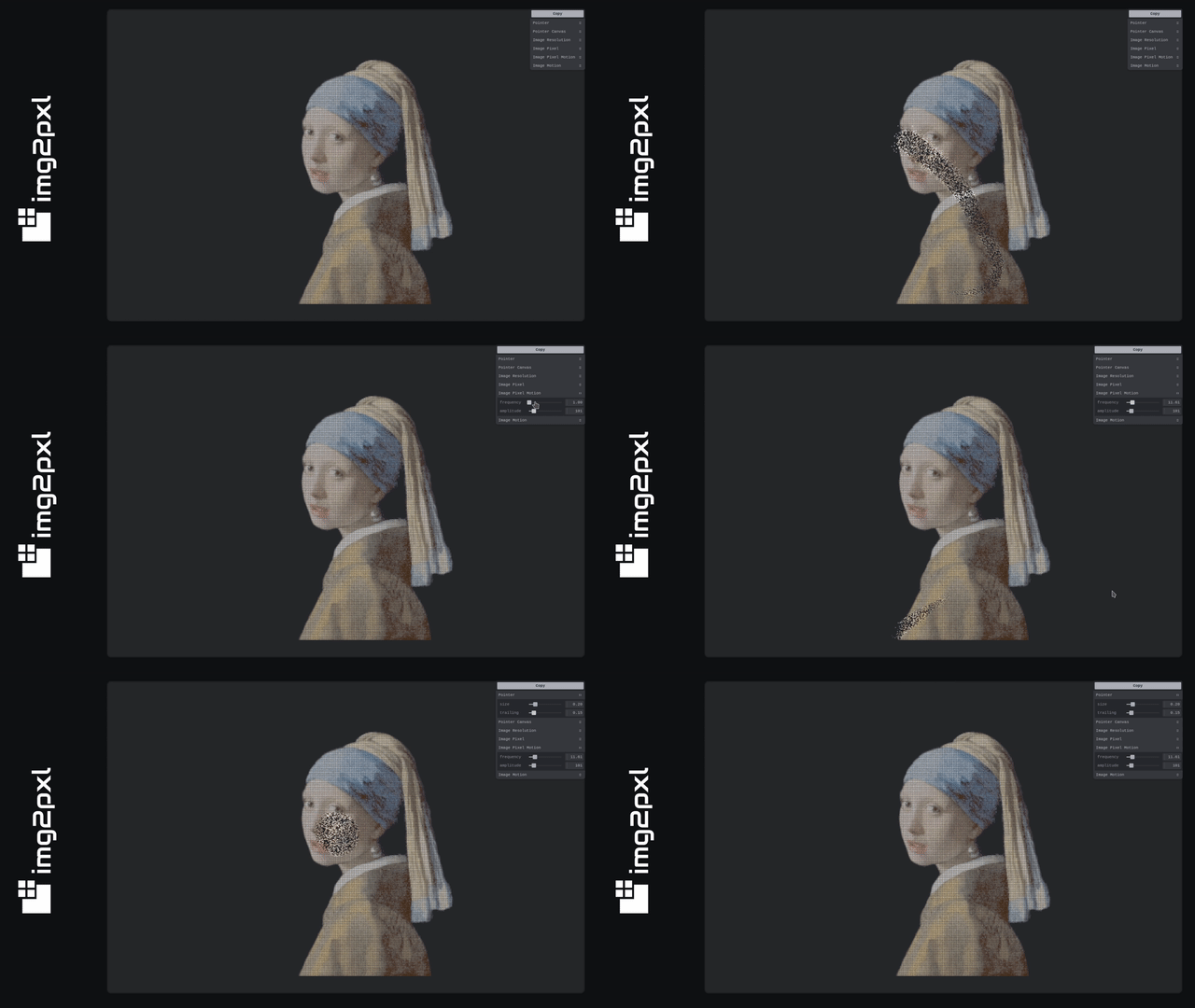
[!TIP] The approach of this implementation bypasses the performance limitations of the 2D canvas API, enabling smooth and dynamic visual effects directly on the GPU.
[!TIP] If you would like to implement a similar effect on a 3D model, you can use the related library
d3p1/thr2pxl, which uses GPGPU to achieve it with high performance.
Installation
You can install this library using a package manager like npm:
npm install @d3p1/img2pxlOr you can use a CDN like jsDelivr and this importmap in the <head> of your html file:
<head>
  ...
  <!-- Vanilla -->
  <script type="importmap">
    {
      "imports": {
        "@d3p1/img2pxl": "https://cdn.jsdelivr.net/npm/@d3p1/img2pxl@<version>/dist/img2pxl.min.js",
        "three": "https://cdn.jsdelivr.net/npm/three@<version>/build/three.module.min.js",
        "tweakpane": "https://cdn.jsdelivr.net/npm/tweakpane@<version>/dist/tweakpane.min.js"
      }
    }
  </script>
  ...
</head>
<head>
...
<!-- React -->
<script type="importmap">
{
"imports": {
"@d3p1/img2pxl": "https://cdn.jsdelivr.net/npm/@d3p1/img2pxl@<version>/dist/img2pxl.min.js",
"react": "https://cdn.jsdelivr.net/npm/react@<version>/jsx-runtime.min.js",
"react-dom": "https://cdn.jsdelivr.net/npm/react-dom@<version>/index.min.js",
"three": "https://cdn.jsdelivr.net/npm/three@<version>/build/three.module.min.js",
"tweakpane": "https://cdn.jsdelivr.net/npm/tweakpane@<version>/dist/tweakpane.min.js"
}
}
</script>
...
</head>[!NOTE] Remember to replace the
<version>with the actual version ofimg2pxland its peer dependencies (three-tweakpane-react-react-dom). To do that, you can check thepackage.jsonof the last release and get required versions from there.
Usage
Using this library is straightforward:
Go to our builder page and make the desired customizations in the tweak panel to achieve the desired effect.
Use the
Copybutton to obtain the configuration that produces the desired effect.Instantiate the library with the configuration copied in the previous step, for example:
// Vanilla
import {Img2Pxl} from '@d3p1/img2pxl/core'
...
const config = {
  images: {
    0: {
      src: <image-src>,
      width: <image-width>,
      height: <image-height>,
        resolution: {
          width: <image-resolution-width>,
          height: <image-resolution-height>
        },
        pixel: {
          size: 2,
          alphaTest: 0.9,
          motion: {
            displacement: {
              frequency: 1,
              amplitude: 40,
            },
          },
        },
        motion: {
          noise: {
            frequency: 0.025,
            amplitude: 40,
          },
        },
      },
    },
  },
  pointer: {
    size: 0.1,
    trailing: {
      factor: 0.01
    }
  }
}
new Img2Pxl(config)
// React
import {Img2Pxl} from '@d3p1/img2pxl/react'
...
const config = {
images: {
0: {
src: <image-src>,
width: <image-width>,
height: <image-height>,
resolution: {
width: <image-resolution-width>,
height: <image-resolution-height>
},
pixel: {
size: 2,
alphaTest: 0.9,
motion: {
displacement: {
frequency: 1,
amplitude: 40,
},
},
},
motion: {
noise: {
frequency: 0.025,
amplitude: 40,
},
},
},
},
pointer: {
size: 0.1,
trailing: {
factor: 0.01
}
}
}
return <Img2Pxl {...config} />[!NOTE] To gain a deeper understanding of how to use this library and how it works under the hood, visit the wiki page (in progress).
Changelog
Detailed changes for each release are documented in CHANGELOG.md.
License
This work is published under MIT License.
Author
Always happy to receive a greeting on: