
@danielblomma/cortex-mcp
v2.5.2
Published
Local, repo-scoped context platform for coding assistants. Semantic search, graph relationships, and architectural rule context.

Maintainers
 danielblomma
Readme
Cortex
The context layer for AI-assisted software engineering.




What Cortex is
Cortex is a local, repository-scoped context engine for coding assistants. It parses your source code with tree-sitter, indexes it into a structured knowledge graph of entities (files, symbols, rules, ADRs) and their relationships (calls, defines, constrains, implements, supersedes), and exposes that context through CLI commands. MCP remains available as a compatibility and integration bridge for clients that support it.
Where a general-purpose AI assistant sees your codebase as a pile of text files, Cortex gives it a precise map: what exists, how it is connected, which rules govern it, and which parts are source-of-truth versus deprecated.
Cortex runs entirely on the developer's machine. Source code never leaves the host.
When to use Cortex
Cortex is designed for engineering teams that rely on AI assistants for non-trivial work on real codebases. Use it when:
- Your codebase is large or fragmented enough that assistants waste context window on irrelevant files.
- You need assistants to respect architectural rules, deprecations, and source-of-truth decisions already made by the team.
- You work across multiple languages and want consistent, structured retrieval across all of them.
- Security or compliance requires that source code stay on-premise and that all AI interactions remain auditable.
- You want retrieval to surface existing functionality before an assistant proposes new code — reducing duplication and drift.
Cortex is not a replacement for your editor, your version control, or your coding assistant. It is the grounding layer that makes those assistants act with knowledge of your specific repository.
Benefits
- Higher-quality suggestions. Assistants see the right files and rules instead of guessing from filenames.
- Lower token cost. Targeted retrieval replaces broad file reads. Typical sessions use a fraction of the context a raw assistant would consume.
- Architectural governance. Rules and ADRs are surfaced with every answer, so assistants follow the team's established patterns rather than generic best practices.
- Multi-language coverage. A single engine indexes multiple languages through tree-sitter grammars, giving polyglot teams consistent tooling.
- Privacy by design. Your code and its derived index stay on your machine. No upload, no cloud dependency for the core product.
- Low friction. One command (
cortex init --bootstrap) scaffolds everything needed for local indexing, git hooks, CLI retrieval, and optional MCP compatibility.
How it works
Cortex operates as a five-stage pipeline between your repository and your AI assistant.
- Ingestion. Source files are parsed with tree-sitter, producing structured entities (files, functions, classes, rules, ADRs) and relations (
CALLS,DEFINES,CONSTRAINS,IMPLEMENTS,IMPORTS,SUPERSEDES). - Storage. Entities and relations are persisted to a local graph database (RyuGraph). An optional vector index provides semantic search across entity content.
- Retrieval. CLI commands combine semantic search with graph traversal to assemble the smallest context package that answers the task.
- Policy. Architectural rules and source-of-truth markers filter conflicting or deprecated content before it reaches the assistant.
- Assembly. Results are delivered as compact, ranked context packages over
cortex ... --json, with MCP exposing equivalent tool responses when enabled.
Git hooks keep the index fresh on every checkout, pull, commit, and rewrite. A live TUI dashboard (cortex dashboard) shows what Cortex adds to the repository in real time.
Why it works
Modern coding assistants are bottlenecked by context, not by model capability. Feeding a model more files rarely helps; feeding it the right files almost always does.
Cortex is built on one principle: prefer retrieval quality over analysis completeness. A smaller, sharper context package outperforms a broad dump of files. Every component — from tree-sitter parsing to graph traversal to rule filtering — exists to raise the signal-to-noise ratio of what the assistant sees.
The result is an assistant that behaves as if it already knows your codebase, because — through Cortex — it does.
Quick demo
Core capabilities
- Semantic search across code, rules, and ADRs.
- Graph relationships between entities and architectural constraints.
- Call-graph traversal, caller lookup, and impact analysis.
- Architectural rules and ADR enforcement at retrieval time.
- Incremental index updates driven by git hooks.
- Live TUI dashboard showing what Cortex adds to your repository.
- CLI-first retrieval commands for local agents and scripts.
- Optional MCP integrations with Claude Code, Claude Desktop, and Codex.
Requirements
- Node.js 20.9+ (Node 20 LTS or newer)
- Git repository
- Optional for MCP registration:
claudeand/orcodexCLI inPATH
Install
npm i -g @danielblomma/cortex-mcpUpgrading
To upgrade an already-scaffolded project to a new Cortex version:
npm i -g @danielblomma/cortex-mcp
cortex init --force   # re-scaffolds .context runtime + .context/scripts
cortex bootstrap     # rebuilds and safely restarts a verified running daemon
cortex update
cortex init --force preserves per-project files: .context/config.yaml,
.context/rules.yaml, .context/enterprise.yml, and your notes/decisions.
It repairs existing Enterprise config permissions to 0600 without rewriting
the file. An npm update alone does not replace code already loaded by the
per-user daemon; cortex bootstrap performs the verified restart.
Version-specific notes (see CHANGELOG.md for details):
- 2.4.2:
cortex init --forcenow uses versioned ownership metadata to remove only unmodified obsolete Cortex-managed files. Unknown files and protected configuration, rules, ontology, Enterprise, and agent-instruction content remain user-owned; modified obsolete files and unsafe collisions fail the upgrade instead of being overwritten or deleted. - 2.4.1: enterprise onboarding no longer accepts API keys as positional
arguments. Pipe the key to
sudo cortex enterprise install --api-key-stdin. Enterprise endpoints must use HTTPS (loopback HTTP remains available for local development). Existing Enterprise users must rerun that stdin install aftercortex bootstrap; enrollment is deliberately not inferred from repository config. Verifycortex enterprise status --jsonreportsenterprise.host_identity_bound: true. One Enterprise endpoint is supported per OS user because organization skills and host process detection are user-global; an explicit install may rotate its API key. Before upgrading legacy organization skills without Cortex ownership markers, back up and move the exact reviewed directories listed by~/.cortex/skills.local.jsonout of the Claude/Codex discovery roots. - 2.1.0: the default embedding model changed, so the first
cortex updateafter upgrading triggers a full re-embed automatically (~2 min per 1000 entities plus a one-time model download). TheCORTEX_EMBED_MAX_CHARSenv var is removed and silently ignored. Existing projects keep their old ranking weights inconfig.yaml; the recommended block is nowsemantic: 0.55, graph: 0.10, trust: 0.20, recency: 0.15. If you use MCP, restart the MCP server after re-embedding. The first search after a re-embed can hit a stale embeddings cache — re-run the query.
Quick Start
From the repository you want to index:
cortex init --bootstrapThis will:
- scaffold
.context/,.context/scripts/, the local context runtime (.context/mcpcompatibility path),.githooks/, and docs files - activate git hooks for checkout, pull/merge, commit, and rewrite events
- build and prepare the local context runtime
- leave MCP client registration opt-in via
cortex connectorcortex init --connect - start background sync unless disabled
Disable watcher setup:
cortex init --bootstrap --no-watchCheck context status:
cortex statusFor large first-time indexes, opt into the conservative interactive background profile. Cortex publishes the lexical+graph index first, then resumes semantic work from atomic checkpoints with two ingest workers, one embedding session, and four embedding threads:
cortex bootstrap --background --profile interactive
cortex indexing status --json
cortex indexing pause
cortex indexing resume
Foreground cortex bootstrap remains the default. Status reports the effective
resource limits and makes incomplete semantic coverage explicit. While a
background generation is active, other ingest, graph, embed, update, and watch
mutations fail clearly instead of racing it; the watcher retries after the
exclusive generation finishes. Progressive background indexing requires macOS,
Linux, or WSL; native Windows fails explicitly and should use foreground
bootstrap instead.
Agent plugin (Claude Code + Codex)
The plugins/cortex directory is a dual-manifest agent plugin: five behavior
skills (using-cortex, repo-research, change-impact, pattern-review,
context-review), a SessionStart bootstrap that re-injects Cortex
instructions after new sessions, /clear, and compaction (Claude Code), and
an MCP config that follows the active workspace.
Claude Code:
/plugin marketplace add DanielBlomma/cortex
/plugin install cortex@cortex
Codex discovers the same skills through .codex-plugin/plugin.json; repos
initialized with cortex init also get an AGENTS.md bootstrap section as a
fallback when the plugin is not installed. The CLI remains the engine — the
plugin only adds the behavior layer, and cortex connect stays opt-in.
Query From The CLI
Use the CLI as the default local agent interface:
cortex search "authentication flow" --json
cortex related file:src/auth.ts --json
cortex impact "payment service" --json
cortex rules --json
cortex explain "where retries are configured" --json
cortex pattern-evidence src/auth.ts --query "error handling" --json
These commands read the same local graph, embeddings, and rules used by the MCP server, but they do not require an MCP client registration.
Optional MCP Connection
MCP remains supported for clients that need it. Register MCP clients explicitly:
cortex connectThen verify the client registration:
Claude:
claude mcp listCodex:
codex mcp listClaude Plugin Marketplace
Install via Claude Code plugin marketplace:
/plugin marketplace add DanielBlomma/cortex
/plugin install cortex@cortex-marketplace
/plugin enable cortex
Then initialize Cortex in your target repository. If you want the plugin to call the local MCP server, also run cortex connect from that repository:
cortex init --bootstrap
cortex connect
Manual MCP Configuration
If client registration is unavailable, configure MCP manually.
Claude Desktop (~/Library/Application Support/Claude/claude_desktop_config.json):
{
  "mcpServers": {
    "cortex": {
      "command": "cortex",
      "args": ["mcp"],
      "env": {
        "CORTEX_PROJECT_ROOT": "/absolute/path/to/your-project"
      }
    }
  }
}
Codex (~/.config/codex/mcp-config.json):
{
  "mcpServers": {
    "cortex-myproject": {
      "command": "cortex",
      "args": ["mcp"],
      "cwd": "/absolute/path/to/your-project"
    }
  }
}
WSL Mode (Windows)
If you run Node.js inside WSL but use Claude Desktop or another MCP client on Windows:
- Install Cortex inside WSL:
# In a WSL terminal
npm i -g @danielblomma/cortex-mcp
cd /mnt/c/Users/yourname/your-project
cortex init --bootstrap- Configure Claude Desktop (
%APPDATA%\Claude\claude_desktop_config.json):
{
  "mcpServers": {
    "cortex": {
      "command": "wsl.exe",
      "args": ["--distribution", "Ubuntu", "--exec", "cortex", "mcp"],
      "env": {
        "CORTEX_PROJECT_ROOT": "C:\\Users\\yourname\\your-project",
        "CORTEX_AUTO_BOOTSTRAP_ON_MCP": "1"
      }
    }
  }
}
Cortex automatically converts Windows paths (e.g. C:\Users\...) to WSL paths (/mnt/c/Users/...).
For projects on the WSL filesystem (e.g. ~/projects/myapp), use the WSL path directly:
{
  "mcpServers": {
    "cortex": {
      "command": "wsl.exe",
      "args": ["--distribution", "Ubuntu", "--exec", "cortex", "mcp"],
      "env": {
        "CORTEX_PROJECT_ROOT": "/home/yourname/projects/myapp",
        "CORTEX_AUTO_BOOTSTRAP_ON_MCP": "1"
      }
    }
  }
}
Notes:
- File watching on
/mnt/paths (Windows filesystem) automatically uses poll mode sinceinotifyis unreliable across filesystem boundaries. - For best performance, keep projects on the WSL filesystem (
~/...) rather than/mnt/c/....
MCP Tool Compatibility
context.search
Ranked context search across indexed entities.
Input:
query(string, required)top_k(int, 1-20, default5)include_deprecated(bool, defaultfalse)include_content(bool, defaultfalse)
context.get_related
Fetch entity relationships from the graph.
Input:
entity_id(string, required)depth(int, 1-3, default1)include_edges(bool, defaulttrue)
context.impact
Traverse likely impact paths across config, code and SQL starting from an entity id or query.
Input:
entity_id(string, optional) — eitherentity_idorqueryis requiredquery(string, optional)depth(int, 1-4, default2)top_k(int, 1-20, default8)include_edges(bool, defaulttrue)profile("all"|"config_only"|"config_to_sql"|"code_only"|"sql_only", default"all")sort_by("impact_score"|"shortest_path"|"semantic_score"|"graph_score"|"trust_score", default"impact_score")
context.get_rules
List indexed rules and optionally include inactive rules.
Input:
scope(string, optional)include_inactive(bool, defaultfalse)
context.reload
Reload the RyuGraph connection after updates/maintenance.
Input:
force(bool, defaulttrue)
Example Prompts
- "Find files that handle authentication."
- "Show related files for this ADR."
- "What active architectural rules apply to this API?"
Dashboard
A live TUI that shows what Cortex adds to your repository at a glance.
cortex dashboard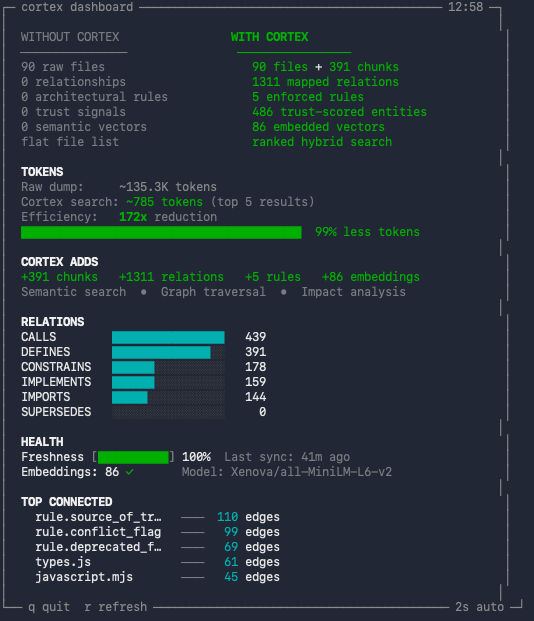
The dashboard displays:
- WITHOUT vs WITH CORTEX — side-by-side comparison of raw files versus indexed entities (files, chunks, relations, rules, embeddings, trust signals).
- TOKENS — per-task token estimate comparing typical LLM file reads without Cortex (~12 files) versus Cortex searches (~3 queries). Shows the reduction ratio and percentage.
- CORTEX ADDS — summary of what Cortex layers on top: chunks, relations, rules, embeddings, and which capabilities are unlocked (semantic search, graph traversal, impact analysis).
- RELATIONS — bar chart of relation types in the graph (CALLS, DEFINES, CONSTRAINS, IMPLEMENTS, IMPORTS, SUPERSEDES) and their counts.
- HEALTH — freshness percentage (how up-to-date the index is relative to uncommitted changes), last sync timestamp, and embedding status with model name.
- TOP CONNECTED — the five most connected entities in the graph by edge count, showing which files or rules are central to the codebase.
Options:
--interval <sec>— auto-refresh interval (default: 2 seconds).- Press
rto force refresh,qto quit. - Non-TTY output (piped) produces a single snapshot with ANSI stripped.
Common Commands
cortex init [path] [--force] [--bootstrap] [--connect] [--no-connect] [--watch] [--no-watch]
cortex connect [path] [--skip-build]
cortex mcp
cortex bootstrap
cortex update
cortex search <query> [--json]
cortex related <entity-id> [--json]
cortex impact <query|entity-id> [--json]
cortex rules [--json]
cortex explain <query|entity-id> [--json]
cortex pattern-evidence <file-path|entity-id> [--query <text>] [--top-k <n>] [--json]
cortex status
cortex dashboard [--interval <sec>]
cortex watch [start|stop|status|run|once] [--interval <sec>] [--debounce <sec>] [--mode <auto|event|poll>]
cortex help
Enterprise Pattern Review
Enterprise context.review includes bounded repo-local pattern context by
default. This evidence is advisory and does not change policy validator totals,
workflow approval, or review trust.
Optional MCP inputs:
include_pattern_evidence— enable or disable pattern context (defaulttrue).pattern_query— shared pattern query; otherwise Cortex derives one per file.pattern_top_k— evidence items per locality tier, from 1 to 5 (default2).pattern_limit— analyzed review targets, from 1 to 25 (default10).
The response adds pattern_review with deterministic targets, the canonical
review question, cited evidence tiers, explicit repository fallback, unindexed
status, and omitted-file counts. Pattern evidence never constitutes automatic
code approval. Enterprise pattern review is lexical-only and never downloads an
embedding model or calls an external service.
Every target uses the same response fields. status is one of
local_evidence, repo_fallback, no_evidence, not_indexed, or error;
local_pattern_found and fallback_used are always explicit booleans, and
evidence_order plus all four tiers are always present. Unavailable evidence
uses empty tiers and sanitized messages rather than local paths or runtime
errors.
Automated Release
This repository includes two GitHub Actions workflows:
Release Bump(.github/workflows/release-bump.yml)- Manual
workflow_dispatchfrommain - Bumps semver (
patch/minor/major) - Syncs release metadata files (
package.json,server.json, plugin manifests) - Runs tests
- Commits and tags
vX.Y.Z
- Manual
Release Publish(.github/workflows/release-publish.yml)- Triggers on tag push
v*.*.* - Verifies tag/version sync
- Runs root tests + context runtime/MCP build/tests
- Publishes
@danielblomma/cortex-mcpto npm via npm trusted publishing (GitHub OIDC)
- Triggers on tag push
Required npm configuration:
- Configure a trusted publisher for
@danielblomma/cortex-mcpon npmjs.com - Use GitHub Actions publisher
DanielBlomma/cortex - Workflow filename must match
release-publish.yml
Embedding performance
Embedding generation tunes itself to the machine: the number of parallel workers, memory limits for long files, token budget, and skip-work caching are all derived from the available CPU cores, RAM, and repository size at run time (container memory limits included). No configuration is needed — on a laptop or a CI runner, cortex picks safe settings by itself.
The embedding token budget defaults to auto, which is quality-first but
memory-aware. Cortex starts from the embedding model's own maximum context and
only lowers the cap when the local memory headroom is unlikely to fit that
model/context combination. Degraded auto runs are explicit in logs, for example
token_budget=auto_degraded reason=memory_headroom cap=2048. To force a
specific capped run, set CORTEX_EMBED_MAX_TOKENS to a number such as 2048;
set it to model or full to force the full-model baseline even on tight
machines. When several cortex instances share one machine, set
CORTEX_EMBED_THREADS to give each its fair share of cores.
For experiments on very large repositories, CORTEX_EMBED_TEXT_PROFILE=compact-files
compacts only large file-level embedding records while keeping chunk-level
embedding text full. The default remains full; use the compact profile only
with a before/after semantic quality check because file-level compaction can
change retrieval behavior.
Limitations
- Requires repo initialization (
cortex init --bootstrap). - Each repository has its own local Cortex context instance.
- No cloud sync by design (privacy-first local storage).
Security and Privacy
- Cortex stores context data locally under
.context/. - No source code upload is required for core functionality.
Troubleshooting
- context runtime missing or
mcp/dist/server.jsmissing: Runcortex bootstrap(or re-runcortex init --bootstrap). claudeorcodexnot found duringcortex connect: MCP registration is skipped for that client; use manual config above if needed.- MCP tools return stale context:
Run
cortex update, then rerun the CLI query. If you use MCP, reconnect the client or callcontext.reload.
Website and Benchmarks
frontend/hosts the cortex website (GitHub Pages, deployed on push tomain): product overview plus bootstrap evaluation metrics.benchmark/bootstrapbench/runscortex bootstrapagainst 69 pinned real-world repositories in isolated containers and extracts chunk, embedding and graph statistics. See benchmark/bootstrapbench/README.md.
Support
- Issues: https://github.com/DanielBlomma/cortex/issues
- MCP registry submission draft: mcp-registry-submission.json
License
MIT