
@danielsitek/eslint-stats
v0.4.2
Published
Modern TypeScript formatters for ESLint with aggregated error/warning statistics and visual graphs - Zero dependencies
Downloads
123

Maintainers
 danielsitek
Readme




Statistics Reporter for ESLint
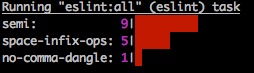
Modern TypeScript formatters for ESLint with aggregated error and warning statistics. Analyzes files by error frequency rather than location, making it easier to prioritize fixes when introducing ESLint to existing projects.
Features
- Multiple aggregation views (by error, warning, folder)
- Color-coded output with visual graphs
- ESLint 8 and 9 compatible
- Full TypeScript support with type definitions
- Zero runtime dependencies
- Modern Node.js (20+)
Installation
npm install --save-dev @danielsitek/eslint-statsUsage with ESLint
Create a file named stats.mjs:
import { byErrorAndWarning } from "@danielsitek/eslint-stats/by-error-and-warning";

export default byErrorAndWarning;
eslint . --format ./stats.mjsAvailable Formatters
by-error
Displays aggregated error statistics without file separation. Only shows rules with errors; warnings are not displayed.
by-warning
Displays aggregated warning statistics without file separation. Only shows rules with warnings; errors are not displayed.
by-error-and-warning
Displays aggregated statistics for both errors and warnings without file separation. Errors are shown in red, warnings in yellow.
by-error-and-warning-stacked
Similar to by-error-and-warning but displays errors and warnings stacked together when a rule has both severities across different files.
by-folder
Displays aggregated statistics grouped by folder. Errors are shown in red, warnings in yellow.
by-prometheus
Exports ESLint statistics in Prometheus text exposition format for monitoring and alerting. Generates metrics compatible with Prometheus, Grafana, and other observability tools.
Metrics exported:
eslint_rule_violations_total{rule,severity,folder}- Violations by rule, severity, and foldereslint_violations_by_severity_total{severity}- Total violations by severityeslint_files_total- Total files analyzedeslint_files_with_violations_total- Files with violationseslint_files_clean_total- Files without violationseslint_rules_violated_total- Unique rules violated
Monorepo support
For monorepo setups where ESLint runs from a subdirectory, use createPrometheusFormatter with folderPrefix to prepend the package name to folder paths:
import { createPrometheusFormatter } from "@danielsitek/eslint-stats/by-prometheus";

export default createPrometheusFormatter({ folderPrefix: "my-package" });
This produces metrics with prefixed folder labels, e.g. folder="my-package/src/utils" instead of folder="src/utils".
Demo
The package includes demo scripts for testing formatters:
npm run demo:error
npm run demo:warning
npm run demo:both
npm run demo:stacked
npm run demo:folder
npm run demo:prometheus
Requirements
- Node.js >= 20.0.0
- ESLint >= 8.0.0
Migration from ganimomer/eslint-stats v1.x
If you're upgrading from the original eslint-stats package:
Update package name:
npm uninstall eslint-stats
npm install --save-dev @danielsitek/eslint-stats
Update formatter paths in your ESLint configuration or CLI commands to use the new scoped package name.
For programmatic usage, update imports to use the scoped package name.
Credits
Modernized fork of eslint-stats by Omer Ganim.
License
MIT