
@danyilf/gantt-task-react
v0.4.27
Published
Interactive Gantt Chart for React with TypeScript.

Maintainers
 danyilf
Readme
gantt-task-react
Interactive Gantt Chart for React with TypeScript.
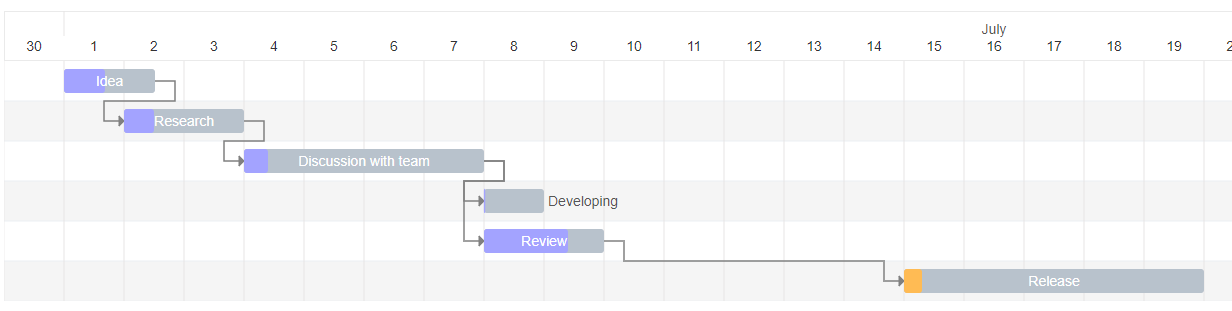
Live Demo
Install
npm install gantt-task-reactHow to use it
import { Gantt, Task, EventOption, StylingOption, ViewMode, DisplayOption } from 'gantt-task-react';
import "gantt-task-react/dist/index.css";

let tasks: Task[] = [
    {
      start: new Date(2020, 1, 1),
      end: new Date(2020, 1, 2),
      name: 'Idea',
      id: 'Task 0',
      type:'task',
      progress: 45,
      isDisabled: true,
      styles: { progressColor: '#ffbb54', progressSelectedColor: '#ff9e0d' },
    },
    ...
];

// Basic usage
<Gantt tasks={tasks} />

// With styling options
<Gantt
  tasks={tasks}
  viewMode={ViewMode.Day}
  listCellWidth="155px"
  hideTimeColumns={false} // Set to true to hide "From" and "To" columns
/>

// With today line enabled (instead of cell highlighting)
<Gantt
  tasks={tasks}
  todayLineEnabled={true}
  todayLineColor="#0066FF"
/>

// With event handlers
<Gantt
  tasks={tasks}
  viewMode={view}
  onDateChange={onTaskChange}
  onTaskDelete={onTaskDelete}
  onProgressChange={onProgressChange}
  onDoubleClick={onDblClick}
  onClick={onClick}
/>
How to run example
cd ./example
npm install
npm start
Gantt Configuration
GanttProps
| Parameter Name | Type | Description | | :------------------------------ | :------------ | :------------------------------------------------- | | tasks* | Task | Tasks array. | | EventOption | interface | Specifies gantt events. | | DisplayOption | interface | Specifies view type and display timeline language. | | StylingOption | interface | Specifies chart and global tasks styles |
EventOption
| Parameter Name | Type | Description | | :----------------- | :---------------------------------------------------------------------------- | :-------------------------------------------------------------------------------------- | | onSelect | (task: Task, isSelected: boolean) => void | Specifies the function to be executed on the taskbar select or unselect event. | | onDoubleClick | (task: Task) => void | Specifies the function to be executed on the taskbar onDoubleClick event. | | onClick | (task: Task) => void | Specifies the function to be executed on the taskbar onClick event. | | onDelete* | (task: Task) => void/boolean/Promise/Promise | Specifies the function to be executed on the taskbar on Delete button press event. | | onDateChange* | (task: Task, children: Task[]) => void/boolean/Promise/Promise | Specifies the function to be executed when drag taskbar event on timeline has finished. | | onProgressChange* | (task: Task, children: Task[]) => void/boolean/Promise/Promise | Specifies the function to be executed when drag taskbar progress event has finished. | | onExpanderClick* | (task: Task | Task[]) => void | Specifies the function to be executed on the table expander click. Can handle a single task or an array of tasks. | | timeStep | number | A time step value for onDateChange. Specify in milliseconds. |
* Chart undoes operation if method return false or error. Parameter children returns one level deep records.
DisplayOption
| Parameter Name | Type | Description | | :------------- | :------ | :---------------------------------------------------------------------------------------------------------- | | viewMode | enum | Specifies the time scale. Hour, Quarter Day, Half Day, Day, Week(ISO-8601, 1st day is Monday), Month, QuarterYear, Year. | | viewDate | date | Specifies display date and time for display. | | preStepsCount | number | Specifies empty space before the fist task | | locale | string | Specifies the month name language. Able formats: ISO 639-2, Java Locale. | | rtl | boolean | Sets rtl mode. |
StylingOption
| Parameter Name | Type | Description |
| :------------------------- | :------ | :--------------------------------------------------------------------------------------------- |
| headerHeight | number | Specifies the header height. |
| ganttHeight | number | Specifies the gantt chart height without header. Default is 0. Its mean no height limitation. |
| columnWidth | number | Specifies the time period width. |
| listCellWidth | string | Specifies the task list cell width. Empty string is mean "no display". |
| hideTimeColumns | boolean | Whether to hide the "From" and "To" columns in the task list while keeping the "Name" column. |
| enhancedTooltips | boolean | Whether to show enhanced tooltips with more task details (start, end, progress) on hover. Default is false`. |
| rowHeight | number | Specifies the task row height. |
| barCornerRadius | number | Specifies the taskbar corner rounding. |
| barFill | number | Specifies the taskbar occupation. Sets in percent from 0 to 100. |
| handleWidth | number | Specifies width the taskbar drag event control for start and end dates. |
| fontFamily | string | Specifies the application font. |
| fontSize | string | Specifies the application font size. |
| barProgressColor | string | Specifies the taskbar progress fill color globally. |
| barProgressSelectedColor | string | Specifies the taskbar progress fill color globally on select. |
| barBackgroundColor | string | Specifies the taskbar background fill color globally. |
| barBackgroundSelectedColor | string | Specifies the taskbar background fill color globally on select. |
| arrowColor | string | Specifies the relationship arrow fill color. |
| arrowIndent | number | Specifies the relationship arrow right indent. Sets in px |
| todayColor | string | Specifies the current period column fill color. |
| todayLineEnabled | boolean | Enables displaying the current time as a vertical line instead of coloring the cell. |
| todayLineColor | string | Specifies the color of the vertical line representing current time when todayLineEnabled=true. |
| TooltipContent | | Specifies the Tooltip view for selected taskbar. |
| TaskListHeader | | Specifies the task list Header view |
| TaskListTable | | Specifies the task list Table view |
- TooltipContent:
React.FC<{ task: Task; fontSize: string; fontFamily: string; }>; - TaskListHeader:
React.FC<{ headerHeight: number; rowWidth: string; fontFamily: string; fontSize: string;}>; - TaskListTable:
React.FC<{ rowHeight: number; rowWidth: string; fontFamily: string; fontSize: string; locale: string; tasks: Task[]; selectedTaskId: string; setSelectedTask: (taskId: string) => void; }>;
Task
| Parameter Name | Type | Description |
| :------------- | :------- | :---------------------------------------------------------------------------------------------------- |
| id* | string | Task id. |
| name* | string | Task display name. |
| type* | string | Task display type: task, milestone, project |
| start* | Date | Task start date. |
| end* | Date | Task end date. |
| progress* | number | Task progress. Sets in percent from 0 to 100. |
| dependencies | string[] | Specifies the parent dependencies ids. |
| icon | React.ReactNode | Optional. Allows adding a React node (e.g., an icon component) next to the task name in the task list. Example: icon: <MyIconComponent /> |
| styles | object | Specifies the taskbar styling settings locally. Object is passed with the following attributes: |
| | | - backgroundColor: String. Specifies the taskbar background fill color locally. |
| | | - backgroundSelectedColor: String. Specifies the taskbar background fill color locally on select. |
| | | - progressColor: String. Specifies the taskbar progress fill color locally. |
| | | - progressSelectedColor: String. Specifies the taskbar progress fill color globally on select. |
| isDisabled | bool | Disables all action for current task. |
| fontSize | string | Specifies the taskbar font size locally. |
| project | string | Task project name |
| hideChildren | bool | Hide children items. Parameter works with project type only |
*Required
Example: Using the icon property
You can use the icon property to display icons next to task names. This property accepts any React.ReactNode.
import React from 'react';
import { Task } from 'gantt-task-react';
import { Bug, Settings } from 'lucide-react'; // Example using lucide-react

const tasks: Task[] = [
  {
    id: 'Task 1',
    name: 'Setup Project',
    type: 'task',
    start: new Date(2024, 5, 1),
    end: new Date(2024, 5, 2),
    progress: 100,
    icon: <Settings size={16} /> // Simple icon
  },
  {
    id: 'Task 2',
    name: 'Fix Critical Bug',
    type: 'task',
    start: new Date(2024, 5, 3),
    end: new Date(2024, 5, 4),
    progress: 0,
    // Icon with custom styling (e.g., background color)
    icon: (
      <span
        style={{
          backgroundColor: '#E53E3E', // Red background
          color: 'white',
          padding: '2px 4px',
          borderRadius: '3px',
          display: 'inline-flex',
          alignItems: 'center',
          justifyContent: 'center',
        }}
      >
        <Bug size={12} />
      </span>
    ),
  },
];
License
Using refs to control the Gantt chart
You can use refs to access methods that control the Gantt chart programmatically:
import React, { useRef } from 'react';
import { Gantt, Task, GanttRef } from 'gantt-task-react';

const App = () => {
  const ganttRef = useRef<GanttRef>(null);

  const handleJumpToNow = () => {
    ganttRef.current?.jumpToNow();
  };

  const handleExpandAll = () => {
    ganttRef.current?.expandAll();
  };

  const handleCollapseAll = () => {
    ganttRef.current?.collapseAll();
  };

  return (
    <div>
      <button onClick={handleJumpToNow}>Jump to Current Time</button>
      <button onClick={handleExpandAll}>Expand All</button>
      <button onClick={handleCollapseAll}>Collapse All</button>
      <Gantt
        ref={ganttRef}
        tasks={tasks}
        todayLineEnabled={true}
        todayLineColor="#0066FF"
      />
    </div>
  );
};
GanttRef Methods
| Method Name | Description | | :---------- | :---------- | | jumpToNow() | Scrolls the chart horizontally to center on the current time/date. | | expandAll() | Expands all tasks that have children (tasks with the hideChildren property). | | collapseAll() | Collapses all tasks that have children (tasks with the hideChildren property). |