
@daowei/my-icons
v1.1.0
Published
Assign file extension icons and colours for improved visual grepping


Readme
File Icons


File-specific icons in Atom for improved visual grepping.
Supports the following core packages:
An API is offered for packages not listed above. See the integration steps for more info.
Installation
Open Settings → Install and search for file-icons.
Alternatively, install through command-line:
apm install --production file-iconsCustomisation
Everything is handled using CSS classes. Use your stylesheet to change or tweak icons.
Consult the package stylesheets to see what classes are used:
- Icons:
styles/icons.less - Colours:
styles/colours.less - Fonts:
styles/fonts.less
Icon reference
Examples
Resize an icon
.html5-icon:before{
	font-size: 18px;
}

// Resize in tab-pane only:
.tab > .html5-icon:before{
	font-size: 18px;
	top: 3px;
}
Choose your own shades of orange
.dark-orange   { color: #6a1e05; }
.medium-orange { color: #b8743d; }
.light-orange  { color: #cf9b67; }
Bring back PHP's blue-shield icon
.php-icon:before{
	font-family: MFizz;
	content: "\f147";
}
Assign icons by file extension
The following examples use attribute selectors to target specific pathnames:
.icon[data-name$=".js"]:before{
	font-family: Devicons;
	content: "\E64E";
}
Assign icons to directories
.directory > .header > .icon{
	&[data-path$=".atom/packages"]:before{
		font-family: "Octicons Regular";
		content: "\f0c4";
	}
}
Troubleshooting
I see this error after installing:
"Cannot read property 'onDidChangeIcon' of undefined"
A restart is needed to complete installation. Reload the window, or restart Atom.
If this doesn't help, please file an issue.
Installation halts with an npm error:
npm ERR! cb() never called!
There might be a corrupted download in your local cache.
Delete ~/.atom/.apm, then try again:
rm -rf ~/.atom/.apm
apm install --production file-icons
An icon has stopped updating:
It's probably a caching issue. Do the following:
- Open the command palette: Cmd/Ctrl + Shift + P
- Run
file-icons:clear-cache - Reload the window, or restart Atom
Ruby files are showing the wrong font:
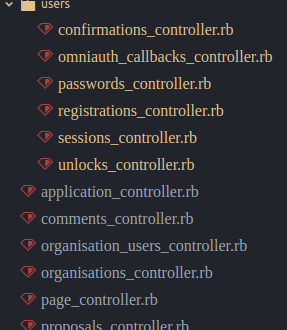
If language-ethereum is installed, remove it.
This is a known issue with the package, which is no longer maintained.
For Solidity support, use linter-solidity or language-solidity instead.
If language-ethereum isn't installed, please follow these steps and file an issue.
The tree-view's files are borked and look like this:

If you haven't restarted Atom since upgrading to File-Icons v2, do so now.
If restarting doesn't help, your stylesheet probably needs updating. See below.
My stylesheet has errors since updating:
As of v2.0, classes are used for displaying icons instead of mixins. Delete lines like these from your stylesheet:
-@import "packages/file-icons/styles/icons";
-@import "packages/file-icons/styles/items";
-@{pane-tab-selector},
.icon-file-directory {
	&[data-name=".git"]:before {
-		.git-icon;
+		font-family: Devicons;
+		content: "\E602";
	}
}
Instead of @pane-tab… variables, use .tab > .icon[data-path]:
-@pane-tab-selector,
-@pane-tab-temp-selector,
-@pane-tab-override {
+.tab > .icon {
 	&[data-path$=".to.file"] {

 	}
}
These CSS classes are no longer used, so delete them:
-.file-icons-force-show-icons,
-.file-icons-tab-pane-icon,
-.file-icons-on-changes
It's something else.
Please file an issue. Include screenshots if necessary.
Integration with other packages
If you're a package author, you can integrate File-Icons using Atom's services API.
First, add this to your package.json file:
"consumedServices": {
	"file-icons.element-icons": {
		"versions": {
			"1.0.0": "consumeElementIcons"
		}
	}
}
Secondly, add a function named consumeElementIcons (or whatever you named it) to your package's main export:
let addIconToElement;
module.exports.consumeElementIcons = function(func){
	addIconToElement = func;
};
Then call the function it gets passed to display icons in the DOM:
let fileIcon = document.querySelector("li.file-entry > span.icon");
addIconToElement(fileIcon, "/path/to/file.txt");
The returned value is a Disposable which clears the icon from memory once it's no longer needed:
const disposable = addIconToElement(fileIcon, "/path/to/file.txt");
fileIcon.onDestroy(() => disposable.dispose());
NOTE: Remember to remove any default icon-classes before calling the service handler!
 let fileIcon = document.querySelector("li.file-entry > span.icon");
+fileIcon.classList.remove("icon-file-text");
 const disposable = addIconToElement(fileIcon, "/path/to/file.txt");
Sponsors
Huge thanks to the following backers who generously sponsored this project in the past:
Acknowledgements
v1 was originally based on sommerper/filetype-color. v2 was completely rewritten.
Both versions owe their success to innumerable contributions from the Atom community.