
@darialan/web-printer
v3.2.2
Published
Content-aware in-browser HTML pagination and export engine for documents, reports, and tables into PDF and PNG.

Maintainers
 iaine
Readme
Web Printer is a browser-side HTML pagination and export engine tailored for business reports, long tables, contracts, and articles. It addresses common pain points in html2pdf.js on complex pages, such as clipped text lines, broken table rows across pages, and blank whiteouts on long documents.
In standardized benchmarks on Apple M1 Pro (16GB RAM), 5-page documents export ~2.0x faster, 10-page documents export ~1.8x faster, and complex tables export ~2.5x faster; 15-page, 20-page, and 50-page long document tests consistently pass page-by-page visual validation without memory crashes or blank pages. See Benchmark Comparison.
Live Demo · npm · Full Benchmark · Integration Guide · Changelog
Why Not html2pdf.js?
While html2pdf.js is widely known for exporting web pages to PDF, developers frequently encounter clipped text lines, broken table layouts across page boundaries, and blank screen crashes on long documents.
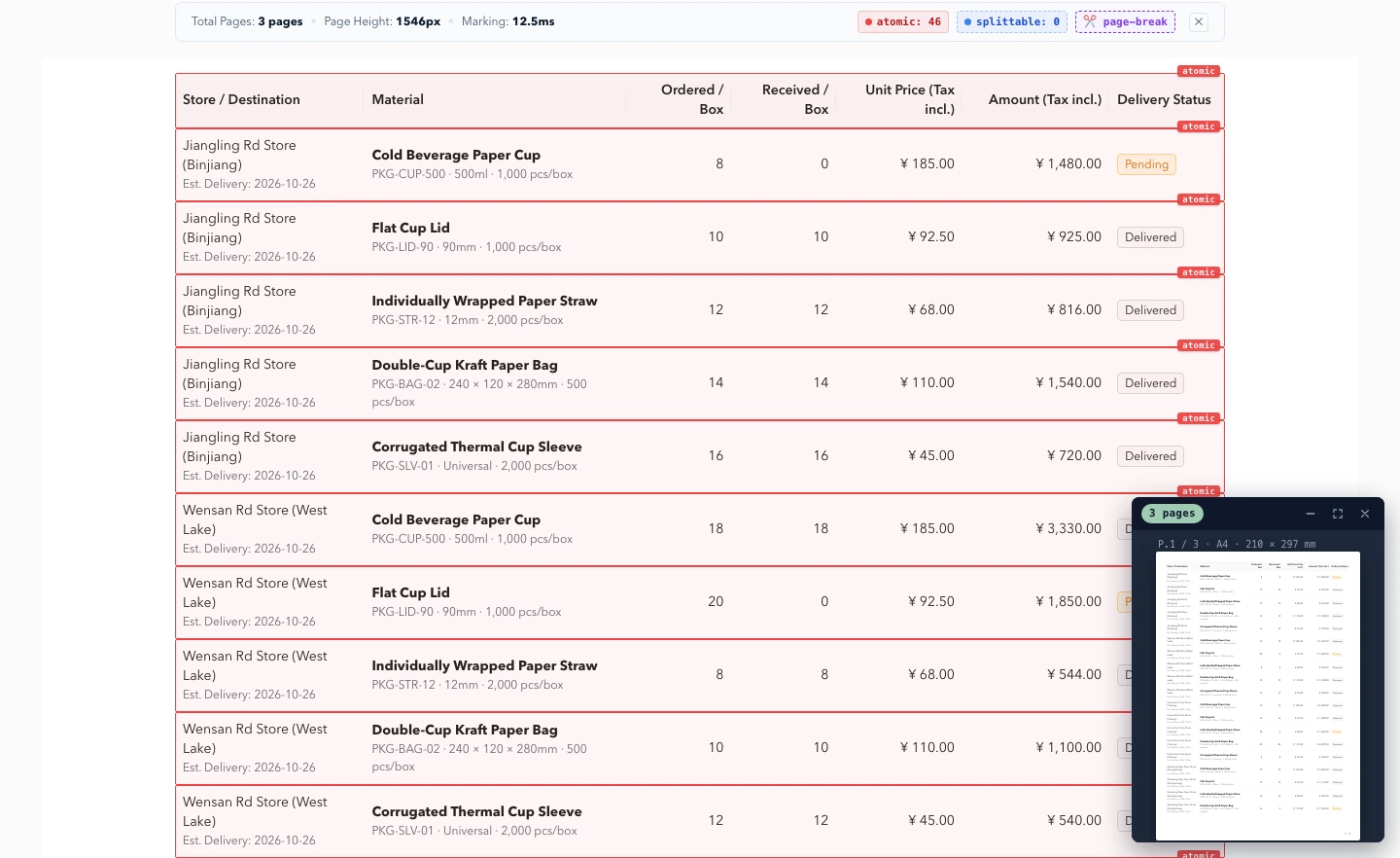
The architectural difference of Web Printer: calculate safe pagination break points first using actual DOM geometry, then render each page independently, rather than taking a monolithic screenshot and slicing it naively by fixed pixel heights.
| Issue in Traditional Tools | How Web Printer Solves It | | --- | --- | | Text lines cut in half at page bottom | Measures real line-box geometry with DOM Range, breaking cleanly between lines | | Table rows split in half, losing headers across pages | Keeps table rows intact with atomic protection, repeating headers automatically | | Page layout reflow during printing | Measures and renders inside an isolated offscreen sandbox, leaving host DOM untouched | | Blank pages or browser freeze on long documents (50+ pages) | Precalculates safe page breaks and renders pages individually, eliminating single-canvas size limits |
Benchmark: Comparison with html2pdf.js
The following data was gathered in a standardized hardware environment (Apple M1 Pro 8-core / 16GB Unified Memory / macOS): html2pdf.js 0.14.0 vs. Web Printer 3.0. Each scenario was executed 3 times independently, taking the median duration.
| Test Scenario | html2pdf.js | Web Printer | Speedup / Result | | --- | ---: | ---: | --- | | Long Text (2 pages) | 1,761 ms | 759 ms | ~2.3x faster | | Complex Table (3 pages) | 3,117 ms | 1,237 ms | ~2.5x faster | | Standard Document (5 pages) | 4,382 ms | 2,167 ms | ~2.0x faster | | Medium Document (10 pages) | 7,798 ms | 4,265 ms | ~1.8x faster | | Flex / Grid Layout | Validation Failed | 630 ms, Passed | Visual Verification Passed | | Long Document (15 pages) | Duplicate text markers, Validation Failed | 6.96 s, Passed | Content Integrity Passed | | Long Document (20 pages) | Duplicate text markers, Validation Failed | 9.96 s, Passed | Content Integrity Passed | | Extra Long Document (50 pages) | Output all blank, Validation Failed | 34.98 s, Passed | Content Integrity Passed |
Test Hardware & Environment: Apple M1 Pro (8-core CPU: 6 Performance + 2 Efficiency) · 16 GB Unified Memory · macOS 26.2 · Chromium 141 (Playwright) · Node.js v25 · A4 Portrait (scale 2) · DPR 1.0 · Viewport 1440×1000. Every exported PDF is strictly verified with PDF.js for blank pages and sequential content marker integrity. Data represents these test scenarios and environment.
Extreme Scale & Reliability Stress Testing
To verify production readiness under heavy load and extreme boundaries, we ran automated stress tests, zero-leak soak tests, and physical capacity ceiling probes (npm run benchmark:stress):
| Test Item | Scenario Setup | Measured Performance | Verification & Conclusion |
| :--- | :--- | :--- | :--- |
| 100-Page Extreme Scale Export | 100-page continuous mixed-media doc | 68.6 s · 32.0 MiB PDF · Peak RSS 818.5 MiB | 100/100 pages verified via PDF.js; 1,000 sequential markers intact |
| 20-Round Continuous Soak Test | 20 consecutive export runs with zero delay | 20/20 (100% success) · Net RSS drift +10.9 MiB (< 3%) | Page canvases & offscreen DOM destroyed immediately; no memory leak |
| Mid-flight Abort & Fast Re-entry | Aborted via AbortController mid-flight and immediately re-triggered | Abort latency < 10 ms · 0 DOM residual · Subsequent run 100% clean | Graceful cancellation and high-frequency re-entrancy without state pollution |
| Single-Tab Physical Capacity Probe | Scaling from 100 → 200 → 300 pages | 200 pages succeeded (331.6 s / 64.2 MiB PDF / 1.3 GiB RSS); 300 pages hit V8 old space heap limit | Recommended single-job safe capacity ceiling is 150–200 pages; larger docs should use startPage / endPage for ranged chunking |
View Full Benchmark Report (Methodology & Reproduction Steps)
Quick Start
1. NPM Installation
npm install @darialan/web-printerimport { outputDocument, previewPrint, togglePageBreaks } from '@darialan/web-printer';
const el = document.getElementById('print-area')!;
// Export PDF or multipage PNG (ZIP)
await outputDocument({ element: el, filename: 'report.pdf', format: 'pdf' });
// Open virtual paper preview floating window (collapse, fullscreen, zoom, virtual scroll)
await previewPrint({ element: el });
// Toggle visual page-break guides and debug markers directly on the page
await togglePageBreaks({ element: el });2. Standalone HTML Example (Directly runnable in HTML or JSFiddle)
<button id="btn-preview">Preview Pages</button>
<button id="btn-line">Toggle Page Breaks</button>
<button id="btn-pdf">Export PDF</button>

<!-- Target printable area -->
<div id="print-area"></div>

<script type="module">
  import {
    outputPDF,
    previewPrint,
    togglePageBreaks,
  } from 'https://esm.sh/@darialan/[email protected]';

  const el = document.getElementById('print-area');

  // Generate test blocks (data-print-atomic="true" protects cards from being cut across pages)
  el.innerHTML = Array.from({ length: 6 }, (_, i) => `
    <div data-print-atomic="true" style="height: 360px; border: 1px solid #ccc; margin: 12px 0; padding: 16px;">
      <h3>Test Block #${i + 1}</h3>
      <p>Hello there from @darialan/web-printer</p>
    </div>
  `).join('');

  // 1. Preview pages (pops up floating preview widget)
  document.getElementById('btn-preview').onclick = () => {
    previewPrint({ element: el });
  };

  // 2. Toggle visual page break lines
  document.getElementById('btn-line').onclick = () => {
    togglePageBreaks({ element: el });
  };

  // 3. Export PDF
  document.getElementById('btn-pdf').onclick = () => {
    outputPDF({ element: el, filename: 'test.pdf' });
  };
</script>
Also includes a specialized React Hook (@darialan/web-printer/react), custom headers and footers, progress callbacks, and export cancellation. See the Integration Guide.
Usage Notes
- Best suited for rendered web content like invoices, receipts, contracts, reports, and articles.
- The output PDF contains rasterized pages (canvas bitmaps); text selection within the PDF is currently not supported.
- Rendering relies on
html2canvas; certain cutting-edge CSS features and cross-origin images may be subject to browser canvas security restrictions.
Integration Guide · Benchmark · Migration Guide · Issues
License
MIT