
@datadog/mobile-react-native
v3.10.0
Published
A client-side React Native module to interact with Datadog

Maintainers
 datadog
Readme
React-Native Monitoring
Datadog Real User Monitoring (RUM) enables you to visualize and analyze the real-time performance and user journeys of your application’s individual users.
Setup
To install with NPM, run:
npm install @datadog/mobile-react-nativeTo install with Yarn, run:
yarn add @datadog/mobile-react-nativeMinimum React Native version: SDK supports React Native version 0.63.4 or higher. Compatibility with older versions is not guaranteed out of the box.
Versions 1.0.0-rc5 and higher require you to have compileSdkVersion = 31 in the Android application setup, which implies that you should use Build Tools version 31, Android Gradle Plugin version 7, and Gradle version 7 or higher. To modify the versions, change the values in the buildscript.ext block of your application's top-level build.gradle file. Datadog recommends using React Native version 0.67 or higher.
Specify application details in UI
- In the Datadog app, select UX Monitoring > RUM Applications > New Application.
- Choose
react-nativeas your Application Type. - Provide a new application name to generate a unique Datadog application ID and client token.
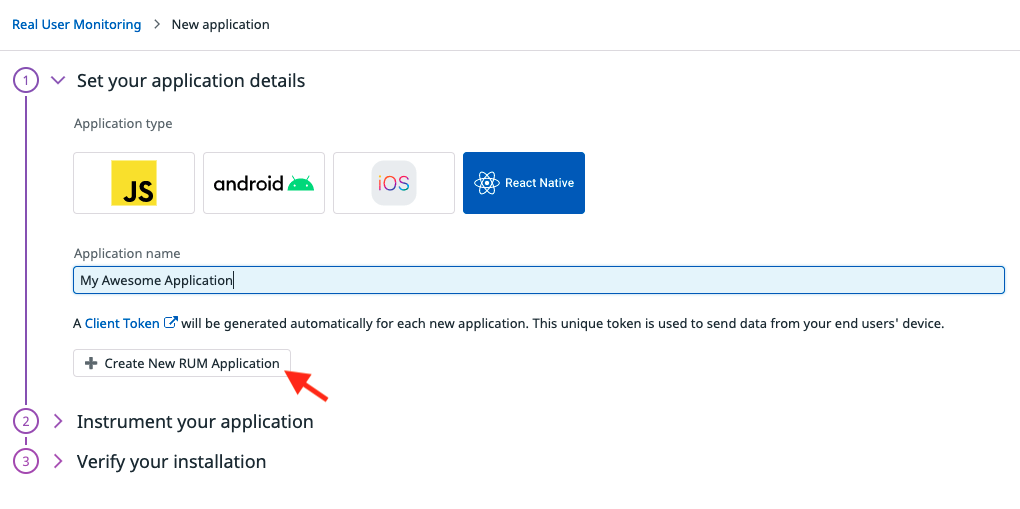
To ensure the safety of your data, you must use a client token. You cannot use only Datadog API keys to configure the @datadog/mobile-react-native library, because they would be exposed client-side. For more information about setting up a client token, see the Client Token documentation.
Initialize the library with application context
import {
    DatadogProvider,
    DatadogProviderConfiguration
} from '@datadog/mobile-react-native';

const datadogConfiguration = new DatadogProviderConfiguration(
    '<CLIENT_TOKEN>',
    '<ENVIRONMENT_NAME>',
    TrackingConsent.GRANTED,
    {
        rumConfiguration: {
            applicationId: '<RUM_APPLICATION_ID>',
            trackInteractions: true, // track User interactions (e.g.: Tap on buttons. You can use 'accessibilityLabel' element property to give tap action the name, otherwise element type will be reported)
            trackResources: true, // track XHR Resources
            trackFetchResources: true, // Optional: also track requests made with the global Expo Fetch implementation
            trackFrustrations: true, // track Frustrations
            trackErrors: true, // track errors
            nativeCrashReportEnabled: true, // Optional: enable or disable native crash reports
            sessionSampleRate: 80, // Optional: sample RUM sessions (here, 80% of session will be sent to Datadog. Default = 100%)
            resourceTraceSampleRate: 80, // Optional: sample tracing integrations for network calls between your app and your backend (here, 80% of calls to your instrumented backend will be linked from the RUM view to the APM view. Default = 20%)
            // You need to specify the hosts of your backends to enable tracing with these backends
            firstPartyHosts: ['example.com'], // matches 'example.com' and subdomains like 'api.example.com'
        },
        logsConfiguration: {
            logEventMapper: logEvent => {
                logEvent.message = `[CUSTOM] ${logEvent.message}`;
                return logEvent;
            }
        },
        traceConfiguration: {}
    }
);
// Optional: Select your Datadog website (one of "US1", "US3", "US5", "EU1", "AP1", "AP2", or "US1_FED"). Default is "US1".
datadogConfiguration.site = 'US1';
// Optional: set the reported service name (by default, it'll use the package name / bundleIdentifier of your Android / iOS app respectively)
datadogConfiguration.service = 'com.example.reactnative';
// Optional: let the SDK print internal logs (above or equal to the provided level. Default = undefined (meaning no logs))
datadogConfiguration.verbosity = SdkVerbosity.WARN;

export default function App() {
    return (
        <DatadogProvider configuration={datadogConfiguration}>
            <Navigation />
        </DatadogProvider>
    );
}
trackFetchResources tracks calls made through the Expo-installed global
fetch. Direct imports retained from expo/fetch are not intercepted. XHR
tracking remains enabled for clients such as axios.
GraphQL error extraction (via DatadogLink({ trackErrors: true })) for
requests made through expo/fetch requires Expo SDK 56 or later, as older
versions of expo/fetch do not implement Response.clone(). On earlier
versions, GraphQL metadata is still reported, but response errors are not.
Track view navigation
Because React Native offers a wide range of libraries to create screen navigation, by default only manual View tracking is supported. You can manually start and stop a View using the following startView() and stopView methods.
import {
    DdSdkReactNative,
    DdSdkReactNativeConfiguration,
    DdLogs,
    DdRum
} from '@datadog/mobile-react-native';

// Start a view with a unique view identifier, a custom view url, and an object to attach additional attributes to the view
DdRum.startView('ViewKey', 'ViewName', Date.now(), {
    'custom.foo': 'something'
});
// Stops a previously started view with the same unique view identifier, and an object to attach additional attributes to the view
DdRum.stopView('ViewKey', Date.now(), { 'custom.bar': 42 });
Data Storage
Android
Before data is uploaded to Datadog, it is stored in cleartext in your application's cache directory. This cache folder is protected by Android's Application Sandbox, meaning that on most devices this data can't be read by other applications. However, if the mobile device is rooted, or someone tempers with the linux kernel, the stored data might become readable.
iOS
Before data is uploaded to Datadog, it is stored in cleartext in the cache directory (Library/Caches)
of your application sandbox, which can't be read by any other app installed on the device.