
@datalayer/personal-agent-protocol
v0.25.0
Published
TypeScript SDK for Personal Agent Protocol draft 0.2 (2026-10-18) and its Operations extension v1


Readme

🤖 🌸 Personal Agent Protocol
Python and TypeScript SDKs for the Personal Agent Protocol: both implement draft 0.2 (2026-10-18) and its Operations extension v1. See Compatibility, Migration, the conformance report, and Support.
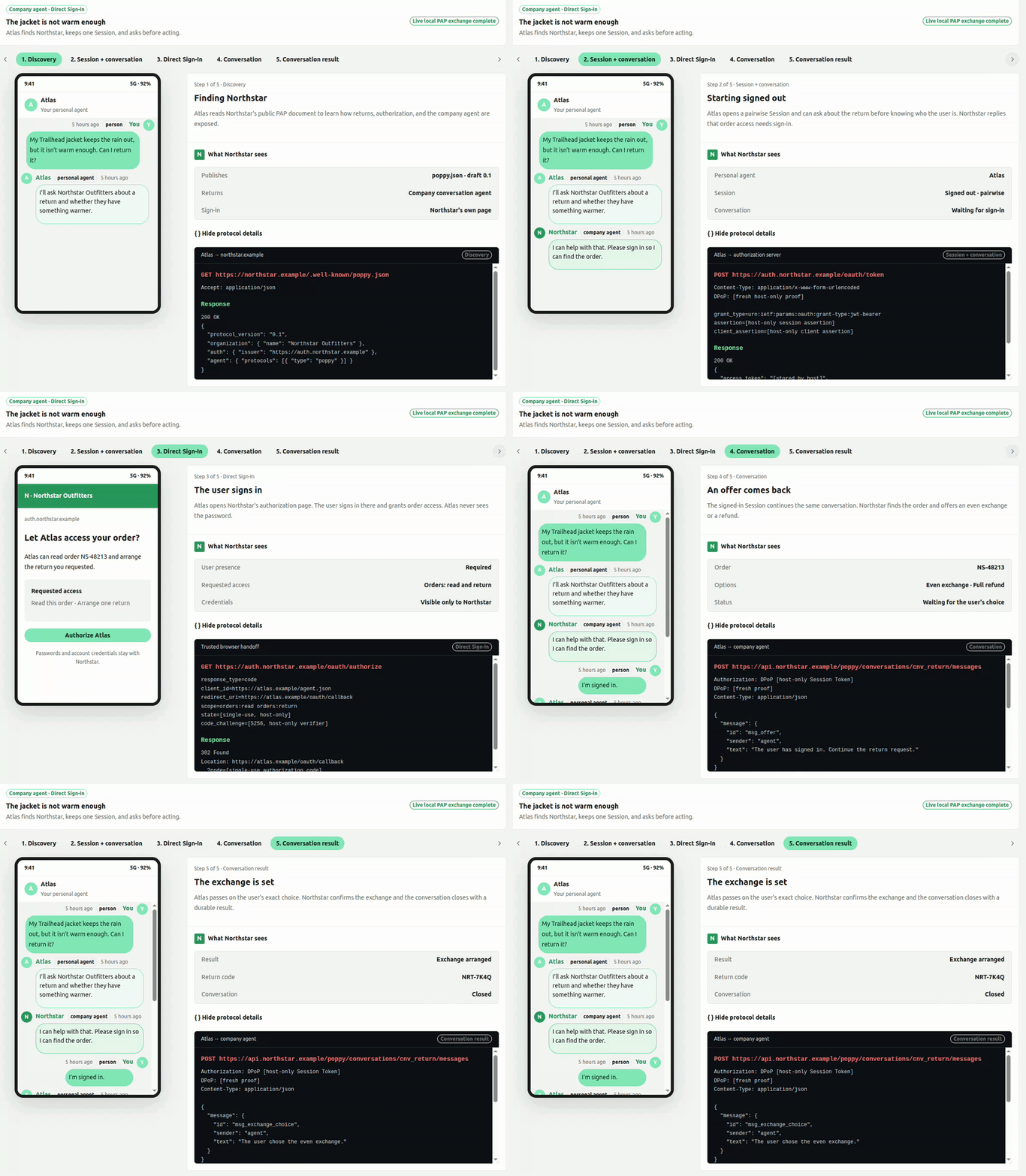
PAP lets a personal agent discover and talk to a company's agent on behalf of a person. The company remains responsible for its identity, authorization, data, and actions; the personal agent does not need the person's company password or a copy of their account data.
Understand PAP in one minute
A typical interaction has five parts:
- Discover — the personal agent reads the company's public
/.well-known/poppy.jsondocument. - Start a Session — the two agents establish a pairwise, initially signed-out relationship.
- Converse — the personal agent can ask questions without disclosing the person's company identity.
- Sign in when required — the company opens its own authorization page. Credentials remain between the person and the company.
- Continue safely — the same conversation resumes with proof-bound access and the scopes the person approved.
sequenceDiagram
    actor Person
    participant PA as Personal agent
    participant Company as Company agent
    participant Auth as Company authorization server

    PA->>Company: Discover /.well-known/poppy.json
    Company-->>PA: Agent, Session, and authorization endpoints
    PA->>Auth: Start a signed-out Session
    Auth-->>PA: DPoP-bound Session Token
    PA->>Company: Start a conversation
    Company-->>PA: Sign-in required for account data
    PA-->>Person: Open the company's sign-in page
    Person->>Auth: Sign in and approve scopes
    Auth-->>PA: Signed-in Session
    PA->>Company: Continue the same conversation
    Company-->>PA: Account-aware response
The SDKs implement these protocol and security mechanics. They do not decide what an agent should say, which model it should use, or whether a proposed action is appropriate for a person.
Install and discover a company
Python
python -m pip install personal-agent-protocolimport asyncio
from personal_agent_protocol import DiscoveryClient
async def main() -> None:
async with DiscoveryClient() as client:
company = await client.discover("example.com")
print(company.document.organization.name)
print(company.document.agent.protocols)
asyncio.run(main())TypeScript
npm install @datalayer/personal-agent-protocolimport { discoverCompany } from '@datalayer/personal-agent-protocol';
const company = await discoverCompany('example.com');
console.log(company.document.organization.name);
console.log(company.document.agent.protocols);Discovery is deliberately a small first example. Production Session, sign-in, and conversation flows also require host-owned signing keys, DPoP proof generation, token storage, and browser handoff. Those capabilities are provided through Reactor rather than hidden global state.
Reactor is the extension foundation
Both SDKs are built on Datalayer Reactor, a typed plugin and contribution system. An application assembles a PAP host from explicit contributions for:
- discovery transport and URL-safety policy;
- protocol profiles and extension handlers;
- clocks and cryptographic randomness;
- signing, protected keys, and DPoP proofs;
- pairwise identity, token storage, and caching;
- browser handoff and authorization-state storage;
- CLI commands supplied by PAP or third-party extensions.
This architecture keeps the protocol core portable while allowing a desktop application, browser application, server, or test harness to provide the security and platform behavior appropriate to its environment. Missing or ambiguous security contributions fail closed.
Python accepts a host-assembled Reactor PluginPlatform:
from reactor import PluginManifest

from personal_agent_protocol import DiscoveryClient, build_pap_reactor


async def discover_with_host() -> None:
    platform, owned_http = build_pap_reactor(
        plugins=[
            (PluginManifest(name="my-security", version="1"), my_security_plugin)
        ]
    )
    try:
        async with DiscoveryClient(reactor=platform) as client:
            company = await client.discover("example.com")
            print(company.document.organization.name)
    finally:
        platform.stop()
        if owned_http is not None:
            await owned_http.aclose()
TypeScript can build a host or receive an existing ReactorPlatformView:
import {
  buildPapReactor,
  discoverCompany,
} from '@datalayer/personal-agent-protocol';

const reactor = buildPapReactor({}, [mySecurityPlugin]);
const company = await discoverCompany('example.com', { reactor });
See the Reactor repository for the plugin model and contribution lifecycle.
What is implemented
Python and TypeScript share fixtures and cover the same principal protocol surface:
| Area | Current support |
| --------------- | --------------------------------------------------------------------------------------------------------------------------------- |
| Models | Forward-compatible discovery, OAuth metadata, client metadata, messages, events, and Operations v1 models |
| Discovery | poppy.json, company-domain and issuer validation, poppy_domains, bounded responses, and redirect controls |
| Sessions | Pairwise user IDs, PAP 4.2 assertions, signed-out start and renewal, redacted tokens, and DPoP nonce retry |
| Cryptography | ES256/RS256 JOSE, RFC 9449 DPoP creation and verification, freshness, token hash, nonce, and replay checks |
| Direct Sign-In | State, S256 PKCE, callback validation, browser handoff, and one-use token exchange orchestration |
| Browser Session | Assertion creation, controlled form POST, replay-safe verification, and company-domain return validation |
| Transport | Host-owned authorization headers, fresh redirect-bound proofs, one nonce retry, and cross-origin credential isolation |
| Conversations | Start and continue, random user-global message IDs, ordered long polling, cursor recovery, duplicate suppression, and safe errors |
| Extensibility | Reactor contribution points for platform, security, protocol, storage, and CLI behavior |
| CLI | Non-secret profiles, company verification, extension diagnostics, and versioned JSON output |
Python additionally provides a SQLite pairwise-identity reference provider.
The portable TypeScript entry rejects obvious local and private literal
addresses. Its explicit server entry adds NodeUrlSafetyPolicy and
createResolvingFetch (A/AAAA resolution, every address global, the vetted one
dialled), JoseSigner, and DPoP verification:
import {
  JoseSigner,
  NodeUrlSafetyPolicy,
} from '@datalayer/personal-agent-protocol/server';
Duplicate JSON members are rejected at Python and TypeScript trust boundaries.
What is not implemented yet
The following work remains before the SDKs cover the complete planned PAP surface:
- managed key custody and durable replay storage;
- Account Token exchange;
- resource-bound MCP Bearer transport;
- device and mediated sign-in;
- conversation SSE streaming, handoff, and explicit close requests;
- the Operations client and server;
Models for Operations v1 exist, but a complete Operations workflow does not. Applications should not infer client support from model availability alone.
Security boundary
PAP credentials belong to the host, not to an agent model or tool call.
- Session Tokens, Account Tokens, proofs, nonces, authorization codes, and pairwise identifiers must not enter prompts or model-visible tool results.
- Direct Sign-In requires host-provided state storage, browser handoff, signing, and DPoP contributions.
- Session requests fail closed until suitable signer and DPoP providers are installed.
- Redirects receive fresh, target-bound proofs; caller-supplied
AuthorizationandDPoPheaders are rejected. - CLI profiles store configuration only—never tokens or private keys.
The guides explain these boundaries at each flow rather than treating them as application conventions.
Command line
The Python distribution installs an extensible pap command. Its command
groups use Reactor's datalayer.reactor.cli entry-point contract.
pap config set domain example.com --profile work
pap config show --profile work --json
pap company verify --profile work --json
pap extensions list --profile work
See the CLI guide for configuration precedence, security boundaries, machine-readable output, and third-party extensions.
Examples and first consumer
The examples/pydantic-ai directory contains small,
focused Python examples. Each example teaches one feature—discovery, identity,
Sessions, Direct Sign-In, Browser Session, cryptography, conversations, or
proof-bound transport—without giving protocol secrets to the model.
Datalayer Agent Runtimes is the first consumer of these SDKs. Its Personal Agent Protocol gallery turns the same features into interactive Reactor/Loop applications, including a guided person-to-company journey rendered with the runtime's real message UI. The gallery's local company simulators are deterministic and clearly identified; the PAP clients, transports, validation, and parsed exchanges are real.
Each implemented feature should have all three learning layers:
- a focused SDK example in this repository;
- a Docusaurus guide with an explanation and Mermaid sequence diagram;
- an interactive Agent Runtimes example when a UI materially clarifies the flow.
Develop the SDKs
Clone the repository, then install the dependencies for the SDK you are changing.
Python
python -m pip install -e '.[test,lint,typing,examples]'
python -m pytest personal_agent_protocol/__tests__
TypeScript
The TypeScript package is at the repository root. Sources and tests live under
src/; published JavaScript and declarations are emitted to lib/.
npm install
npm test
The shared fixtures are in fixtures/. Documentation is a Docusaurus site in
docs/.
Learn more
- Documentation
- Overview
- Specification
- Implementation guides
- Extensions
- Open topics
- Datalayer Reactor
- Datalayer Agent Runtimes
License
BSD 3-Clause. See LICENSE.