
@datalust/seqcli
v2026.1.2645
Published
The Seq command-line client. Administer, log, ingest, search, from any OS.
Downloads
332


Readme
seqcli 

The Seq command-line interface for Seq users and AI agents.
Supports logging (seqcli log), searching (search), tailing (tail), querying (query) and JSON or plain-text log file ingestion (ingest), and much more.
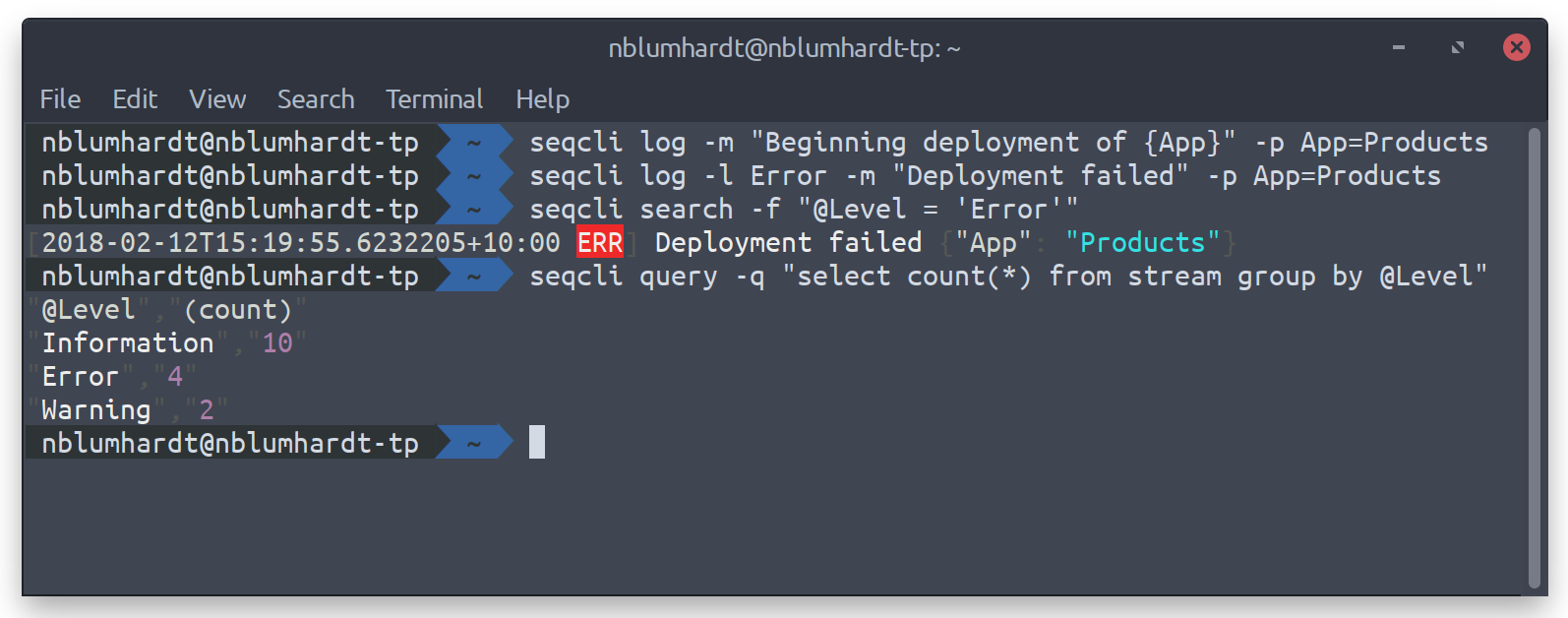
Getting started
The Seq installer for Windows includes seqcli. Otherwise, download the release for your operating system. Or, if you have dotnet installed, seqcli can be installed as a global tool using:
dotnet tool install --global seqcliWith Node.js installed, seqcli can be installed from npm using:
npm install -g @datalust/seqcliOn Windows, if the Seq installation directory is on your PATH, the seqcli bundled with Seq may take precedence over the npm-installed copy; where seqcli shows the resolution order, and npx @datalust/seqcli <command> always runs the npm version.
To set a default server URL and API key, run:
seqcli config set -k connection.serverUrl -v https://your-seq-server
seqcli config set -k connection.apiKey -v your-api-key
The API key will be stored in your SeqCli.json configuration file; on Windows, this is encrypted using DPAPI; on Mac/Linux the key is stored in
plain text unless an encryptor is defined in encryption.encryptor. As an alternative to storing the server URL and API key in configuration,
they can be passed to each command via the --server= and --apikey= arguments, or in the SEQCLI_CONNECTION_SERVERURL and
SEQCLI_CONNECTION_APIKEY environment variables.
seqcli is also available as a Docker container under datalust/seqcli:
docker run --rm datalust/seqcli:latest <command> [<args>]To connect to Seq in a docker container on the local machine use the machine's IP address (not localhost) or specify docker host networking with --net host.
Use Docker networks and volumes to make local files and other containers accessible to seqcli within its container.
Environment variable overrides
Each setting value can be overridden at runtime by specifying an environment variable of the form SEQCLI_<setting path>, where contains one element for each dotted segment of the setting name, separated by underscores.
For example the setting connection.serverUrl can overridden with the SEQCLI_CONNECTION_SERVERURL variable.
Connecting without an API key
If you're automating Seq setup, chances are you won't have an API key yet for seqcli to use. During the initial Seq server configuration, you can specify firstRun.adminUsername and firstRun.adminPasswordHash (or the equivalent environment variables SEQ_FIRSTRUN_ADMINUSERNAME and SEQ_FIRSTRUN_ADMINPASSWORDHASH) to set an initial username and password for the administrator account. You can use these to create an API key, and then use the API key token with the remaining seqcli commands.
The seqcli apikey create command accepts --connect-username and --connect-password-stdin, and prints the new API key token to STDOUT (PowerShell syntax is used below):
$user = "admin"
$pw = "thepassword"
$token = (
  echo $pw |
  seqcli apikey create `
    -t CLI `
    --permissions="Read,Write,Project,Organization,System" `
    --connect-username $user --connect-password-stdin
)
MCP and agent skills
AI agents use seqcli to access Seq. Installing the seqcli skills and MCP server makes AI agents faster, more successful and more efficient.
For skill installation:
seqcli skills install --agent <agent> [--global]For local MCP server installation:
seqcli mcp install --agent <agent> [--profile <profile>] [--global]Credentials are set using configuration and environment variables as described above.
Upon running the AI agent verify that the skills and MCP server have been detected. If not, consult the agent's documentation for skill and MCP server installation.
Contributing
See CONTRIBUTING.md.
Permissions
When connecting with an API key the allowed operations are determined by the permissions assigned to that API key.
To determine the permission required for a command check the 'Permission demand' column of the equivalent server API operation. For example, the command apikey create uses the POST api/apikeys endpoint, which requires the Write permission.
Usage
All seqcli commands follow the same pattern:
seqcli <command> [<args>]Command help
The complete list of supported commands can be viewed by running:
seqcli helpTo show usage information for a specific command, run seqcli help <command>, for example:
seqcli help apikey createThis also works for command groups; to list all apikey sub-commands, run:
seqcli help apikeyAvailable commands:
alertalert create— Create an alert.alert disable— Disable one or more alerts.alert enable— Enable one or more alerts.alert list— List alerts.alert remove— Remove an alert from the server.alert update— Update an existing alert.
apikeyapikey create— Create an API key for automation or ingestion.apikey list— List available API keys.apikey remove— Remove an API key from the server.apikey update— Update an existing API key.
appapp define— Generate an app definition for a .NET[SeqApp]plug-in.app install— Install an app package.app list— List installed app packages.app run— Host a .NET[SeqApp]plug-in.app uninstall— Uninstall an app package.app update— Update an installed app package.
appinstanceappinstance create— Create an instance of an installed app.appinstance list— List instances of installed apps.appinstance remove— Remove an app instance from the server.appinstance update— Update an existing app instance.
bench— Measure query performance.cluster health— Probe a Seq node's/health/clusterendpoint, and print the returned status. This command can also be used to wait on a timeout until the cluster is healthy..configconfig clear— Clear fields in theSeqCli.jsonfile.config get— View a field from theSeqCli.jsonfile.config list— View all fields in theSeqCli.jsonfile.config set— Set a field in theSeqCli.jsonfile.
dashboarddashboard list— List dashboards.dashboard remove— Remove a dashboard from the server.dashboard render— Produce a CSV or JSON result set from a dashboard chart.
diagnostics ingestionlog— Retrieve the ingestion log.expressionindexexpressionindex create— Create an expression index.expressionindex list— List expression indexes.expressionindex remove— Remove an expression index from the server.
feedfeed create— Create a NuGet feed.feed list— List NuGet feeds.feed remove— Remove a NuGet feed from the server.feed update— Update an existing NuGet feed.
forwarderforwarder install— Install the forwarder as a Windows service.forwarder restart— Restart the forwarder Windows service.forwarder run— Listen on an HTTP endpoint and forward ingested logs to Seq.forwarder start— Start the forwarder Windows service.forwarder status— Show the status of the forwarder Windows service.forwarder stop— Stop the forwarder Windows service.forwarder truncate— Empty the forwarder's persistent log buffer.forwarder uninstall— Uninstall the forwarder Windows service.
help— Show information about available commands.indexindex list— List indexes.index suppress— Suppress an index.
ingest— Send log events from a file orSTDIN.licenselicense apply— Apply a license to the Seq server.license show— Shows license applied to the Seq server.
log— Send a structured log event to the server.nodenode health— Probe a Seq node's/healthendpoint, and print the returned HTTP status code, or 'Unreachable' if the endpoint could not be queried; note that no API key is required.node list— List nodes in the Seq cluster.
print— Pretty-print events in CLEF/JSON format, from a file orSTDIN.profileprofile create— Create or replace a connection profile.profile list— List connection profiles.profile remove— Remove a connection profile.
query— Execute an SQL query and receive results in CSV format.retentionretention create— Create a retention policy.retention list— List retention policies.retention remove— Remove a retention policy from the server.retention update— Update an existing retention policy.
samplesample ingest— Log sample events into a Seq instance.sample setup— Configure a Seq instance with sample dashboards, signals, users, and so on.
search— Retrieve log events that match a given filter.settingsetting clear— Clear a runtime-configurable server setting.setting names— Print the names of all supported settings.setting set— Change a runtime-configurable server setting.setting show— Print the current value of a runtime-configurable server setting.
signalsignal create— Create a signal.signal import— Import signals in newline-delimited JSON format.signal list— List available signals.signal remove— Remove a signal from the server.signal update— Update an existing signal.
tail— Stream log events matching a filter.templatetemplate export— Export entities into template files.template import— Import entities from template files.
trace— Display a trace as a tree of spans.useruser create— Create a user.user list— List users.user remove— Remove a user from the server.user update— Update an existing user.
version— Print the current executable version.workspaceworkspace create— Create a workspace.workspace list— List available workspaces.workspace remove— Remove a workspace from the server.workspace update— Update an existing workspace.
alert create
Create an alert.
Example:
seqcli alert create -t 'Too many errors' --select "count(*) as errors" --from stream --signal signal-m33302 --where "@Level = 'Error'" --window 5m --having "errors > 10" --notification-level Error --suppression-time 10m| Option | Description |
| ------ | ----------- |
| -t, --title=VALUE | A title for the alert |
| --description=VALUE | A description for the alert |
| --from=VALUE | The data source the alert queries; either stream (the default) or series |
| --signal=VALUE | A signal expression limiting the alert's input, for example signal-1 or signal-1,signal-2 |
| --lateral=VALUE | A lateral join over a set-valued function applied to the data source, in the form <setFunctionCall> as <alias>, for example unnest(http.server.request.duration.buckets) as bucket; this argument can be used multiple times |
| --where=VALUE | A predicate that selects the events the alert will consider |
| --select=VALUE | A measurement the alert condition will test, for example count(*) as errors; this argument can be used multiple times |
| --group-by=VALUE | An expression to group measurements by, for example ServiceName or ServiceName ci as service; the ci modifier makes the grouping case-insensitive; this argument can be used multiple times |
| --window=VALUE | The measurement window over which the alert condition is evaluated, as a duration, for example 1m or 1h |
| --having=VALUE | The alert condition; a predicate over the grouped measurements, for example errors > 10 |
| --notification-level=VALUE | The level of the notifications raised by the alert, for example Warning or Error |
| --suppression-time=VALUE | A duration for which notifications are suppressed after the alert triggers, for example 10m or 1h |
| --notification-app=VALUE | The id of an app instance that will be notified when the alert triggers; this argument can be used multiple times |
| --protected | Specify that the alert is editable only by administrators |
| --disabled | Create the alert in a disabled state; disabled alerts are not processed and do not send notifications |
| -s, --server=VALUE | The URL of the Seq server; by default the connection.serverUrl config value will be used |
| -a, --apikey=VALUE | The API key to use when connecting to the server; by default the connection.apiKey config value will be used |
| --profile=VALUE | A connection profile to use; by default the connection.serverUrl and connection.apiKey config values will be used |
| --json | Print output in newline-delimited JSON (the default is plain text) |
| --no-color | Don't colorize text output |
| --force-color | Force redirected output to have ANSI color (unless --no-color is also specified) |
| --storage=VALUE | The folder where SeqCli.json and other data will be stored; falls back to SEQCLI_STORAGE_PATH from the environment, then the seqcli forwarder service's configured storage path (Windows only), then the current user's home directory |
alert disable
Disable one or more alerts.
Example:
seqcli alert disable -t 'Too many errors'| Option | Description |
| ------ | ----------- |
| -t, --title=VALUE | The title of the alert(s) to disable |
| -i, --id=VALUE | The id of a single alert to disable |
| -o, --owner=VALUE | The id of the user to disable alerts for; by default, shared alerts are disabled |
| -s, --server=VALUE | The URL of the Seq server; by default the connection.serverUrl config value will be used |
| -a, --apikey=VALUE | The API key to use when connecting to the server; by default the connection.apiKey config value will be used |
| --profile=VALUE | A connection profile to use; by default the connection.serverUrl and connection.apiKey config values will be used |
| --storage=VALUE | The folder where SeqCli.json and other data will be stored; falls back to SEQCLI_STORAGE_PATH from the environment, then the seqcli forwarder service's configured storage path (Windows only), then the current user's home directory |
alert enable
Enable one or more alerts.
Example:
seqcli alert enable -t 'Too many errors'| Option | Description |
| ------ | ----------- |
| -t, --title=VALUE | The title of the alert(s) to enable |
| -i, --id=VALUE | The id of a single alert to enable |
| -o, --owner=VALUE | The id of the user to enable alerts for; by default, shared alerts are enabled |
| -s, --server=VALUE | The URL of the Seq server; by default the connection.serverUrl config value will be used |
| -a, --apikey=VALUE | The API key to use when connecting to the server; by default the connection.apiKey config value will be used |
| --profile=VALUE | A connection profile to use; by default the connection.serverUrl and connection.apiKey config values will be used |
| --storage=VALUE | The folder where SeqCli.json and other data will be stored; falls back to SEQCLI_STORAGE_PATH from the environment, then the seqcli forwarder service's configured storage path (Windows only), then the current user's home directory |
alert list
List alerts.
Example:
seqcli alert list| Option | Description |
| ------ | ----------- |
| -t, --title=VALUE | The title of the alert(s) to list |
| -i, --id=VALUE | The id of a single alert to list |
| -o, --owner=VALUE | The id of the user to list alerts for; by default, shared alerts are listed |
| --json | Print output in newline-delimited JSON (the default is plain text) |
| --no-color | Don't colorize text output |
| --force-color | Force redirected output to have ANSI color (unless --no-color is also specified) |
| --storage=VALUE | The folder where SeqCli.json and other data will be stored; falls back to SEQCLI_STORAGE_PATH from the environment, then the seqcli forwarder service's configured storage path (Windows only), then the current user's home directory |
| -s, --server=VALUE | The URL of the Seq server; by default the connection.serverUrl config value will be used |
| -a, --apikey=VALUE | The API key to use when connecting to the server; by default the connection.apiKey config value will be used |
| --profile=VALUE | A connection profile to use; by default the connection.serverUrl and connection.apiKey config values will be used |
alert remove
Remove an alert from the server.
Example:
seqcli alert remove -t 'Too many errors'| Option | Description |
| ------ | ----------- |
| -t, --title=VALUE | The title of the alert(s) to remove |
| -i, --id=VALUE | The id of a single alert to remove |
| -o, --owner=VALUE | The id of the user to remove alerts for; by default, shared alerts are removed |
| -s, --server=VALUE | The URL of the Seq server; by default the connection.serverUrl config value will be used |
| -a, --apikey=VALUE | The API key to use when connecting to the server; by default the connection.apiKey config value will be used |
| --profile=VALUE | A connection profile to use; by default the connection.serverUrl and connection.apiKey config values will be used |
| --storage=VALUE | The folder where SeqCli.json and other data will be stored; falls back to SEQCLI_STORAGE_PATH from the environment, then the seqcli forwarder service's configured storage path (Windows only), then the current user's home directory |
alert update
Update an existing alert.
Example:
seqcli alert update --json '{...}'| Option | Description |
| ------ | ----------- |
| --json=VALUE | The updated alert in JSON format; this can be produced using seqcli alert list --json |
| --json-stdin | Read the updated alert as JSON from STDIN |
| -s, --server=VALUE | The URL of the Seq server; by default the connection.serverUrl config value will be used |
| -a, --apikey=VALUE | The API key to use when connecting to the server; by default the connection.apiKey config value will be used |
| --profile=VALUE | A connection profile to use; by default the connection.serverUrl and connection.apiKey config values will be used |
| --storage=VALUE | The folder where SeqCli.json and other data will be stored; falls back to SEQCLI_STORAGE_PATH from the environment, then the seqcli forwarder service's configured storage path (Windows only), then the current user's home directory |
apikey create
Create an API key for automation or ingestion.
Example:
seqcli apikey create -t 'Test API Key' -p Environment=Test| Option | Description |
| ------ | ----------- |
| -t, --title=VALUE | A title for the API key |
| --token=VALUE | A pre-allocated API key token; by default, a new token will be generated and written to STDOUT |
| -p, --property=NAME=VALUE | Specify name/value properties, e.g. -p Customer=C123 -p Environment=Production |
| --filter=VALUE | A filter to apply to incoming events |
| --minimum-level=VALUE | The minimum event level/severity to accept; the default is to accept all events |
| --use-server-timestamps | Discard client-supplied timestamps and use server clock values |
| --permissions=VALUE | A comma-separated list of permissions to delegate to the API key; valid permissions are Ingest (default), Read, Write, Project, Organization, and System |
| --connect-username=VALUE | A username to connect with, useful primarily when setting up the first API key; servers with an 'Individual' subscription only allow one simultaneous request with this option |
| --connect-password=VALUE | When connect-username is specified, a corresponding password |
| --connect-password-stdin | When connect-username is specified, read the corresponding password from STDIN |
| -s, --server=VALUE | The URL of the Seq server; by default the connection.serverUrl config value will be used |
| -a, --apikey=VALUE | The API key to use when connecting to the server; by default the connection.apiKey config value will be used |
| --profile=VALUE | A connection profile to use; by default the connection.serverUrl and connection.apiKey config values will be used |
| --json | Print output in newline-delimited JSON (the default is plain text) |
| --no-color | Don't colorize text output |
| --force-color | Force redirected output to have ANSI color (unless --no-color is also specified) |
| --storage=VALUE | The folder where SeqCli.json and other data will be stored; falls back to SEQCLI_STORAGE_PATH from the environment, then the seqcli forwarder service's configured storage path (Windows only), then the current user's home directory |
apikey list
List available API keys.
Example:
seqcli apikey list| Option | Description |
| ------ | ----------- |
| -t, --title=VALUE | The title of the API key(s) to list |
| -i, --id=VALUE | The id of a single API key to list |
| --json | Print output in newline-delimited JSON (the default is plain text) |
| --no-color | Don't colorize text output |
| --force-color | Force redirected output to have ANSI color (unless --no-color is also specified) |
| --storage=VALUE | The folder where SeqCli.json and other data will be stored; falls back to SEQCLI_STORAGE_PATH from the environment, then the seqcli forwarder service's configured storage path (Windows only), then the current user's home directory |
| -s, --server=VALUE | The URL of the Seq server; by default the connection.serverUrl config value will be used |
| -a, --apikey=VALUE | The API key to use when connecting to the server; by default the connection.apiKey config value will be used |
| --profile=VALUE | A connection profile to use; by default the connection.serverUrl and connection.apiKey config values will be used |
apikey remove
Remove an API key from the server.
Example:
seqcli apikey remove -t 'Test API Key'| Option | Description |
| ------ | ----------- |
| -t, --title=VALUE | The title of the API key(s) to remove |
| -i, --id=VALUE | The id of a single API key to remove |
| -s, --server=VALUE | The URL of the Seq server; by default the connection.serverUrl config value will be used |
| -a, --apikey=VALUE | The API key to use when connecting to the server; by default the connection.apiKey config value will be used |
| --profile=VALUE | A connection profile to use; by default the connection.serverUrl and connection.apiKey config values will be used |
| --storage=VALUE | The folder where SeqCli.json and other data will be stored; falls back to SEQCLI_STORAGE_PATH from the environment, then the seqcli forwarder service's configured storage path (Windows only), then the current user's home directory |
apikey update
Update an existing API key.
Example:
seqcli apikey update --json '{...}'| Option | Description |
| ------ | ----------- |
| --json=VALUE | The updated API key in JSON format; this can be produced using seqcli apikey list --json |
| --json-stdin | Read the updated API key as JSON from STDIN |
| -s, --server=VALUE | The URL of the Seq server; by default the connection.serverUrl config value will be used |
| -a, --apikey=VALUE | The API key to use when connecting to the server; by default the connection.apiKey config value will be used |
| --profile=VALUE | A connection profile to use; by default the connection.serverUrl and connection.apiKey config values will be used |
| --storage=VALUE | The folder where SeqCli.json and other data will be stored; falls back to SEQCLI_STORAGE_PATH from the environment, then the seqcli forwarder service's configured storage path (Windows only), then the current user's home directory |
app define
Generate an app definition for a .NET [SeqApp] plug-in.
Example:
seqcli app define -d "./bin/Debug/netstandard2.2"| Option | Description |
| ------ | ----------- |
| -d, --directory=VALUE | The directory containing .NET Standard assemblies; defaults to the current directory |
| --type=VALUE | The [SeqApp] plug-in type name; defaults to scanning assemblies for a single type marked with this attribute |
| --indented | Format the definition over multiple lines with indentation |
app install
Install an app package.
Example:
seqcli app install --package-id 'Seq.App.JsonArchive'| Option | Description |
| ------ | ----------- |
| --package-id=VALUE | The package id of the app to install |
| --version=VALUE | The package version to install; the default is to install the latest version |
| --feed-id=VALUE | The id of the NuGet feed to install the package from; may be omitted if only one feed is configured |
| -s, --server=VALUE | The URL of the Seq server; by default the connection.serverUrl config value will be used |
| -a, --apikey=VALUE | The API key to use when connecting to the server; by default the connection.apiKey config value will be used |
| --profile=VALUE | A connection profile to use; by default the connection.serverUrl and connection.apiKey config values will be used |
| --json | Print output in newline-delimited JSON (the default is plain text) |
| --no-color | Don't colorize text output |
| --force-color | Force redirected output to have ANSI color (unless --no-color is also specified) |
| --storage=VALUE | The folder where SeqCli.json and other data will be stored; falls back to SEQCLI_STORAGE_PATH from the environment, then the seqcli forwarder service's configured storage path (Windows only), then the current user's home directory |
app list
List installed app packages.
Example:
seqcli app list| Option | Description |
| ------ | ----------- |
| --package-id=VALUE | The package id of the app(s) to list |
| -i, --id=VALUE | The id of a single app to list |
| --json | Print output in newline-delimited JSON (the default is plain text) |
| --no-color | Don't colorize text output |
| --force-color | Force redirected output to have ANSI color (unless --no-color is also specified) |
| --storage=VALUE | The folder where SeqCli.json and other data will be stored; falls back to SEQCLI_STORAGE_PATH from the environment, then the seqcli forwarder service's configured storage path (Windows only), then the current user's home directory |
| -s, --server=VALUE | The URL of the Seq server; by default the connection.serverUrl config value will be used |
| -a, --apikey=VALUE | The API key to use when connecting to the server; by default the connection.apiKey config value will be used |
| --profile=VALUE | A connection profile to use; by default the connection.serverUrl and connection.apiKey config values will be used |
app run
Host a .NET [SeqApp] plug-in.
Example:
seqcli tail --json | seqcli app run -d "./bin/Debug/netstandard2.2" -p [email protected]| Option | Description |
| ------ | ----------- |
| -d, --directory=VALUE | The directory containing .NET Standard assemblies; defaults to the current directory |
| --type=VALUE | The [SeqApp] plug-in type name; defaults to scanning assemblies for a single type marked with this attribute |
| -p, --property=NAME=VALUE | Specify name/value settings for the app, e.g. -p [email protected] -p Subject="Alert!" |
| --storage=VALUE | A directory in which app-specific data can be stored; defaults to the current directory |
| -s, --server=VALUE | The URL of the Seq server, used only for app configuration (no connection is made to the server); by default the connection.serverUrl value will be used |
| --server-instance=VALUE | The instance name of the Seq server, used only for app configuration; defaults to no instance name |
| -t, --title=VALUE | The app instance title, used only for app configuration; defaults to a placeholder title. |
| --id=VALUE | The app instance id, used only for app configuration; defaults to a placeholder id. |
| --read-env | Read app configuration and settings from environment variables, as specified in https://docs.datalust.co/docs/seq-apps-in-other-languages; ignores all options except --directory and --type |
app uninstall
Uninstall an app package.
Example:
seqcli app uninstall --package-id 'Seq.App.JsonArchive'| Option | Description |
| ------ | ----------- |
| --package-id=VALUE | The package id of the app package to uninstall |
| -i, --id=VALUE | The id of a single app package to uninstall |
| -s, --server=VALUE | The URL of the Seq server; by default the connection.serverUrl config value will be used |
| -a, --apikey=VALUE | The API key to use when connecting to the server; by default the connection.apiKey config value will be used |
| --profile=VALUE | A connection profile to use; by default the connection.serverUrl and connection.apiKey config values will be used |
| --storage=VALUE | The folder where SeqCli.json and other data will be stored; falls back to SEQCLI_STORAGE_PATH from the environment, then the seqcli forwarder service's configured storage path (Windows only), then the current user's home directory |
app update
Update an installed app package.
Example:
seqcli app update -n 'HTML Email'| Option | Description |
| ------ | ----------- |
| -i, --id=VALUE | The id of a single installed app to update |
| -n, --name=VALUE | The name of the installed app to update |
| --all | Update all installed apps; not compatible with -i or -n |
| --version=VALUE | The package version to update to; the default is to update to the latest version in the associated feed |
| --force | Update the app even if the target version is already installed |
| -s, --server=VALUE | The URL of the Seq server; by default the connection.serverUrl config value will be used |
| -a, --apikey=VALUE | The API key to use when connecting to the server; by default the connection.apiKey config value will be used |
| --profile=VALUE | A connection profile to use; by default the connection.serverUrl and connection.apiKey config values will be used |
| --json | Print output in newline-delimited JSON (the default is plain text) |
| --no-color | Don't colorize text output |
| --force-color | Force redirected output to have ANSI color (unless --no-color is also specified) |
| --storage=VALUE | The folder where SeqCli.json and other data will be stored; falls back to SEQCLI_STORAGE_PATH from the environment, then the seqcli forwarder service's configured storage path (Windows only), then the current user's home directory |
appinstance create
Create an instance of an installed app.
Example:
seqcli appinstance create -t 'Email Ops' --app hostedapp-314159 -p [email protected]| Option | Description |
| ------ | ----------- |
| -t, --title=VALUE | A title for the app instance |
| --app=VALUE | The id of the installed app package to instantiate |
| -p, --property=NAME=VALUE | Specify name/value settings for the app, e.g. -p [email protected] -p Subject="Alert!" |
| --stream[=VALUE] | Stream incoming events to this app instance as they're ingested; optionally accepts a signal expression limiting which events should be streamed, for example signal-1,signal-2 |
| --overridable=VALUE | Specify setting names that may be overridden by users when invoking the app |
| -s, --server=VALUE | The URL of the Seq server; by default the connection.serverUrl config value will be used |
| -a, --apikey=VALUE | The API key to use when connecting to the server; by default the connection.apiKey config value will be used |
| --profile=VALUE | A connection profile to use; by default the connection.serverUrl and connection.apiKey config values will be used |
| --json | Print output in newline-delimited JSON (the default is plain text) |
| --no-color | Don't colorize text output |
| --force-color | Force redirected output to have ANSI color (unless --no-color is also specified) |
| --storage=VALUE | The folder where SeqCli.json and other data will be stored; falls back to SEQCLI_STORAGE_PATH from the environment, then the seqcli forwarder service's configured storage path (Windows only), then the current user's home directory |
appinstance list
List instances of installed apps.
Example:
seqcli appinstance list| Option | Description |
| ------ | ----------- |
| -t, --title=VALUE | The title of the app instance(s) to list |
| -i, --id=VALUE | The id of a single app instance to list |
| --json | Print output in newline-delimited JSON (the default is plain text) |
| --no-color | Don't colorize text output |
| --force-color | Force redirected output to have ANSI color (unless --no-color is also specified) |
| --storage=VALUE | The folder where SeqCli.json and other data will be stored; falls back to SEQCLI_STORAGE_PATH from the environment, then the seqcli forwarder service's configured storage path (Windows only), then the current user's home directory |
| -s, --server=VALUE | The URL of the Seq server; by default the connection.serverUrl config value will be used |
| -a, --apikey=VALUE | The API key to use when connecting to the server; by default the connection.apiKey config value will be used |
| --profile=VALUE | A connection profile to use; by default the connection.serverUrl and connection.apiKey config values will be used |
appinstance remove
Remove an app instance from the server.
Example:
seqcli appinstance remove -t 'Email Ops'| Option | Description |
| ------ | ----------- |
| -t, --title=VALUE | The title of the app instance(s) to remove |
| -i, --id=VALUE | The id of a single app instance to remove |
| -s, --server=VALUE | The URL of the Seq server; by default the connection.serverUrl config value will be used |
| -a, --apikey=VALUE | The API key to use when connecting to the server; by default the connection.apiKey config value will be used |
| --profile=VALUE | A connection profile to use; by default the connection.serverUrl and connection.apiKey config values will be used |
| --storage=VALUE | The folder where SeqCli.json and other data will be stored; falls back to SEQCLI_STORAGE_PATH from the environment, then the seqcli forwarder service's configured storage path (Windows only), then the current user's home directory |
appinstance update
Update an existing app instance.
Example:
seqcli appinstance update --json '{...}'| Option | Description |
| ------ | ----------- |
| --json=VALUE | The updated app instance in JSON format; this can be produced using seqcli appinstance list --json |
| --json-stdin | Read the updated app instance as JSON from STDIN |
| -s, --server=VALUE | The URL of the Seq server; by default the connection.serverUrl config value will be used |
| -a, --apikey=VALUE | The API key to use when connecting to the server; by default the connection.apiKey config value will be used |
| --profile=VALUE | A connection profile to use; by default the connection.serverUrl and connection.apiKey config values will be used |
| --storage=VALUE | The folder where SeqCli.json and other data will be stored; falls back to SEQCLI_STORAGE_PATH from the environment, then the seqcli forwarder service's configured storage path (Windows only), then the current user's home directory |
bench
Measure query performance.
| Option | Description |
| ------ | ----------- |
| -r, --runs=VALUE | The number of runs to execute; the default is 10 |
| -c, --cases=VALUE | A JSON file containing the set of cases to run. Defaults to a standard set of cases. |
| -s, --server=VALUE | The URL of the Seq server; by default the connection.serverUrl config value will be used |
| -a, --apikey=VALUE | The API key to use when connecting to the server; by default the connection.apiKey config value will be used |
| --profile=VALUE | A connection profile to use; by default the connection.serverUrl and connection.apiKey config values will be used |
| --start=VALUE | ISO 8601 date/time to query from |
| --end=VALUE | ISO 8601 date/time to query to |
| --timeout=VALUE | The execution timeout in milliseconds |
| --reporting-server=VALUE | The address of a Seq server to send bench results to |
| --reporting-apikey=VALUE | The API key to use when connecting to the reporting server |
| --description=VALUE | Optional description of the bench test run |
| --with-ingestion | Should the benchmark include sending events to Seq |
| --with-queries | Should the benchmark include querying Seq |
| --storage=VALUE | The folder where SeqCli.json and other data will be stored; falls back to SEQCLI_STORAGE_PATH from the environment, then the seqcli forwarder service's configured storage path (Windows only), then the current user's home directory |
cluster health
Probe a Seq node's /health/cluster endpoint, and print the returned status. This command can also be used to wait on a timeout until the cluster is healthy..
Example:
seqcli cluster health -s https://seq.example.com --wait-until-healthy| Option | Description |
| ------ | ----------- |
| --wait-until-healthy | Wait until the cluster returns a status of healthy |
| --timeout=VALUE | The execution timeout in milliseconds |
| --json | Print output in newline-delimited JSON (the default is plain text) |
| --no-color | Don't colorize text output |
| --force-color | Force redirected output to have ANSI color (unless --no-color is also specified) |
| --storage=VALUE | The folder where SeqCli.json and other data will be stored; falls back to SEQCLI_STORAGE_PATH from the environment, then the seqcli forwarder service's configured storage path (Windows only), then the current user's home directory |
| -s, --server=VALUE | The URL of the Seq server; by default the connection.serverUrl config value will be used |
| -a, --apikey=VALUE | The API key to use when connecting to the server; by default the connection.apiKey config value will be used |
| --profile=VALUE | A connection profile to use; by default the connection.serverUrl and connection.apiKey config values will be used |
config clear
Clear fields in the SeqCli.json file.
| Option | Description |
| ------ | ----------- |
| --storage=VALUE | The folder where SeqCli.json and other data will be stored; falls back to SEQCLI_STORAGE_PATH from the environment, then the seqcli forwarder service's configured storage path (Windows only), then the current user's home directory |
| -k, --key=VALUE | The field, for example connection.serverUrl |
config get
View a field from the SeqCli.json file.
| Option | Description |
| ------ | ----------- |
| --storage=VALUE | The folder where SeqCli.json and other data will be stored; falls back to SEQCLI_STORAGE_PATH from the environment, then the seqcli forwarder service's configured storage path (Windows only), then the current user's home directory |
| -k, --key=VALUE | The field, for example connection.serverUrl |
config list
View all fields in the SeqCli.json file.
| Option | Description |
| ------ | ----------- |
| --storage=VALUE | The folder where SeqCli.json and other data will be stored; falls back to SEQCLI_STORAGE_PATH from the environment, then the seqcli forwarder service's configured storage path (Windows only), then the current user's home directory |
config set
Set a field in the SeqCli.json file.
| Option | Description |
| ------ | ----------- |
| --storage=VALUE | The folder where SeqCli.json and other data will be stored; falls back to SEQCLI_STORAGE_PATH from the environment, then the seqcli forwarder service's configured storage path (Windows only), then the current user's home directory |
| -k, --key=VALUE | The field, for example connection.serverUrl |
| -v, --value=VALUE | The field value, comma-separated if multiple values are accepted |
| --value-stdin | Read the value from STDIN |
dashboard list
List dashboards.
Example:
seqcli dashboard list| Option | Description |
| ------ | ----------- |
| -t, --title=VALUE | The title of the dashboard(s) to list |
| -i, --id=VALUE | The id of a single dashboard to list |
| -o, --owner=VALUE | The id of the user to list dashboards for; by default, shared dashboards are listed |
| --json | Print output in newline-delimited JSON (the default is plain text) |
| --no-color | Don't colorize text output |
| --force-color | Force redirected output to have ANSI color (unless --no-color is also specified) |
| --storage=VALUE | The folder where SeqCli.json and other data will be stored; falls back to SEQCLI_STORAGE_PATH from the environment, then the seqcli forwarder service's configured storage path (Windows only), then the current user's home directory |
| -s, --server=VALUE | The URL of the Seq server; by default the connection.serverUrl config value will be used |
| -a, --apikey=VALUE | The API key to use when connecting to the server; by default the connection.apiKey config value will be used |
| --profile=VALUE | A connection profile to use; by default the connection.serverUrl and connection.apiKey config values will be used |
dashboard remove
Remove a dashboard from the server.
Example:
seqcli dashboard remove -i dashboard-159| Option | Description |
| ------ | ----------- |
| -t, --title=VALUE | The title of the dashboard(s) to remove |
| -i, --id=VALUE | The id of a single dashboard to remove |
| -o, --owner=VALUE | The id of the user to remove dashboards for; by default, shared dashboards are removed |
| -s, --server=VALUE | The URL of the Seq server; by default the connection.serverUrl config value will be used |
| -a, --apikey=VALUE | The API key to use when connecting to the server; by default the connection.apiKey config value will be used |
| --profile=VALUE | A connection profile to use; by default the connection.serverUrl and connection.apiKey config values will be used |
| --storage=VALUE | The folder where SeqCli.json and other data will be stored; falls back to SEQCLI_STORAGE_PATH from the environment, then the seqcli forwarder service's configured storage path (Windows only), then the current user's home directory |
dashboard render
Produce a CSV or JSON result set from a dashboard chart.
Example:
seqcli dashboard render -i dashboard-159 -c 'Response Time (ms)' --last 7d --by 1h| Option | Description |
| ------ | ----------- |
| -i, --id=VALUE | The id of a single dashboard to render |
| -c, --chart=VALUE | The title of a chart on the dashboard to render |
| --last=VALUE | A duration over which the chart should be rendered, e.g. 7d; this will be aligned to an interval boundary; either --last or --start and --end must be specified |
| --by=VALUE | The time-slice interval for the chart data, as a duration, e.g. 1h |
| --start=VALUE | ISO 8601 date/time to query from |
| --end=VALUE | ISO 8601 date/time to query to |
| --signal=VALUE | A signal expression or list of intersected signal ids to apply, for example signal-1,signal-2 |
| --timeout=VALUE | The execution timeout in milliseconds |
| --json | Print output in newline-delimited JSON (the default is plain text) |
| --no-color | Don't colorize text output |
| --force-color | Force redirected output to have ANSI color (unless --no-color is also specified) |
| --storage=VALUE | The folder where SeqCli.json and other data will be stored; falls back to SEQCLI_STORAGE_PATH from the environment, then the seqcli forwarder service's configured storage path (Windows only), then the current user's home directory |
| -s, --server=VALUE | The URL of the Seq server; by default the connection.serverUrl config value will be used |
| -a, --apikey=VALUE | The API key to use when connecting to the server; by default the connection.apiKey config value will be used |
| --profile=VALUE | A connection profile to use; by default the connection.serverUrl and connection.apiKey config values will be used |
diagnostics ingestionlog
Retrieve the ingestion log.
Example:
seqcli diagnostics ingestionlog| Option | Description |
| ------ | ----------- |
| -s, --server=VALUE | The URL of the Seq server; by default the connection.serverUrl config value will be used |
| -a, --apikey=VALUE | The API key to use when connecting to the server; by default the connection.apiKey config value will be used |
| --profile=VALUE | A connection profile to use; by default the connection.serverUrl and connection.apiKey config values will be used |
| --storage=VALUE | The folder where SeqCli.json and other data will be stored; falls back to SEQCLI_STORAGE_PATH from the environment, then the seqcli forwarder service's configured storage path (Windows only), then the current user's home directory |
expressionindex create
Create an expression index.
Example:
seqcli expressionindex create --expression "ServerName"| Option | Description |
| ------ | ----------- |
| -e, --expression=VALUE | The expression to index |
| -s, --server=VALUE | The URL of the Seq server; by default the connection.serverUrl config value will be used |
| -a, --apikey=VALUE | The API key to use when connecting to the server; by default the connection.apiKey config value will be used |
| --profile=VALUE | A connection profile to use; by default the connection.serverUrl and connection.apiKey config values will be used |
| --json | Print output in newline-delimited JSON (the default is plain text) |
| --no-color | Don't colorize text output |
| --force-color | Force redirected output to have ANSI color (unless --no-color is also specified) |
| --storage=VALUE | The folder where SeqCli.json and other data will be stored; falls back to SEQCLI_STORAGE_PATH from the environment, then the seqcli forwarder service's configured storage path (Windows only), then the current user's home directory |
expressionindex list
List expression indexes.
Example:
seqcli expressionindex list| Option | Description |
| ------ | ----------- |
| -i, --id=VALUE | The id of a single expression index to list |
| --json | Print output in newline-delimited JSON (the default is plain text) |
| --no-color | Don't colorize text output |
| --force-color | Force redirected output to have ANSI color (unless --no-color is also specified) |
| --storage=VALUE | The folder where SeqCli.json and other data will be stored; falls back to SEQCLI_STORAGE_PATH from the environment, then the seqcli forwarder service's configured storage path (Windows only), then the current user's home directory |
| -s, --server=VALUE | The URL of the Seq server; by default the connection.serverUrl config value will be used |
| -a, --apikey=VALUE | The API key to use when connecting to the server; by default the connection.apiKey config value will be used |
| --profile=VALUE | A connection profile to use; by default the connection.serverUrl and connection.apiKey config values will be used |
expressionindex remove
Remove an expression index from the server.
Example:
seqcli expressionindex -i expressionindex-2529| Option | Description |
| ------ | ----------- |
| -i, --id=VALUE | The id of an expression index to remove |
| -s, --server=VALUE | The URL of the Seq server; by default the connection.serverUrl config value will be used |
| -a, --apikey=VALUE | The API key to use when connecting to the server; by default the connection.apiKey config value will be used |
| --profile=VALUE | A connection profile to use; by default the connection.serverUrl and connection.apiKey config values will be used |
| --storage=VALUE | The folder where SeqCli.json and other data will be stored; falls back to SEQCLI_STORAGE_PATH from the environment, then the seqcli forwarder service's configured storage path (Windows only), then the current user's home directory |
feed create
Create a NuGet feed.
Example:
seqcli feed create -n 'CI' --location="https://f.feedz.io/example/ci" -u Seq --password-stdin| Option | Description |
| ------ | ----------- |
| -n, --name=VALUE | A unique name for the feed |
| -l, --location=VALUE | The feed location; this may be a NuGet v2 or v3 feed URL, or a local filesystem path on the Seq server |
| -u, --username=VALUE | The username Seq should supply when connecting to the feed, if authentication is required |
| -p, --password=VALUE | A feed password, if authentication is required; note that --password-stdin is more secure |
| --password-stdin | Read the feed password from STDIN |
| -s, --server=VALUE | The URL of the Seq server; by default the connection.serverUrl config value will be used |
| -a, --apikey=VALUE | The API key to use when connecting to the server; by default the connection.apiKey config value will be used |
| --profile=VALUE | A connection profile to use; by default the connection.serverUrl and connection.apiKey config values will be used |
| --json | Print output in newline-delimited JSON (the default is plain text) |
| --no-color | Don't colorize text output |
| --force-color | Force redirected output to have ANSI color (unless --no-color is also specified) |
| --storage=VALUE | The folder where SeqCli.json and other data will be stored; falls back to SEQCLI_STORAGE_PATH from the environment, then the seqcli forwarder service's configured storage path (Windows only), then the current user's home directory |
feed list
List NuGet feeds.
Example:
seqcli feed list| Option | Description |
| ------ | ----------- |
| -n, --name=VALUE | The name of the feed to list |
| -i, --id=VALUE | The id of a single feed to list |
| --json | Print output in newline-delimited JSON (the default is plain text) |
| --no-color | Don't colorize text output |
| --force-color | Force redirected output to have ANSI color (unless --no-color is also specified) |
| --storage=VALUE | The folder where SeqCli.json and other data will be stored; falls back to SEQCLI_STORAGE_PATH from the environment, then the seqcli forwarder service's configured storage path (Windows only), then the current user's home directory |
| -s, --server=VALUE | The URL of the Seq server; by default the connection.serverUrl config value will be used |
| -a, --apikey=VALUE | The API key to use when connecting to the server; by default the connection.apiKey config value will be used |
| --profile=VALUE | A connection profile to use; by default the connection.serverUrl and connection.apiKey config values will be used |
feed remove
Remove a NuGet feed from the server.
Example:
seqcli feed remove -n CI| Option | Description |
| ------ | ----------- |
| -n, --name=VALUE | The name of the feed to remove |
| -i, --id=VALUE | The id of a single feed to remove |
| -s, --server=VALUE | The URL of the Seq server; by default the connection.serverUrl config value will be used |
| -a, --apikey=VALUE | The API key to use when connecting to the server; by default the connection.apiKey config value will be used |
| --profile=VALUE | A connection profile to use; by default the connection.serverUrl and connection.apiKey config values will be used |
| --storage=VALUE | The folder where SeqCli.json and other data will be stored; falls back to SEQCLI_STORAGE_PATH from the environment, then the seqcli forwarder service's configured storage path (Windows only), then the current user's home directory |
feed update
Update an existing NuGet feed.
Example:
seqcli feed update --json '{...}'| Option | Description |
| ------ | ----------- |
| --json=VALUE | The updated NuGet feed in JSON format; this can be produced using seqcli feed list --json |
| --json-stdin | Read the updated NuGet feed as JSON from STDIN |
| -s, --server=VALUE | The URL of the Seq server; by default the connection.serverUrl config value will be used |
| -a, --apikey=VALUE | The API key to use when connecting to the server; by default the connection.apiKey config value will be used |
| --profile=VALUE | A connection profile to use; by default the connection.serverUrl and connection.apiKey config values will be used |
| --storage=VALUE | The folder where SeqCli.json and other data will be stored; falls back to SEQCLI_STORAGE_PATH from the environment, then the seqcli forwarder service's configured storage path (Windows only), then the current user's home directory |
forwarder install
Preview command: only available when the
--precommand-line flag is specified. This command is supported on Windows platforms only.
Install the forwarder as a Windows service.
| Option | Description |
| ------ | ----------- |
| --storage=VALUE | The folder where SeqCli.json and other data will be stored; falls back to SEQCLI_STORAGE_PATH from the environment, then the seqcli forwarder service's configured storage path (Windows only), then the current user's home directory |
| -l, --listen=VALUE | Set the address seqcli forwarder will listen at; http://127.0.0.1:15341/ is used by default. |
| -u, --username=VALUE | The name of a Windows account to run the service under; if not specified the NT AUTHORITY\LocalService account will be used |
| -p, --password=VALUE | The password for the Windows account to run the service under |
forwarder restart
Preview command: only available when the
--precommand-line flag is specified. This command is supported on Windows platforms only.
Restart the forwarder Windows service.
forwarder run
Preview command: only available when the
--precommand-line flag is specified.
Listen on an HTTP endpoint and forward ingested logs to Seq.
| Option | Description |
| ------ | ----------- |
| --nologo | |
| -l, --listen=VALUE | Set the address seqcli forwarder will listen at; http://127.0.0.1:15341/ is used by default. |
| -s, --server=VALUE | The URL of the Seq server; by default the connection.serverUrl config value will be used |
| -a, --apikey=VALUE | The API key to use when connecting to the server; by default the connection.apiKey config value will be used |
| --profile=VALUE | A connection profile to use; by default the connection.serverUrl and connection.apiKey config values will be used |
| --storage=VALUE | The folder where SeqCli.json and other data will be stored; falls back to SEQCLI_STORAGE_PATH from the environment, then the seqcli forwarder service's configured storage path (Windows only), then the current user's home directory |
forwarder start
Preview command: only available when the
--precommand-line flag is specified. This command is supported on Windows platforms only.
Start the forwarder Windows service.
forwarder status
Preview command: only available when the
--precommand-line flag is specified. This command is supported on Windows platforms only.
Show the status of the forwarder Windows service.
forwarder stop
Preview command: only available when the
--precommand-line flag is specified. This command is supported on Windows platforms only.
Stop the forwarder Windows service.
forwarder truncate
Preview command: only available when the
--precommand-line flag is specified.
Empty the forwarder's persistent log buffer.
| Option | Description |
| ------ | ----------- |
| --storage=VALUE | The folder where SeqCli.json and other data will be stored; falls back to SEQCLI_STORAGE_PATH from the environment, then the seqcli forwarder service's configured storage path (Windows only), then the current user's home directory |
| -y, --confirm | Answer [y]es when prompted to continue |
forwarder uninstall
Preview command: only available when the
--precommand-line flag is specified. This command is supported on Windows platforms only.
Uninstall the forwarder Windows service.
help
Show information about available commands.
Example:
seqcli help search| Option | Description |
| ------ | ----------- |
| --pre | Show preview commands |
| -m, --markdown | Generate markdown for use in documentation |
index list
List indexes.
Example:
seqcli index list| Option | Description |
| ------ | ----------- |
| -i, --id=VALUE | The id of a single index to list |
| --json | Print output in newline-delimited JSON (the default is plain text) |
| --no-color | Don't colorize text output |
| --force-color | Force redirected output to have ANSI color (unless --no-color is also specified) |
| --storage=VALUE | The folder where SeqCli.json and other data will be stored; falls back to SEQCLI_STORAGE_PATH from the environment, then the seqcli forwarder service's configured storage path (Windows only), then the current user's home directory |
| -s, --server=VALUE | The URL of the Seq server; by default the connection.serverUrl config value will be used |
| -a, --apikey=VALUE | The API key to use when connecting to the server; by default the connection.apiKey config value will be used |
| --profile=VALUE | A connection profile to use; by default the connection.serverUrl and connection.apiKey config values will be used |
index suppress
Suppress an index.
Example:
seqcli index suppress -i index-2191448f1d9b4f22bd32c6edef752748| Option | Description |
| ------ | ----------- |
| -i, --id=VALUE | The id of an index to suppress |
| --storage=VALUE | The folder where SeqCli.json and other data will be stored; falls back to SEQCLI_STORAGE_PATH from the environment, then the seqcli forwarder service's configured storage path (Windows only), then the current user's home directory |
| -s, --server=VALUE | The URL of the Seq server; by default the connection.serverUrl config value will be used |
| -a, --apikey=VALUE | The API key to use when connecting to the server; by default the connection.apiKey config value will be used |
| --profile=VALUE | A connection profile to use; by default the connection.serverUrl and connection.apiKey config values will be used |
ingest
Send log events from a file or STDIN.
Example:
seqcli ingest -i log-*.txt --json --filter="@Level <> 'Debug'" -p Environment=Test| Option | Description |
| ------ | ----------- |
| -i, --input=VALUE | File(s) to ingest, including the * wildcard; if not specified, STDIN will be used |
| --invalid-data=VALUE | Specify how invalid data is handled: fail (default) or ignore |
| -p, --property=NAME=VALUE | Specify name/value properties, e.g. -p Customer=C123 -p Environment=Production |
| -x, --extract=VALUE | An extraction pattern to apply to plain-text logs (ignored when --json is specified) |
| --json | Read the events as JSON (the default assumes plain text) |
| -f, --filter=VALUE | Filter expression to select a subset of events |
| -m, --message=VALUE | A message to associate with the ingested events; https://messagetemplates.org syntax is supported |
| -l, --level=VALUE | The level or severity to associate with the ingested events; this will override any level information present in the events themselves |
| --send-failure=VALUE | Specify how connection failures are handled: fail (default), retry, continue, or ignore |
| -s, --server=VALUE | The URL of the Seq server; by default the connection.serverUrl config value will be used |
| -a, --apikey=VALUE | The API key to use when connecting to the server; by default the connection.apiKey config value will be used |
| --profile=VALUE | A connection profile to use; by default the connection.serverUrl and connection.apiKey config values will be used |
| --batch-size=VALUE | The maximum number of events to send in each request to the ingestion endpoint; if not specified a value of 100 will be used |
| --storage=VALUE | The folder where SeqCli.json and other data will be stored; falls back to SEQCLI_STORAGE_PATH from the environment, then the seqcli forwarder service's configured storage path (Windows only), then the current user's home directory |
license apply
Apply a license to the Seq server.
Example:
seqcli license apply --certificate="license.txt"| Option | Description | | ------ |