
@dazecoop/liquid-glass
v0.1.3
Published
A liquid glass lens that refracts, frosts and splits the light of real HTML behind it, plus iOS 26 style switches, tab bars and buttons. Vanilla JS, with React bindings.

Maintainers
 dazecoop
Readme
Liquid Glass
A "liquid glass" lens that refracts, frosts and splits the light of real HTML behind it: text, buttons, inputs, images. Move your cursor (or drag on touch) and the lens follows with spring physics, stretching as it moves. Everything under it stays selectable and clickable.
Built with vanilla JavaScript, SVG filters, Vite and Tailwind CSS.
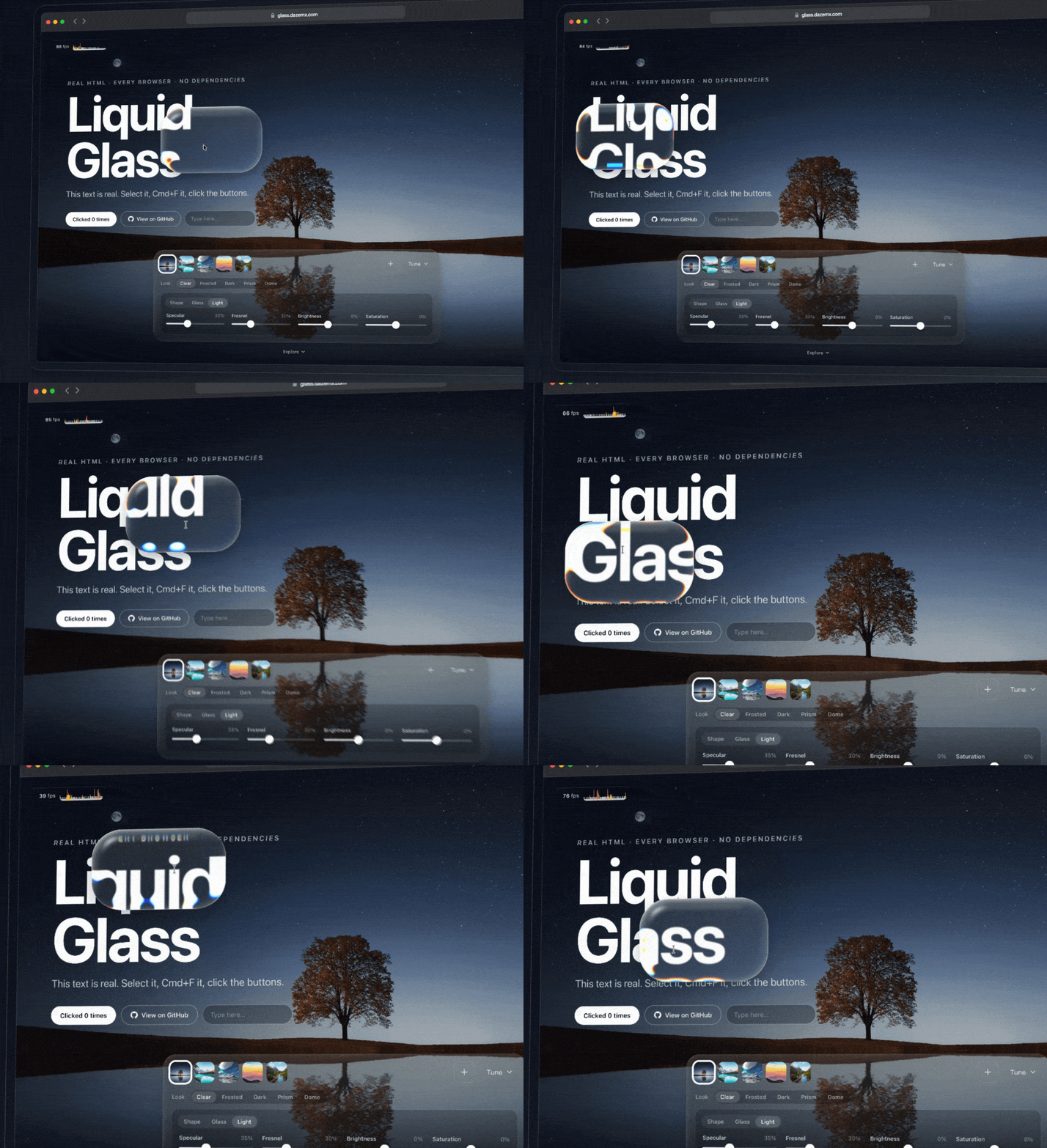
[!NOTE] Live demo: glass.dazemx.com
Features
- Rounded-rectangle lens with a curved, refracting rim, over live HTML
- Frosted blur, chromatic dispersion, brightness and saturation, and a soft drop shadow
- Lighting: rim light, a Blinn-Phong specular highlight and a fresnel edge glow
- Adjustable bevel depth, from a thin rim to a full magnifying dome
- Five presets: Clear, Frosted, Dark, Prism and Dome
- Glass can also sit behind an element as its background (the demo's dock), and button mode makes it brighten on hover and flatten on press
- Spring-driven movement with squash and stretch, plus a press effect
- Press L to lock the lens in place (handy for screenshots)
- Live controls for shape, glass and light, grouped in tabs
- Built-in backgrounds, or upload / drag and drop your own image
- The lens pops like a bubble when you scroll away from the hero, and swells back in when you return
- A code section that generates a drop-in snippet with your current settings
- Retina aware, touch friendly, keyboard nudging, respects
prefers-reduced-motion
How it works
backdrop-filter: url(#svg-filter) would refract whatever is behind an element, but only Chrome supports it. Instead, the lens holds a copy of the page, lined up with the original, and bends that copy with an SVG displacement filter. Plain filter: url() works in every browser. The displacement map and rim lighting are generated from a signed-distance rounded rectangle with a circular bevel.
The copy refreshes whenever the page changes (a MutationObserver plus input and scroll events). It is inert and aria-hidden, so it doesn't affect find-in-page, focus or screen readers.
Safari needs two workarounds, both handled in src/glass.js:
- It drops an SVG filter when the filtered content contains GPU-composited layers, so the copy has
backdrop-filter,will-changeand animations stripped. - It scales transformed content inside an SVG filter wrongly on retina screens, so the copy is positioned with
left/top, and zoom scales the filtered layer from outside.
Two details keep the refraction steady as the lens moves:
- Zoom isn't stored in the displacement map. Its channels are 8-bit, so a zoom stored there moved in half-pixel steps that swept across the content. The filtered layer is built at
1 / zoomsize and scaled up instead, so the map only holds the rim. - The lens snaps to whole CSS pixels. Browsers rasterise filters on the CSS pixel grid, so at a fractional position the refraction is resampled and jumps against the settled frame.
The demo page has a longer, illustrated walkthrough in its "How it works" section.
Browser support
Chrome, Firefox and Safari, on desktop and mobile.
Limitations of the copy: it doesn't show hover or focus states, backdrop-filter blur inside it is dropped (see above), and WebGL canvases and <video> aren't copied. IDs are removed from the copy so they stay unique, so style content inside the source with classes rather than #id selectors.
Install
npm install @dazecoop/liquid-glassOne package with three ways in. The core has no dependencies, and React is an optional peer.
| Import | What it is |
| --- | --- |
| @dazecoop/liquid-glass | LiquidGlass, plus the GlassSwitch, GlassTabBar and GlassButton components (ESM and CommonJS) |
| @dazecoop/liquid-glass/react | React components and a useLiquidGlass hook |
| @dazecoop/liquid-glass/style.css | Styles for the UI components (the lens itself needs none) |
TypeScript types are included.
React
import { GlassScene, LiquidGlass } from "@dazecoop/liquid-glass/react";

export function Hero() {
  return (
    // The lens follows the pointer over everything inside, refracting it
    <GlassScene glass={{ ...LiquidGlass.presets.frosted, width: 240 }} style={{ height: 480 }}>
      <h1>Liquid Glass</h1>
    </GlassScene>
  );
}
Every component builds its glass after mount and destroys it on unmount, so StrictMode, route changes and server rendering are all fine. The file is marked "use client" for the Next.js app router.
| Component | Description |
| --- | --- |
| <GlassScene glass> | A lens that follows the pointer over its children, clipped to the scene |
| <GlassPanel source button glass> | An element with glass as its background, refracting source (a ref; its parent by default) |
| <GlassSwitch checked onChange> | The switch. Controlled, or uncontrolled with defaultChecked |
| <GlassSegment options value onChange> | A switch with a label each side: two options, as strings or { value, label } |
| <GlassTabBar items value onChange> | The floating tab bar. items are { value, label, icon?, href? } |
| <GlassButton tint source> | Clear glass that lights up in tint. Refracts its parent's [data-glass-source] child, or source |
| useLiquidGlass(sourceRef, options) | Returns the LiquidGlass instance for anything custom. Pass anchor or container as refs |
Components take a look prop to override their glass parameters, and pass other props (className, style, aria-*) to their element.
JavaScript
import { LiquidGlass } from "@dazecoop/liquid-glass";

// The lens refracts everything inside this element
const scene = document.querySelector("main");
const glass = new LiquidGlass(scene, { container: scene });

glass.set({ width: 280, height: 180, radius: 64 });

scene.addEventListener("pointermove", (e) => glass.moveTo(e.clientX, e.clientY));
scene.addEventListener("pointerdown", () => glass.press(true));
scene.addEventListener("pointerup", () => glass.press(false));

// When it's no longer needed
glass.destroy();
To give an element a glass background instead, anchor the glass to it. Add button: true to make it respond to hover and press:
new LiquidGlass(scene, { anchor: document.querySelector("#panel"), refraction: 12, chroma: 0 });
new LiquidGlass(scene, { anchor: document.querySelector("#play"), button: true });
Start from a preset and override what you like:
const glass = new LiquidGlass(scene, { ...LiquidGlass.presets.frosted, frost: 8 });
glass.set(LiquidGlass.presets.dark);
Script tag
No install and no build step. The script defines one global, LiquidGlass:
<link rel="stylesheet" href="https://cdn.jsdelivr.net/npm/@dazecoop/liquid-glass@0/lib/liquid-glass.css" />
<script src="https://cdn.jsdelivr.net/npm/@dazecoop/liquid-glass@0/lib/liquid-glass.global.js"></script>
<script>
  const glass = new LiquidGlass(document.querySelector("main"));
  LiquidGlass.initComponents(); // any switches, tab bars and buttons in the page
</script>
You can also tune the lens on the demo and copy the code from its Use it anywhere section, written for React, JavaScript, a script tag, or as one self-contained file.
UI components
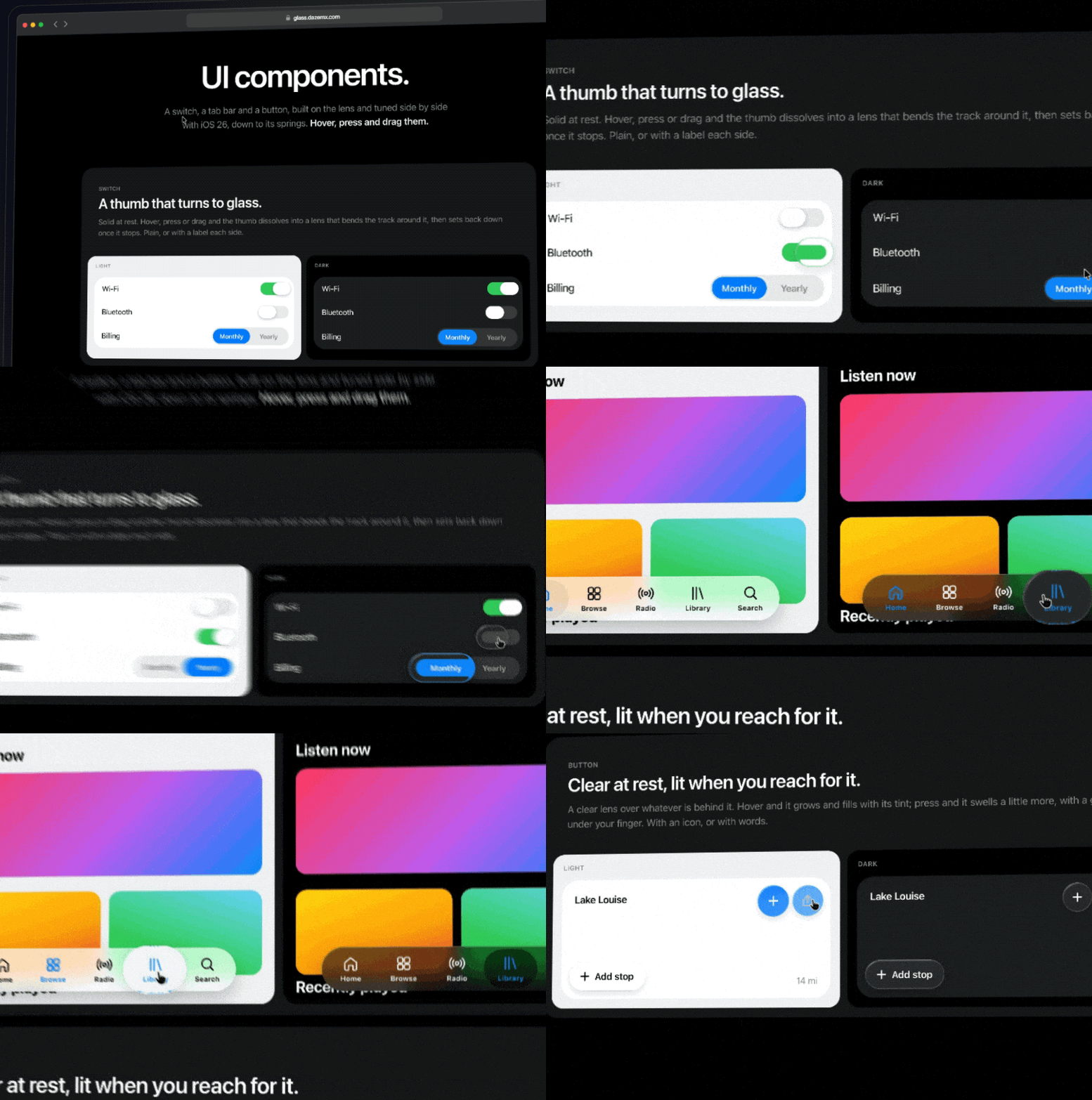
A switch, a segmented switch, a floating tab bar and a glass button, after iOS 26. Import style.css once. In React, use the components above. In HTML, write the markup and call initComponents():
<button type="button" role="switch" aria-checked="true" aria-label="Wi-Fi" class="lg-switch" data-glass-switch>
  <span class="refract"></span><span class="thumb"></span><span data-opt></span><span data-opt></span>
</button>

<div role="radiogroup" aria-label="Billing" class="lg-segment" data-glass-switch>
  <span class="refract"></span><span class="thumb"></span>
  <button type="button" role="radio" aria-checked="true" data-opt>Monthly</button>
  <button type="button" role="radio" aria-checked="false" data-opt>Yearly</button>
</div>

<nav class="lg-tabs" aria-label="Main" data-glass-tabs>
  <span class="lg-pill" hidden></span>
  <span class="lg-glowbox"><span class="lg-glow"></span></span>
  <button type="button" aria-current="page">Home</button>
  <button type="button">Search</button>
</nav>

<!-- The button's lens lives in its (positioned) parent and refracts the [data-glass-source] -->
<div style="position:relative">
  <div data-glass-source><img src="map.jpg" alt="" /></div>
  <button type="button" class="lg-button" data-glass-button><span class="lg-content">Add stop</span></button>
</div>
import { initComponents } from "@dazecoop/liquid-glass";
const components = initComponents(); // or initComponents(someElement)
// Later: components.forEach((c) => c.destroy());Switches and tab bars fire a bubbling change event (event.detail.value is 0 or 1 for a switch, event.detail.tab is the element for a tab bar).
The dark look is the default. Put data-theme="light" on any ancestor for the light one. Every colour is a custom property (--lg-accent, --lg-on, --lg-surface and so on, listed at the top of src/liquid-glass.css), so a theme is a handful of overrides. --lg-surface should match the colour right behind a component.
API
| Method | Description |
| --- | --- |
| new LiquidGlass(source, options) | Creates a lens over source. Options: anchor (an element to fill as its background), container (an element for the lens to live in, clipped to it), button: true (anchored glass responds to hover and press), throttle (re-copy a large source at most every this many ms), plus any parameters below. |
| LiquidGlass.presets | clear, frosted, dark, prism and dome, each a set of parameters. |
| set(params) | Updates any of the parameters below. |
| moveTo(x, y) | Moves the lens to a point in viewport (client) coordinates. |
| press(down) | Grows the lens slightly while true. |
| show(visible, { pop }) | Fades the lens in or out. With pop: true it bursts like a bubble on the way out and swells back in. moveTo shows it again. |
| destroy() | Removes the glass and everything it added to the page, and stops its listeners and observers. Safe to call twice. The components have destroy() too. |
The glass re-copies its source whenever the source changes. Put data-glass-skip on anything inside it that updates every frame (a counter, a clock, an animated style) and its changes won't trigger a re-copy; the copy shows it as it was at the last one.
| Parameter | Default | Description |
| --- | --- | --- |
| width, height | 280, 180 | Lens size in CSS pixels (anchored glass takes its anchor's size) |
| radius | 64 | Corner radius in CSS pixels (anchored glass takes its anchor's) |
| bevel | 35 | How far the curved rim reaches in, in CSS pixels. At half the lens's smaller side or more, it's a full dome |
| refraction | 40 | How far the rim bends the content, in CSS pixels |
| frost | 2 | Blur radius in CSS pixels |
| chroma | 0.4 | Chromatic dispersion at the rim, 0 to 1 |
| zoom | 1.08 | Magnification across the whole lens |
| specular | 0.35 | Strength of the specular highlight, 0 to 1 |
| fresnel | 0.3 | Strength of the edge glow where the glass turns away, 0 to 1 |
| brightness | 0 | Brightness of what's seen through the glass, -0.5 to 0.5 |
| saturation | 0 | Saturation of what's seen through the glass, -1 (grey) to 1 |
| tint | "" | A CSS colour laid over the glass, for legibility |
| rim | 1 | Strength of the rim lighting and edge hairline, 0 to 1 |
Development
bun install
bun run dev
Then open the URL Vite prints. bun run build outputs the demo site to dist/, and bun run build:lib outputs the package to lib/.
npm works too: npm install && npm run dev.
Project structure
index.html            Demo page markup (Tailwind)
src/glass.js          LiquidGlass: the copy, SVG filter, displacement map and spring physics
src/components.js     GlassSwitch, GlassTabBar and GlassButton
src/liquid-glass.css  The components' styles (the package's style.css)
src/react.jsx         React bindings
src/index.js          Package entry; src/global.js is the script tag's
types/                TypeScript definitions
src/main.js           Demo UI: backgrounds, presets, sliders, pointer handling, page sections
src/developer.js      The demo's code guide and snippet generator
src/style.css         Demo styles (Tailwind)
Credits
Inspired by this CodePen by shingidad, which this project started as a rebuild of.
Lighting, tone, presets, the dome bevel and button mode are adapted from ybouane/liquidglass.
Background photos from Pexels.
Not affiliated with Apple.
Support
If my projects have been useful to you and you'd like to support the work, you can buy me a coffee. Completely optional, but always appreciated!
Licence
MIT. See LICENSE.