
@dcopestake/teamcity-cucumber-formatter
v1.1.0-alpha.3
Published
TeamCity formatter for Cucumber

Maintainers
 dcopestake
Readme
teamcity-cucumber-formatter


TeamCity formatter for @cucumber/cucumber npm package
Install
$ npm install teamcity-cucumber-formatter --save-devUsage
There are 2 ways to use teamcity-cucumber-formatter as described here
1. On the CLI:
$ cucumber-js --format ./node_modules/teamcity-cucumber-formatter2. In a configuration file:
{ format: './node_modules/teamcity-cucumber-formatter' }Note:
If you need to use teamcity-cucumber-formatter only on CI, you can specify it in such way in configuration file:
    format: [
        `json:${pathToCucumberJsonReport}`,
        `summary`,
        `progress-bar`,
        ...(process.env.CI ? [path.resolve('node_modules', 'teamcity-cucumber-formatter')] : [])
    ],
Configuration
You have possibility
- to publish artifacts (only screenshots for now) related to failed tests while TeamCity build is running as described here;
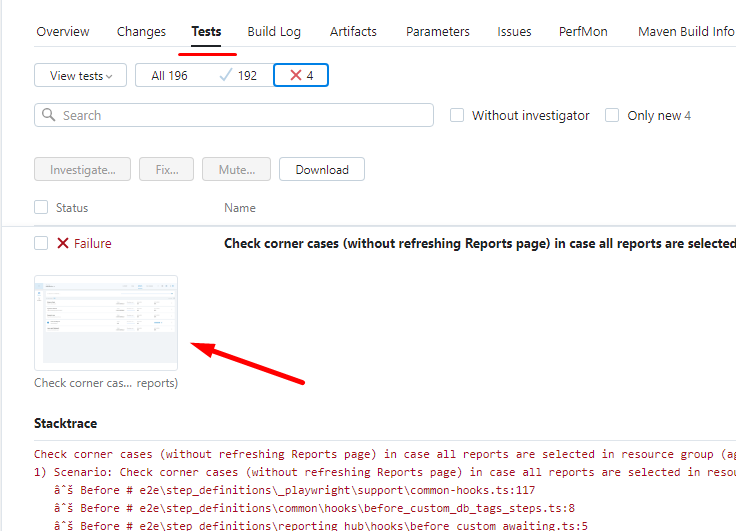
- to link artifacts (only screenshots for now) with failed tests as described here. In this case screenshot will be available in
Teststab, in expanded section of failed test:
| Example of screenshot linked to failed test |
|:-------------------------:|
| |
|
To have possibility to link and publish artifacts you need to use the following environment variables (set appropriate values):
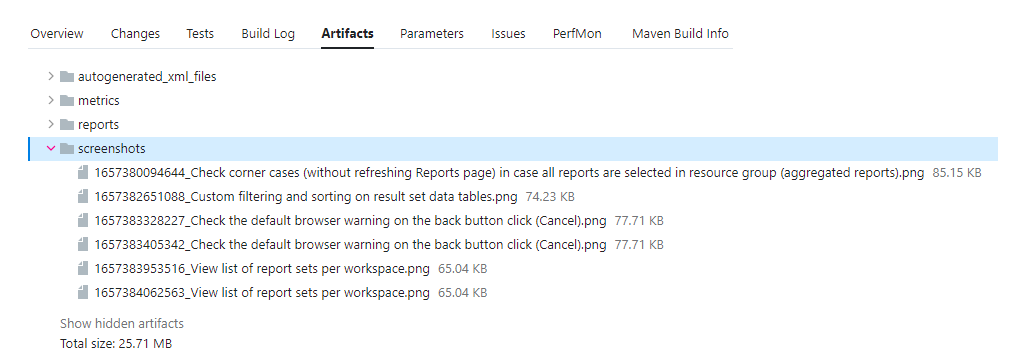
TEAMCITY_CUCUMBER_PATH_TO_SCREENSHOTS- set a relative path (from project root, e.g../test_artifacts/screenshots) to local directory where screenshots are stored.TEAMCITY_CUCUMBER_SCREENSHOT_NAME(optional) - set a name of saved screenshot (e.g.TIMESTAMP_TEST_NAME). You can do it inAfterhook for each failed test. By default apickle.namevalue is used.TEAMCITY_CUCUMBER_SCREENSHOT_EXTENSION- set an extension of saved screenshot. Be default apngformat is used.TEAMCITY_CUCUMBER_PUBLISH_ARTIFACTS_RUNTIME- set this variable (e.g. usetruevalue) if you want to publish artifacts while TeamCity build is running.TEAMCITY_CUCUMBER_ARTIFACTS_SUB_FOLDER- set this variable if some subfolder for screenshots is used inside the TeamCity artifacts storage (e.g.screenshots). Don't set it if you save screenshots directly in Artifacts.
| Example of TeamCity artifacts subdirectories |
|:-------------------------:|
| |
|