
@dctrl/json2doc
v1.0.6
Published
Converter JSON to DOC

Maintainers
 dctrl
dctrlReadme
Json2Doc
Seamless API documentation generator from JSON specs. Transform Swagger or Postman collections into professional DOCX files in seconds.


📦 Installation
npm install -g @dctrl/json2docOr use it locally in your project:
npm install --save-dev @dctrl/json2doc🛠️ Usage
json2doc convert sample.json --platform=swaggerOptions
| Option|Description|
|-|-|
| --platform=<platform>| Input type: swagger, postman|
| --output <filename>| Output file path|
| --template <file>| Path to custom DOCX template|
Example
Convert with file swagger.json to DOC:
json2doc convert sample.json --platform=swaggerConvert with file postman.json to DOC:
json2doc convert sample.json --platform=postmanConvert with custom output filename:
json2doc convert sample.json --platform=swagger --output=custome-api.docxConvert with custom template:
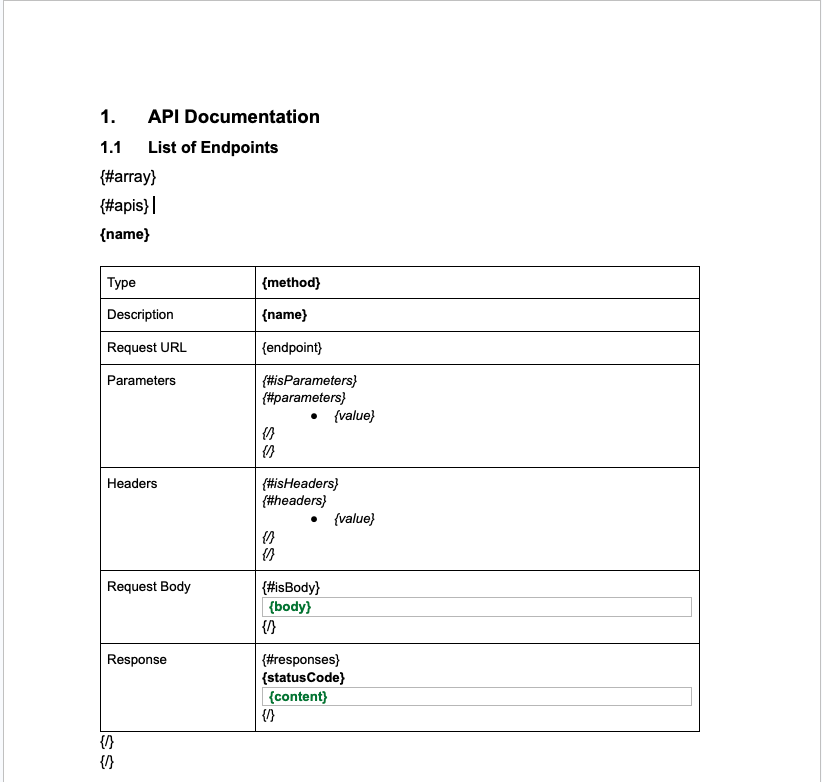
json2doc convert sample.json --platform=swagger --template=custome-template.docxNote: If you use the --template option, make sure your template file matches the format expected by json2doc.
For example, you can provide a template as shown below:
📊 Structure Data
{
  "array": {
    "module": "Admin",
    "apis": [
      {
        "endpoint": "{baseUrl}/api/v1/admins",
        "method": "POST",
        "name": "Create Admin",
        "description": "Returns admin data",
        "headers": [
          {
            "value": "Authorization is required (ex: authorization: Bearer {token})"
          }
        ],
        "isHeaders": true,
        "parameters": [],
        "isParameters": false,
        "responses": [
          {
            "statusCode": "201",
            "description": "Successful Response",
            "content": "{\n  \"success\": true,\n  \"code\": 201,\n  \"message\": \"Data created successfully\",\n  \"data\": {\n    \"id\": \"ad42e763-7884-4fc2-83c4-8e61440ac4a4\",\n    \"email\": \"[email protected]\",\n    \"password\": \"$2a$10$gIjSA8bKO7bADCANmshDZOHJAO/br7FzJIu4nhgG/zYKP3UD0nc8O\",\n    \"roleId\": 1,\n    \"updatedAt\": \"2024-01-11T03:19:11.248Z\",\n    \"createdAt\": \"2024-01-11T03:19:11.248Z\",\n    \"deletedAt\": null\n  }\n}"
          },
        ],
        "isResponses": true,
        "body": "{\n  \"name\": \"string\",\n  \"phoneNumber\": \"string\",\n  \"email\": \"string\",\n  \"password\": \"string\",\n  \"roleId\": \"number\",\n  \"status\": \"string\"\n}",
        "isBody": true
      },
    ]
  }
}
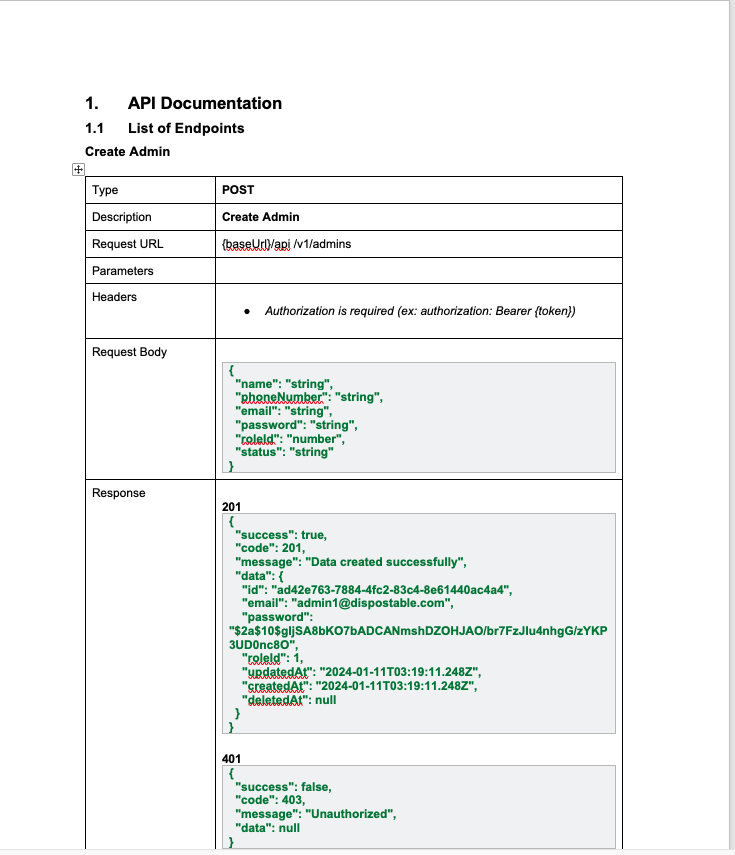
📄 Output File
📄 License
This project is licensed under the MIT License – see the LICENSE file for details.