
@dealmakertech/api
v0.107.5
Published
A javascript wrapper for the DealMaker API


Readme
api
Api - JavaScript client for api
Introduction
Welcome to DealMaker’s Web API v1! This API is RESTful, easy to integrate with, and offers support in 2 different languages. This is the technical documentation for our API. There are tutorials and examples of integrations with our API available on our knowledge centre as well.
Libraries
- Javascript
- Ruby
Authentication
To authenticate, add an Authorization header to your API request that contains an access token. Before you generate an access token your must first create an application on your portal and retrieve the your client ID and secret
Create an Application
DealMaker’s Web API v1 supports the use of OAuth applications. Applications can be generated in your account.
To create an API Application, click on your user name in the top right corner to open a dropdown menu, and select "Integrations". Under the API settings tab, click the Create New Application button
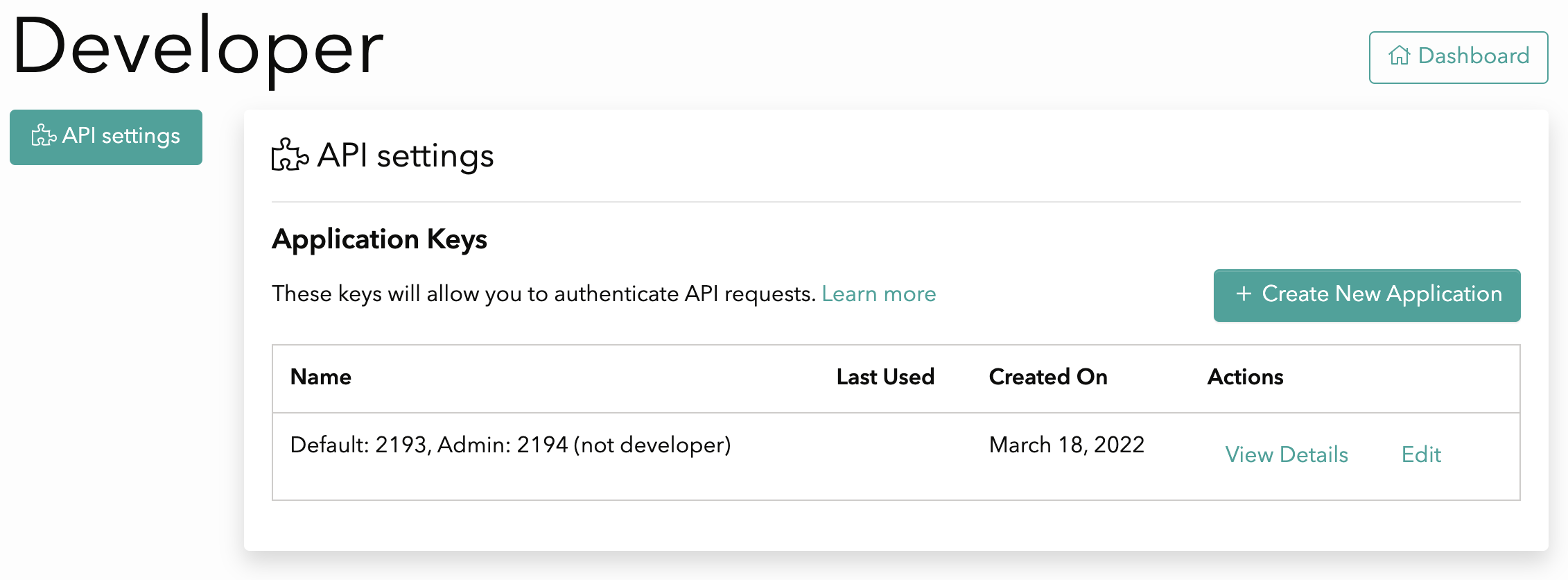
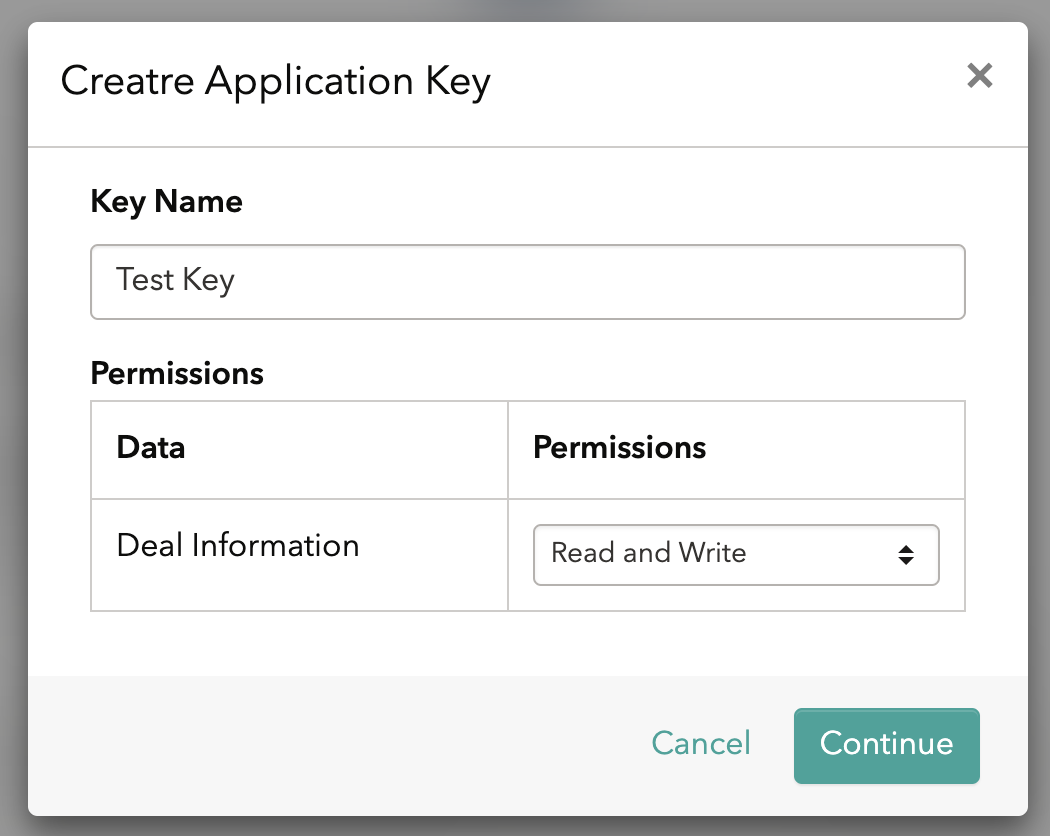
Name your application and assign the level of permissions for this application
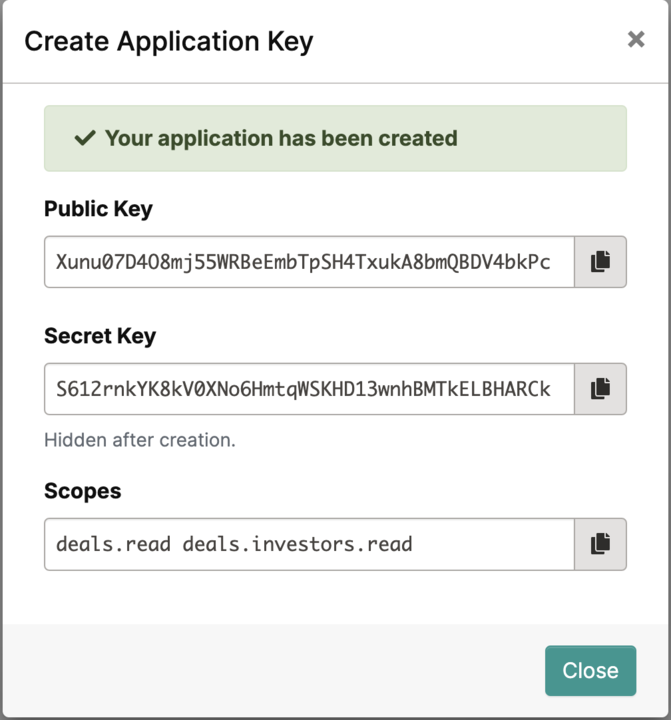
Once your application is created, save in a secure space your client ID and secret.
WARNING: The secret key will not be visible after you click the close button
From the developer tab, you will be able to view and manage all the available applications
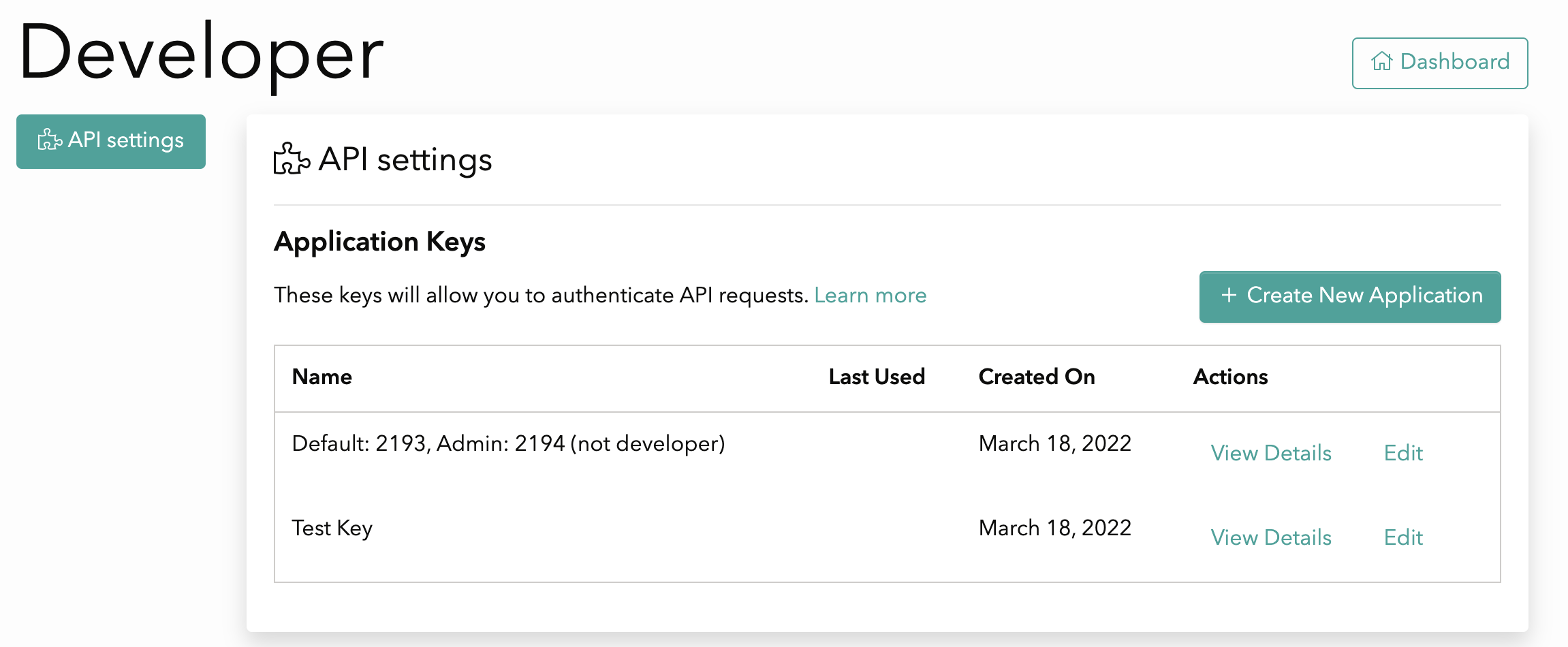
Each Application consists of a client id, secret and set of scopes. The scopes define what resources you want to have access to. The client ID and secret are used to generate an access token. You will need to create an application to use API endpoints.
How to generate an access token
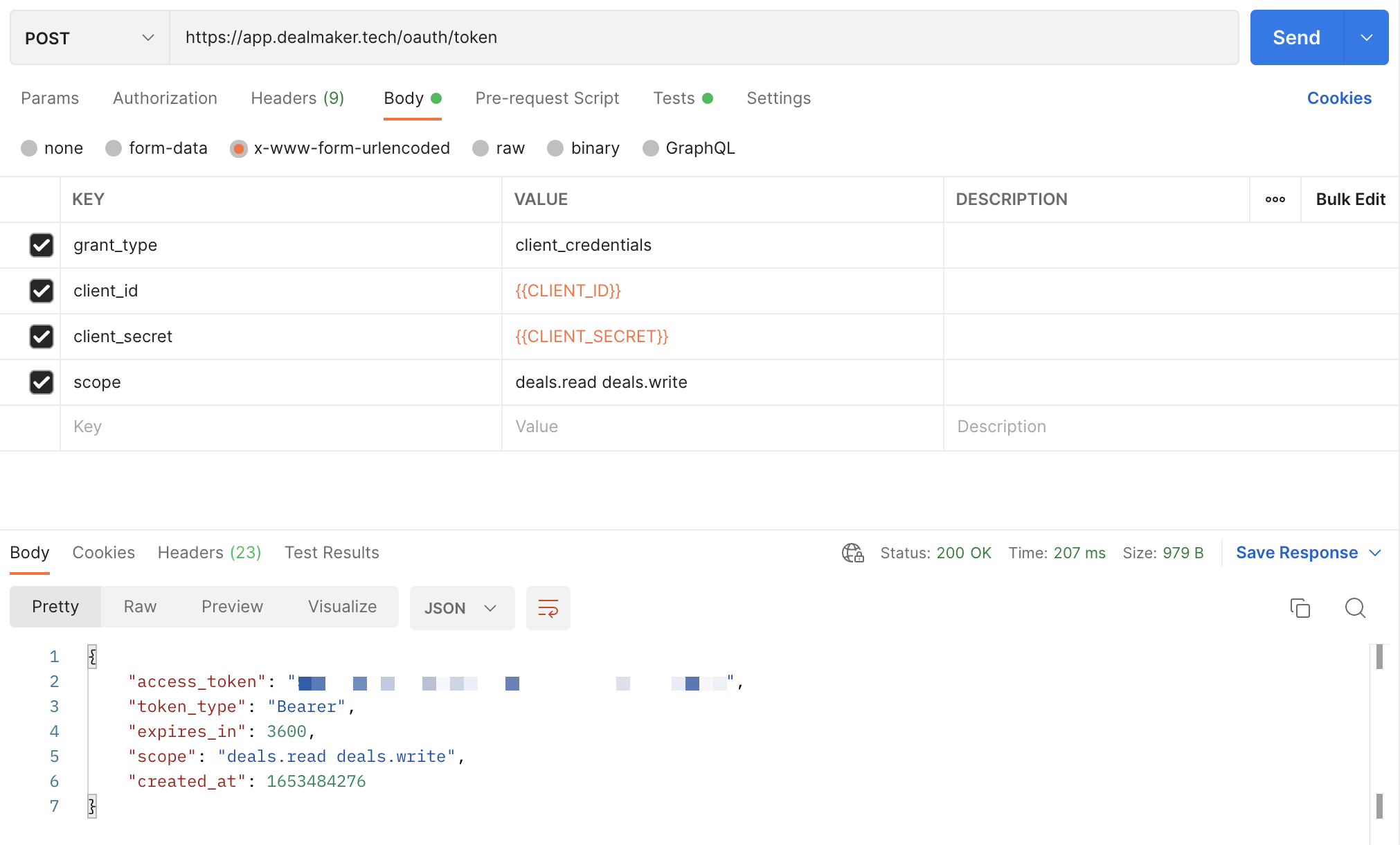
After creating an application, you must make a call to obtain a bearer token using the Generate an OAuth token operation. This operation requires the following parameters:
token endpoint - https://app.dealmaker.tech/oauth/token
grant_type - must be set to client_credentials
client_id - the Client ID displayed when you created the OAuth application in the previous step
client_secret - the Client Secret displayed when you created the OAuth application in the previous step
scope - the scope is established when you created the OAuth application in the previous step
Note: The Generate an OAuth token response specifies how long the bearer token is valid for. You should reuse the bearer token until it is expired. When the token is expired, call Generate an OAuth token again to generate a new one.
To use the access token, you must set a plain text header named Authorization with the contents of the header being “Bearer XXX” where XXX is your generated access token.
Example
Postman
Here's an example on how to generate the access token with Postman, where {{CLIENT_ID}} and {{CLIENT_SECRET}} are the values generated after following the steps on Create an Application
Status Codes
Content-Type Header
All responses are returned in JSON format. We specify this by sending the Content-Type header.
Status Codes
Below is a table containing descriptions of the various status codes we currently support against various resources.
Sometimes your API call will generate an error. Here you will find additional information about what to expect if you don’t format your request properly, or we fail to properly process your request.
| Status Code | Description |
| ----------- | ----------- |
| 200 | Success |
| 403 | Forbidden |
| 404 | Not found |
Pagination
Pagination is used to divide large responses is smaller portions (pages). By default, all endpoints return a maximum of 25 records per page. You can change the number of records on a per request basis by passing a per_page parameter in the request header parameters. The largest supported per_page parameter is 100.
When the response exceeds the per_page parameter, you can paginate through the records by increasing the offset parameter. Example: offset=25 will return 25 records starting from 26th record. You may also paginate using the page parameter to indicate the page number you would like to show on the response.
Please review the table below for the input parameters
Inputs
| Parameter | Description |
| ---------- | ------------------------------------------------------------------------------- |
| per_page | Amount of records included on each page (Default is 25) |
| page | Page number |
| offset | Amount of records offset on the API request where 0 represents the first record |
Response Headers
| Response Header | Description |
| --------------- | -------------------------------------------- |
| X-Total | Total number of records of response |
| X-Total-Pages | Total number of pages of response |
| X-Per-Page | Total number of records per page of response |
| X-Page | Number of current page |
| X-Next-Page | Number of next page |
| X-Prev-Page | Number of previous page |
| X-Offset | Total number of records offset |
Search and Filtering (The q parameter)
The q optional parameter accepts a string as input and allows you to filter the request based on that string. Please note that search strings must be encoded according to ASCII. For example, "[email protected]" should be passed as “john%2Binvestor%40dealmaker.tech”. There are two main ways to filter with it.
Keyword filtering
Some keywords allow you to filter investors based on a specific “scope” of the investors, for example using the string “Invited” will filter all investors with the status invited, and the keyword “Has attachments” will filter investors with attachments.
Here’s a list of possible keywords and the “scope” each one of the keywords filters by:
| Keywords | Scope | Decoded Example | Encoded Example |
| ---------------------------------------------- | --------------------------------------------------------------------------- | -------------------------------------------------------------------- | ---------------------------------------------------------------------------------------- |
| Signed on \(date range\) | Investors who signed in the provided date range | Signed on (date range) [2020-07-01:2020-07-31] | Signed%20on%20%28date%20range%29%20%5B2020-07-01%3A2020-07-31%5D |
| Enabled for countersignature on \(date range\) | Investors who were enabled for counter signature in the provided date range | Enabled for countersignature on (date range) [2022-05-24:2022-05-25] | Enabled%20for%20countersignature%20on%20(date%20range)%20%5B2022-05-24%3A2022-05-25%5D |
| Accepted on \(date range\) | Investors accepted in the provided date rage | Accepted on (date range) [2022-05-24:2022-05-25] | Accepted%20on%20(date%20range)%20%5B2022-05-24%3A2022-05-25%5D |
| Offline | Investors added to the deal offline | Offline | Offline |
| Online | Investors added to the deal online | Online | Online |
| Signed | Investors who signed their agreement | Signed | Signed |
| Waiting for countersignature | Investors who have signed and are waiting for counter signature | Waiting for countersignature | Waiting%20for%20countersignature |
| Invited | Investors on the Invited Status | Invited | Invited |
| Accepted | Investors in the Accepted Status | Accepted | Accepted |
| Questionnaire in progress | All Investors who have not finished completing the questionnaire | Questionnaire in progress | Questionnaire%20in%20progress |
| Has attachments | All Investors with attachments | Has attachments | Has%20attachments |
| Has notes | All Investors with notes | Has notes | Has%20notes |
| Waiting for co-signature | Investors who have signed and are waiting for co-signature | Waiting for co-signature | Waiting%20for%20co-signature |
| Background Check Approved | Investors with approved background check | Background Check Approved | Background%20Check%20Approved |
| Document Review Pending | Investors with pending review | Document Review Pending | Document%20Review%20Pending |
| Document Upload Pending | Investors with pending documents to upload | Document Upload Pending | Document%20Upload%20Pending |
| Required adjudicator review | Investors who are required to be review by the adjudicator | Required adjudicator review | Required%20adjudicator%20review |
NOTE
Filtering keywords are case sensitive and need to be encoded
Search String
Any value for the parameter which does not match one of the keywords listed above, will use fields like first name, last name, email, tags to search for the investor.
For example, if you search “Robert”, because this does not match one of the keywords listed above, it will then return any investors who have the string “Robert” in their name, email, or tags fields.
Versioning
The latest version is v1.
The version can be updated on the Accept header, just set the version as stated on the following example:
Accept:application/vnd.dealmaker-v1+json
| Version | Accept Header |
| ------- | ----------------------------------- |
| v1 | application/vnd.dealmaker-v1+json |
SDK’s
For instruction on installing SDKs, please view the following links
Webhooks
Our webhooks functionality allows clients to automatically receive updates on a deal's investor data.
Some of the data that the webhooks include:
- Investor Name
- Date created
- Phone
- Allocation
- Attachments
- Accredited investor status
- Accredited investor category
- State (Draft, Invited, Signed, Accepted, Waiting, Inactive)
Via webhooks clients can subscribe to the following events as they happen on Dealmaker:
- Investor is created
- Investor details are updated (any of the investor details above change or are updated)
- Investor has signed their agreement
- Invertor fully funded their investment
- Investor has been accepted
- Investor is deleted
A URL supplied by the client will receive all the events with the information as part of the payload. Clients are able to add and update the URL within DealMaker.
Configuration
For a comprehensive guide on how to configure Webhooks please visit our support article: Configuring Webhooks on DealMaker – DealMaker Support.
As a developer user on DealMaker, you are able to configure webhooks by following the steps below:
- Sign into Dealmaker
- Go to “Your profile” in the top right corner
- Access an “Integrations” configuration via the left menu
- The developer configures webhooks by including:
- The HTTPS URL where the request will be sent
- Optionally, a security token that we would use to build a SHA1 hash that would be included in the request headers. The name of the header is
X-DealMaker-Signature. If the secret is not specified, the hash won’t be included in the headers. - The Deal(s) to include in the webhook subscription
- An email address that will be used to notify about errors.
- The developers can disable webhooks temporarily if needed
Specification
Events
The initial set of events will be related to the investor. The events are:
investor.created- Triggers every time a new investor is added to a deal
investor.updated- Triggers on updates to any of the following fields:
- Status
- Name
- Email - (this is a user field so we trigger event for all investors with webhook subscription)
- Allocated Amount
- Investment Amount
- Accredited investor fields
- Adding or removing attachments
- Tags
- When the investor status is signed, the payload also includes a link to the signed document; the link expires after 30 minutes
- Triggers on updates to any of the following fields:
investor.signed- Triggers when the investor signs their subscription agreement (terms and conditions)
- When this happens the investor.state becomes
signed
- When this happens the investor.state becomes
- This event includes the same fields as the
investor.updatedevent
- Triggers when the investor signs their subscription agreement (terms and conditions)
investor.funded- Triggers when the investor becomes fully funded
- This happens when the investor.funded_state becomes
funded
- This happens when the investor.funded_state becomes
- This event includes the same fields as the
investor.updatedevent
- Triggers when the investor becomes fully funded
investor.accepted- Triggers when the investor is countersigned
- When this happens the investor.state becomes
accepted
- When this happens the investor.state becomes
- This event includes the same fields as the
investor.updatedevent
- Triggers when the investor is countersigned
investor.deleted
- Triggers when the investor is removed from the deal
- The investor key of the payload only includes investor ID
- The deal is not included in the payload. Due to our implementation it’s impossible to retrieve the deal the investor was part of
Requests
- The request is a
POST - The payload’s
content-typeisapplication/json - Only
2XXresponses are considered successful. In the event of a different response, we consider it failed and queue the event for retry - We retry the request five times, after the initial attempt. Doubling the waiting time between intervals with each try. The first retry happens after 30 seconds, then 60 seconds, 2 mins, 4 minutes, and 8 minutes. This timing scheme gives the receiver about 1 hour if all the requests fail
- If an event fails all the attempts to be delivered, we send an email to the address that the user configured
Payload
Common Properties
There will be some properties that are common to all the events on the system.
| Key | Type | Description | | ----------------- | ------ | -------------------------------------------------------------------------------------- | | event | String | The event that triggered the call | | event_id | String | A unique identifier for the event | | deal\ | Object | The deal in which the event occurred. please see below for an example on the deal object\\* |
\*This field is not included when deleting a resource
\\ Sample Deal Object in the webhook payload
\"deal\": {
        \"id\": 0,
        \"title\": \"string\",
        \"created_at\": \"2022-12-06T18:14:44.000Z\",
        \"updated_at\": \"2022-12-08T12:46:48.000Z\",
        \"state\": \"string\",
        \"currency\": \"string\",
        \"security_type\": \"string\",
        \"price_per_security\": 0.00,
        \"deal_type\": \"string\",
        \"minimum_investment\": 0,
        \"maximum_investment\": 0,
        \"issuer\": {
            \"id\": 0,
            \"name\": \"string\"
        },
        \"enterprise\": {
            \"id\": 0,
            \"name\": \"string\"
        }
    }
Common Properties (investor scope)
By design, we have incorporated on the webhooks payload the same investor-related fields included in the Investor model, for reference on the included fields, their types and values please click here. This will allow you to get all the necessary information you need about a particular investor without having to call the Get Investor by ID endpoint. |
Investor State
Here is a brief description of each investor state:
- Draft: the investor is added to the platform but hasn't been invited yet and cannot access the portal
- Invited: the investor was added to the platform but hasn’t completed the questionnaire
- Signed: the investor signed the document (needs approval from Lawyer or Reviewer before countersignature)
- Waiting: the investor was approved for countersignature by any of the Lawyers or Reviewers in the deal
- Accepted: the investor's agreement was countersigned by the Signatory
- Inactive the investor is no longer eligible to participate in the offering. This may be because their warrant expired, they requested a refund, or they opted out of the offering
Update Delay
Given the high number of updates our platform performs on any investor, we’ve added a cool down period on update events that allows us to “group” updates and trigger only one every minute. In consequence, update events will be delivered 1 minute after the initial request was made and will include the latest version of the investor data at delivery time.
This SDK is automatically generated by the OpenAPI Generator project:
- API version: 1.75.0
- Package version: 0.107.5
- Generator version: 7.8.0-SNAPSHOT
- Build package: org.openapitools.codegen.languages.JavascriptClientCodegen
Installation
For Node.js
npm
To publish the library as a npm, please follow the procedure in "Publishing npm packages".
Then install it via:
npm install api --saveFinally, you need to build the module:
npm run buildLocal development
To use the library locally without publishing to a remote npm registry, first install the dependencies by changing into the directory containing package.json (and this README). Let's call this JAVASCRIPT_CLIENT_DIR. Then run:
npm installNext, link it globally in npm with the following, also from JAVASCRIPT_CLIENT_DIR:
npm linkTo use the link you just defined in your project, switch to the directory you want to use your api from, and run:
npm link /path/to/<JAVASCRIPT_CLIENT_DIR>Finally, you need to build the module:
npm run buildgit
If the library is hosted at a git repository, e.g.https://github.com/GIT_USER_ID/GIT_REPO_ID then install it via:
npm install GIT_USER_ID/GIT_REPO_ID --saveFor browser
The library also works in the browser environment via npm and browserify. After following
the above steps with Node.js and installing browserify with npm install -g browserify,
perform the following (assuming main.js is your entry file):
browserify main.js > bundle.jsThen include bundle.js in the HTML pages.
Webpack Configuration
Using Webpack you may encounter the following error: "Module not found: Error: Cannot resolve module", most certainly you should disable AMD loader. Add/merge the following section to your webpack config:
module: {
  rules: [
    {
      parser: {
        amd: false
      }
    }
  ]
}
Getting Started
Please follow the installation instruction and execute the following JS code:
var Api = require('api');

var defaultClient = Api.ApiClient.instance;

var api = new Api.CampaignApi()
var id = 56; // {Number}
var callback = function(error, data, response) {
  if (error) {
    console.error(error);
  } else {
    console.log('API called successfully. Returned data: ' + data);
  }
};
api.getTtwCampaign(id, callback);
Documentation for API Endpoints
All URIs are relative to http://api.dealmaker.tech
Class | Method | HTTP request | Description ------------ | ------------- | ------------- | ------------- Api.CampaignApi | getTtwCampaign | GET /ttw/campaigns/{id} | Gets a TTW campaign for a given company Api.CampaignApi | getTtwCampaigns | GET /ttw/companies/{company_id}/campaigns | Gets a list TTW campaigns for a given company Api.CampaignApi | getUserTtwReservation | GET /ttw/campaign/{id}/reservation/{reservation_uuid} | Gets User ID for a TTW reservation Api.CompanyApi | createBulkUpload | POST /companies/{id}/documents/bulk_uploads | Create bulk upload record Api.CompanyApi | createBulkUploadDetail | POST /companies/{company_id}/documents/bulk_uploads/{bulk_upload_id}/details | Create a BulkUploadDetail class record Api.CompanyApi | createCompany | POST /companies | Create new company Api.CompanyApi | createEmailTemplate | POST /companies/{id}/news_releases/email_templates | Creates an email template Api.CompanyApi | createMembersBulkUpload | POST /companies/{id}/members/bulk_uploads | Create bulk upload record Api.CompanyApi | createShareholderAction | POST /companies/{company_id}/shareholders/{shareholder_id}/actions | Create a shareholder action Api.CompanyApi | deleteEmailTemplate | DELETE /companies/{id}/news_releases/email_templates/{template_id} | Deletes an email template Api.CompanyApi | getBulkUpload | GET /companies/{id}/documents/bulk_uploads/{bulk_upload_id} | Return a given bulk upload by id Api.CompanyApi | getBulkUploadDetailsErrors | GET /companies/{company_id}/documents/bulk_uploads/{bulk_upload_id}/details/errors | Returns a full list of details with errors of the given bulk upload ordered by status desc and id asc Api.CompanyApi | getBulkUploads | GET /companies/{id}/documents/bulk_uploads | Return bulk uploads Api.CompanyApi | getCompanies | GET /companies | Get list of Companies Api.CompanyApi | getCompany | GET /companies/{id} | Get a Company Api.CompanyApi | getDetailsErrorsGrouped | GET /companies/{company_id}/documents/bulk_uploads/{bulk_upload_id}/details/grouped_errors | Return bulk upload details grouped by status Api.CompanyApi | getDividends | GET /companies/{company_id}/portal/dividends | Return dividends Api.CompanyApi | getEmailEvents | GET /companies/{company_communication_id}/email_events | Get a list of email events for a company communication Api.CompanyApi | getEmailTemplate | GET /companies/{id}/news_releases/email_templates/{template_id} | Get an email template Api.CompanyApi | getEmailTemplates | GET /companies/{id}/news_releases/email_templates | Get list of email template Api.CompanyApi | getMembersBulkUpload | GET /companies/{id}/members/bulk_uploads/{id_members_bulk_upload} | Get bulk upload record Api.CompanyApi | getMembersBulkUploads | GET /companies/{id}/members/bulk_uploads | Get bulk uploads records Api.CompanyApi | getShareholderLedger | GET /companies/{id}/shareholder_ledger | Get shareholder ledger by company Api.CompanyApi | getUserAccessibleCompanies | GET /users/accessible_companies | Get list of all Companies accessible by the user Api.CompanyApi | sendPortalInvite | POST /companies/{id}/shareholders/{shareholder_id}/send_portal_invite | Send portal invite to shareholder Api.CompanyApi | testDocumentUploadEmail | POST /companies/{id}/documents/test_upload_email | Send document upload test email to given user Api.CountryApi | getCountryStates | GET /country/states | Returns a list of all valid countries and it states Api.CustomEmailsApi | getAccessToken | POST /custom_emails/get_access_token | Generate authorization token information for initializing Beefree editor Api.DealApi | achBankAccountSetupIntent | GET /deals/{id}/investor/{investor_id}/subscription/{subscription_id}/payments/ach/bank_account_setup_intent | Prepares an investor for payment Api.DealApi | acssBankAccountSetupIntent | GET /deals/{id}/investor/{investor_id}/subscription/{subscription_id}/payments/acss/bank_account_setup_intent | Prepares an investor for payment Api.DealApi | createDealSetup | POST /deal_setups | Create deal setup Api.DealApi | getDeal | GET /deals/{id} | Get deal by Deal ID Api.DealApi | getDealIncentivePlan | GET /deals/{id}/incentive_plan | Get incentive plan by deal id Api.DealApi | getPlatformEmailPage | GET /deals/{id}/platform_emails/{kind}/page | Get the Page for a given Platform Email Api.DealApi | listDeals | GET /deals | List available deals Api.DealApi | listPlatformEmails | GET /deals/{id}/platform_emails | Get a list of platform emails for the deal Api.DealApi | patchPlatformEmail | PATCH /deals/{id}/platform_emails/{kind}/update | Patch platform email by kind and deal. Api.DealApi | patchPlatformEmailPage | PATCH /deals/{id}/platform_emails/{kind}/page | Create and associate a page with a platform email or update the existing page Api.DealsApi | postDealsIdEmailCampaignEmailCampaignIdSendEmail | POST /deals/{id}/email_campaign/{email_campaign_id}/send_email | Send emails to all the investors invited to the material change campaign Api.DealsApi | putDealsIdScriptTagEnvironment | PUT /deals/{id}/script_tag_environment | Update script tag environment for the deal. Api.DefaultApi | getDealsDealIdPaymentOnboardingQuestionnaireDigitalPaymentsConnectionData | GET /deals/{deal_id}/payment_onboarding/questionnaire/digital_payments_connection/data | Load data for the digital payments connection stage Api.DefaultApi | getDealsDealIdPaymentOnboardingQuestionnairePayoutAccountDetailsData | GET /deals/{deal_id}/payment_onboarding/questionnaire/payout_account_details/data | Get payout account data Api.DefaultApi | getDealsIdInvestorsInvestorIdPaymentsExpressWireInstructions | GET /deals/{id}/investors/{investor_id}/payments/express_wire/instructions | Displays the express wire instructions for an investor on a deal Api.DefaultApi | getDealsIdInvestorsPaymentsExpressWireInstructions | GET /deals/{id}/investors/payments/express_wire/instructions | Displays the express wire instructions for all the investors on a deal Api.DefaultApi | getDealsIdPlatformEmailsDomain | GET /deals/{id}/platform_emails/domain | Get the email domain settings for the deal Api.DefaultApi | getDealsIdProgressPage | GET /deals/{id}/progress_page | Get deal progress Api.DefaultApi | getDealsIdProgressPageSummary | GET /deals/{id}/progress_page/summary | Get the deal progress summary Api.DefaultApi | getDealsIdSummary | GET /deals/{id}/summary | Get Deal Overview Api.DefaultApi | getDealsPaymentOnboardingQuestionnaireInitialQuestions | GET /deals/payment_onboarding/questionnaire/initial_questions | Get initial questions Api.DefaultApi | getWebhooks | GET /webhooks | Returns a list of webhook subscription which is associated to the user Api.DefaultApi | getWebhooksDealId | GET /webhooks/deal/{id} | Finds a deal using the id Api.DefaultApi | getWebhooksDealsSearch | GET /webhooks/deals/search | Searches for deals for a given user Api.DefaultApi | getWebhooksSecurityToken | GET /webhooks/security_token | Creates a new security token for webhook subscription Api.DefaultApi | patchDealsIdPlatformEmailsDomain | PATCH /deals/{id}/platform_emails/domain | Update the email domain settings for the deal Api.DefaultApi | postDealsDealIdPaymentOnboardingQuestionnairePayoutAccountDetailsSubmit | POST /deals/{deal_id}/payment_onboarding/questionnaire/payout_account_details/submit | Submit a payout account details form Api.DefaultApi | postDealsDealIdPaymentOnboardingQuestionnaireQualificationQuestionnaireResponseSubmit | POST /deals/{deal_id}/payment_onboarding/questionnaire/qualification_questionnaire/response/submit | Submit a qualification questionnaire response Api.DefaultApi | postDealsDealIdPaymentOnboardingQuestionnaireQualificationQuestionnaireSubmit | POST /deals/{deal_id}/payment_onboarding/questionnaire/qualification_questionnaire/submit | Submit a qualification questionnaire form Api.DefaultApi | postInvestorsInvestorIdDeleteInvestmentProcess | POST /investors/{investor_id}/delete_investment/process | Delete investment Api.DefaultApi | postInvestorsInvestorIdTransactionsRequestRefundProcess | POST /investors/{investor_id}/transactions/request_refund/process | Request refund for investor transactions Api.DefaultApi | postWebhooks | POST /webhooks | Creates a webhook subscription which is associated to the user Api.DefaultApi | putWebhooksId | PUT /webhooks/{id} | Updates webhook subscription and webhooks subcription deals Api.IncentivePlanApi | getDealIncentivePlansTime | GET /deals/{id}/incentive_plans/time | Get incentive plans by deal id Api.IncentivePlanApi | patchDealIncentivePlan | PATCH /deals/{id}/incentive_plans/{incentive_plan_id} | Updates incentive plan by deal id Api.IncentivePlanApi | postDealIncentivePlan | POST /deals/{id}/incentive_plans | Creates incentive plan by deal id Api.InvestorApi | add506cDocument | POST /deals/{id}/investors/{investor_id}/add_506c_document | Add 506c document for deal investor Api.InvestorApi | addDocument | POST /deals/{id}/investors/{investor_id}/add_document | Add document for deal investor Api.InvestorApi | bulkUploadInvestors | POST /deals/{id}/investors/bulk_upload | Bulk upload investors for deal investor Api.InvestorApi | createInvestor | POST /deals/{id}/investors | Create a deal investor Api.InvestorApi | deleteDocument | DELETE /deals/{id}/investors/{investor_id}/delete_document/{document_id} | Delete document for deal investor Api.InvestorApi | deleteInvestorProfile | DELETE /investor_profiles/{type}/{id} | Delete investor profile. Api.InvestorApi | editInvestorTags | POST /deals/{id}/investors/{investor_id}/edit_tags | Append or replace tag(s) for a specific investor Api.InvestorApi | getDealInvestorSearchEntities | GET /deals/{id}/investors/{investor_id}/search_entities | Get the search entities attached to the investor Api.InvestorApi | getEnforcements | GET /deals/{id}/investors/{investor_id}/background_checks/{search_entity_id}/enforcements | Get enforcements for a background search Api.InvestorApi | getIncentivePlan | GET /deals/{id}/investors/{investor_id}/incentive_plan | Get investor incentive plan by investor id Api.InvestorApi | getInvestor | GET /deals/{id}/investors/{investor_id} | Get a deal investor by id Api.InvestorApi | getInvestorOtpLink | GET /deals/{id}/investors/{investor_id}/otp_access_link | Get OTP access link for deal investor Api.InvestorApi | listInvestors | GET /deals/{id}/investors | List deal investors Api.InvestorApi | patchInvestor | PATCH /deals/{id}/investors/{investor_id} | Patch a deal investor Api.InvestorApi | requestNewDocument | POST /deals/{id}/investors/{investor_id}/background_checks/{search_entity_id}/send_review | Request new document for a specific entity Api.InvestorApi | runBackgroundSearch | POST /deals/{id}/investors/{investor_id}/background_checks/run | Run Alloy background search for the investor Api.InvestorApi | updateInvestor | PUT /deals/{id}/investors/{investor_id} | Update a deal investor Api.InvestorProfileApi | createCorporationProfile | POST /investor_profiles/corporations | Create new corporation investor profile. Api.InvestorProfileApi | createIndividualProfile | POST /investor_profiles/individuals | Create new individual investor profile Api.InvestorProfileApi | createJointProfile | POST /investor_profiles/joints | Create new joint investor profile Api.InvestorProfileApi | createManagedProfile | POST /investor_profiles/managed | Create new managed investor profile. Api.InvestorProfileApi | createTrustProfile | POST /investor_profiles/trusts | Create new trust investor profile. Api.InvestorProfileApi | getDealInvestorProfiles | GET /investor_profiles/{deal_id} | Get list of InvestorProfiles for a specific deal Api.InvestorProfileApi | getInvestorProfile | GET /investor_profiles/profile/{id} | Get an investor profile by id Api.InvestorProfileApi | getInvestorProfiles | GET /investor_profiles | Get list of InvestorProfiles Api.InvestorProfileApi | patchCorporationProfile | PATCH /investor_profiles/corporations/{investor_profile_id} | Patch a corporation investor profile Api.InvestorProfileApi | patchIndividualProfile | PATCH /investor_profiles/individuals/{investor_profile_id} | Patch an individual investor profile. Api.InvestorProfileApi | patchJointProfile | PATCH /investor_profiles/joints/{investor_profile_id} | Patch a joint investor profile Api.InvestorProfileApi | patchManagedProfile | PATCH /investor_profiles/managed/{investor_profile_id} | Patch managed investor profile. Api.InvestorProfileApi | patchTrustProfile | PATCH /investor_profiles/trusts/{investor_profile_id} | Patch a trust investor profile Api.PaymentsApi | postDealInvestorPaymentsIra | POST /deals/{id}/investors/{investor_id}/payments/ira | Creates a payment intent for express wire and mail its instructions. Api.ReservationApi | createReservation | POST /ttw/reservations | Create a new reservation Api.ReservationApi | getTtwReservation | GET /ttw/reservations/{id} | Gets a TTW reservation Api.ShareholderApi | getShareholders | GET /companies/{id}/shareholders | Get a company shareholders list Api.ShareholderApi | getShareholdersTags | GET /companies/{id}/shareholders/tags | Get a company shareholders list grouped by tags Api.ShwApi | getShwPage | GET /shw/{id}/page | Get self hosted website page Api.ShwApi | publishShwPage | PATCH /shw/{id}/page/publish | Publish self hosted website page Api.TtwCampaignsApi | getTtwCampaignPage | GET /ttw/campaigns/{id}/page | Get ttw campaign page Api.TtwCampaignsApi | publishTtwCampaignPage | PATCH /ttw/campaigns/{id}/page/publish | Publish ttw campaign page Api.UploadApi | generateUrl | POST /uploads/generate_url | Create a presigned URL for Amazon S3 Api.UserApi | createFactor | POST /users/{id}/create_factor | Creates an API endpoint for creating a new TOTP factor Api.UserApi | deleteChannel | DELETE /users/{id}/two_factor_channels/delete/{channel} | Creates an API endpoint to delete a specific two factor channel" Api.UserApi | disableMfa | DELETE /users/{id}/disable_mfa | Disable all the multi-factor authentication integrations for a user Api.UserApi | getTwoFactorChannels | GET /users/{id}/two_factor_channels | Creates an API endpoint to return a list of existing TOTP factor Api.UserApi | getUser | GET /users/{id} | Get user by User ID Api.UserApi | getVerificationResources | GET /users/verification/resources | Gets the verification process resources Api.UserApi | sendVerificationCode | POST /users/verification/send_code | Sends the verification code to the user Api.UserApi | setupSmsVerification | POST /users/{id}/setup_sms_verification | Start a setup for a SMS Verification by creating a two factor channel of sms type Api.UserApi | updateUserPassword | PUT /users/{id}/update_password | Update user password Api.UserApi | verifyFactor | PUT /users/{id}/verify_factor | Creates an API endpoint to verify an existing TOTP factor Api.UserApi | verifySmsVerification | POST /users/{id}/verify_sms_verification | Verify a SMS Verification by creating a two factor channel of sms type Api.UsersApi | getUsersIdContexts | GET /users/{id}/contexts | Get contexts for a user Api.UsersApi | getUsersInvestments | GET /users/investments | Gets the investments for a specific user.
Documentation for Models
- Api.Add506cDocumentRequest
- Api.AddDocumentRequest
- Api.BulkUploadInvestorsRequest
- Api.CreateBulkUploadDetailRequest
- Api.CreateBulkUploadRequest
- Api.CreateCompanyRequest
- Api.CreateDealSetupRequest
- Api.CreateEmailTemplateRequest
- Api.CreateMembersBulkUploadRequest
- Api.CreateReservationRequest
- Api.CreateShareholderActionRequest
- Api.EditInvestorTagsRequest
- Api.GenerateUrlRequest
- Api.GetAccessTokenRequest
- Api.PatchDealIncentivePlanRequest
- Api.PatchDealsIdPlatformEmailsDomainRequest
- Api.PatchInvestorProfilesCorporations
- Api.PatchInvestorProfilesCorporationsBeneficialOwnersInner
- Api.PatchInvestorProfilesIndividuals
- Api.PatchInvestorProfilesJoints
- Api.PatchInvestorProfilesManaged
- Api.PatchInvestorProfilesTrusts
- Api.PatchInvestorProfilesTrustsTrusteesInner
- Api.PatchInvestorRequest
- Api.PatchPlatformEmailPageRequest
- Api.PatchPlatformEmailRequest
- Api.PostDealIncentivePlanRequest
- Api.PostDealsIdInvestors
- Api.PostInvestorProfilesCorporations
- Api.PostInvestorProfilesCorporationsBeneficialOwnersInner
- Api.PostInvestorProfilesIndividuals
- Api.PostInvestorProfilesJoints
- Api.PostInvestorProfilesManaged
- Api.PostInvestorProfilesTrusts
- Api.PostInvestorProfilesTrustsTrusteesInner
- Api.PostWebhooksRequest
- Api.PutDealsIdInvestors
- Api.PutDealsIdScriptTagEnvironmentRequest
- Api.PutWebhooksIdRequest
- Api.RequestNewDocumentRequest
- Api.RunBackgroundSearchRequest
- Api.SendPortalInviteRequest
- Api.SendVerificationCodeRequest
- Api.SetupSmsVerificationRequest
- Api.TestDocumentUploadEmailRequest
- Api.UpdateUserPasswordRequest
- Api.V1EntitiesAddress
- Api.V1EntitiesAddresses
- Api.V1EntitiesAttachment
- Api.V1EntitiesBackgroundCheckSearch
- Api.V1EntitiesBeefreeAccessToken
- Api.V1EntitiesBulkUpload
- Api.V1EntitiesBulkUploadDetail
- Api.V1EntitiesBulkUploadDetails
- Api.V1EntitiesBulkUploads
- Api.V1EntitiesCompany
- Api.V1EntitiesCompanyDeal
- Api.V1EntitiesCompanyDeals
- Api.V1EntitiesCountries
- Api.V1EntitiesCountry
- Api.V1EntitiesDeal
- Api.V1EntitiesDealEnterprise
- Api.V1EntitiesDealFundingMetrics
- Api.V1EntitiesDealInvestorMetrics
- Api.V1EntitiesDealIssuer
- Api.V1EntitiesDealSetup
- Api.V1EntitiesDealSetupUser
- Api.V1EntitiesDeals
- Api.V1EntitiesDealsIncentivePlan
- Api.V1EntitiesDealsIncentivePlansIncentiveTier
- Api.V1EntitiesDealsInvestorsPaymentAchBankAccountSetupIntent
- Api.V1EntitiesDealsInvestorsPaymentAcssBankAccountSetupIntent
- Api.V1EntitiesDealsPlatformEmail
- Api.V1EntitiesDealsPlatformEmails
- Api.V1EntitiesDealsPlatformEmailsDomainSettings
- Api.V1EntitiesDealsPriceDetails
- Api.V1EntitiesDealsProgress
- Api.V1EntitiesDealsProgressColumn
- Api.V1EntitiesDealsProgressKinds
- Api.V1EntitiesDealsProgressPageSummary
- Api.V1EntitiesDealsProgressPageSummaryItem
- Api.V1EntitiesDeleteResult
- Api.V1EntitiesDividend
- Api.V1EntitiesDividends
- Api.V1EntitiesEmailEvent
- Api.V1EntitiesEmailEvents
- Api.V1EntitiesEmailTemplate
- Api.V1EntitiesExpressWireInstruction
- Api.V1EntitiesExpressWireInstructions
- Api.V1EntitiesGenericResponse
- Api.V1EntitiesInvestor
- Api.V1EntitiesInvestorOtpAccessLink
- Api.V1EntitiesInvestorProfileAddress
- Api.V1EntitiesInvestorProfileCorporation
- Api.V1EntitiesInvestorProfileFieldsAccountHolder
- Api.V1EntitiesInvestorProfileFieldsBeneficialOwner
- Api.V1EntitiesInvestorProfileFieldsBeneficiary
- Api.V1EntitiesInvestorProfileFieldsCorporation
- Api.V1EntitiesInvestorProfileFieldsPrimaryHolder
- Api.V1EntitiesInvestorProfileFieldsProvider
- Api.V1EntitiesInvestorProfileFieldsSigningOfficer
- Api.V1EntitiesInvestorProfileFieldsTrust
- Api.V1EntitiesInvestorProfileFieldsTrustee
- Api.V1EntitiesInvestorProfileId
- Api.V1EntitiesInvestorProfileIndividual
- Api.V1EntitiesInvestorProfileItem
- Api.V1EntitiesInvestorProfileJoint
- Api.V1EntitiesInvestorProfileManaged
- Api.V1EntitiesInvestorProfileOwner
- Api.V1EntitiesInvestorProfileTrust
- Api.V1EntitiesInvestorProfiles
- Api.V1EntitiesInvestorSearchEntities
- Api.V1EntitiesInvestorSearchEntitiesRequiredFields
- Api.V1EntitiesInvestorUser
- Api.V1EntitiesInvestors
- Api.V1EntitiesMembersBulkUpload
- Api.V1EntitiesMembersBulkUploads
- Api.V1EntitiesMoneyEntity
- Api.V1EntitiesPage
- Api.V1EntitiesPaymentsSelfServeOnboardingDigitalPaymentsConnectionData
- Api.V1EntitiesPaymentsSelfServeOnboardingPayoutAccountDetailsData
- Api.V1EntitiesPaymentsSelfServeOnboardingPayoutAccountDetailsResult
- Api.V1EntitiesPaymentsSelfServeOnboardingQualificationQuestionnaireResult
- Api.V1EntitiesPresignedUrlResult
- Api.V1EntitiesShareholder
- Api.V1EntitiesShareholderLedger
- Api.V1EntitiesShareholders
- Api.V1EntitiesShareholdersTags
- Api.V1EntitiesState
- Api.V1EntitiesSubscriptionAgreement
- Api.V1EntitiesTtwCampaignList
- Api.V1EntitiesTtwCampaignResponse
- Api.V1EntitiesTtwReservationCreate
- Api.V1EntitiesTtwReservationGetResponse
- Api.V1EntitiesTtwReservationResponse
- Api.V1EntitiesUser
- Api.V1EntitiesUsersBinding
- Api.V1EntitiesUsersContext
- Api.V1EntitiesUsersContexts
- Api.V1EntitiesUsersFactor
- Api.V1EntitiesUsersTwoFactorChannel
- Api.V1EntitiesUsersTwoFactorChannels
- Api.V1EntitiesUsersVerificationResources
- Api.V1EntitiesWebhooksDeal
- Api.V1EntitiesWebhooksSecurityToken
- Api.V1EntitiesWebhooksSubscription
- Api.V1EntitiesWebhooksSubscriptionDeal
- Api.V1EntitiesWebhooksSubscriptionDeals
- Api.VerifyFactorRequest
- Api.VerifySmsVerificationRequest
Documentation for Authorization
Endpoints do not require authorization.