
@deepbag/react-grid-x
v0.3.0
Published
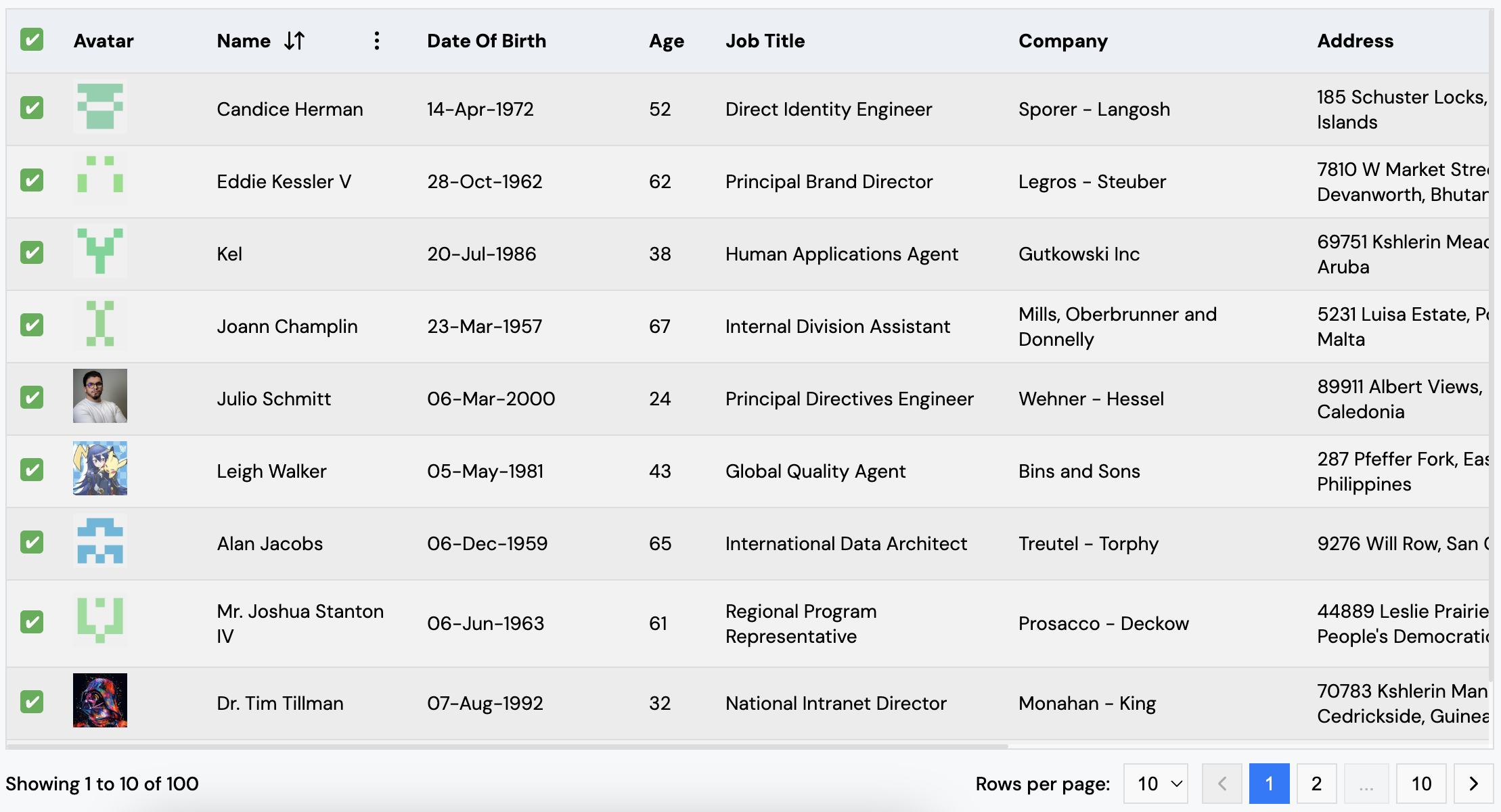
ReactGridX is a customizable and flexible React table component that supports pagination, dynamic rendering of table data, and customizable column rendering. It provides an easy-to-use interface for displaying tabular data with configurable columns, pagin

Maintainers
 deepbag
Readme
@deepbag/react-grid-x







@deepbag/react-grid-xis a customizable and flexible React table component that supports pagination, sorting (client-side and server-side), dynamic rendering of table data, and customizable column rendering. It provides an easy-to-use interface for displaying tabular data with configurable columns, pagination, sorting, and styling.
Check out the live demo of @deepbag/react-grid-x here.
Compatibility
- This package supports React 18 and higher versions.
- It is optimized to work seamlessly with the latest React features, including Concurrent Mode and Suspense, ensuring smooth performance and improved rendering.
- Make sure your project is using React 18 or a newer version for full compatibility and performance benefits.
Features
- Customizable columns: Define columns with dynamic rendering of data using custom render functions.
- Sorting support: Supports sorting by multiple columns, including both numerical and alphabetical sorting and "Clear Sorting" popup is available when sorting is enabled.
- Server-side sorting: Optionally support server-side sorting for large datasets.
- Pagination support: Choose from different pagination types (
rgx-table-paginationorrgx-arrow-pagination) with configurable rows per page and pagination controls. - Customizable styling: Apply custom themes and styles to the table and pagination components.
- Server-side pagination: Optionally support server-side pagination for large datasets.
- Tooltip support: Enable tooltips for column headers with customizable content for better user guidance.
- Row click event: Capture row clicks using the onRowClick callback to handle user interactions.
- Expandable rows: Expand rows with a customizable
expandedComponentto show additional details or content within the same row. - Loader support: Customize the loader displayed when the table is in a loading state using the
loaderComponentprop. If not provided, the default loader will be used. - Row selection: Supports row selection with checkboxes, allowing both single and select-all functionality.
- Light & Dark Mode: Now supports both light and dark themes for better visual adaptability.
Installation
To install the library, you can use either npm or yarn:
Using Yarn
yarn add @deepbag/react-grid-xUsing npm
npm install @deepbag/react-grid-xUsage
Here's a basic example of how to use the ReactGridX component in your React project:
import React from "react";
import { ReactGridX } from "@deepbag/react-grid-x";
import "@deepbag/react-grid-x/dist/themes/rgx-theme/rgx-theme-combined.css";

const App = () => {
  return (
    <div>
      <h1>React Grid Example</h1>
      <ReactGridX
        columns={[
          { name: "Name", key: "name", sortable: true },
          {
            name: "Age",
            key: "age",
            sortable: true,
            render: (data) => <span>{data.age}</span>,
          },
        ]}
        data={[
          { id: 1, name: "John", age: 28 },
          { id: 2, name: "Jane", age: 34 },
        ]}
        rowsPerPageOptions={[5, 10, 15]}
        paginationStyle={{
          "rgx-table-pagination": { backgroundColor: "#f5f5f5" },
        }}
        tableStyle={{
          "rgx-table": { width: "100%", borderCollapse: "collapse" },
        }}
        loaderStyle={{
          "rgx-loader-container": {},
        }}
        popupStyle={{ "rgx-popover-content": {} }}
        tooltipStyle={{ "rgx-tooltip-container": {} }}
      />
    </div>
  );
};

export default App;
Table Props
| Prop | Type | Description |
| ------------------------------ | ----------------------------------------------------------- | --------------------------------------------------------------------------------------------------------------------------------------------------------- |
| columns | ReactGridXColumnProps[] | An array of column definitions, each containing a name and optional render function for custom rendering. |
| data | any[] | The data to be displayed in the table. Each object should correspond to a row. |
| theme | string | The theme for the table (default is "rgx-theme"). |
| rowsPerPageOptions | number[] | Options for rows per page (default is [5, 10, 15]). |
| paginationType | "rgx-table-pagination" \| "rgx-arrow-pagination" | The pagination type to use. Options are "rgx-table-pagination" or "rgx-arrow-pagination". |
| paginationStyle | Record<string, React.CSSProperties> | Custom styles for pagination components. |
| tableStyle | Record<string, React.CSSProperties> | Custom styles for the table and its elements. |
| loaderStyle | Record<string, React.CSSProperties> | Custom styles for the loader component and its elements. |
| popupStyle | Record<string, React.CSSProperties> | Custom styles for the popop component and its elements. |
| tooltipStyle | Record<string, React.CSSProperties> | Custom styles for the tooltip component and its elements. |
| serverSidePagination | boolean | Flag to indicate if server-side pagination should be used (default is false). |
| onPaginationAndRowSizeChange | (page: number, rowsPerPage: number) => void | Callback function for pagination and row size changes. |
| totalRows | number | The total number of rows in the database (required for server-side pagination). |
| sortable | boolean | Enables sorting on a column (default is false). |
| serverSideSorting | boolean | Enables server-side sorting (default is false). |
| onSorting | (column:{key: string, direction: "asc" "desc"}[]) => void | Callback function to handle server-side sorting logic. |
| onRowClick | (rowData: any) => void | Callback function triggered when a row is clicked, receiving the clicked row's data. |
| expandedComponent | (rowData: any) => JSX.Element | A function that returns a component to render when a row is expanded, receiving the clicked row's data. |
| loading | boolean | A boolean value indicating whether the table is in a loading state. When set to true, the table will show a loader. |
| loaderComponent | ({style}:{style?:{}}) => JSX.Element | A function returning a custom loader when the table is loading. The style prop is optional for custom styling. |
| selectionCheckbox | boolean | A boolean value that determines whether the table rows will have a checkbox for selection. If set to true, checkboxes will be shown for selecting rows. |
| onSelectionCheck | (selectedRows: any[], isAllChecked: boolean) => void | A callback triggered when the selection state changes, receiving an array of selected rows and a boolean indicating if all rows are selected |
| mode | 'light' or 'dark' | Defines the table's theme mode. Supports both light and dark modes for better visual adaptability. Default is 'light'. |
Column Props (ReactGridXColumnProps)
The ReactGridXColumnProps interface defines the properties that can be set for each column in the ReactGridX component.
| Prop | Type | Description |
| ---------------------- | -------------------------------------------------------- | ---------------------------------------------------------------------------- |
| name | string | The column name displayed in the table header. |
| key | string | The unique key that matches the data field for this column. |
| render | (data: any) => JSX.Element \| string | Optional function to customize how cell data is rendered. |
| sortable | boolean | Determines whether sorting is enabled for this column. |
| onSort | (a: any, b: any, direction: "asc" \| "desc") => number | Optional custom sorting function. If provided, it overrides default sorting. |
| tooltip | boolean | Enables tooltips for this column when set to true. |
| tooltipCustomContent | (data: any) => string | Defines custom tooltip content for the column header. |
Exports
The package exports the following components and props interfaces:
Components
ReactGridX: The main table component.RGXTablePagination: Pagination component with table-based navigation.RGXArrowPagination: Pagination component with arrow-based navigation.RGXTooltip: The default tooltip component displayed for columns.RGXLoader: The default loader component displayed when the table is in a loading state, which can be customized using theloaderComponentprop.RGXPopover: The default popover component displayed for sorting and clearing sorting icons in the header.RGXSVGIcon: The default component for rendering SVG icons used in the table, ensuring consistent styling and performance.
Interfaces (Props)
ReactGridXProps: Props for theReactGridXcomponent.RGXTablePaginationProps: Props for theRGXTablePaginationcomponent.RGXArrowPaginationProps: Props for theRGXArrowPaginationcomponent.ReactGridXColumnProps: Column props for defining columns in theReactGridXcomponent.RGXTooltipProps: Props for theRGXTooltipcomponent.RGXLoaderProps: Props for theRGXLoadercomponent.RGXPopoverProps: Props for theRGXPopovercomponent.SvgIconProps: Props for theRGXSVGIconcomponent, used for rendering SVG icons consistently.
License
MIT License - see the LICENSE file for details.