
@dev-ryo/treeview
v1.0.3
Published
High-performance CLI tool to generate AI-optimized ASCII tree representations of project directories

Maintainers
 dev-ryo
Readme
@dev-ryo/treeview
🌲 High-performance, ultra-lightweight CLI tool and NPM library that generates clean, token-efficient ASCII repository trees wrapped in Markdown for LLMs.




💡 Why treeview?
When feeding codebases to AI models like Claude, ChatGPT, or Gemini, providing clear repository context is essential. Standard directory listing commands either include thousands of unnecessary files (node_modules, dist, .git) or produce plain text that wastes context tokens.
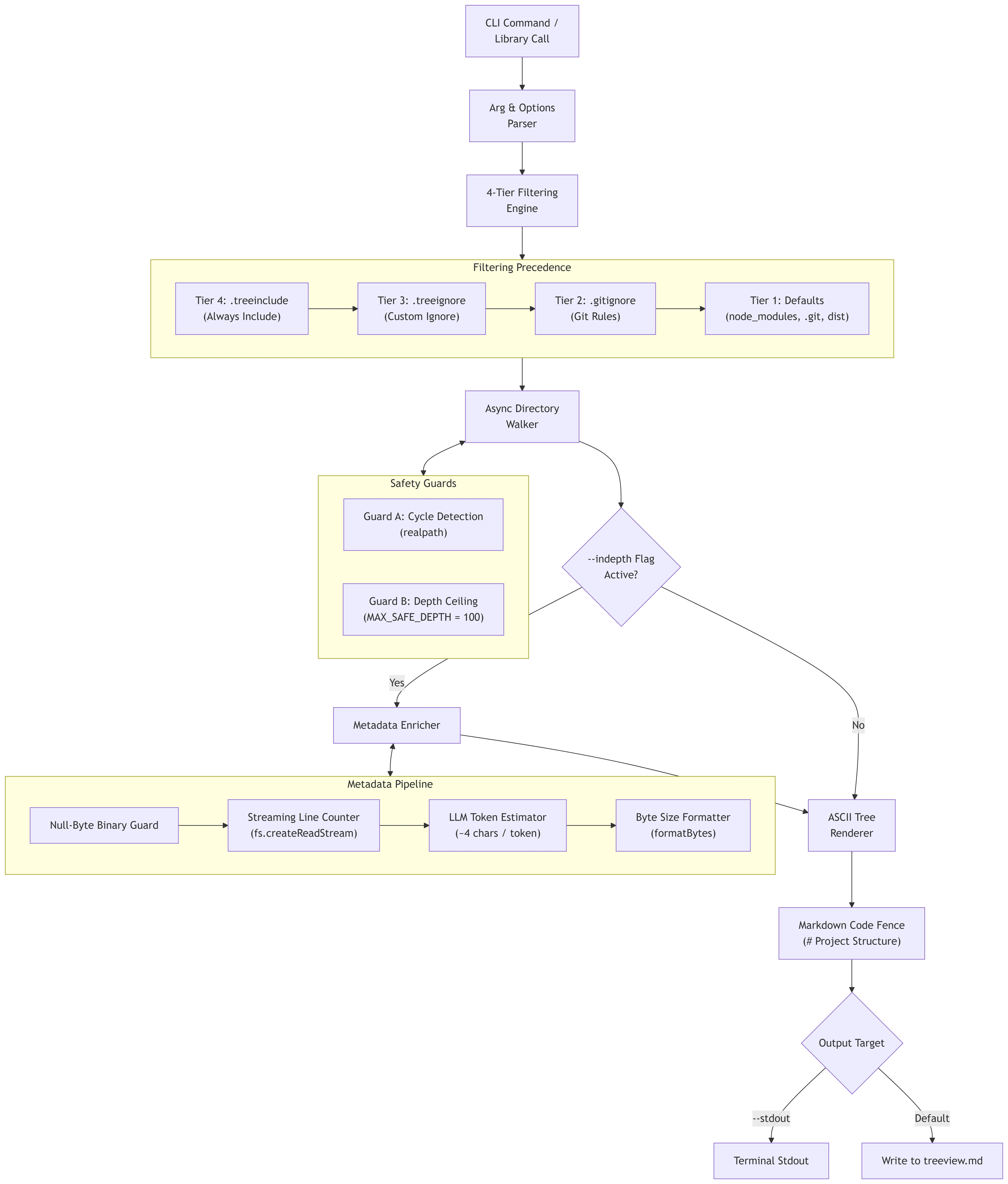
treeview scans your directory asynchronously and outputs an optimized ASCII tree inside a Markdown file (treeview.md). With optional --indepth metadata, it calculates human-readable file sizes, streaming line counts, and estimated LLM token usage for every file node.
🏗️ Architecture & How It Works
⚡ Quick Start (Zero Installation)
Run treeview directly in any project folder without installing anything:
# Generate treeview.md for the current directory
npx @dev-ryo/treeview

# Include file sizes, line counts, and estimated LLM tokens
npx @dev-ryo/treeview --indepth

# Cap estimated LLM token footprint within context budget globally
npx @dev-ryo/treeview --max-tokens 2000

# Cap estimated LLM token footprint per directory branch (prevents single folder domination)
npx @dev-ryo/treeview --max-dir-tokens 500

# Customize token ratio using model presets (e.g. claude, gpt4, dense) or custom multiplier (e.g. 0.33)
npx @dev-ryo/treeview --token-ratio claude

# Print tree directly to your terminal stdout
npx @dev-ryo/treeview --stdout
📦 Global Installation
If you prefer to have the treeview command permanently available everywhere:
npm install -g @dev-ryo/treeviewThen run anywhere:
treeview
treeview --indepth -d 3
treeview --max-tokens 1500
treeview --max-dir-tokens 500
treeview --token-ratio claude
📋 CLI Flags & Usage Reference
npx @dev-ryo/treeview [path] [options]| Flag | Short | Default | Description |
|------|-------|---------|-------------|
| [path] | — | . (CWD) | Target directory path to traverse. |
| --output <file> | -o | treeview.md | Custom output Markdown file path. |
| --depth <num> | -d | 100 | Maximum directory recursion depth limit (capped at 100). |
| --max-tokens <num> | -m | — | Maximum token budget before pruning branches globally (auto-enables --indepth). |
| --max-dir-tokens <num> | — | — | Maximum token budget per directory sub-tree branch (auto-enables --indepth). |
| --token-ratio <num\|preset> | — | 0.25 | Custom token estimation ratio (0.05-1.0) or preset alias (gpt4, claude, llama, dense). |
| --min-file-tokens <num> | — | — | Filter out individual files below this token count (auto-enables --indepth). |
| --max-file-tokens <num> | — | — | Filter out individual files above this token count (auto-enables --indepth). |
| --silent | — | false | Suppress roll-up summary nodes for token threshold filters. |
| --indepth | — | false | Enables metadata annotations (size, line count, LLM tokens). |
| --stdout | -s | false | Prints Markdown tree to terminal stdout instead of writing a file. |
| --help | -h | — | Displays the CLI help menu. |
| --version | -v | — | Displays installed package version. |
🎯 Filtering Engine & 4-Tier Precedence
treeview evaluates every file and directory against a 4-tier filtering hierarchy. Rules with higher priority explicitly override rules below them:
1. Tier 4 (Highest Priority — .treeinclude)
Create a .treeinclude file in your repository root to force-include specific folders or files that would otherwise be ignored by .gitignore or built-in defaults:
# .treeinclude example
dist/
node_modules/custom-internal-pkg/
2. Tier 3 (.treeignore)
Create a .treeignore file to specify rules exclusively for repository structure generation without affecting your Git tracking:
# .treeignore example
docs/
fixtures/
*.tmp
3. Tier 2 (.gitignore)
Automatically parses your project's .gitignore rules relative to the repository root using glob matching.
4. Tier 1 (Built-in Defaults)
Automatically excludes common heavy/built directories and lockfiles:
- Directories:
.git,node_modules,dist,build,.next - System files:
.DS_Store - Lockfiles:
package-lock.json,yarn.lock,pnpm-lock.yaml - Output target:
treeview.md(or custom-ofilename)
📊 Output Modes & Visual Examples
1. Standard Tree (Default)
Clean ASCII tree without metadata annotations. Perfect for lightweight file listing.
npx @dev-ryo/treeviewmy-project/
├── assets/
│ └── logo.png
├── bin/
│ └── shim.js
├── src/
│ ├── cli.ts
│ ├── index.ts
│ └── utils.ts
└── package.json2. In-Depth Metadata Mode (--indepth)
Annotates files with human-readable size, stream line counts, LLM token estimates, and binary flags. Displays total aggregate tokens directly in your terminal:
npx @dev-ryo/treeview --indepthmy-project/
├── assets/
│ └── logo.png (24.5 KB, binary)
├── bin/
│ └── shim.js (134 B, 4 lines, ~12 tokens)
├── src/
│ ├── cli.ts (5.2 KB, 174 lines, ~1340 tokens)
│ ├── index.ts (1.7 KB, 49 lines, ~427 tokens)
│ └── utils.ts (411 B, 18 lines, ~103 tokens)
└── package.json (1.2 KB, 55 lines, ~311 tokens)
Total estimated tokens: ~2,1933. Total Token Budget Limit (--max-tokens <num>)
Caps cumulative token usage across your project. Automatically prunes remaining branches once the token limit is reached.
npx @dev-ryo/treeview --max-tokens 1500my-project/
├── assets/
│ └── logo.png (24.5 KB, binary)
├── bin/
│ └── shim.js (134 B, 4 lines, ~12 tokens)
├── src/
│ ├── cli.ts (5.2 KB, 174 lines, ~1340 tokens)
│ └── ... [pruned: 2 items omitted (exceeded --max-tokens budget of 1500)]
└── ... [pruned: 1 item omitted (exceeded --max-tokens budget of 1500)]4. Per-Directory Branch Token Limit (--max-dir-tokens <num>)
Caps aggregate tokens per directory branch sub-tree. Prevents any single heavy folder (e.g. docs/ or tests/) from dominating your token allocation, ensuring sibling directories continue rendering cleanly.
npx @dev-ryo/treeview --max-dir-tokens 500my-project/
├── .agent/
│ ├── features/
│ │ └── treeview-cli/
│ │ ├── 00-scaffolding.md (4.2 KB, 166 lines, ~1078 tokens)
│ │ └── ... [pruned: 6 items omitted (exceeded --max-dir-tokens budget of 500)]
│ └── ... [pruned: 2 items omitted (exceeded --max-dir-tokens budget of 500)]
├── bin/
│ └── shim.js (134 B, 4 lines, ~12 tokens)
├── src/
│ ├── cli.ts (5.2 KB, 174 lines, ~1340 tokens)
│ └── ... [pruned: 4 items omitted (exceeded --max-dir-tokens budget of 500)]
└── tests/
├── cli.test.ts (2.8 KB, 85 lines, ~710 tokens)
└── ... [pruned: 8 items omitted (exceeded --max-dir-tokens budget of 500)]5. Custom Token Ratio & Model Profiles (--token-ratio <num|alias>)
Overrides the default $0.25$ token/char ratio ($1/4$). Allows passing custom multipliers (e.g., 0.33 for dense code, 0.2 for text) or model alias presets (gpt4: 0.25, claude: 0.28, llama: 0.30, dense: 0.35).
npx @dev-ryo/treeview --token-ratio claudemy-project/
├── bin/
│ └── shim.js (134 B, 4 lines, ~38 tokens)
├── src/
│ ├── cli.ts (5.2 KB, 174 lines, ~1501 tokens)
│ ├── index.ts (1.7 KB, 49 lines, ~479 tokens)
│ └── utils.ts (411 B, 18 lines, ~116 tokens)
└── package.json (1.2 KB, 55 lines, ~348 tokens)6. Per-File Token Thresholds (--min-file-tokens, --max-file-tokens)
Filters individual files outside a specific token range and aggregates omitted files into clean roll-up summary nodes. Binary files bypass this filter safely.
npx @dev-ryo/treeview --min-file-tokens 100my-project/
├── assets/
│ └── logo.png (24.5 KB, binary)
├── bin/
│ └── [+ 1 file omitted < 100 tokens]
├── src/
│ ├── cli.ts (5.2 KB, 174 lines, ~1340 tokens)
│ ├── index.ts (1.7 KB, 49 lines, ~427 tokens)
│ └── utils.ts (411 B, 18 lines, ~103 tokens)
└── package.json (1.2 KB, 55 lines, ~311 tokens)7. Silent Threshold Mode (--silent)
Suppresses roll-up summary nodes when using --min-file-tokens or --max-file-tokens for completely silent filtering.
npx @dev-ryo/treeview --min-file-tokens 100 --silentmy-project/
├── assets/
│ └── logo.png (24.5 KB, binary)
├── bin/
├── src/
│ ├── cli.ts (5.2 KB, 174 lines, ~1340 tokens)
│ ├── index.ts (1.7 KB, 49 lines, ~427 tokens)
│ └── utils.ts (411 B, 18 lines, ~103 tokens)
└── package.json (1.2 KB, 55 lines, ~311 tokens)💻 Programmatic Node.js / TypeScript API
You can also use treeview as an imported library inside your Node.js or TypeScript applications:
npm install @dev-ryo/treeviewimport { generateTree, generateTreeWithStats, walkDirectory, renderTree } from '@dev-ryo/treeview';
// 1. Generate full Markdown string with max token budget
const markdownOutput = await generateTree({
rootPath: './',
outputPath: 'treeview.md',
maxTokens: 2000,
});
console.log(markdownOutput);
// 2. Or generate Markdown along with total statistics (tokens, files, dirs, size)
const { markdown, stats } = await generateTreeWithStats({
rootPath: './',
indepth: true,
});
console.log(`Total estimated tokens: ~${stats.totalTokens}`);
// 3. Or walk directory programmatically to inspect TreeNode objects
const tree = await walkDirectory('./', {
maxDepth: 2,
maxTokens: 1000,
shouldInclude: (relativePath, isDirectory) => !relativePath.includes('temp'),
});
console.log(tree.children);❓ Frequently Asked Questions (FAQ)
Q1: How does treeview compare to the standard OS tree command?
Standard OS tree includes unwanted build artifacts (node_modules, .git), lacks native Markdown formatting, and provides no token or line metrics for AI prompts. treeview is specifically engineered for AI context economy: it applies a 4-tier filtering engine, formats output directly inside Markdown code blocks, and calculates token estimates.
Q2: Why does treeview use character heuristics ($\approx 4\text{ chars} = 1\text{ token}$) instead of heavy tokenizers like tiktoken?
Heavy tokenizers require large WebAssembly or C++ binaries, adding megabytes to package size and slowing execution down. The $4\text{ characters} \approx 1\text{ token}$ heuristic provides $\sim 95%$ accuracy across OpenAI, Anthropic, and Google Gemini models while keeping treeview near-instant and under 25 KB.
Q3: How does treeview prevent getting stuck in infinite loops or freezing on large repos?
treeview incorporates dual safety guards:
- Guard A (Symlink Cycle Detection): Tracks canonical real paths (
realpath). If a symlink or Windows junction points to an ancestor folder,treeviewdetects the loop, issues a warning, and prunes recursion. - Guard B (Hard Safety Ceiling): Enforces a safety ceiling (
MAX_SAFE_DEPTH = 100) to guarantee call-stack overflow protection.
Q4: How does .treeinclude override .gitignore and default excludes?
In monorepos or complex projects, build output directories (like dist/) are listed in .gitignore, but you may want your AI assistant to view the generated structure. Adding dist/ to .treeinclude forces treeview to display it without modifying your Git configuration.
Q5: Is treeview safe to run on massive monorepos?
Yes. treeview uses non-blocking asynchronous directory iteration (fs.promises.readdir) and early branch pruning. Directories matching ignore rules are skipped immediately before recursing, preventing unnecessary disk I/O and memory overhead.
Q6: Can binary files crash or slow down the --indepth metadata scan?
No. Before calculating line or token counts, treeview inspects the first 8KB of the file for null bytes (0x00). If a binary file is detected (image, compiled binary, media), line/token scanning is safely bypassed and it is annotated as (size, binary).
Q7: How does --max-tokens (-m) pruning work?
--max-tokens <number> maintains a cumulative token estimate across files during traversal. It evaluates a Pre-Check budget: before adding any file, it verifies if adding its tokens exceeds the threshold. If a file breaches the budget, the file and remaining items in that folder are omitted, and a single condensed summary line (e.g., ... [pruned: X items omitted (exceeded --max-tokens budget of 2000)]) is rendered.
Q8: How do per-file token thresholds (--min-file-tokens, --max-file-tokens, --silent) work?
Per-file threshold flags filter individual file nodes based on their estimated token count. Small utility files (< min-file-tokens) or huge vendor scripts (> max-file-tokens) are omitted. By default, omitted files in a folder are aggregated into a summary line (e.g., [+ 3 files omitted < 30 tokens]). Adding --silent completely suppresses these summary lines for clean, silent removal. Binary files bypass these filters safely.
Q9: How does --max-dir-tokens differ from --max-tokens (-m)?
--max-tokens enforces a single global ceiling across the entire project scan—once reached, all remaining directories across the project are skipped. In contrast, --max-dir-tokens <number> caps tokens per directory sub-tree branch. Each folder branch receives an independent token allocation (e.g., max 500 tokens per folder), so a token-heavy directory (like docs/ or tests/) prunes itself without hiding or starving sibling directories (src/, bin/).
📜 License
MIT © dev-ryo