
@dhtmlx/booking
v1.1.1
Published
DHTMLX Booking – JavaScript appointment booking widget with slot availability, filterable card list, configurable booking form, and Scheduler integration – GPL v2 open source edition.


Readme
DHTMLX Booking — JavaScript Appointment Booking Widget (GPL Edition)




@dhtmlx/booking is a JavaScript appointment booking widget for building online reservation interfaces with a filterable card list, real-time slot availability, a configurable booking form, image previews, star ratings, and full CSS customization.
It is a standalone widget that works with plain JavaScript and integrates with React, Angular, and Vue.
It is ideal for prototyping appointment booking interfaces for healthcare, beauty, consulting, and similar services in open-source applications, or for evaluating DHTMLX Booking's core features under the GPL v2 license.
License
This edition of DHTMLX Booking is licensed under the GNU General Public License v2.0 (GPL v2).
You can redistribute this package and/or modify it under the terms of the GPL v2.
GPL v2 requires that any project using this package also be open source under a GPL-compatible license.
You may NOT use this package in closed-source, proprietary, or commercial applications without a separate commercial license. For commercial use, please obtain a commercial license of DHTMLX Booking.
This package is distributed in the hope that it will be useful, but WITHOUT ANY WARRANTY; without even the implied warranty of MERCHANTABILITY or FITNESS FOR A PARTICULAR PURPOSE. See the GPL v2 for more details.
Using DHTMLX Booking in a commercial or closed-source project?
You need a commercial license. DHTMLX offers Individual, Commercial, Enterprise, and Ultimate license tiers.
- Compare licenses and pricing
- Download a free 30-day trial of DHTMLX Booking
- Download 30-day trial versions of all DHTMLX components
- Contact us regarding licensing: [email protected]
Copyright © 2026 XB Software Ltd.
What is DHTMLX Booking
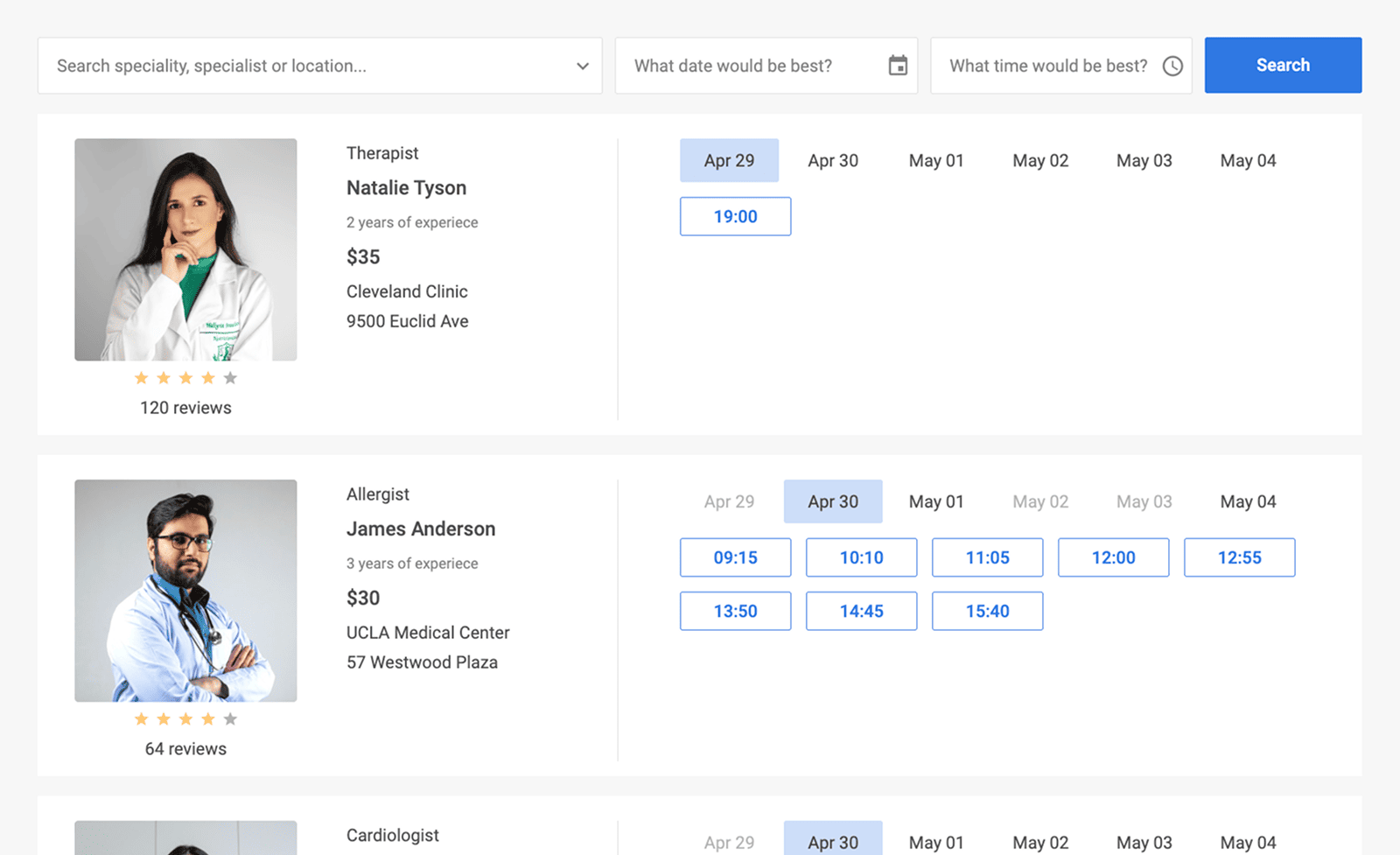
DHTMLX Booking is a JavaScript widget for building online appointment booking interfaces. It renders a two-part UI: a filter area where users search and narrow down providers by text, date, time range, and category, and a card list where each provider card shows a photo, title, category, subtitle, details, price, and star rating on the left, and clickable time slots on the right. Clicking a slot opens a configurable booking dialog where users fill in their details and confirm the appointment. Slot availability is defined per card using weekly recurrence rules or explicit available slot arrays, with support for per-card slot size and gap settings.
DHTMLX Booking is a standalone component. It is not part of the DHTMLX Suite library, is distributed and licensed separately, and does not require Suite as a dependency. It is designed to integrate with DHTMLX Scheduler to deliver complete scheduling solutions – Booking handles the customer-facing appointment UI while Scheduler manages the staff-side schedule and availability rules.
Use this GPL edition when you want to prototype an appointment booking interface, integrate online reservation into an open-source project, or evaluate DHTMLX Booking's core features before obtaining a commercial license.
Quick Start
Install the package, import the styles, and initialize Booking in a container element.
Install
npm install @dhtmlx/bookingInclude in your project
import { Booking } from "@dhtmlx/booking";
import "@dhtmlx/booking/dist/booking.css";
Or with script tags pointing to local dist files:
<script type="text/javascript" src="./dist/booking.js"></script>
<link href="./dist/booking.css" rel="stylesheet" />
The CSS import is required for default Booking styling and layout.
Initialize
import { Booking } from "@dhtmlx/booking";
import "@dhtmlx/booking/dist/booking.css";

const data = [
	{
		id: "1",
		title: "Natalie Tyson",
		category: "Therapist",
		subtitle: "2 years of experience",
		details: "Cleveland Clinic\n9500 Euclid Ave",
		preview: "https://example.com/img/natalie.jpg",
		price: "$35",
		review: { stars: 4, count: 120 },
		slots: [
			{ from: 9, to: 20, days: [1, 2, 3, 4, 5] },
			{ from: 10, to: 18, days: [6, 0] },
		],
	},
];

new Booking("#root", { data });
Add a container element to your HTML:
<div id="root" style="width: 100%; height: 700px;"></div>Basic Usage — DHTMLX Booking
Two slot definition approaches
Approach 1 – Weekly recurrence rules (best for fixed schedules):
const data = [
	{
		id: "1",
		title: "James Anderson",
		category: "Allergist",
		slotSize: 45,
		slotGap: 10,
		slots: [{ from: "9:15", to: 17, days: [1, 2, 3, 4, 5] }],
		usedSlots: [1716890400, 1716894000],
	},
];
Approach 2 – Explicit available slots (best for varying schedules):
const data = [
	{
		id: "2",
		title: "Sarah Lee",
		category: "Dermatologist",
		availableSlots: [
			[1716890400, 20],
			[1716892200, 25],
		],
	},
];
Configuring card display, filters, and booking form
import { Booking } from "@dhtmlx/booking";
import "@dhtmlx/booking/dist/booking.css";

const cardShape = {
	review: true,
	subtitle: true,
	price: true,
	details: true,
	preview: true,
};

const filterShape = [
	{ type: "text", key: "category", label: "Specialty" },
	{ type: "date", key: "date", label: "Date" },
	{ type: "time", key: "time", label: "Time range" },
];

const formShape = [
	{ type: "text", key: "name", label: "Full name", required: true },
	{ type: "text", key: "contact", label: "Phone number", required: true },
	{ type: "textarea", key: "description", label: "Reason for visit" },
];

new Booking("#root", {
	data,
	cardShape,
	filterShape,
	formShape,
});
Listening to booking confirmation
import { Booking } from "@dhtmlx/booking";
import "@dhtmlx/booking/dist/booking.css";

const widget = new Booking("#root", { data });

widget.api.on("confirm-booking", function ({ slot, formData }) {
	console.log("Booked slot:", slot);
	console.log("Form data:", formData);
	fetch("/api/bookings", {
		method: "POST",
		headers: { "Content-Type": "application/json" },
		body: JSON.stringify({ slot, ...formData }),
	});
});
DHTMLX Booking Features
DHTMLX Booking includes the following features in the GPL edition.
| Feature | Details |
| :----------------------------- | :--------------------------------------------------------------------------------------------------- |
| Card list with provider info | Display photo, title, category, subtitle, details, price, and star rating per provider card |
| Weekly slot recurrence rules | Define recurring available slots by weekday, start time, end time, and slot size |
| Explicit available slots | Pass an array of exact available timestamps and durations via availableSlots |
| Used slots (booked exclusions) | Pass booked slot timestamps via usedSlots to automatically hide them from the UI |
| Per-card slot size and gap | Set slotSize and slotGap per provider card to support varying schedules |
| Double-booking prevention | Only available slots are shown; booked slots are hidden automatically |
| Single card view | Click a card's left area to open a full-page calendar view for that provider |
| Configurable card shape | Toggle visibility of review, subtitle, price, details, and preview via cardShape |
| Filter area | Built-in filter controls for text search, date, and time range; fully configurable via filterShape |
| Auto-filtering | Optionally hide the Search button and apply filter values in real time as users type or select |
| Configurable booking form | Define booking dialog fields (text, textarea; required flag) via formShape |
| Configurable info panel | Configure left side of the booking dialog (title, category, details) via infoShape |
| api.getState() | Read full widget state: filtered data, filter values, selected item, selected slot, slot settings |
| Mobile-responsive | Optimized layout and touch support for smartphones and tablets |
| Three built-in locales | English (default), German (DE), and Chinese (CN); define a custom locale for any language |
| Material theme | Built-in Material theme; customize colors and styles via CSS variables |
| DHTMLX Scheduler integration | Sync Booking with DHTMLX Scheduler to share availability data and appointment records |
| Cross-browser support | Chrome, Firefox, Safari, Microsoft Edge, Opera, and other Chromium-based browsers |
| Event system | API events including confirm-booking and state-change events |
This table highlights key features. For the complete and up-to-date feature list, see the DHTMLX Booking documentation.
Framework Integration
DHTMLX Booking works with popular front-end frameworks including React, Angular, and Vue. These integration guides apply to both the GPL edition and the commercial editions of DHTMLX Booking.
Documentation and Resources
- Product page – overview, screenshots, and key features.
- Documentation – getting started, guides, and configuration options.
- API reference – full JavaScript API.
- Live demos and samples – interactive examples of DHTMLX Booking features.
- Support forum – community Q&A and discussions for DHTMLX Booking.