
@dhtmlx/kanban
v1.7.3
Published
DHTMLX Kanban – JavaScript Kanban board with drag-and-drop, swimlanes, card editor, REST backend sync, and configurable toolbar – GPL v2 open source edition.


Readme
DHTMLX Kanban — JavaScript Kanban Board (GPL Edition)




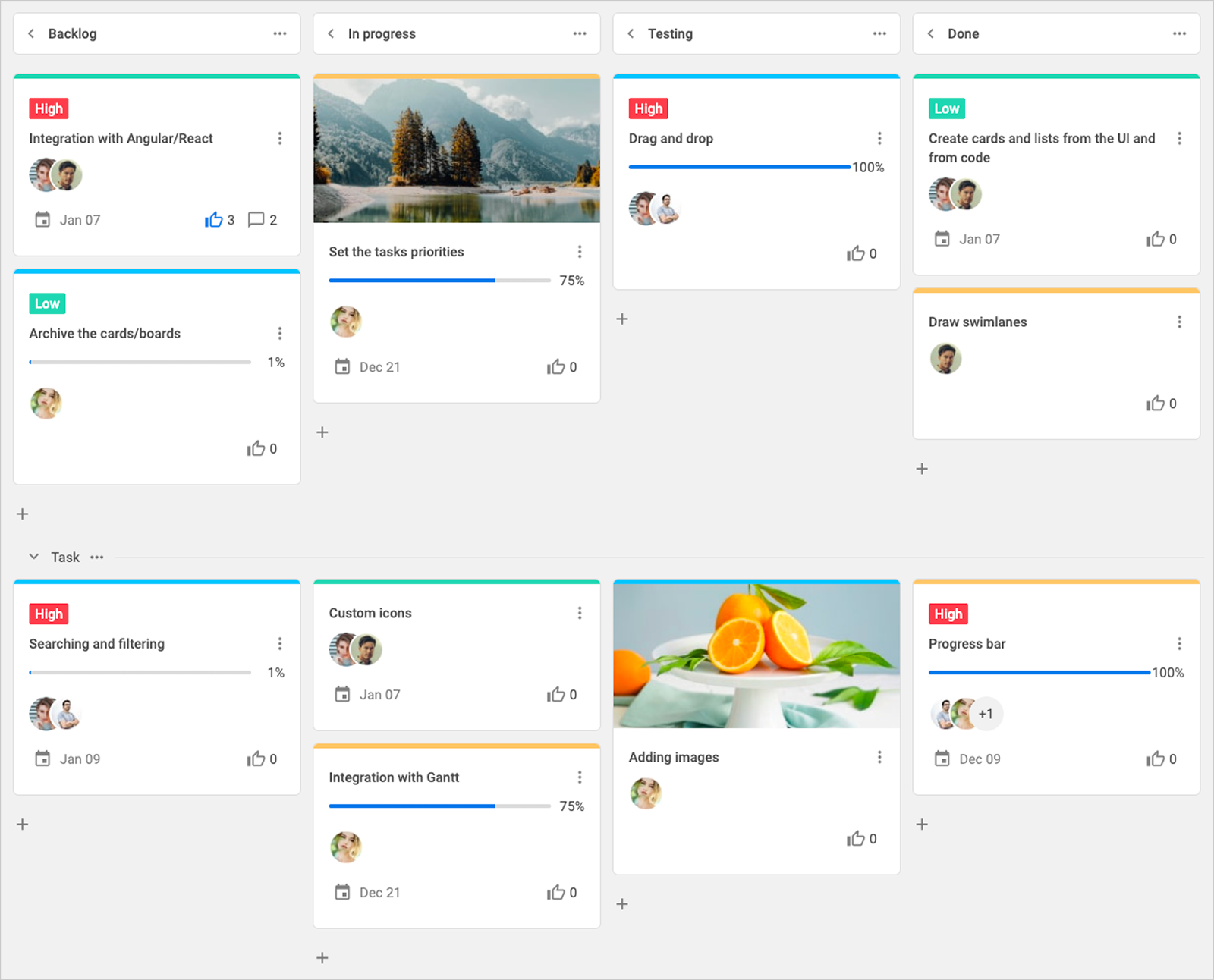
@dhtmlx/kanban is a JavaScript Kanban board component for building interactive task management interfaces with columns, swimlanes, drag-and-drop cards, a configurable card editor, search and sort toolbar, REST API backend integration, and full CSS customization.
It is a standalone widget that works with plain JavaScript and integrates with React, Angular, Vue, and Svelte.
It is ideal for prototyping project management tools, agile dashboards, and workflow visualization interfaces in open-source applications, or for evaluating DHTMLX Kanban's core features under the GPL v2 license.
License
This edition of DHTMLX Kanban is licensed under the GNU General Public License v2.0 (GPL v2).
You can redistribute this package and/or modify it under the terms of the GPL v2.
GPL v2 requires that any project using this package also be open source under a GPL-compatible license.
You may NOT use this package in closed-source, proprietary, or commercial applications without a separate commercial license. For commercial use, please obtain a commercial license of DHTMLX Kanban.
This package is distributed in the hope that it will be useful, but WITHOUT ANY WARRANTY; without even the implied warranty of MERCHANTABILITY or FITNESS FOR A PARTICULAR PURPOSE. See the GPL v2 for more details.
Using DHTMLX Kanban in a commercial or closed-source project?
You need a commercial license. DHTMLX offers Individual, Commercial, Enterprise, and Ultimate license tiers.
- Compare licenses and pricing
- Download a free 30-day trial of DHTMLX Kanban
- Download 30-day trial versions of all DHTMLX components
- Contact us regarding licensing: [email protected]
Copyright © 2026 XB Software Ltd.
What is DHTMLX Kanban
DHTMLX Kanban is a JavaScript component for building interactive Kanban boards in web applications. It renders a board of columns and optional swimlanes (rows) populated with draggable task cards. Each card opens a configurable editor panel – inline or in a modal window – where users can manage task data including labels, descriptions, assignees, due dates, priorities, and custom fields. A separate Toolbar component provides search, sort, undo/redo, and add-column/add-row controls. The board supports multi-card selection and drag-and-drop, column collapsing, card voting, and real-time backend synchronization via a built-in RestDataProvider service.
DHTMLX Kanban is a standalone component. It is not part of the DHTMLX Suite library, is distributed and licensed separately, and does not require Suite as a dependency. It integrates natively with other DHTMLX widgets – DHTMLX Gantt, Scheduler, and To Do List – for building comprehensive project management applications.
Use this GPL edition when you want to prototype a Kanban-based workflow interface, integrate task management into an open-source project, or evaluate DHTMLX Kanban's core features before obtaining a commercial license.
Quick Start
Install the package, import the styles, and initialize the Kanban board and Toolbar in their container elements.
Install
npm install @dhtmlx/kanbanInclude in your project
import { Kanban, Toolbar } from "@dhtmlx/kanban";
import "@dhtmlx/kanban/dist/kanban.css";
Or with script tags pointing to local codebase files:
<script type="text/javascript" src="./codebase/kanban.js"></script>
<link rel="stylesheet" href="./codebase/kanban.css" />
The CSS import is required for default Kanban styling and layout.
Initialize
import { Kanban, Toolbar } from "@dhtmlx/kanban";
import "@dhtmlx/kanban/dist/kanban.css";

const columns = [
    { id: "todo", label: "To Do" },
    { id: "in_progress", label: "In Progress" },
    { id: "done", label: "Done" },
];

const cards = [
    { id: 1, label: "Update landing page", column: "todo", priority: 1 },
    { id: 2, label: "Fix login bug", column: "in_progress", priority: 2 },
    { id: 3, label: "Write release notes", column: "done", priority: 3 },
];

const board = new Kanban("#root", {
    columns,
    cards,
});

const toolbar = new Toolbar("#toolbar", {
    api: board.api,
    items: ["search", "spacer", "sort", "addColumn", "addRow"],
});
Add container elements to your HTML:
<div id="toolbar"></div>
<div id="root" style="height: 600px;"></div>
The Toolbar is optional. If you do not need it, initialize only kanban.Kanban with a single container.
Basic Usage — DHTMLX Kanban
Board with swimlanes, custom card shape, and editor
Organize cards into columns and rows (swimlanes), define which fields appear on cards and in the editor:
import { Kanban } from "@dhtmlx/kanban";
import "@dhtmlx/kanban/dist/kanban.css";

const columns = [
    { id: "todo", label: "To Do" },
    { id: "in_progress", label: "In Progress" },
    { id: "done", label: "Done" },
];

const rows = [
    { id: "frontend", label: "Frontend" },
    { id: "backend", label: "Backend" },
];

const cards = [
    {
        id: 1,
        label: "Migrate to TypeScript",
        column: "todo",
        row: "frontend",
        priority: 2,
    },
    {
        id: 2,
        label: "Add REST endpoints",
        column: "in_progress",
        row: "backend",
        priority: 1,
    },
    {
        id: 3,
        label: "Write unit tests",
        column: "todo",
        row: "backend",
        priority: 3,
    },
];

const board = new Kanban("#root", {
    columns,
    rows,
    cards,
    rowKey: "row", // the card property used to assign cards to rows

    cardShape: {
        label: { show: true },
        priority: { show: true },
        progress: { show: true },
        assigned: { show: true },
    },

    editorShape: [
        { type: "text", key: "label", label: "Task title" },
        { type: "textarea", key: "description", label: "Description" },
        {
            type: "combo",
            key: "priority",
            label: "Priority",
            options: [
                { id: 1, label: "High" },
                { id: 2, label: "Medium" },
                { id: 3, label: "Low" },
            ],
        },
    ],

    editor: {
        placement: "modal", // open card editor in a modal window
    },
});
Listening to card events and syncing with backend
// React when a card is moved to a different column
board.api.on("move-card", function ({ id, columnId, rowId }) {
    fetch("/api/cards/" + id, {
        method: "PATCH",
        body: JSON.stringify({ column: columnId, row: rowId }),
    });
});

// React when a card is updated via the editor
board.api.on("update-card", function ({ id, card }) {
    fetch("/api/cards/" + id, {
        method: "PUT",
        body: JSON.stringify(card),
    });
});
REST backend integration
Use the built-in RestDataProvider to load data from and sync changes to a REST API automatically:
import { Kanban, RestDataProvider } from "@dhtmlx/kanban";
import "@dhtmlx/kanban/dist/kanban.css";

const url = "/api";
const dataProvider = new RestDataProvider(url);

Promise.all([
    dataProvider.getCards(),
    dataProvider.getColumns(),
    dataProvider.getRows(),
]).then(([cards, columns, rows]) => {
    const board = new Kanban("#root", { cards, columns, rows });
    dataProvider.link(board); // sync all board changes back to the server
});
DHTMLX Kanban Features
DHTMLX Kanban includes the following features in the GPL edition.
| Feature | Details |
| :------------------------------------- | :-------------------------------------------------------------------------------------------------- |
| Columns and swimlanes (rows) | Organize the board into status columns and category rows for multi-project or team views |
| Drag-and-drop cards | Move cards between columns and rows by dragging; automatic scroll to target area |
| Multi-card selection and drag | Select multiple cards and drag them to a new column or row simultaneously |
| Card editor — inline or modal | Edit card details in an inline side panel or a focused modal window |
| Editor opened on click or double-click | Configure whether the editor opens on single or double card click |
| Configurable card shape | Choose which fields (label, priority, progress, assignee, dates, votes) appear on cards |
| Configurable editor shape | Define form controls shown in the card editor: text, textarea, combo, date, multiselect, and more |
| Card voting | Users can upvote cards directly from the board via a thumbs-up icon |
| Card duplication | Duplicate any card via the card context menu |
| Card priority and progress | Built-in priority levels and progress indicator per card |
| Column collapsing | Collapse and expand columns; customizable header templates for collapsed and expanded states |
| Custom column header templates | Render custom HTML in column headers (e.g. task count badges) via headerTemplate |
| Search | Search cards by label or description via the Toolbar search bar; customizable search result display |
| Sort | Sort cards within columns by any card property in ascending or descending order |
| Undo/Redo | Full undo/redo history for all board actions via Toolbar buttons |
| Configurable Toolbar | Choose and reorder toolbar items; add custom controls |
| Custom card templates | Replace the default card HTML with any custom template via cardTemplate |
| Custom search result templates | Customize how search suggestions appear in the Toolbar search bar |
| REST backend integration | Built-in RestDataProvider loads data from and syncs changes to a REST API |
| Three built-in themes | Material (default), Willow, and Willow-Dark themes; switch via the theme config |
| CSS variable theming | Customize colors, borders, card styles, and column backgrounds via CSS variables |
| Localization | Translate all UI labels via built-in locale objects (EN, RU, CN) or a custom locale |
| Touch support | Full touch event support for mobile and tablet devices |
| TypeScript support | Bundled TypeScript type definitions |
| Integration with DHTMLX Gantt | Sync Kanban cards with Gantt tasks for combined workflow and timeline views |
| Integration with DHTMLX Scheduler | Link Kanban cards to Scheduler events for resource and scheduling management |
| Integration with DHTMLX To Do List | Combine Kanban with To Do List for layered task management |
| Salesforce integration | Embed DHTMLX Kanban inside Salesforce apps (from v1.7) |
| Event system | Rich API events including move-card, update-card, add-card, delete-card, and more |
This table highlights key features. For the complete and up-to-date feature list, see the DHTMLX Kanban documentation.
Framework Integration
DHTMLX Kanban works with popular front-end frameworks including React, Angular, Vue, Svelte, and Salesforce. These integration guides apply to both the GPL edition and the commercial editions of DHTMLX Kanban.
- React integration guide
- Angular integration guide
- Vue.js integration guide
- Svelte integration guide
- Salesforce integration guide
Documentation and Resources
- Product page – overview, screenshots, and key features.
- Documentation – getting started, guides, and configuration options.
- API reference – full JavaScript API for Kanban and Toolbar.
- Live demos and samples – interactive examples of DHTMLX Kanban features.
- Support forum – community Q&A and discussions for DHTMLX Kanban.