
@dhtmlx/todolist
v1.3.2
Published
DHTMLX To Do List – JavaScript task list with subtasks, assignees, due dates, tags, priorities, REST backend sync, and real-time multi-user collaboration – GPL v2 open source edition.


Readme
DHTMLX To Do List — JavaScript To Do List Component (GPL Edition)




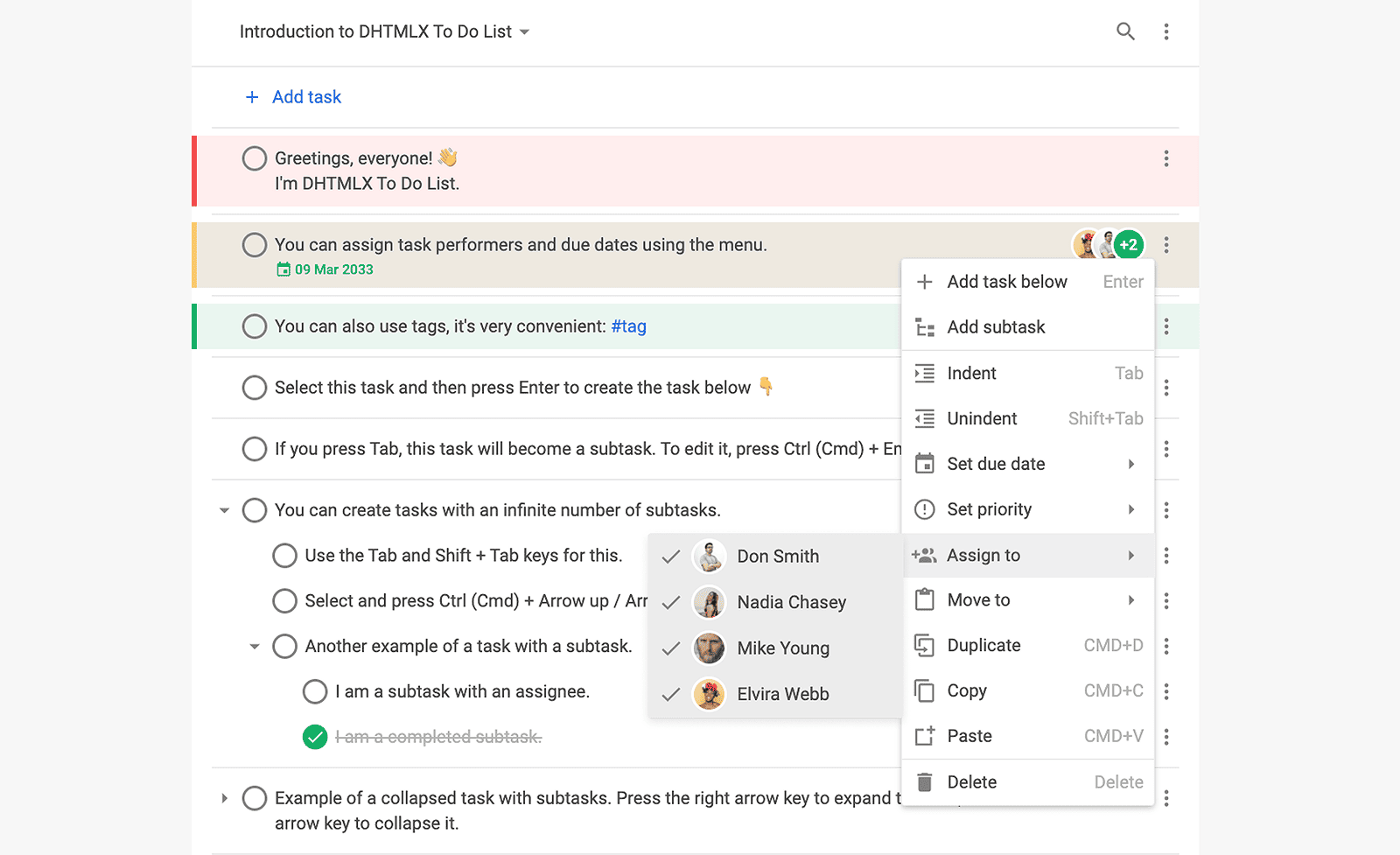
@dhtmlx/todolist is a JavaScript to do list component for building interactive task management interfaces with unlimited projects and subtasks, drag-and-drop reordering, task assignees, due dates, priority levels, inline tags, filtering, real-time multi-user collaboration, and REST API backend integration.
It is a standalone widget that works with plain JavaScript and integrates with React, Angular, Vue, and Svelte.
It is ideal for prototyping personal productivity tools, team task trackers, and project management interfaces in open-source applications, or for evaluating DHTMLX To Do List's core features under the GPL v2 license.
License
This edition of DHTMLX To Do List is licensed under the GNU General Public License v2.0 (GPL v2).
You can redistribute this package and/or modify it under the terms of the GPL v2.
GPL v2 requires that any project using this package also be open source under a GPL-compatible license.
You may NOT use this package in closed-source, proprietary, or commercial applications without a separate commercial license. For commercial use, please obtain a commercial license of DHTMLX To Do List.
This package is distributed in the hope that it will be useful, but WITHOUT ANY WARRANTY; without even the implied warranty of MERCHANTABILITY or FITNESS FOR A PARTICULAR PURPOSE. See the GPL v2 for more details.
Using DHTMLX To Do List in a commercial or closed-source project?
You need a commercial license. DHTMLX offers Individual, Commercial, Enterprise, and Ultimate license tiers.
- Compare licenses and pricing
- Download a free 30-day trial of DHTMLX To Do List
- Download 30-day trial versions of all DHTMLX components
- Contact us regarding licensing: [email protected]
Copyright © 2026 XB Software Ltd.
What is DHTMLX To Do List
DHTMLX To Do List is a JavaScript component for building structured task management interfaces in web applications. It renders a two-part UI: a Toolbar with a project switcher, search bar, and custom controls, and a List where tasks and infinite-depth subtasks are displayed and managed. Tasks support assignees, due dates with overdue highlighting, three priority levels, inline hashtag notation for tagging, and a subtask completion counter shown as a number or percentage. Users can reorder tasks and change nesting levels via drag-and-drop or keyboard shortcuts, select multiple tasks and operate on them in bulk, and hide completed tasks from view. The component syncs with a REST backend via a built-in RestDataProvider service and supports real-time multi-user collaboration via RemoteEvents.
DHTMLX To Do List is a standalone component. It is not part of the DHTMLX Suite library, is distributed and licensed separately, and does not require Suite as a dependency. It integrates natively with DHTMLX Gantt for combining list-based task tracking with timeline and resource management views.
Use this GPL edition when you want to prototype a task management feature, integrate a to do list into an open-source project, or evaluate DHTMLX To Do List's core features before obtaining a commercial license.
Quick Start
Install the package, import the styles, and initialize the To Do List and Toolbar in their container elements.
Install
npm install @dhtmlx/todolistInclude in your project
import { ToDo, Toolbar } from "@dhtmlx/todolist";
import "@dhtmlx/todolist/dist/todo.css";
Or with script tags pointing to local dist files:
<script type="text/javascript" src="./dist/todo.js"></script>
<link rel="stylesheet" href="./dist/todo.css" />
The CSS import is required for default To Do List styling and layout.
Initialize
import { ToDo, Toolbar } from "@dhtmlx/todolist";
import "@dhtmlx/todolist/dist/todo.css";

const tasks = [
	{ id: "1", project: "p1", text: "Design mockups", priority: 1 },
	{ id: "2", project: "p1", text: "Implement frontend", priority: 2 },
	{
		id: "3",
		project: "p1",
		text: "Write tests",
		parent: "2",
		text: "Unit tests",
	},
];

const projects = [{ id: "p1", label: "Website Redesign" }];

const list = new ToDo("#root", {
	tasks,
	projects,
	activeProject: "p1",
});

const toolbar = new Toolbar("#toolbar", {
	api: list.api,
});
Add container elements to your HTML:
<div id="toolbar"></div>
<div id="root" style="height: 600px;"></div>
The Toolbar is optional. If you do not need it, initialize only ToDo with a single container.
Basic Usage — DHTMLX To Do List
Tasks with assignees, due dates, tags, and priorities
import { ToDo } from "@dhtmlx/todolist";
import "@dhtmlx/todolist/dist/todo.css";

const users = [
	{ id: "u1", label: "Alice Johnson", avatar: "/img/alice.jpg" },
	{ id: "u2", label: "Bob Smith", avatar: "/img/bob.jpg" },
];

const tasks = [
	{
		id: "1",
		project: "p1",
		text: "Launch campaign #marketing", // inline tag: #marketing
		priority: 1, // 1=High, 2=Medium, 3=Low
		assigned: ["u1", "u2"],
		due_date: "2026-06-01T00:00:00.000Z",
	},
	{
		id: "2",
		project: "p1",
		text: "Write copy #marketing",
		parent: "1", // subtask of task "1"
		priority: 2,
		assigned: ["u2"],
	},
];

const list = new ToDo("#root", {
	tasks,
	users,
	projects: [{ id: "p1", label: "Q2 Launch" }],
	activeProject: "p1",
	taskShape: {
		counter: { type: "percentage" }, // show subtask progress as %
		date: { format: "%d %M %Y", validate: true },
		completed: { behavior: "auto", taskHide: false },
		priority: { cover: true, label: true },
	},
});
Filtering tasks by tag or text
// Filter tasks containing the #marketing tag
list.setFilter({ match: "#marketing", highlight: true, strict: true });

// Filter by partial text match
list.setFilter({ match: "copy", highlight: true });

// Reset filter
list.setFilter({ match: null });
REST backend integration
import { ToDo, Toolbar, RestDataProvider } from "@dhtmlx/todolist";
import "@dhtmlx/todolist/dist/todo.css";

const url = "http://localhost:3000";
const restProvider = new RestDataProvider(url);

Promise.all([
	restProvider.getProjectTasks(null),
	restProvider.getUsers(),
	restProvider.getProjects(),
	restProvider.getTags(),
]).then(([tasks, users, projects, tags]) => {
	const list = new ToDo("#root", { tasks, users, projects, tags });
	const toolbar = new Toolbar("#toolbar", { api: list.api });

	// sync client changes to server
	list.api.setNext(restProvider);
	restProvider.setAPI(list.api);
});
Real-time multi-user collaboration
// After REST initialization, attach RemoteEvents to receive live updates from other users
import { ToDo, RemoteEvents, todoUpdates } from "@dhtmlx/todolist";

const events = new RemoteEvents(url + "/api/v1", token);
const handlers = todoUpdates(list.api, restProvider.getIDResolver());
events.on(handlers);
The RemoteEvents service listens for server-sent events and applies changes from other users to the To Do List in real time — no page reload required.
DHTMLX To Do List Features
DHTMLX To Do List includes the following features in the GPL edition.
| Feature | Details |
| :--------------------------------- | :-------------------------------------------------------------------------------------------------------------------------------------------- |
| Unlimited projects | Create any number of projects; switch between them via the Toolbar project combo |
| Unlimited tasks and subtasks | Add tasks with infinite nesting depth; assign parent via the parent property |
| Drag-and-drop reordering | Drag tasks to reorder them or change their nesting level within the list |
| Three priority levels | High, Medium, Low; set via context menu, keyboard (Alt+1/2/3), or the priority task property |
| Task assignees | Assign one or more users to a task; avatars displayed on the task item |
| Due dates | Set due dates per task; overdue dates highlighted in red; configurable date format |
| Inline tags | Add #hashtag notation directly in task text; filter tasks by tag via setFilter() |
| Subtask completion counter | Show the count of completed first-level subtasks as a number ratio or percentage |
| Auto or manual parent completion | Auto-check parent when all children are done, or require manual checking |
| Hide completed tasks | Toggle visibility of completed tasks via taskShape.completed.taskHide |
| Multi-task selection | Select multiple tasks and bulk copy, paste, indent, outdent, or mark complete |
| Keyboard shortcuts | Full keyboard control: Tab/Shift+Tab for nesting, Alt+1/2/3 for priority, Space for complete, Ctrl+C/V for copy/paste, Ctrl+Arrow for reorder |
| Search | Search tasks by text or tag via the Toolbar search bar; highlight matching results |
| Filtering | Filter tasks programmatically via setFilter() with text, tag, or strict match mode |
| Configurable Toolbar | Reorder or add custom controls to the Toolbar; project switcher, search, and more |
| serialize() | Export the full To Do List state (tasks, users, projects, priorities, tags) as JSON |
| REST backend integration | Built-in RestDataProvider loads and syncs tasks, users, projects, and tags via REST API |
| Real-time multi-user collaboration | RemoteEvents + todoUpdates sync changes from other users in real time without page reload |
| Integration with DHTMLX Gantt | Link To Do List tasks to Gantt for combined list and timeline project management |
| Touch support | Full touch event support for mobile and tablet devices |
| Localization | Built-in EN, RU, and CN locales; define a custom locale object for any language |
| CSS variable theming | Customize colors, fonts, and spacing via CSS variables |
| Event system | Rich API events for all task operations: add, update, move, delete, check, and more |
This table highlights key features. For the complete and up-to-date feature list, see the DHTMLX To Do List documentation.
Framework Integration
DHTMLX To Do List works with popular front-end frameworks including React, Angular, Vue, and Svelte. These integration guides apply to both the GPL edition and the commercial editions of DHTMLX To Do List.
Documentation and Resources
- Product page – overview, screenshots, and key features.
- Documentation – getting started, guides, and configuration options.
- API reference – full JavaScript API for ToDo and Toolbar.
- Live demos and samples – interactive examples of DHTMLX To Do List features.
- Support forum – community Q&A and discussions for DHTMLX To Do List.