
@dineug/erd-editor
v3.9.1
Published
Entity-Relationship Diagram Editor

Maintainers
 dineug
Readme
@dineug/erd-editor
Entity-Relationship Diagram Editor as a custom element
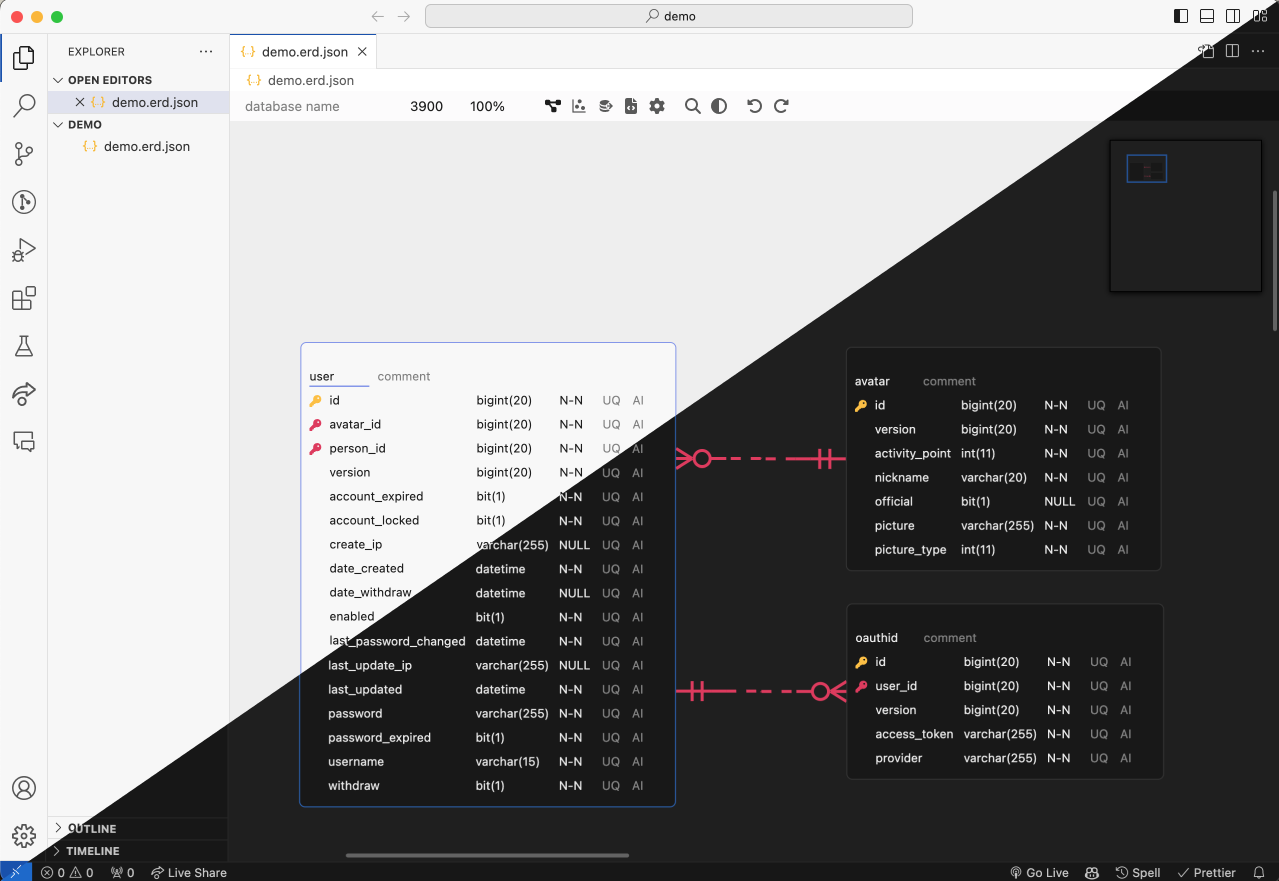
<erd-editor> is a full database-schema editor in a single custom element. It has no
framework dependency and renders into a closed shadow root, so it drops into any page —
React, Vue, Svelte, or plain HTML — without leaking styles either way.
This is the same editor that powers erd-editor.io, the VS Code extension and the IntelliJ plugin.
Features
- Visual schema design — tables, columns, memos, and four relationship cardinalities (zero-one, zero-N, one-only, one-N)
- Import — a
.sqldump, a GraphQL SDL schema from any tool that emits one, a.dbmlfile, or an.amlfile - SQL DDL export — Databricks, MariaDB, MSSQL, MySQL, Oracle, PostgreSQL, Snowflake and SQLite
- Code generation — TypeScript, GraphQL, C#, Java, JPA, Kotlin, Scala, Go, SQLAlchemy, TypeORM, Sequelize, Drizzle, DBML, AML
- Export —
.erd.json,.sql,.png - Force-directed visualization of table relationships
- Quick search, undo / redo, remappable keyboard shortcuts, and a built-in theme builder
- Collaboration hooks — the editor emits and applies actions; you supply the transport
Install
npm install @dineug/erd-editorThe package ships ES modules with its dependencies left as bare imports, so any bundler
(Vite, webpack, Rspack, esbuild, …) resolves, dedupes and tree-shakes them like the rest of
your app. Four features run in shared workers — schema garbage collection, the PNG export, the
automatic table placement and the syntax highlighting — constructed as
new SharedWorker(new URL('./workers/…', import.meta.url)), which those bundlers emit as worker
files beside your chunks; a strict CSP needs worker-src 'self'. Without a bundler, use the UMD
file described under Script tag instead.
Usage
import '@dineug/erd-editor';

const editor = document.createElement('erd-editor');
// the editor fills its container, and a custom element is inline by default
Object.assign(editor.style, { display: 'block', width: '100%', height: '100vh' });
document.body.appendChild(editor);

// load a document without adding an undo entry, then keep it in sync
editor.setInitialValue(localStorage.getItem('my-diagram') ?? '');
editor.addEventListener('change', () => {
  localStorage.setItem('my-diagram', editor.value);
});
setInitialValue('') starts an empty document.
Server-side rendering
Importing the package registers the custom element at module scope, so it needs a DOM and throws in Node. In Next.js, Nuxt, SvelteKit or Astro, reach it from a client-only path:
useEffect(() => {
  import('@dineug/erd-editor');
}, []);
Vite
In development Vite pre-bundles dependencies into its cache directory, and the worker files would then be looked up there rather than beside the package. Exclude the editor packages from that step; a production build needs nothing.
// vite.config.js
export default {
  optimizeDeps: {
    exclude: ['@dineug/erd-editor'],
  },
};
Script tag
dist/erd-editor.umd.js is a self-contained build for a plain <script> tag: every
dependency and all four workers are inside it, and it registers <erd-editor> and exposes the
two file callbacks as window.ErdEditor. It is what unpkg and jsdelivr serve.
<erd-editor style="display: block; width: 100%; height: 100vh"></erd-editor>
<script src="https://cdn.jsdelivr.net/npm/@dineug/erd-editor/dist/erd-editor.umd.js"></script>
The workers travel inside the file as data: URLs, so a strict CSP needs worker-src data:
for this build. Pin a version in the URL for anything beyond a demo.
HTML
<erd-editor system-dark-mode enable-theme-builder></erd-editor>
<script type="module">
  import '@dineug/erd-editor';

  const editor = document.querySelector('erd-editor');
</script>
erd-editor {
display: block;
width: 100%;
height: 100vh;
}API
Attributes
| Attribute | Property | Description |
| --- | --- | --- |
| readonly | readonly | Blocks editing and suppresses the change event. Assigning value, setSchemaSQL(), setSchemaGraphQL(), setSchemaDBML(), setSchemaAML() and clear() are ignored while it is set — load with setInitialValue() instead. Viewport actions and the SQL/code output settings still apply. |
| system-dark-mode | systemDarkMode | Follows the OS color scheme |
| enable-theme-builder | enableThemeBuilder | Shows the built-in theme builder |
Properties
| Property | Description |
| --- | --- |
| value: string | The document as JSON — an .erd.json document (schema). Assigning it loads the document as an edit, so it lands in the undo history; use setInitialValue to load without one. |
Methods
| Method | Description |
| --- | --- |
| setInitialValue(value: string) | Load the initial document. Does not create a history entry, and clears the undo history, so nothing done before the load can be undone or redone onto it. |
| getSchemaSQL(vendor?) | Export DDL. vendor is one of Databricks, MariaDB, MSSQL, MySQL, Oracle, PostgreSQL, Snowflake, SQLite; omit it to use the document's own setting. |
| setSchemaSQL(value: string) | Parse a DDL string and replace the current document with it. Lands in the undo history; an empty string is ignored. |
| setSchemaGraphQL(value: string) | Parse a GraphQL SDL string and replace the current document with it. Object types become tables, scalars map to the document's own dialect, and relationships are read from the fields that point at another type. Lands in the undo history; an empty string is ignored. |
| setSchemaDBML(value: string) | Parse a DBML string and replace the current document with it. Tables, columns, indexes and every Ref spelling are read; a Project, TableGroup or sticky Note is skipped, and text it cannot read loads an empty document rather than being refused. Lands in the undo history; an empty string is ignored. |
| setSchemaAML(value: string) | Parse an AML string and replace the current document with it. Entities, attributes, indexes and every relation arrow are read, in the v2 and the legacy v1 spelling; a check, a struct type and a view are skipped, and text it cannot read loads an empty document rather than being refused. Lands in the undo history; an empty string is ignored. |
| setDiffValue(value: string) | Open the diff viewer against another document. |
| setPresetTheme(options) | Set appearance, grayColor and accentColor. |
| setTheme(theme) | Override individual theme tokens. |
| setKeyBindingMap(map) | Remap shortcuts. edit, stop, search, undo, redo, zoomIn, zoomOut and zoomReset are reserved. |
| getSharedStore(config?) | Returns { subscribe, dispatch, dispatchSync, connection, disconnect, destroy }. subscribe gives you this editor's actions to relay; dispatch applies a peer's. You supply the transport. config is { getNickname?, mouseTracker?, focusTracker? }; both trackers default to true and broadcast this editor's cursor and table focus to peers. |
| focus() / blur() | Move focus in and out of the editor. |
| clear() | Empty the document. |
| destroy() | Tear the editor down and release its listeners, subscriptions and shared stores. |
Events
| Event | Description |
| --- | --- |
| change | The document changed. Debounced, and never fired while readonly. Read editor.value. |
| changePresetTheme | The theme was changed from inside the editor. event.detail carries the new options. |
Syntax highlighting
The SQL and code-generation panels are highlighted by Shiki, in a shared worker of its own. There is nothing to install or register: the worker is built the first time a code panel renders, so a page that opens none never fetches the grammars.
| | |
| --- | --- |
| Languages | SQL, TypeScript, GraphQL, C#, Java, Kotlin, Scala, Go, Python |
| Themes | github-dark, github-light, picked from the editor's light / dark appearance |
Those are exactly the languages the panels emit — the JPA generator emits Java, the SQLAlchemy generator emits Python, the TypeORM, Sequelize and Drizzle generators emit TypeScript, and the DBML and AML generators are highlighted as SQL, the closest grammar shiki ships.
Where SharedWorker is missing — Chrome on Android, Safari before 16.4 — the underlying error is
logged and the panels render as plain text; nothing else is affected. The regex engine is plain
JavaScript, so no host CSP needs wasm-unsafe-eval.
File dialogs
Import and export go through injectable callbacks, so a host without a browser file dialog — an IDE webview, for example — can supply its own. The two are not symmetric: export hands you the finished file, while import only asks for one, and you push the content back in yourself.
import { setExportFileCallback, setImportFileCallback } from '@dineug/erd-editor';

setExportFileCallback((blob, { fileName }) => host.writeFile(fileName, blob));

setImportFileCallback(async ({ type, op, accept }) => {
  const text = await host.pickFile(accept);

  if (op === 'diff') {
    editor.setDiffValue(text);
  } else if (type === 'json') {
    editor.value = text;
  } else if (type === 'sql') {
    editor.setSchemaSQL(text);
  } else if (type === 'graphql') {
    editor.setSchemaGraphQL(text);
  } else if (type === 'dbml') {
    editor.setSchemaDBML(text);
  } else if (type === 'aml') {
    editor.setSchemaAML(text);
  }
});
Dispatch on every type you handle and ignore the rest. Assigning value clears the
document before it parses, so routing a payload there that is not an .erd.json document —
through a catch-all else, or because a type added later fell through — empties the
diagram instead of importing anything. accept carries the extensions for that type
(.json, .sql, or .graphql,.gql,.graphqls), ready to hand to a host file dialog.
Left unset, the editor uses the browser's own download and file-picker behavior.
Headless replica
A second entry point runs the document store with no DOM, for hosts that need to apply an action stream and serialize the result off the main thread:
import { createReplicationStore } from '@dineug/erd-editor/engine.js';

// `toWidth` measures text for layout — a worker has no DOM, so you supply it
const store = createReplicationStore({ toWidth });

store.setInitialValue(savedJson);
store.on({ change: () => persist(store.value) });
store.dispatch(actions); // actions relayed from a live editor's shared store
Development
This package is the editor core of the erd-editor monorepo; work on it from a workspace checkout.
pnpm --filter @dineug/erd-editor dev            # builds workspace deps, then a dev server
pnpm --filter @dineug/erd-editor dev:storybook  # component playground
pnpm exec vp run --filter @dineug/erd-editor --fail-if-no-match test
pnpm --filter @dineug/erd-editor e2e            # Playwright
Documentation
Issues
Found a bug or want a feature? Open an issue.
License
MIT © SeungHwan-Lee