
@ditpsoftware/bq-lens
v0.0.5
Published
Developer overlay for Blueriq-driven Angular applications.


Readme
BqLens
A developer overlay for Angular applications driven by Blueriq — the kind where the UI is not authored in Angular templates, but composed at runtime from JSON the runtime sends down.
Made by Roel Berends — [email protected] Repository — bitbucket.org/ditpsoftware/bq-lens
Contents
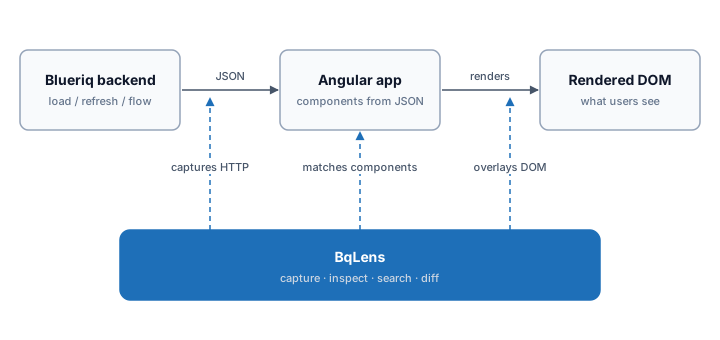
The problem
Blueriq-driven apps invert the usual Angular relationship between code and UI:
- The rendered DOM doesn't match anything you can
Cmd+Clickto. Components are picked from a registry against incomingElementtypes. What's on screen is the result of a JSON tree the server emitted, not a template you can grep for. - Angular DevTools shows the host components, not the Blueriq elements. You can see which Angular component rendered a node, but not which Blueriq element it was rendering, what its
keyis, whatcontentStyledrove the styling decision, or what the server actually sent. - The HTTP traffic is the source of truth, but it's opaque. Every
/load,/refresh,/start_flowcarries a Blueriq response shaping the next render. To understand a bug you usually need to read those responses — and the browser's network tab gives you raw JSON with no context. - Reproducing a state in Storybook is a chore. You see a buggy element on the page, you want it isolated in a story, and there's no shortcut between "this element on screen" and "a CSF3 story I can paste into the Storybook tree."
- Nothing connects an element to its surroundings. Walking ancestors, finding all fields inside a section, listing every button on the page — these are common questions with no good answer in the standard tooling.
In short: the gap between the DOM you see, the Blueriq element that produced it, and the server payload that produced that is wide, and bridging it manually slows everything down.
How BqLens solves it
BqLens is a single floating panel injected into the app at runtime (dev only). It threads three views together — DOM, Blueriq element model, and HTTP traffic — so a developer can move between them in one or two clicks.
Element inspector (the picker)
Press Alt+P and click anywhere. BqLens walks up the DOM, finds the nearest Angular host that renders a Blueriq element, and shows you:
- The element's
key,type,functionalKey, the Angular component selector that rendered it (soCmd+Clickdoes work — on the right thing), the Angular class name, and the@BlueriqComponentselector that picked that class for this element. Selector and class capture both depend on dev-mode prerequisites — see Build-config requirements. - Five views on that element, switchable via tabs:
- Template — the Angular component template generated from this element via
JsonToTemplatesComponent(paste-ready into a real component). - JSON — the cache-enriched server payload for this element and its descendants, fully resolved.
- Story — a Storybook CSF3 story for this element, with a configurable providers import path. Drop straight into the Storybook tree.
- Insights — typed analysis: fields with their data types and values, buttons with their actions, validation messages, table summaries. Picking a disabled or read-only element surfaces a Why blocked? section with a plain-English row per blocker (read-only flag set, required-empty, blocking validation, precondition gate, validate-on-click). A Looks-wrong section flags high-confidence authoring smells (empty captions, required-but-readonly, refresh on a read-only field, duplicate labels, validations without messages).
- Structure — the Blueriq element tree rooted at the inspected element, with type icons, descendant counts, and click-to-navigate. A History subsection lists each cached element's last value transitions (timestamp, before → after, originating capture id) plus its source URLs and the captures that touched it — surfacing the bounded provenance rings the cache already collects.
- Template — the Angular component template generated from this element via
- A breadcrumb trail of ancestor Blueriq elements (not Angular components — Blueriq elements), each clickable.
- Back / forward navigation history (20-deep ring buffer), so jumping into a child and back is a key away.
- A scroll-following overlay so the highlight stays anchored as the user scrolls the page underneath.
When the live DOM doesn't have the element anymore (e.g. it scrolled out, was unmounted, or you got there via search), BqLens falls back to the cached server payload and synthesizes enough of an element to keep the inspector working.
HTTP capture & diff
A DevInterceptor sits in front of every Blueriq request. The capture list shows method, URL, status, request body, response body, and a status-class filter (2xx / 4xx / 5xx). For every POST /load (and similar), the response is warmed into an in-memory element cache — a flat map from key to enriched element JSON, with children resolved into nested objects.
That cache is what makes everything else fast: the inspector reads from it, the search reads from it, the structure tree reads from it. If it's not in the cache, BqLens falls back to live DOM serialization and merges the result back in.
A diff mode lets the developer pick two captures and answer "what changed between this refresh and the last one?" in three views, available as a tab strip at the top of the diff modal:
- Structure (default) — field-level diff built on the typed analysis:
field <name> · editable: true → false,table <name> · rowCount: 5 → 0, sections appearing or disappearing, page-context attribute changes. Match keys are functional:functionalKeyfor fields,captionfor buttons and links,displayNamefor sections,namefor tables. - Semantic — cache-key-level: which elements appeared, disappeared, or had attribute changes, regardless of how their identity reads to a human. Useful when the structural view shows nothing but you can see something moved.
- Text — raw JSON line-by-line diff with hunks. Last-resort view for whitespace, ordering, or metadata changes the structural views deliberately skip.
Element search
Alt+S opens a fuzzy search across every cached element. Each element contributes a weighted set of search fields — display name, name, caption, question text, functional key, type, content style, plain text, styles, values — so typing "voornaam" finds every field whose label, name, or value contains that word, ranked by field weight. Selecting a result jumps the inspector to that element, regardless of whether it's still on screen.
Page view
Alt+G builds a full page snapshot: the entire current page's template (via JsonToTemplatesComponent), its JSON, its element tree, and its captured analysis — opened in a large modal view. Useful when "show me what the runtime thinks is on screen right now" is the question.
Internals (self-diagnostics)
A separate Internals view, opened from the action bar next to Pick / Page / Search, is bq-lens looking at itself. It surfaces live counters (cached elements, tombstones, parent links, slow merges, integrity violations, template memo size and hit rate, evictions), a filterable cache-event log, a storage-layer event log, and on-demand Run audit / Force rehydrate actions. Every counter, button, and filter carries a plain-language tooltip so the panel explains itself without external docs.
The same view exposes Export bug bundle — one click downloads a single JSON file with the captures, the (internals-stripped) cache snapshot, the structure graph, the counters, the cache-event ring, and the current page tree. Hand it to a teammate and they can reproduce what you're seeing without sharing your screen. The bundle inherits the captures' sensitivity (response bodies are included verbatim), so treat it the same way you'd treat the captures themselves.
Activation
Alt+D— toggle the panelAlt+P— element pickerAlt+G— page viewAlt+S— element searchAlt+E— jump to last error captureEsc— cancel the picker, or close the topmost overlay (one per press: help / treemap / diff / search / large view / inspector)↑/↓— previous / next capture while a capture is selectedddddd(fivedpresses outside a text field, in production) — toggle the dev-mode session flag
Shortcuts match the physical key, so they work with macOS Option too. They are ignored while focus is in a text field, select or rich-text editor — Option+E there still types an accent (é) — and with Ctrl/Cmd or AltGr held, so international layouts keep their AltGr characters.
The floating tab is draggable; the side it docks on is persisted to localStorage, as is the picker's story-providers import path.
Installation
npm install @ditpsoftware/bq-lensThen register the module in your app's root module — see Configuration for the full options:
import { BqLensModule } from '@ditpsoftware/bq-lens';

@NgModule({
  imports: [
    BqLensModule.forRoot(),  // production flag and Blueriq base URL auto-detected
  ],
})
export class AppModule {}
Both production and blueriqBaseUrl are auto-detected:
productiondefaults to!isDevMode()from@angular/core.blueriqBaseUrlis read from the publicBackend.toUrl('')API of@blueriq/angular/backend/common— i.e. whatever URL the host configured onV2BackendModule.forRoot({ baseUrl }). IfBackendisn't in DI, BqLens falls back to sniffing outgoing HTTP traffic for the first request matching a Blueriq v2 URL shape (/api/v2/session/{id}/…,/api/v2/start…) and replays any pre-learning requests once the prefix is locked in. The value may be absolute or relative and matches on path-segment boundaries (/blueriqdoes not match/blueriq-portal). Each Blueriq session's ownbaseUrl(from theSessionRegistry) is accepted automatically.
Privacy default in production. While production is true and the panel is locked, BqLens captures nothing and never opens IndexedDB — Blueriq bodies (form values, CSRF tokens) are neither held nor persisted. Unlocking with five d presses (remembered per tab in sessionStorage) starts capture from that moment; traffic before the unlock is not recorded. Locking it again (five d presses) drops everything recorded meanwhile — captures, the element cache and this tab's IndexedDB records.
Plain BqLensModule (without forRoot()) also works and uses the defaults above, but only forRoot() registers the Blueriq session-lifecycle hook that keeps the element cache in step with deltas that bypass HttpClient (file-upload responses).
Pass them explicitly only for unusual setups — multi-runtime hosts, non-standard build configs, or test harnesses that don't register a Backend.
Once Angular reaches its first stable tick (or after 2 s, for apps that never stabilize) BqLens auto-bootstraps and appends a floating tab to document.body. Press Alt+D (or click the tab) to open the panel.
Prerequisites
- Angular 20, 21 or 22 runtime (peer-declared in
package.json; built with Angular 22, linkable by Angular 20+). @blueriq/angularand@blueriq/core0.18, 0.19, 0.20, 0.22 or 0.23 — from the Blueriq Artifactory; consumers need their.npmrcconfigured for the@blueriqscope.- No install flags needed with Blueriq 0.20 or newer (0.20 declares Angular 19.2–21 peers, 0.22/0.23 declare Angular 20.3–22, both overlapping bq-lens's Angular 20–22). With Blueriq 0.18.x, which declares Angular 15–19 peers, add
legacy-peer-deps=trueto your project's.npmrconce so everynpm installresolves cleanly.
Icons are bundled inline as SVG — no Font Awesome required. The extraSections.icon field accepts a name from the bundled icon registry; see bq-icon.component.ts for the available names.
Recommended dev-mode build config
The inspector popup surfaces the Blueriq selector (e.g. field[contentStyle=hint]) and the Angular component class name for each picked element. Both are captured at runtime from a console.table dump that @blueriq/angular emits inside provideCompiledComponentResolver. The dump is gated by isDevMode() && config.logComponents and only fires once Angular dev mode is fully active.
For these rows to appear, the host app's dev configuration must satisfy:
- Blueriq config — leave
logComponentsat its default (true). Setting it tofalsesilences the dump and bq-lens has no way to recover the data. - No
enableProdMode()— typically gated behindif (environment.production), but worth double-checking. - Angular CLI build flags —
optimization,buildOptimizer, andaotmust all befalsefor the dev build configuration. The Angular build optimizer statically foldsif (isDevMode())blocks in third-party libraries, dead-code-eliminating the dump at build time — even whenenvironment.productionisfalseandenableProdMode()is never called. The runtime check and the build-time strip are independent; both must be satisfied.
To verify dev mode is active in the running app, open the browser console and evaluate:
typeof ngDevMode !== 'undefined' && ngDevModeIf that returns falsy, the build optimizer has stripped the dump and the bq-lens "Blueriq selector" / "Angular class" rows will stay empty. Fix by overriding the offending flags for the dev configuration in angular.json:
{
  "configurations": {
    "development": {
      "optimization":    false,
      "buildOptimizer":  false,
      "aot":             false
    }
  }
}
Class names rely on the same dev-mode guarantee: minified builds mangle cls.name, which is what bq-lens uses as the lookup key. bq-lens is a dev-only overlay, so this is acceptable — but it is the reason a misconfigured build can show garbage characters in the "Angular class" row.
Offline / vendored install
For air-gapped environments where the npm registry isn't reachable, every release is also packed as a .tgz and committed under releases/ in this repo. Drop the tarball into the host app's vendor/ folder and reference it via npm's file: protocol:
mkdir -p vendor
curl -L -o vendor/ditpsoftware-bq-lens-0.0.1.tgz \
  https://bitbucket.org/ditpsoftware/bq-lens/raw/main/releases/ditpsoftware-bq-lens-0.0.1.tgz
{
"dependencies": {
"@ditpsoftware/bq-lens": "file:./vendor/ditpsoftware-bq-lens-0.0.1.tgz"
}
}Then npm install. Commit the .tgz so CI and other developers don't depend on the download being available at install time. To upgrade, download the new version's .tgz, replace the file in vendor/, bump the version in package.json, then run npm install file:./vendor/ditpsoftware-bq-lens-<new-version>.tgz (the explicit path forces npm to refresh the lockfile integrity hash even if the version string is unchanged).
Configuration
The minimum to mount the panel — no arguments, all fields auto-detected:
BqLensModule.forRoot(),That's enough — the panel auto-bootstraps once Angular reaches its first stable tick (or after 2 s at the latest) and appends itself to document.body. No template change is required in the host app. production defaults to !isDevMode() and blueriqBaseUrl resolves from Backend.toUrl('') (or, failing that, from sniffed traffic).
If you'd rather control the mount point yourself (e.g. to put the panel inside a specific layout container, or to keep it next to a sibling overlay), drop the tag once into the host's root template (typically app.component.html):
<bq-lens-panel></bq-lens-panel>When the tag is present, bq-lens uses it; when it's absent, the auto-bootstrap kicks in. The panel uses position: fixed, so the parent doesn't matter for layout — keep it at the root level rather than inside a routed view so the panel survives navigation.
Add fields as you need them. A fully populated call looks like this:
import { NgModule } from '@angular/core';
import { environment } from '../environments/environment';
import { BqLensModule } from '@ditpsoftware/bq-lens';
import { MyThemeSectionComponent } from './app/my-theme-section.component';

@NgModule({
  imports: [
    // …
    BqLensModule.forRoot({
      // production and blueriqBaseUrl auto-detect; uncomment only if you need to override:
      // production:     environment.production,
      // blueriqBaseUrl: environment.blueriqBaseUrl,
      title:          'My BqLens',
      tabLabel:       'LENS',
      primaryColor:   '#01689b',
      secondaryColor: '#cce0f1',
      flatCorners:    false,
      extraSections: [
        { label: 'Theme', icon: 'palette', component: MyThemeSectionComponent, initiallyOpen: false },
      ],
    }),
  ],
})
export class AppModule {}
BqLensConfig accepts the following fields:
| Field | Type | Purpose |
|---|---|---|
| production | boolean? | When true, the panel is gated behind a session-storage flag and a five-d keystroke escape hatch, and nothing is captured or persisted until it is unlocked. When false, always on. Defaults to !isDevMode() from @angular/core. |
| blueriqBaseUrl | string? | Root URL the interceptor watches — captures only fire for requests under this prefix. Defaults to Backend.toUrl('') from @blueriq/angular/backend/common, with URL-pattern sniffing as a last resort. Override for multi-runtime hosts. |
| title | string? | Header text. Defaults to 'BqLens'. |
| tabLabel | string? | Floating tab label, trimmed to 4 characters. Defaults to 'DEV'. |
| primaryColor | string? | Initial primary color (any CSS color). Mutable at runtime via DevColorsService. |
| secondaryColor | string? | Initial secondary color (any CSS color). Mutable at runtime via DevColorsService. |
| flatCorners | boolean? | When true, every element inside the panel renders with border-radius: 0. Useful for hosts whose design language is square/flat. Defaults to false. |
| extraSections | BqLensSectionConfig[]? | Host-defined collapsible sections rendered above the main tab switcher. See below. |
Extension slots
extraSections lets a host app inject arbitrary collapsible sections into the panel — theme switchers, feature-flag toggles, environment selectors, mock-data switchers, anything app-specific. Each entry is { label, icon?, component, initiallyOpen? }; BqLens owns the section frame (header, chevron, open/close state) and renders the host's component inside via *ngComponentOutlet. The component is fully Angular and can inject any service from the host's DI tree — BqLens itself stays domain-agnostic.
Colors
BqLens exposes exactly two color knobs: primary and secondary. Everything else — hover tints, focus rings, scrollbars, chip surfaces, the pulse animation on the picker — is derived from these two via CSS color-mix() so a single setter recolors the whole panel coherently. Default fallbacks match the inspect theme: primary #01689b, secondary #cce0f1.
Plumbing
| Layer | Name | Purpose |
|---|---|---|
| CSS custom property | --bq-lens-primary | Runtime primary color. Written to :root. |
| CSS custom property | --bq-lens-secondary | Runtime secondary color. Written to :root. |
| SCSS alias | v.$primary | var(--bq-lens-primary, <fallback>) — use this in component SCSS. |
| SCSS alias | v.$secondary | var(--bq-lens-secondary, <fallback>). |
| SCSS derived | v.$primary-light | color-mix(in srgb, $primary 12%, white) — pale hover/highlight bg. |
| SCSS derived | v.$primary-tint-sm/md/lg | color-mix(... transparent) at 15% / 35% / 60% — focus ring, scrollbar tints. |
| SCSS derived | v.$primary-dark | color-mix(... black 5%) — chip border. |
| SCSS derived | v.$secondary-dark | color-mix(... black 10%) — chip border. |
Setting colors
At module setup — pass them to forRoot(...):
BqLensModule.forRoot({
  ...environment,
  primaryColor:   '#01689b',
  secondaryColor: '#cce0f1',
}),
DevColorsService reads the config at construction and writes both CSS custom properties to document.documentElement immediately.
Per-environment — declare the colors on each environment object and spread them in. Each build target ships pre-colored — no flash of inspect-blue at boot:
// src/environments/environment.ts
export const environment = {
  // …
  bqLensPrimary:   '#01689b',  // inspect blue
  bqLensSecondary: '#cce0f1',
};

// src/environments/environment.bvm.ts
export const environment = {
  // …
  bqLensPrimary:   '#e17000',  // BVM orange
  bqLensSecondary: '#f6d4b2',
};
// app.module.ts
BqLensModule.forRoot({
...environment,
primaryColor: environment.bqLensPrimary,
secondaryColor: environment.bqLensSecondary,
}),At runtime — inject DevColorsService and call any setter:
constructor(private colors: DevColorsService) {}

this.colors.setPrimary('#42145f');
this.colors.setSecondary('#c6b8cf');
this.colors.setColors('#42145f', '#c6b8cf');  // either arg is optional
Every consumer of the CSS variables (and every color-mix() derived from them) repaints in the same frame.
Limits
This is not a theming engine — no named themes, no presets, no palettes, just two colors. If the host has its own ThemeService, the host wires up its theme switches to call DevColorsService.setColors(...) itself. For one-off tinted variants, derive them via color-mix() in SCSS rather than expanding the API.
color-mix() is Baseline 2023 (Chrome 111+, Firefox 113+, Safari 16.2+) — fine for a dev-only target.
Storage keys
BqLens persists a small amount of UI state to localStorage and sessionStorage under the bq-lens-* namespace. To reset panel state, clear these keys in DevTools → Application → Storage:
| Key | Storage | Purpose |
|---|---|---|
| bq-lens-panel | session | Whether the panel is enabled in this tab (production gate; set by the ddddd escape hatch). |
| bq-lens-panel-side | local | Which edge (left / right) the floating tab docks on. |
| bq-lens-panel-tab-top | local | Vertical position (px) of the floating tab. |
| bq-lens-sections | session | Open/closed state of extraSections per tab. |
| bq-lens-captures | session | Persisted HTTP capture log (last 10 entries kept on quota errors). |
| bq-lens-dismissed-errors | session | IDs of captures the user dismissed from the error banner; prevents the same error from re-appearing across reloads. |
| bq-lens-story-providers | local | Last-used providers import path for generated CSF stories. |
Why a single panel
Each piece of the above could exist as a separate Chrome extension, or a separate dev tool, or a separate npm package. The reason they're one panel:
- The element cache is shared. Capturing once feeds the inspector, the search, the structure tree, and the diff. Splitting it across tools would mean re-warming for every consumer.
- Navigation is shared. Picker → child → breadcrumb → search result → cached element are all the same operation against the same state, with the same back/forward history.
- The panel is dev-only. Tree-shaken out of production builds (gated by
environment.productionplus the session flag), so size is not a primary concern; coherence is.
The internal architecture mirrors that:
- A
DevInspectorService(component-scoped) owns inspector state — selected element, view mode, history, breadcrumbs, scroll-follow lifecycle. - A
DevElementCacheService(root-scoped) owns the element cache and its enrichment. - A
DevPickerServiceowns DOM ↔ Blueriq element resolution, the visual overlay, and ancestor walks. - A
DevCaptureServiceowns the HTTP capture log and persistence. - A
DevFormatServiceowns syntax highlighting and template formatting. - A
DevSearchServiceowns weighted fuzzy search. - A
DevColorsServiceowns the two runtime CSS custom properties (--bq-lens-primary,--bq-lens-secondary).
The component is the orchestrator; the services are independent enough to test alone but kept together because they share a single user-facing surface.
Contributing
For working on bq-lens itself — editing source, watching changes flow into a host app, and cutting a release. Consumers don't need any of this: see Installation.
Local setup
nvm use 24                              # ng-packagr 22 requires Node ^22.22.3 / ^24.15 / >=26
npm install                             # @blueriq/* peers come from the Artifactory; .npmrc needs @blueriq scope auth
There is no ng serve for the library itself — it's not an app, it's a package. Iteration happens by building into dist/ and consuming dist/ from a host app that does run ng serve.
Live-development loop
The fastest inner loop: ng-packagr in watch mode + a host app pointed at dist/ via a sibling-repo symlink. Edits in src/lib/ rebuild in 1–2s and the host's dev server picks them up on the next change-detection tick.
This setup is for development only — never commit the symlinked dependency reference into the host's package.json. Distribution to consumers always goes through the npm-published package.
1. In bq-lens/ — start the watcher:
npm run watch # rebuilds dist/ on every save2. In the host app (sibling directory, e.g. ../my-app/) — point @ditpsoftware/bq-lens at dist/:
npm install file:../bq-lens/distThis rewrites the host's package.json to "@ditpsoftware/bq-lens": "file:../bq-lens/dist" and symlinks node_modules/@ditpsoftware/bq-lens → ../bq-lens/dist.
3. In the host's angular.json — add preserveSymlinks: true to the build target's options. Webpack would otherwise resolve bq-lens's peer deps from bq-lens/node_modules/; with this flag, it resolves them from the host's own node_modules like any normal package. The flag is a no-op for non-symlinked installs, so it's safe to leave on permanently:
{
  "projects": {
    "<your-app>": {
      "architect": {
        "build": {
          "options": {
            "preserveSymlinks": true
          }
        }
      }
    }
  }
}
4. Run the host's dev server. Saves in bq-lens/src/lib/ rebuild dist/; the host's HMR picks them up.
Storybook in a symlinked dev setup
preserveSymlinks: true keeps ng serve and ng build happy, but Storybook's webpack pipeline does not pick that flag up the same way. From bq-lens's dist files, webpack walks up the filesystem and lands inside bq-lens/node_modules/@blueriq/angular — bq-lens's own dev install — which can't resolve @ngrx/store/@ngrx/effects from there. The bundle fails before any bq-lens code runs.
This is dev-only. Consumers who install bq-lens via npm install @ditpsoftware/bq-lens (registry or .tgz) get only dist/ content and webpack walks straight up to the host's node_modules — no sibling node_modules/ to fall into, no error.
If you're symlinked and need Storybook to bundle, stub out @ditpsoftware/bq-lens in the host's storybook config. A no-op BqLensModule is enough — Storybook stories don't exercise the panel anyway:
// .storybook/bq-lens-stub.ts
import { ModuleWithProviders, NgModule } from '@angular/core';

@NgModule({})
export class BqLensModule {
  static forRoot(_config?: unknown): ModuleWithProviders<BqLensModule> {
    return { ngModule: BqLensModule };
  }
}
// .storybook/main.ts
import * as path from 'path';
webpackFinal: async (config) => {
config.resolve = config.resolve || {};
config.resolve.alias = {
...(config.resolve.alias || {}),
'@ditpsoftware/bq-lens': path.resolve(__dirname, 'bq-lens-stub.ts'),
};
return config;
},Add ./bq-lens-stub.ts to the include array of .storybook/tsconfig.json so Angular's compiler picks it up.
The alternative — install via the tarball under releases/ instead of symlinking — sidesteps this entirely.
To return to the published package:
npm install @ditpsoftware/bq-lensTip: wrap step 2 and the return-to-published command in two npm scripts on the host side (e.g.
bqlens:link/bqlens:unlink) so switching is one command.
Cutting a release
# bq-lens/
# 1. Bump version in package.json
#    (semver — public-api.ts breakage = major; new exports = minor; fixes = patch)
npm run release                          # build → pack into releases/ditpsoftware-bq-lens-<version>.tgz

# 2. Publish to npm
cd dist
npm publish --access public
Commit the source changes, the version bump, and releases/ditpsoftware-bq-lens-<version>.tgz. Tag the commit v<version> and push — the Bitbucket pipeline verifies the package version matches the tag and rebuilds from source.
The committed tarball under releases/ is the offline-install fallback (see Offline / vendored install); npm is the default distribution channel.