
@dkolosovsky/specflow
v0.4.0
Published
A microframework for spec-driven development. Epic → Milestone → Wave → Slice with strict TDD execution.
Downloads
13

Maintainers
 dkolosovsky
Readme
specflow
📖 Documentation: kolosochek.github.io/specflow — Why · Quick start · Concepts · Benefits
A microframework for spec-driven development. Formalize a strategic theme once, decompose it into reviewable units of work, and let humans or agents execute it under a strict TDD contract — without ever drifting from the spec.
Version: v0.4.0
Status: Stable. Epic → Milestone → Wave → Slice grammar, CLI, tRPC HTTP server, React + MUI kanban board, agent orchestration (tmux + node-pty + browser xterm), production deployment at HH Pipeline.
Install
npm install --save-dev @dkolosovsky/specflow
npx specflow init
# → backlog/ + backlog/templates/{epic,milestone,wave,slice}.md created
The npm name is scoped (
@dkolosovsky/specflow) because the unscopedspecflowwas rejected by the registry as too similar to the unrelatedspec-flowpackage. The CLI binary is stillspecflow.
Then drive the lifecycle:
npx specflow create epic "Onboarding"
npx specflow create milestone E001 "Auth flow"
npx specflow create wave E001/M001 "Cookie hardening"
npx specflow create slice E001/M001/W001 "Set SameSite"
npx specflow checklist E001/M001/W001 --promote
npx specflow promote E001/M001/W001
Full walkthrough: docs.kolosochek.github.io/specflow/quick-start.
To run the kanban UI + tRPC server (cloned-repo path):
git clone https://github.com/kolosochek/specflow.git && cd specflow
npm install
npm run dev    # tRPC server on :3030, Vite on :5173 with HMR
# open http://localhost:5173 → live kanban for backlog/
Lifecycle in pictures
specflow walks every unit of work through five execution states. The same kanban board renders all of them. Each card is a wave; each column is a state. The screenshots below come from the project's own dogfooded backlog.
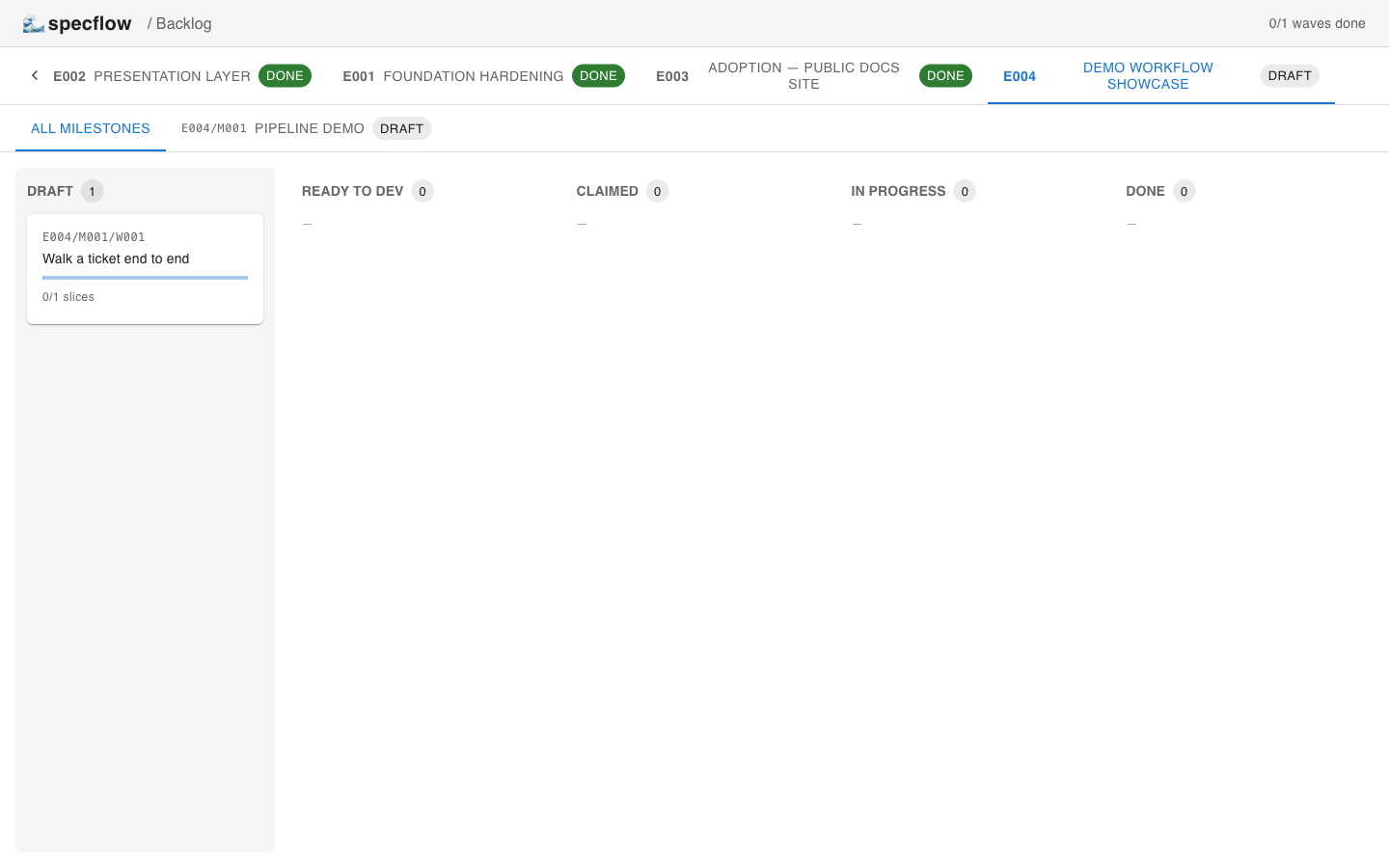
1. draft — wave just created
specflow create wave … writes a wave_defined-shaped Markdown file from the template and lands the card in the leftmost column. The body is empty section headings — the author fills them in before promoting.
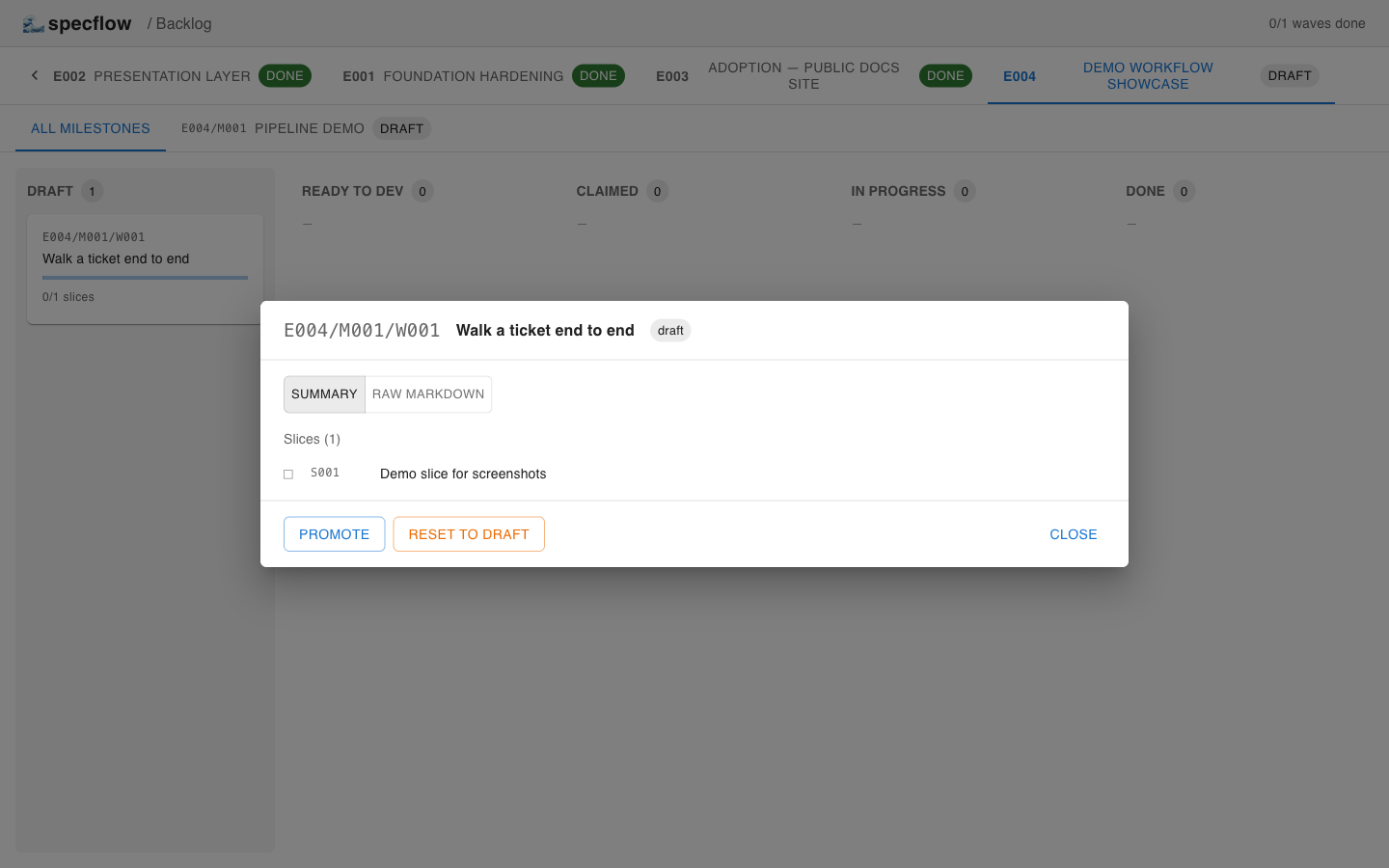
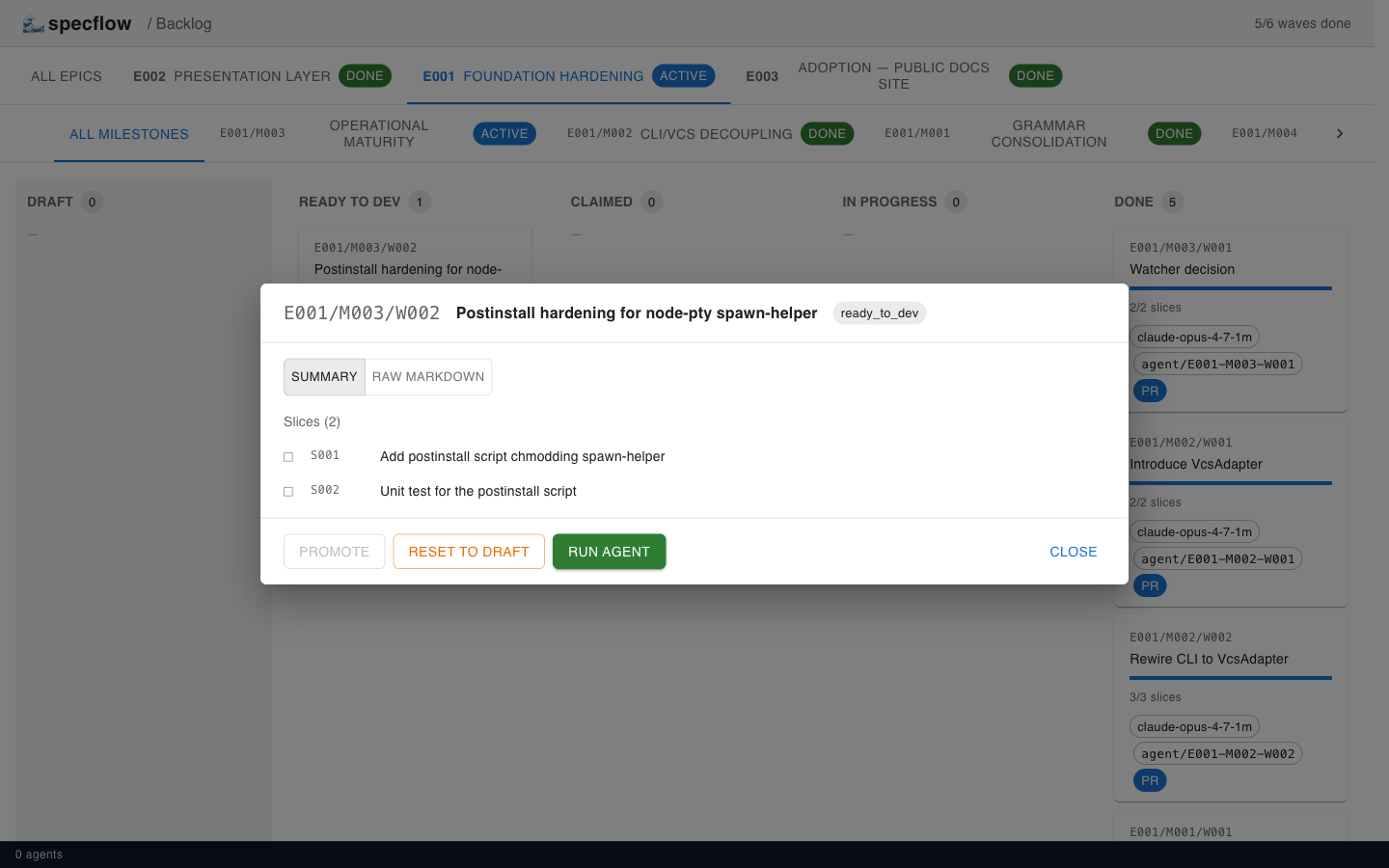
The wave detail modal exposes Promote and Reset to draft — the same gate-checked operations the CLI runs.
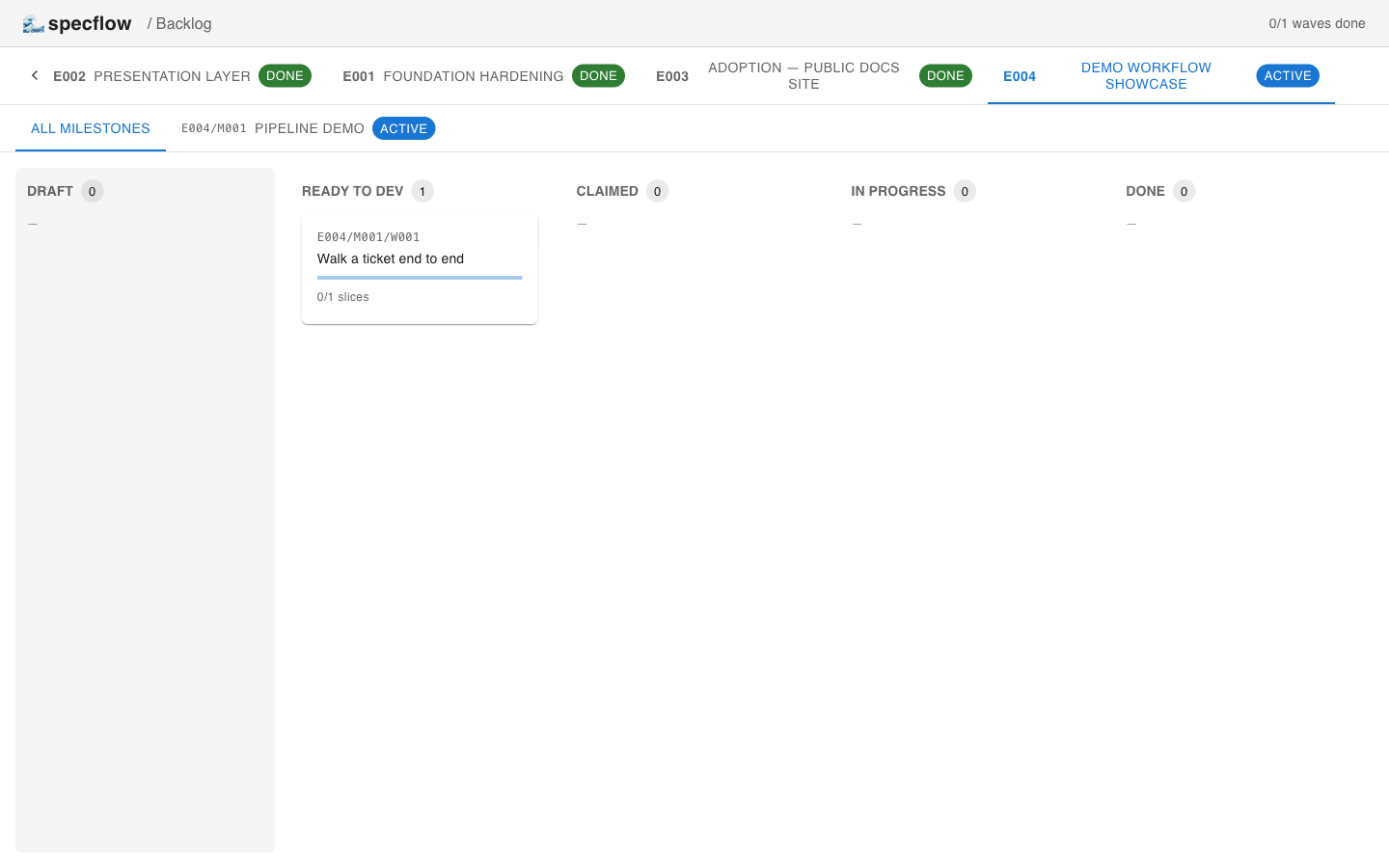
2. ready_to_dev — readiness gates passed
promote checks: wave content wave_defined, every child slice slice_defined, ≥1 child slice. Failing any condition returns a structured error with no DB mutation. When all pass, the wave moves to ready_to_dev and a green Run agent button appears.
3. claimed — an agent picks it up
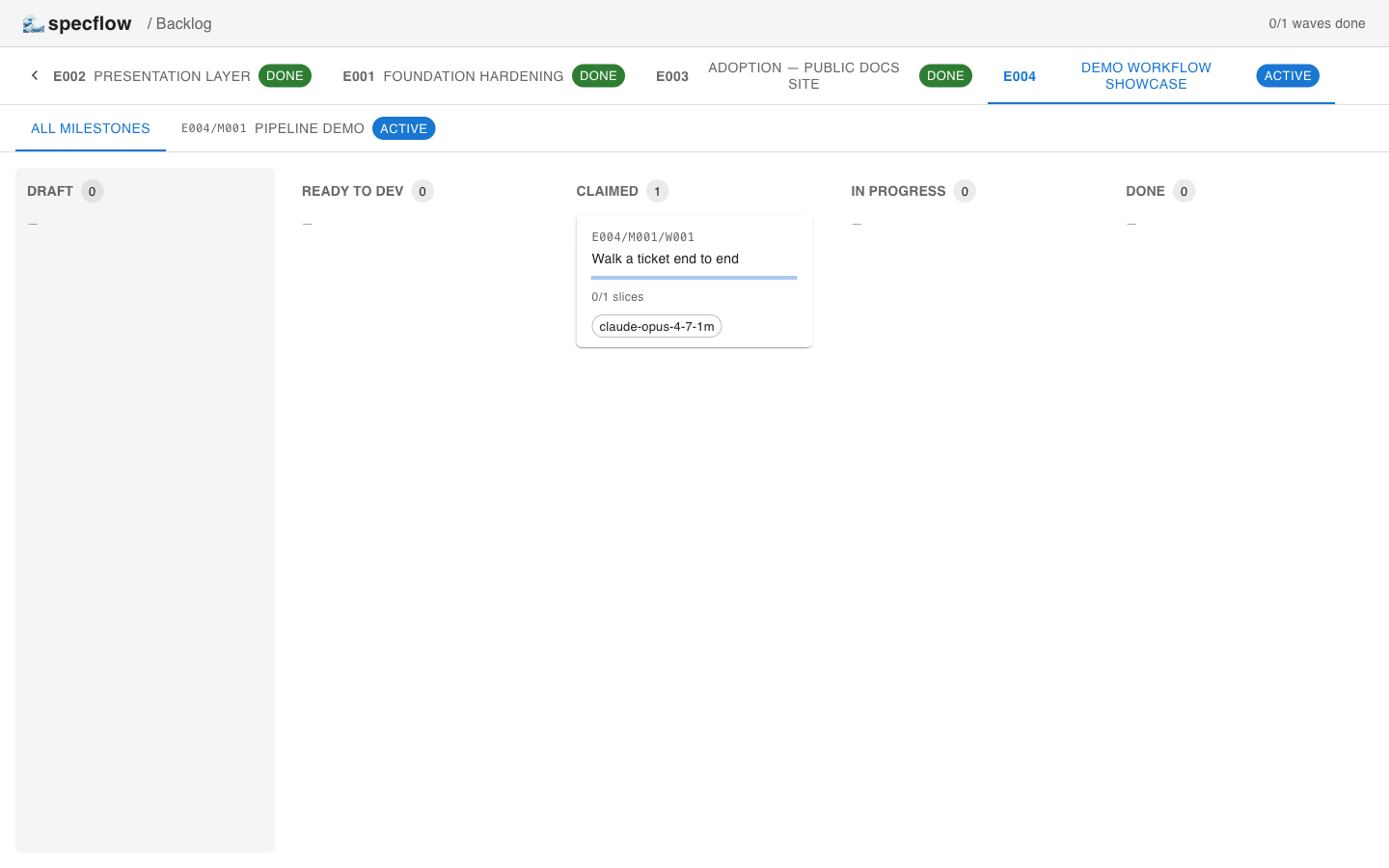
specflow claim <wave-id> <agent-id> records the actor on the card and moves the wave to claimed. The card now shows the agent's identifier (claude-opus-4-7-1m here).
4. in_progress — the agent runs
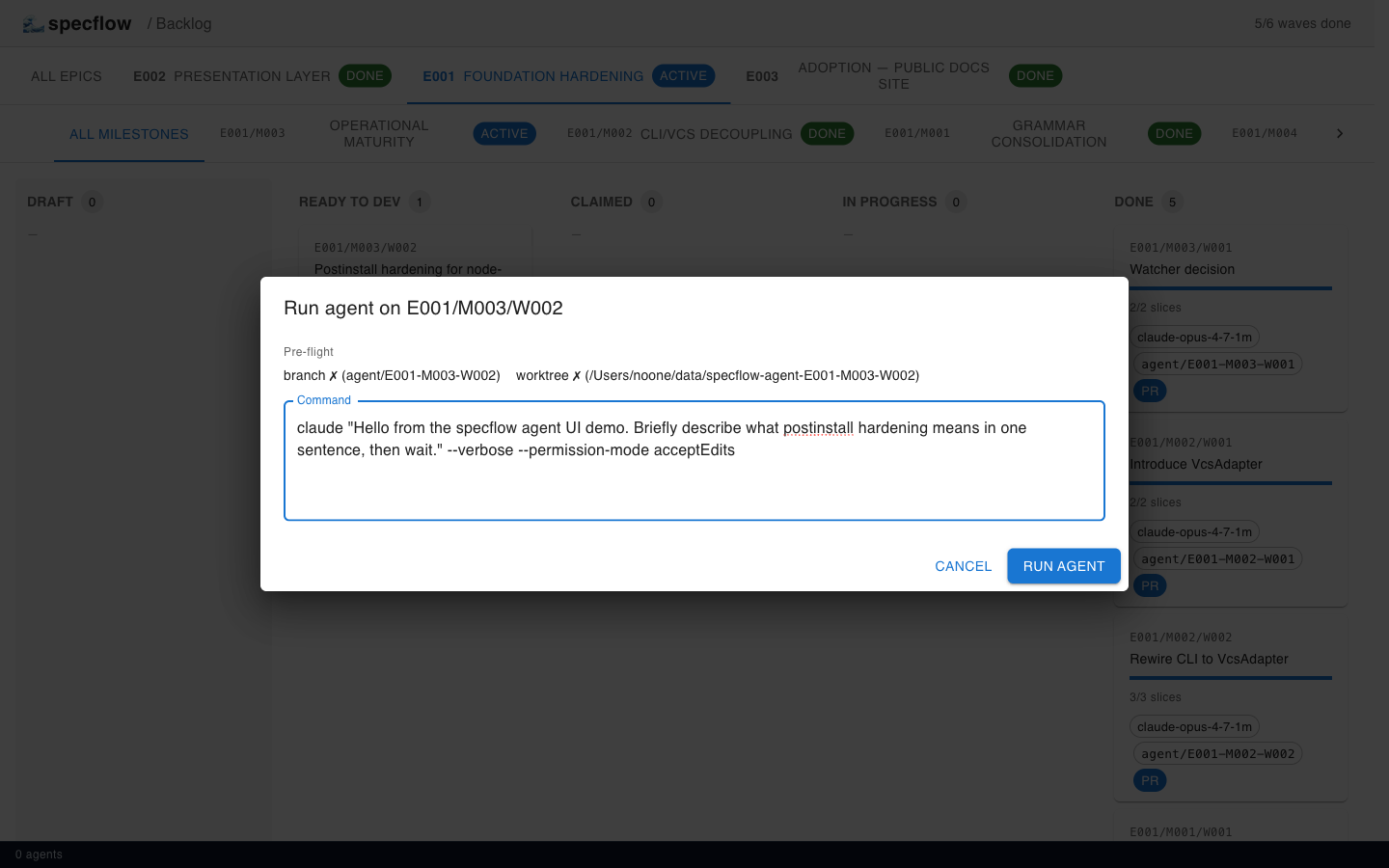
Clicking Run agent opens the CommandEditor: it shows the spawn pre-flight (branch + worktree existence, suggested claude command) and lets you tweak the launch command before spawning.
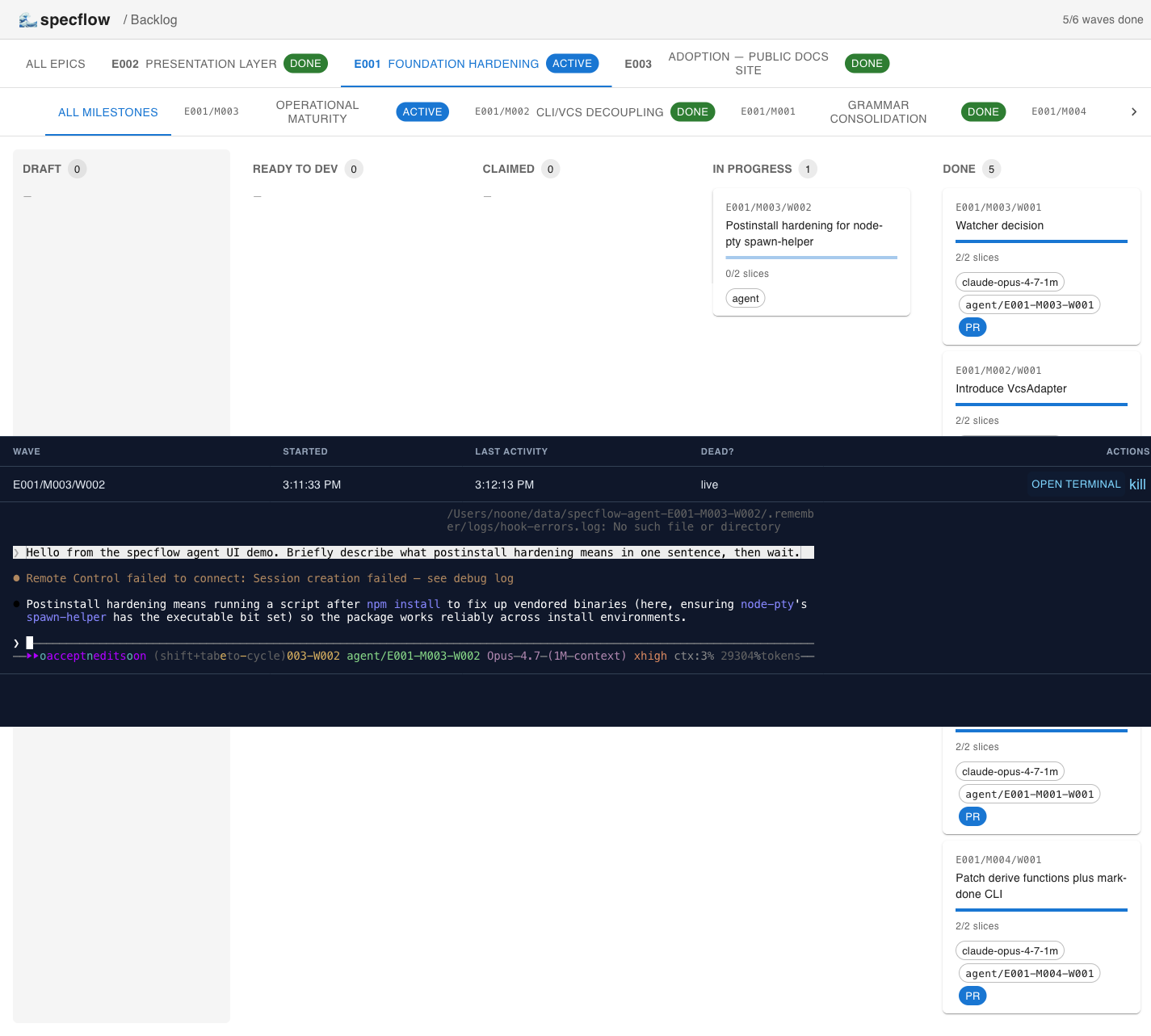
Submitting the command creates a dedicated git worktree, spawns the binary inside a tmux session, and pipes the pty to the browser's xterm.js terminal via WebSocket. The agent drawer at the bottom of the UI tracks every live session.
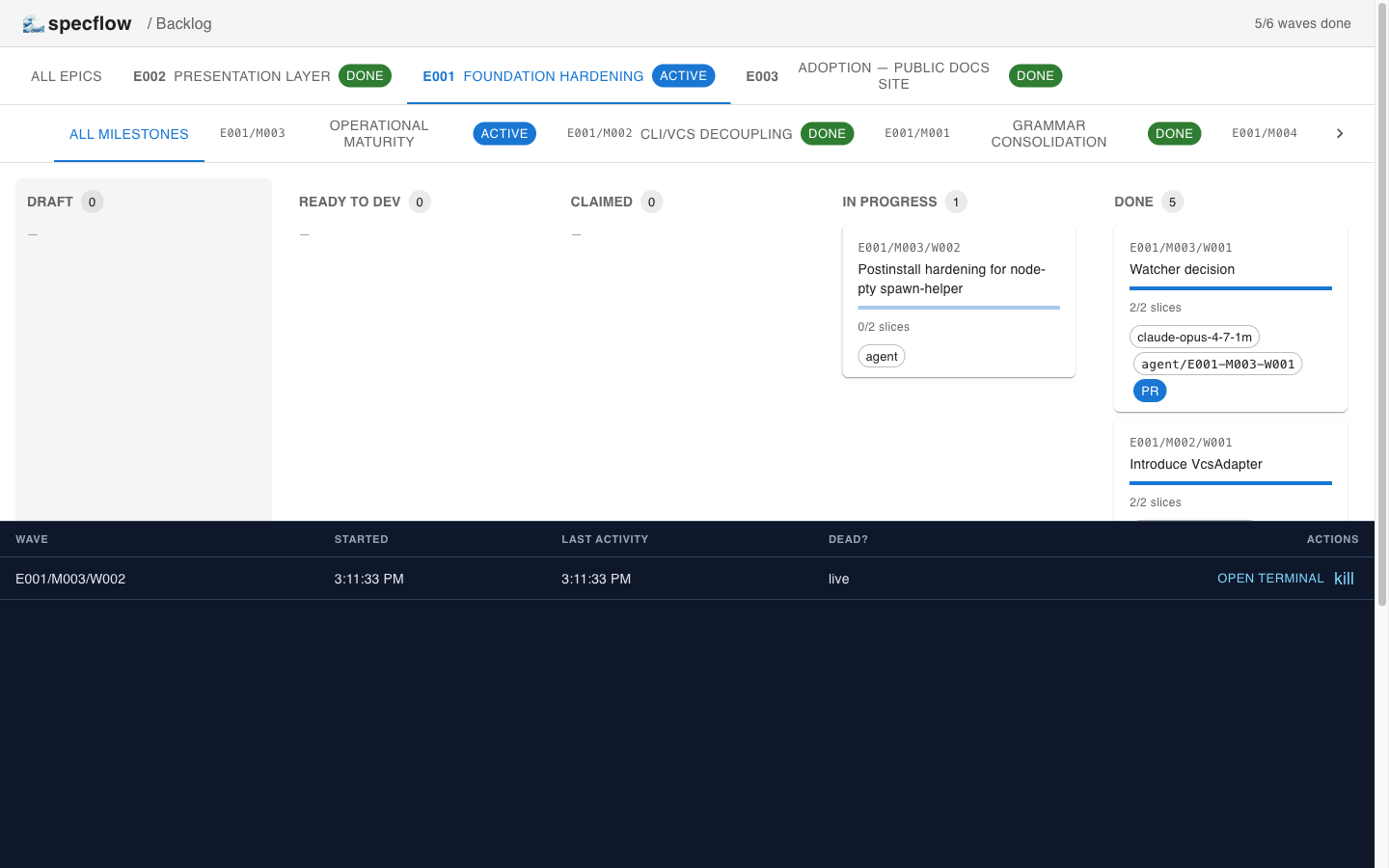
Click OPEN TERMINAL to attach. Below, the agent (real Claude Code, Opus 4.7, running headlessly) is answering a prompt inside the worktree — keystrokes flow back through the same socket.
5. done — wave merged
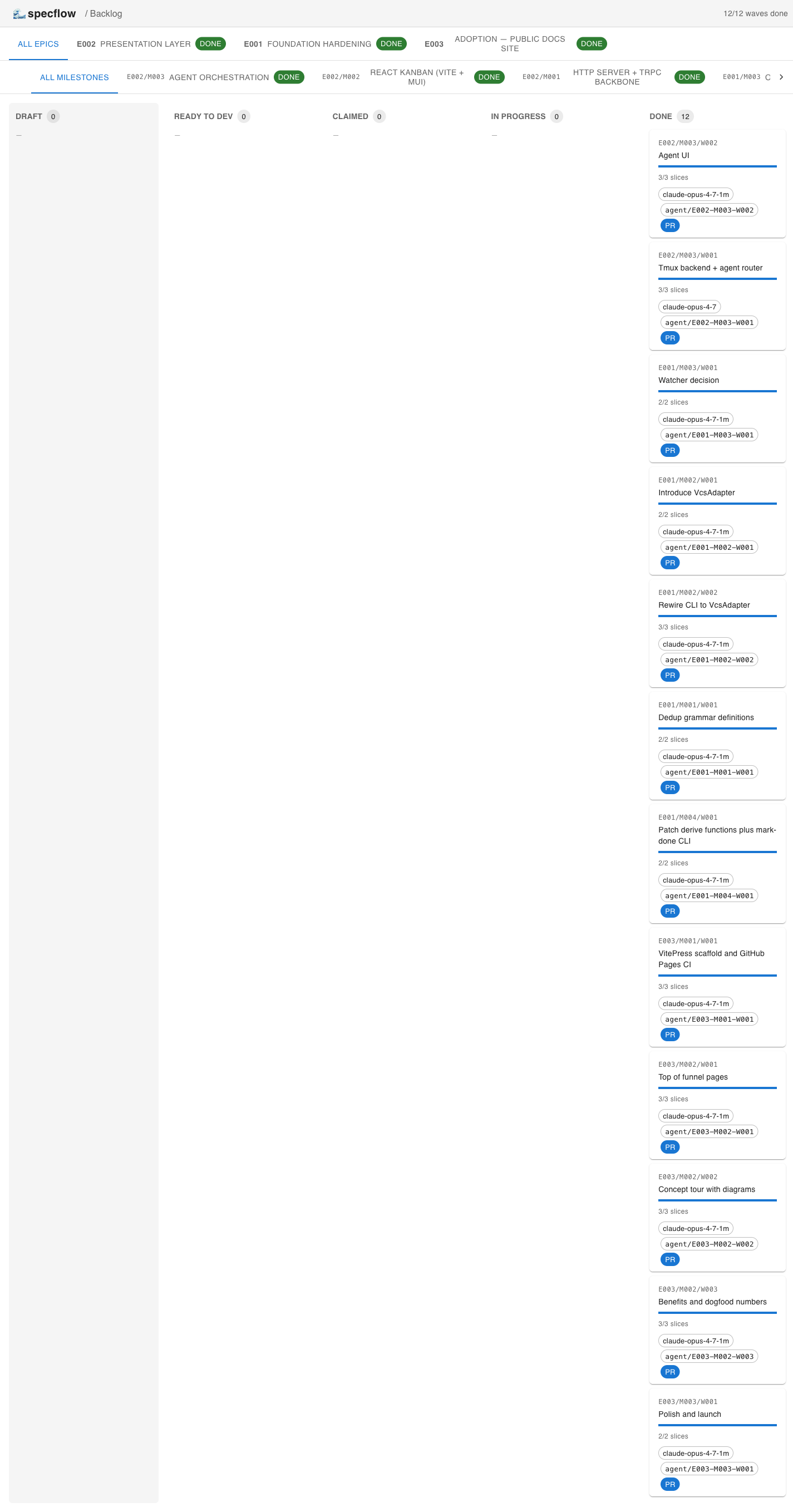
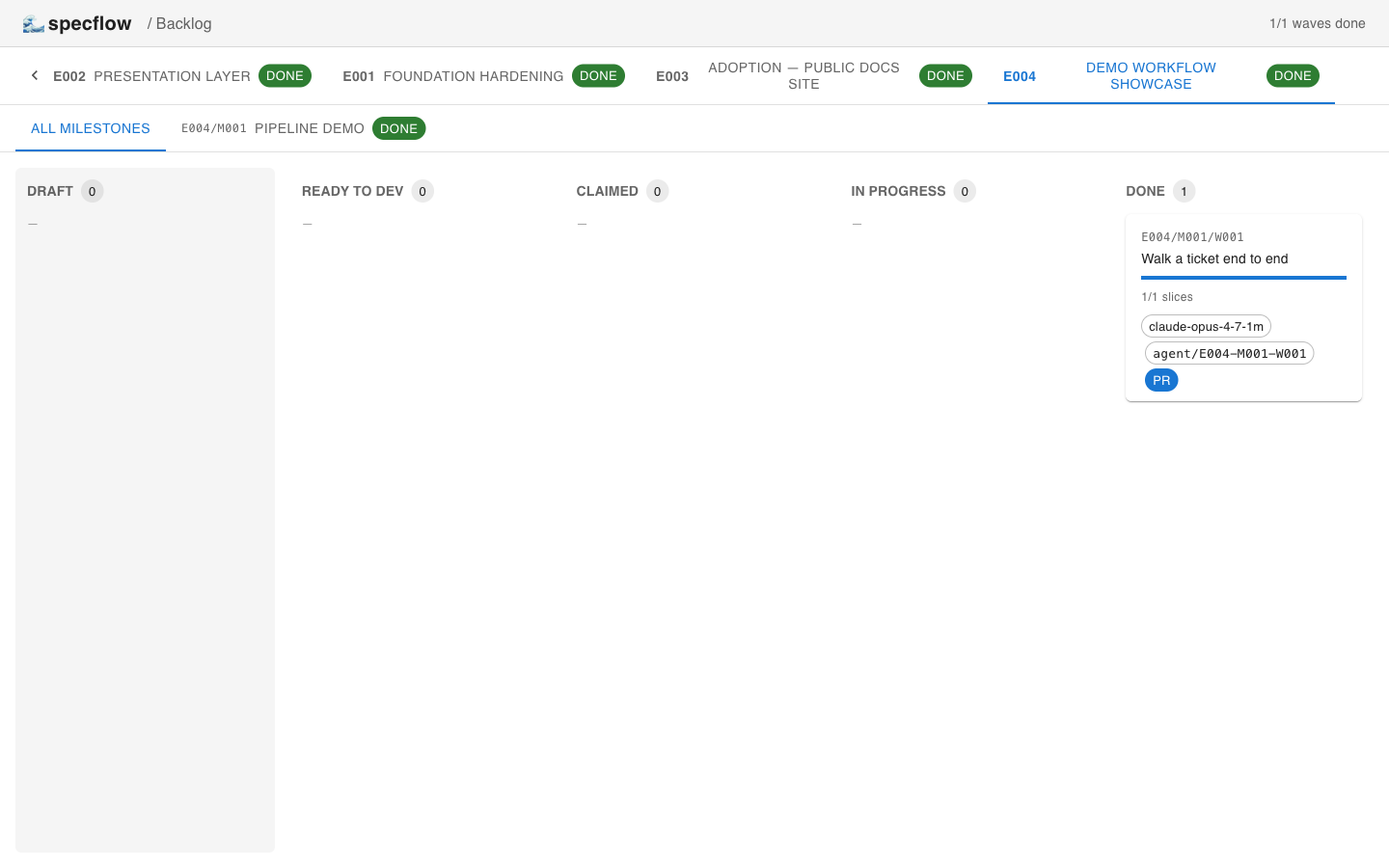
specflow done --branch … --pr … requires every child slice to have slice_state.status = 'done'. No bulk shortcut — the only way to finish a wave is to mark each slice individually. The card now carries the agent's id, the branch name, and a clickable PR link.
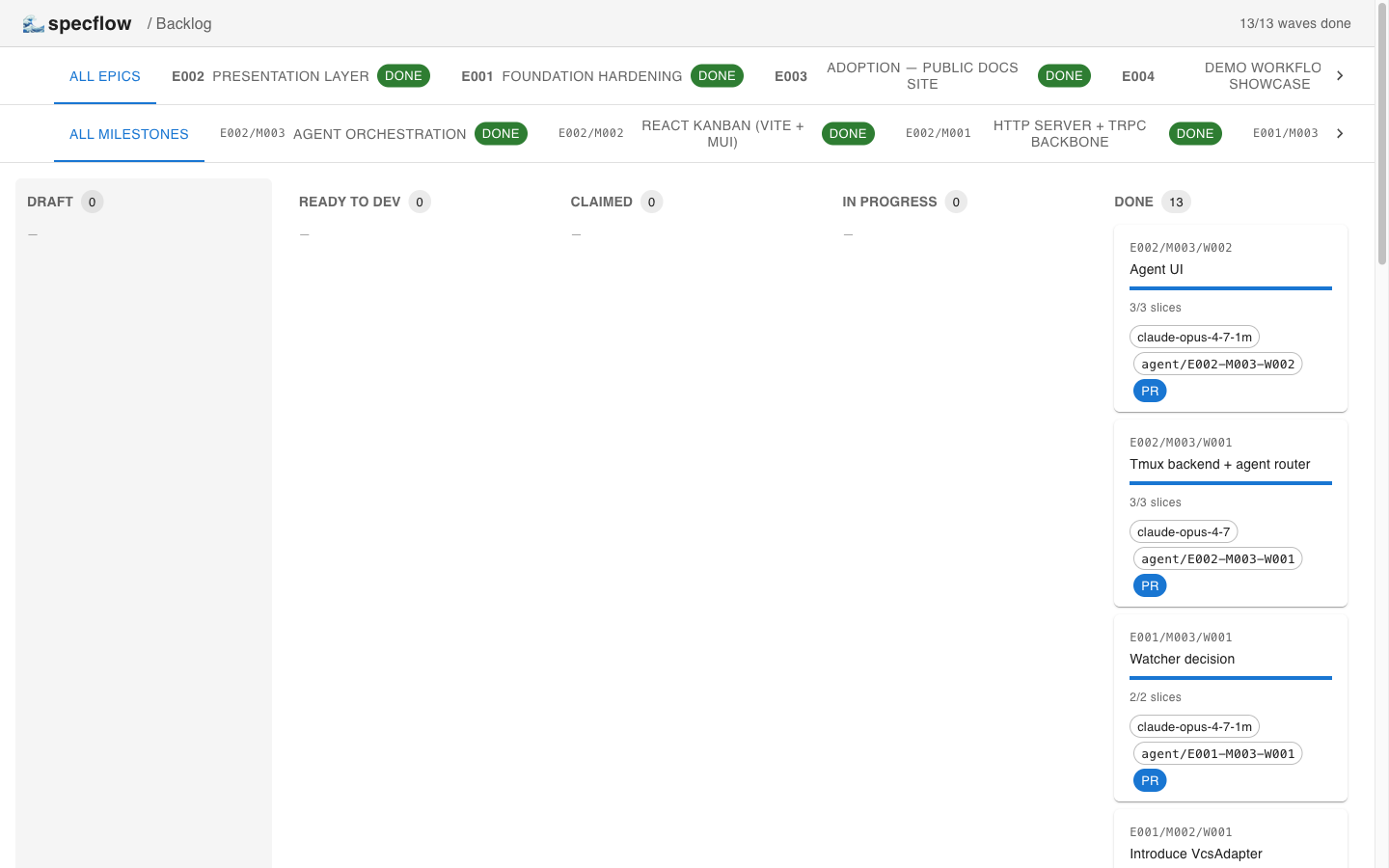
The full board shows the dogfooded backlog — every E001 / E002 / E003 wave was authored, executed, and merged through this exact pipeline.
Why specflow exists
Most ticketing systems (Jira, Linear, GitHub Issues) treat work units as opaque conversations: a title, a description, comments, status. They are great for human collaboration but bad for two things:
- Machine-readability. Agents and tooling can't reliably extract scope, test plans, or acceptance criteria from prose.
- Process discipline. "Definition of done" is a checklist in a wiki — easy to ignore, easy to drift.
specflow inverts this. The spec is the artefact: a plain-text Markdown document with a strict structure, parsed by tooling, gated by automated readiness checks, and executed under a fixed TDD protocol. Status changes are not a side-channel — they are first-class CLI operations with preconditions.
The result is a unit of work that:
- 📄 Reads like a normal markdown document.
- 🤖 Executes like a typed program.
- 🔒 Cannot drift from its definition while it's being worked on.
The four-layer model
flowchart TD
    E["🗺 Epic — strategic initiative\nGoal · Success criteria"]
    M["🎯 Milestone — release-aligned deliverable\nGoal · Success criteria"]
    W["🌊 Wave — coherent slab of work\nContext · Scope overview · Slices summary\n(unit of branch + PR)"]
    S["🔪 Slice — atomic TDD step\nContext · Assumptions · Scope · Requirements ·\nTest expectations · Acceptance criteria\n(unit of commit)"]

    E -->|1..N| M
    M -->|1..N| W
    W -->|1..N, strictly sequential| S
Each layer has a dedicated grammar (mandatory sections, frontmatter shape, ID format) and a dedicated role:
| Layer | Answers | Granularity | Maps to | | ----------- | ------------- | ---------------------- | -------------------- | | Epic | Why long-term | Multi-quarter themes | Roadmap initiative | | Milestone | Why now | Quarter / release | Versioned deliverable| | Wave | What | Days / weeks | Branch + PR | | Slice | How | Hours / one TDD cycle | Commit |
🎬 Slash commands for creating any layer are documented in SKILLS.md.
How it fits together
flowchart LR
    subgraph FS["📁 Filesystem (source of truth)"]
        T["templates/*.md"]
        BL["backlog/E…/M…/W…/S….md"]
    end
    subgraph DB["🗄 SQLite projection (backlog.sqlite)"]
        DEF["epics · milestones · waves · slices\n(rebuilt from MD)"]
        STATE["wave_state · slice_state\n(mutable, CLI-only)"]
    end
    subgraph CLI["⚙️ ticket CLI"]
        OPS["parse · sync · validate\nchecklist · promote\nclaim · status · slice-done · done"]
    end
    subgraph AGT["🤖 Agent contract"]
        PROT["§1 pickup · §2 resume · §3 slice TDD\n§4 wave finish · §5 prohibited · §6 blocked"]
    end

    T --> BL
    BL -- fullSync / targetedSync --> DEF
    CLI -- writes --> STATE
    CLI -- reads --> DEF
    AGT -. drives .-> CLI
    AGT -. reads .-> BL
Rule of thumb:
- 📝 Content lives in Markdown files under git. The DB is a projection —
rm backlog.sqlitefollowed byticket syncreproduces the definitions. - ⚙️ Runtime state lives in SQLite, mutable only through the CLI. Status changes are never committed to git.
Reading order
| # | File | Read it when… |
| - | --------------------------------------------------------- | ---------------------------------------------------------------------------- |
| 1 | docs/overview.md | You want the mental model in 5 minutes. |
| 2 | docs/document-model.md | You're writing or auditing an epic / milestone / wave / slice. |
| 3 | docs/lifecycle.md | You want to understand the two-axis state machine. |
| 4 | docs/cli.md | You're using or extending the ticket CLI. |
| 5 | docs/agent-protocol.md | You're an agent (or instructing one) about to pick up a wave. |
| 6 | docs/extensibility.md | You want to add a new section, status, or command. |
| 7 | SKILLS.md | You want to use the slash commands /create-epic, /create-milestone, etc. |
| 8 | docs/proposals/cli-vcs-decoupling.md | Curious about post-v0.2 design directions. |
Reference implementation
The reference implementation ships in this repo:
- CLI:
src/cli.ts— TypeScript, run viatsxin dev or compiled todist/cli.jsfor the publishedspecflowbin. - Core:
src/backlog/—parser.ts,checklist.ts,state.ts,sync.ts,db.ts,schema.ts,watcher.ts. - HTTP server:
src/server/— Express + tRPC, routes the CLI logic over HTTP for the UI. - Web UI:
src/client/— Vite + React 19 + MUI v6 +@trpc/react-query. The kanban lives atpages/BacklogPage.tsx. - Tests:
src/backlog/__tests__/— unit tests for parser, checklist, state machine, and sync (66 tests). - Slash commands:
.claude/commands/—create-epic,create-milestone,create-wave,create-slice. - CI:
.github/workflows/ci.yml— typecheck + unit tests on Node 22 and 24. - Stack: Node.js ≥ 22 · TypeScript · Express 5 · tRPC 11 · React 19 · MUI 6 · Vite 6 ·
gray-matter·zod· Drizzle ORM ·better-sqlite3.
To run it:
npm install
npm test                     # backlog + UI + site unit tests
npm run typecheck            # tsc --noEmit
npm run ticket list          # exercise the CLI (alias for tsx src/cli.ts list)
npm run build:lib            # produce publishable dist/cli.js + dist/backlog/
npm run dev                  # tRPC server on :3030, Vite on :5173
npm run build                # builds dist/client + dist/server
npm run start                # serves built client from the prod server
Portability to other stacks (Python, Go) is not a goal of v0.4. The grammar of the documents is portable; the CLI/DB/server/UI layers are TypeScript-specific. Sections of the spec that depend on this stack are marked (reference impl.).
Web UI
The kanban shows a two-tier filter (epic → milestone) above five status columns (draft / ready_to_dev / claimed / in_progress / done). Each wave is a card with title, slice progress, assignee, branch, and PR link. Clicking a card opens a modal with the slice list and a "Show raw markdown" toggle. The Promote and Reset to draft buttons map directly onto the same gate-checked operations the CLI runs.
Agent orchestration ships in v0.4 (E002/M003): clicking Run agent on a ready_to_dev-or-later wave opens a CommandEditor with branch/worktree pre-flight, spawns the binary inside a dedicated tmux session on a per-wave git worktree, and streams the pty to a browser xterm.js terminal via WebSocket. See the Lifecycle in pictures section above for the full flow.
Sample backlog
A frozen snapshot of one epic (E001 Runtime hardening / M001 Runtime deployment hardening from hhru) lives in examples/sample-backlog/ as a worked example of epic / milestone / wave / slice grammar. It is not under backlog/ — see examples/sample-backlog/README.md for why.
Live backlog (specflow on itself)
The repo's own backlog/ contains E001-foundation-hardening — the actual ongoing work to harden specflow itself. specflow is dogfooded against its own framework.
What specflow is not
- ❌ A replacement for issue trackers in human-only teams that don't need machine-readable scope.
- ❌ A general-purpose project management tool — it has no notion of estimates, sprints, velocity, or assignees beyond the active claim.
- ❌ Stack-agnostic in
v0.2. The reference implementation is TypeScript + SQLite; the grammar of the documents is portable, but the CLI/DB are not.
Versioning
| Version | What landed |
| ------------------ | -------------------------------------------------------------------------------------------------------- |
| v0.1 | Initial extraction from hhru. Three-layer model: Milestone → Wave → Slice. |
| v0.2 | Breaking. Epic layer added on top. Slash commands. CI. Live backlog. Migration: wrap M001 dirs in E001.|
| v0.3.0-alpha | tRPC server + React/MUI kanban (M001+M002 of E002). M003 agent orchestration planned in slices. |
| v0.4.0 (current) | E002/M003 agent orchestration shipped — tmux/node-pty session manager, agent tRPC router, WebSocket pty bridge, in-browser xterm. E001 foundation hardening complete (grammar dedup, CLI/VCS decoupling adapter, watcher decision, manual status overrides). E003 public docs site launched with illustrated lifecycle and the HH Pipeline production case study. |
| v0.5 (planned) | CLI/git decoupling — see proposal. Postinstall hardening for node-pty (E001/M003/W002). |