
@dkothule/ai-context
v1.2.2
Published
Shared memory for coding agents — Cursor, Claude Code, and Codex

Maintainers
 dkothule
Readme
AI Context
Context infrastructure — the agent harness — for AI coding agents. Keep AGENTS.md, CLAUDE.md, and Cursor rules thin, and put durable, versioned project memory in .ai-context/ — so Claude Code, Cursor, and Codex all work from the same map of decisions, plans, standards, and session history.
One ai-context command manages that context, checks it for drift, and compacts old sessions as your project grows.




npm install -g @dkothule/ai-context
ai-context init
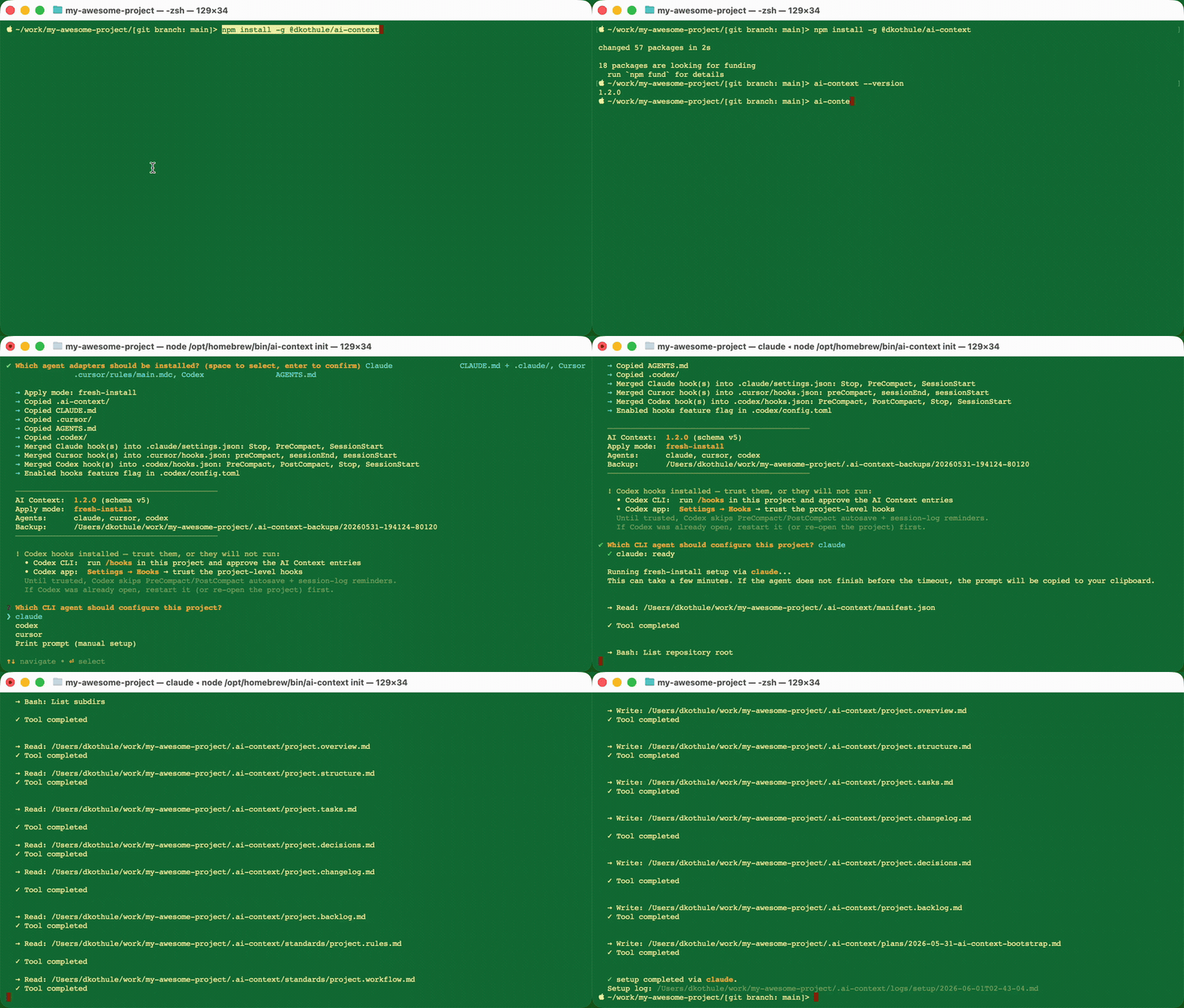
Install once, run ai-context init in a repo, and every supported agent starts from the same project context. File installation is quick; repo-specific setup runs through your chosen agent and can take a few minutes on larger projects.
Why this exists
AI coding agents are getting better at writing code, but they still lose leverage when project context is scattered across chats, local memories, stale READMEs, and one-off instructions. You ask Claude to refactor something. Tomorrow you switch to Cursor. Next week a teammate opens Codex. Unless the repository itself carries the context, every agent starts from zero.
ai-context turns context into project infrastructure: versioned, reviewable, local-first files that every agent can read and update.
What you get
| | |
|---|---|
| 🧠 Shared memory | One context directory, read by Claude Code, Cursor, and Codex alike. |
| 🔁 Session continuity | Session logs carry decisions, plans, and state across sessions. |
| 🪝 Compaction recovery | Per-agent hooks save transcript breadcrumbs and request curation; recovery is best-effort. |
| 🔍 Drift detection | check-drift audits your context against the real codebase and can auto-apply fixes by severity. |
| 🗜️ Session compaction | compact rolls up stale logs so "read the latest session" stays useful after months of work. |
| ⚙️ One CLI, three agents | setup / check-drift / compact run non-interactively through whichever agent CLI you configure. |
| 🔒 Reversible & local-first | Installs back up before they write; files stay local unless your selected agent CLI sends context to its provider. |
The pattern
This project has shipped the pattern since its first open-source commit in December 2025: keep AGENTS.md, CLAUDE.md, and Cursor rules thin, and make a durable, versioned .ai-context/ directory the system of record that every agent reads from.
OpenAI's harness engineering post (February 2026) later reached the same conclusion independently — giant instruction files waste scarce context, go stale quickly, and resist verification, so repository knowledge should be the system of record and the injected AGENTS.md a map, not a manual. It's encouraging external validation of an approach ai-context already automates.
ai-context packages that pattern for real repositories:
- One shared directory (
.ai-context/) that acts as the project context system of record. - Thin adapter files (
AGENTS.md,CLAUDE.md,.cursor/rules/…) that act as tables of contents, not monoliths. - Scoped context files for overview, structure, standards, tasks, decisions, changelog, plans, and sessions.
- Session hooks that emit log reminders and attempt to save transcript breadcrumbs before compaction drops context.
- Maintenance commands that mechanically check drift, compact old sessions, and keep shared context usable over time.
Why not just maintain a CLAUDE.md by hand?
- A single adapter file locks you to one agent.
ai-contextkeeps Claude, Cursor, and Codex reading the same source through thin per-agent adapters — switch tools without rewriting anything. - Hand-maintained docs go stale silently.
check-driftfinds the drift and patches it, so your context tracks the code instead of slowly lying about it. - Compaction recovery needs a handoff. Hooks attempt to save transcript breadcrumbs and request curation into a durable session log; recovery is best-effort.
- It scales past one repo and one person. Session logs, decision records, and shared standards give the next contributor — human or agent — a real handoff, not a wall of instructions.
Get started
Run ai-context init in any repo (the install command is in the intro above). Interactive prompts pick your agents (Claude, Cursor, Codex — all pre-checked), then an LLM reads your repo and configures the context files. Because it's installed globally, every later command is just ai-context <cmd> — check-drift, compact, status, use — in any project, no prefix.
ai-contextis language-agnostic — it runs on Python, Go, Rust, or any repo, not just Node projects.
Just want to try it without installing?
npx @dkothule/ai-context@latest initruns the scaffold once and installs nothing — but then every later command needs thenpx …prefix too, so the global install above is the better default for ongoing use.
What init does
- Asks you which agent adapters to install.
- Backs up existing
.ai-context/,CLAUDE.md,AGENTS.md, and any current agent adapters to.ai-context-backups/<timestamp>/. Nothing destructive happens without a safety copy. - Copies templates into your project: generic
.ai-context/files, thin adapter wrappers (CLAUDE.md,AGENTS.md,.cursor/rules/main.mdc, etc.), and per-agent session-management hooks under.claude/hooks/,.cursor/hooks/, and.codex/hooks/. - Runs a setup prompt via your configured CLI (
claude -p,codex exec, oragent --print). The agent reads your repo and personalizesproject.overview.md,project.structure.md, and any language/testing standards it detects (TypeScript, Python, Go, etc.). - Writes an install log to
.ai-context/logs/install/<timestamp>.mdso you can see exactly what happened.
After init, start a session with any supported agent — it will read .ai-context/ on its own. No further configuration needed.
Other ways to install / upgrade
npm install -g @dkothule/ai-context@latest && ai-context init  # upgrade to latest — safely handles existing installs

ai-context init --agents claude,cursor,codex --yes   # non-interactive (for CI / scripts)
ai-context init --agents codex --yes --cli codex      # non-interactive + run setup via Codex
ai-context apply                     # install/upgrade only (no setup) — fully non-interactive
ai-context init --dry-run            # preview without writing
ai-context init --gitignore          # also add sessions/ + backups to .gitignore
--yes skips every prompt, including the post-install CLI picker: it runs setup via --cli if given, otherwise the first selected agent (and saves that choice as configured_cli). For install/upgrade with no setup step at all, use ai-context apply.
Requirements: Node 18+. Any Unix-like shell for the bash hooks (macOS, Linux, WSL, Git Bash on Windows).
Commands
Each command does one thing:
| Command | What it does |
|---|---|
| ai-context init | Install or upgrade. Interactive prompts for agents + setup. |
| ai-context apply | Install/upgrade files non-interactively without running setup. |
| ai-context setup | Re-run just the setup prompt (your agent configures .ai-context/). |
| ai-context use [cli] | Set the CLI agent (claude/codex/cursor) used by setup/check-drift/compact. |
| ai-context check-drift | Audit .ai-context/ vs. your actual code. Optionally apply patches. |
| ai-context compact | Archive old session logs to reduce noise. |
| ai-context status | Show installed version + schema + configured CLI. |
| ai-context uninstall | Remove everything. |
All LLM-driven commands (setup, check-drift, compact) run via a coding-agent CLI and fall back to copying the prompt to your clipboard if none is available or authenticated.
Which CLI runs them? The CLI you pick during init/setup is remembered (saved as configured_cli in .ai-context/manifest.json), and setup, check-drift, and compact use it by default — so a project set up with Codex keeps using Codex instead of silently falling back to Claude. To change it later, run ai-context use (interactive picker) or ai-context use codex (direct). A one-off --cli <name> flag still overrides it per run, and if no CLI is configured the commands auto-detect a local claude, codex, or Cursor agent (with pre-approved permissions for Claude, a workspace-write sandbox for Codex, and --force for Cursor).
Getting help: every command supports --help (or -h) for full flag reference:
ai-context --help                    # list all commands
ai-context check-drift --help        # flags for a specific command
ai-context help check-drift          # same — subcommand form
What gets installed
your-project/
├── .ai-context/                 # shared context (the whole point)
│   ├── project.overview.md      # what this project is
│   ├── project.tasks.md         # what's in flight
│   ├── project.decisions.md     # architecture decisions (ADRs)
│   ├── project.changelog.md     # user-visible changes
│   ├── project.backlog.md       # ideas, deferred work
│   ├── project.structure.md     # directory layout
│   ├── plans/                   # design plans (write before non-trivial work)
│   ├── sessions/                # session logs (written at session end)
│   │   └── _archive/            # rollups of old sessions (don't read at session start)
│   ├── standards/               # coding + workflow rules
│   └── logs/                    # audit log of every ai-context command run
│
├── CLAUDE.md                    # thin wrapper → @AGENTS.md
├── AGENTS.md                    # thin wrapper → points to .ai-context/
├── .cursor/
│   ├── rules/main.mdc           # Cursor adapter
│   ├── hooks/                   # session-management hooks (preCompact, sessionStart, sessionEnd)
│   └── hooks.json               # Cursor hook registrations
├── .codex/
│   ├── hooks/                   # session-management hooks (PreCompact, PostCompact, SessionStart, SessionEnd)
│   ├── hooks.json               # Codex hook registrations
│   └── config.toml              # enables `hooks` feature flag (required by Codex)
├── .claude/
│   ├── hooks/                   # context-preservation hooks (see below)
│   └── settings.json            # hook registrations
└── your source code...Principle: adapter files are thin. All real content lives in .ai-context/, loaded on demand by each agent. This keeps context windows clean — agents read only what they need for the current task.
How agents use it
On session start, every agent follows the same tiered reading protocol:
All paths below are relative to .ai-context/.
Always read:
project.overview.md— what this project isproject.tasks.md— what is in flight, blocked, next- Session logs in
sessions/— never_archive/, never_template.md: a. Newest by filename date. If several share that date, order by thetime:frontmatter field; where absent, fall back to filename order. b. Scan the# Session:heading of the other same-date logs and read any whose topic relates to the current task. c. If that log's "Next Steps" or "Notes For Next Agent" points at earlier work you are continuing, follow the reference. Read at most 3 logs unless continuation references in (c) require more.
Then read based on task:
- Writing/modifying code →
standards/project.rules.base.md,standards/project.rules.md - Release/history context →
project.changelog.md - Understanding layout →
project.structure.md - Planning non-trivial work →
project.tasks.md,plans/ - Language/testing → files in
standards/
At session end, the agent writes a session log, updates project.tasks.md, logs decisions to project.decisions.md, and notes user-visible changes in project.changelog.md.
Hooks
Session-management hooks are installed for Claude Code, Cursor, and Codex. Coverage by agent:
| Agent | Session-start log reminder | Pre-compact autosave | Session-end capture | Post-compact reminder |
|---|---|---|---|---|
| Claude Code (.claude/settings.json) | SessionStart → additionalContext | ✅ PreCompact | ✅ SessionEnd | ✅ SessionStart(compact) |
| Cursor (.cursor/hooks.json) | sessionStart → additional_context | ✅ preCompact | ✅ sessionEnd (not on cloud agents) | ✅ sessionStart (additional_context) |
| Codex (.codex/hooks.json) | SessionStart → additionalContext | ✅ PreCompact | ✅ SessionEnd | ✅ PostCompact + SessionStart |
What each hook does:
- Session-start log reminder — when no log exists for today, emits “write one before you finish” through the documented context channel. Configuration and script-output tests verify the fields; live delivery has not been verified for this release. The reminder is advisory and does not enforce logging.
- Pre-compact autosave — writes
sessions/YYYY-MM-DD-HHMMSS[-N]-precompact-autosave.mdbefore compaction. Atomic filename reservation adds-2,-3, etc. before the suffix on collisions. The autosave includes alocal_transcript_refpointer to the local agent transcript JSONL and, when possible, a short recent-turn excerpt, to support best-effort recovery when the compacted summary omits critical context. - Session-end capture — when a session ends with no log for today, writes
sessions/YYYY-MM-DD-HHMMSS[-N]-sessionend-autosave.mdrecording the end reason, branch, working tree, diffstat, recent commits, and the transcript pointer. It writes the breadcrumb directly rather than asking the agent, so it does not depend on any hook-output channel. Nothing is written when a curated log for today already exists. Fires on every documented exit reason,resumeincluded — a session resumed in a different agent is exactly the handoff this protects. - Post-compact reminder — in the fresh session after compaction, surfaces the autosave so the agent curates it into a proper session log. The session log should preserve
source_autosaveand the autosave'slocal_transcript_refwhen present, then delete the autosave. Older autosaves may use the legacy nametranscript_ref; copy it intolocal_transcript_refduring curation.
The session-start hook surfaces autosaves from both sources, names the newest, says which kind it came from, and reports how many are pending so earlier breadcrumbs are not stranded.
Cursor coverage limit: Cursor's sessionEnd is tied to the IDE session and does not fire for cloud agents, so session-end capture does not run there. Breadcrumbs record is_background_agent so you can tell. Compaction autosaves are unaffected.
Discovery selects the most recently modified autosave, including legacy HHMM names; equal modification times use descending filename order independent of locale. Reminder and capture scripts use the existing Node 18+ runtime to read timestamps and parse or encode JSON. If Node is somehow unavailable, session-end capture still writes a minimal breadcrumb using shell builtins rather than leaving an empty file. If no reminder is needed, the scripts exit successfully without output.
Recovery is best-effort: it depends on hooks running, the local transcript remaining available, and the agent reviewing and curating the autosave. Optional jq enables the recent-turn excerpt; without it, hooks still write an autosave with the local_transcript_ref pointer but no excerpt. Installing jq does not guarantee recovery.
The local transcript reference is a fallback, not the durable memory itself. It helps the same local agent recover exact prior discussion if something important was lost during compaction; the curated session log remains the portable handoff future agents should read first. Hooks write the path home-relative when possible (~/.codex/... instead of /Users/name/...), but if you commit or share session logs, still treat local_transcript_ref as local/private and redact it if needed.
All hooks are installed automatically by ai-context init for the agents you select. Existing user-owned hooks in hooks.json / settings.json are preserved — the installer preserves user handlers while replacing its own registrations and removing retired Stop/sessionEnd handlers.
[!IMPORTANT] Codex requires a one-time trust step, or its hooks silently do nothing. Codex loads
.codex/hooks.jsononly after you explicitly trust each hook — installing the files is not enough. Afterai-context init(or any time the Codex hooks change), trust them one of two ways:
- Codex CLI — open Codex in the project and run
/hooks, then approve the AI Context entries (PreCompact,PostCompact,SessionStart,SessionEnd).- Codex desktop app — go to Settings → Hooks and trust the project-level hooks.
Until you do this, Codex's autosave-on-compaction and session-log reminders will not run. Trust is stored per hook hash in
~/.codex/config.toml, so re-trust after the hooks change. If a Codex session was already open when the hooks were added, restart the app/session (or re-open the project) before trusting them.
What about Claude Code and Cursor? They don't need this explicit per-hook approval:
- Claude Code loads hooks from
.claude/settings.jsonon startup. If the hooks change mid-session it shows a review notice (/hooks); otherwise restarting the session is enough — there's no separate trust gate that blocks them. - Cursor loads
.cursor/hooks.jsonunder normal workspace trust; no per-hook approval. Restart Cursor (or reload the window) if hooks were added while it was open.
In short: only Codex hard-blocks hooks behind an explicit trust step. For all three, restarting the agent after install is the safe move.
Drift detection
Over time, .ai-context/ drifts from your actual code. Files get renamed, architecture evolves, the overview goes stale. check-drift catches this:
ai-context check-drift                # analyze + write report to .ai-context/logs/drift/
ai-context check-drift --static-only  # fast local checks only (no LLM)
ai-context check-drift --copy         # write report + copy follow-up prompt to clipboard
ai-context check-drift --print        # print the analysis prompt to stdout (no file, no execute)
ai-context check-drift --dry-run      # preview what would happen; no files written
Two layers:
- Static checks (local, fast): broken refs in
project.structure.md, stalelast_updatedfrontmatter, "In Progress" tasks with no recent commits, backlog items older than 90 days. - LLM analysis (optional, via your configured CLI): compares overview/structure/decisions against recent git log + tree, produces a structured report with severity-tagged patches (
[significant],[moderate],[minor]).
Reports land in .ai-context/logs/drift/<timestamp>-drift.md.
Auto-applying patches with --fix
--fix [severity] runs drift analysis, then invokes a second LLM pass that reads the report and applies matching patches. The severity argument is a cutoff — patches at that severity and anything more critical are applied:
ai-context check-drift --fix               # default: only [significant] patches
ai-context check-drift --fix=significant   # same as above — most critical only
ai-context check-drift --fix=moderate      # [significant] + [moderate]
ai-context check-drift --fix=minor         # everything (includes cleanup/polish items)
ai-context check-drift --fix=all           # alias for minor — full YOLO
ai-context check-drift --fix --dry-run     # print what would be patched, don't write anything
Tip: snapshot .ai-context/ first (cd .ai-context && git add -A && git commit -m "pre-fix") if you want an easy rollback. The fix step edits files in place; reviewing a clean diff afterwards is the safety net.
Choosing the CLI agent
setup, check-drift, and compact need a coding-agent CLI to run their LLM prompt. The CLI you pick the first time you run init/setup is saved to .ai-context/manifest.json (configured_cli) and reused by every later command — so the project stays on the agent you chose instead of always falling back to Claude.
ai-context use            # interactive picker (claude / codex / cursor), defaults to current
ai-context use codex      # set it directly
ai-context status # shows "Configured CLI: codex"- The value is preserved across upgrades (
init/applywon't reset it). ai-context usesaves your choice even if that CLI isn't installed/authenticated yet (it warns, then persists) so you can configure it ahead of time.- A per-run
--cli <name>flag onsetup/check-drift/compactstill overrides the saved default. - If nothing is configured, the commands auto-detect the first available CLI (and copy the prompt to your clipboard if none is ready).
Session compaction
Session logs accumulate. After a few months you'll have dozens; after a year, hundreds. That noise makes "read the latest session at session start" less useful because there's too much "latest" to sort through.
ai-context compact summarizes old sessions into a single rollup file and deletes the originals — keeping sessions/ focused on recent, actionable context without losing long-term history.
ai-context compact --dry-run                 # preview what would be archived (safe)
ai-context compact                           # archive > 30 days old, keep latest 10
ai-context compact --older-than 90           # only > 90 days old
ai-context compact --keep 20                 # always preserve the newest 20
ai-context compact --older-than 90 --keep 50 # combine
ai-context compact --copy                    # prompt → clipboard, skip CLI execution
ai-context compact --print                   # prompt → stdout, for pipes
ai-context compact --cli codex               # force a specific CLI
What happens:
- Selects sessions that are older than
--older-thandays AND outside the latest--keep. - Builds an LLM prompt listing the selected files + a rollup template.
- The agent reads each file, extracts decisions / open threads / file knowledge, writes a rollup at
.ai-context/sessions/_archive/YYYY-MM-rollup.md, deletes the originals. - An operation log lands at
.ai-context/logs/compact/<ts>.md.
Rollup format (sessions/_archive/YYYY-MM-rollup.md):
---
archived: true
range_start: 2026-02-27
range_end: 2026-03-03
source_count: 4
---

# Archived sessions 2026-02-27 → 2026-03-03

## Decisions carried forward
- ADRs 007–011 added for agent architecture; source: 2026-02-27-agent-architecture.md
- ...

## Open threads at end of range
- Architecture diagram not yet created; source: ...

## File/area knowledge
- knowledge/: runtime content lives under live/, staging area under staging/

## Archived sessions
- 2026-02-27-agent-architecture.md — one-line summary
- ...
archived: true in frontmatter + the _archive/ README tell agents to skip this folder at session start. grep still works when you need a specific historical answer.
If the result isn't what you wanted → see Safety & rollback below.
Audit trail
Every command that produces meaningful output writes a log to .ai-context/logs/:
.ai-context/logs/
├── install/       # ai-context init / apply
├── setup/         # ai-context setup
├── drift/         # ai-context check-drift reports
└── compact/       # ai-context compact operations
Logs are append-only — past runs aren't overwritten on upgrade. Review them to see what ai-context did to your project, when, and what the agent said.
Most adopters gitignore .ai-context/logs/ since logs are machine-local and noisy.
Safety & rollback
Everything ai-context does is reversible. Three scenarios, three recovery paths.
Before running anything risky — snapshot .ai-context/
If you track .ai-context/ in git (recommended), make a snapshot before any LLM-driven command. This gives you a one-command rollback:
cd .ai-context
git add -A && git commit -m "snapshot before <command>"
cd ..

# run whatever
ai-context check-drift --fix
# or
ai-context compact
# or
ai-context init
If the outcome isn't what you want:
cd .ai-context
git checkout -- .           # revert tracked changes
git clean -fd               # remove untracked files (rollup, logs, etc.)
check-drift --fix edited files you don't like
cd .ai-context
git diff project.structure.md project.overview.md   # review what changed
git checkout -- project.structure.md                 # revert one file
# or
git checkout -- .                                    # revert everything
The original drift report stays in logs/drift/<ts>-drift.md — you can re-read what was supposed to change and cherry-pick manually.
compact deleted sessions you wanted back
cd .ai-context
git checkout -- sessions/                           # restores deleted session files
rm sessions/_archive/<YYYY-MM>-rollup.md            # remove the rollup (it's untracked)
The rollup file itself is valuable reading before deletion — it distilled what was in those sessions. Review it first, then decide.
init / apply (upgrade) went wrong
Every install backs up the pre-install state automatically. No git required:
ls .ai-context-backups/                              # list timestamped backups
# 20260418-081533-19339/   ← pick one

TARGET=20260418-081533-19339
# restore (overwrites current state):
rm -rf .ai-context .cursor .codex .claude/hooks AGENTS.md CLAUDE.md
cp -R .ai-context-backups/$TARGET/* .
Or just re-run ai-context init against any version — the installer handles downgrades and re-applies cleanly.
Full uninstall
ai-context uninstall --dry-run                       # preview what will be removed
ai-context uninstall                                 # remove everything ai-context installed
Your source code, git history, and non-AI-Context files are never touched by any of these commands.
Customization
Agent adapters are thin on purpose
CLAUDE.md is literally one line (@AGENTS.md) plus a few Claude-specific notes. AGENTS.md is ~40 lines. Neither duplicates content from .ai-context/. If you want to add project-specific rules, edit .ai-context/standards/project.rules.md — not the adapters.
Language/testing standards are created per-project
The installer doesn't ship example project.python.md or project.testing.md. Instead, ai-context init's setup prompt analyzes your repo and creates the right standards files based on what it finds (TypeScript, Python, Go, etc.). You can always add more by hand later.
Sessions stay local if you want
ai-context init --gitignore # adds .ai-context/sessions/ and backups to .gitignoreMany teams keep session logs local (personal) while committing the rest of .ai-context/. Your call.
Supported agents
| Agent | Adapter | Hooks | CLI support for setup/check-drift/compact |
|---|---|---|---|
| Claude Code | CLAUDE.md + .claude/hooks/ + settings.json | PreCompact, SessionStart(startup/resume/compact), SessionEnd | ✅ claude -p (primary) |
| Cursor | .cursor/rules/main.mdc | preCompact, sessionStart, sessionEnd (IDE only; .cursor/hooks.json) | ✅ agent --print (falls back to cursor-agent for older installs) |
| Codex / OpenAI agents | AGENTS.md + .codex/hooks/ | PreCompact, PostCompact, SessionStart, SessionEnd (.codex/hooks.json) | ✅ codex exec |
| GitHub Copilot | (not shipped — incompatible with Copilot's auto-review + can't resolve relative links; backlog: generate a self-contained instructions file) | N/A | N/A |
All agents read .ai-context/. The CLI column affects whether ai-context setup/check-drift/compact can execute the LLM prompt directly vs. copy it to your clipboard for manual paste.
FAQ
Do I need all the agents?
No. Pick whatever combo you use during init. Rest of the flow is identical.
Can I use this without AI? Yes. Session logs become work journals, standards ensure consistency. Works fine for human-only teams.
How do I handle secrets?
Never commit them to .ai-context/. Reference environment variables in project.overview.md — don't store values.
What if I want to roll back a change?
Every action is reversible. See the Safety & rollback section for recovery paths after check-drift --fix, compact, or init/upgrade.
Does it work on Windows? Yes, via Git Bash or WSL. Native PowerShell equivalents are on the backlog.
What's the upgrade path?
Re-run npm install -g @dkothule/ai-context@latest && ai-context init. The installer detects existing installs, backs up, upgrades the installer-managed files, and preserves everything project-owned (your overview, tasks, decisions, history, custom standards).
Something went wrong — how do I see what happened?
Check .ai-context/logs/install/ for the latest install, .ai-context/logs/setup/ for agent output, .ai-context-backups/<timestamp>/ for pre-upgrade state.
Architecture
Deep dive with mermaid diagrams covering every command and flow: docs/ARCHITECTURE.md.
Short version:
- Single source of truth:
.ai-context/holds all governance. Adapters are thin pointers. - Base vs. local standards:
project.rules.base.mdships with the tool (upgraded automatically);project.rules.mdis project-owned (never overwritten). - Ownership-based restore: on upgrade, tool-owned files are replaced, project-owned files are restored from backup by path pattern. Custom files you add are preserved.
- Session logs are mandatory: adapter instructions require them; session-start hooks emit forward-looking advisory reminders through each agent’s context channel, verified here at configuration level.
- Best-effort compaction recovery: pre-compact hooks attempt to save a local transcript pointer and optional excerpt; post-compact/session-start hooks request curation. The curated session log provides the durable handoff.
Maintainer note: hook source of truth
Hook behavior has two sources, by design:
- Script behavior lives at the repo root in
.claude/hooks/*.sh,.cursor/hooks/*.sh, and.codex/hooks/*.sh.scripts/sync-templates.shcopies those scripts intopackages/cli/src/templates/<agent>/hooks/before packaging. - Hook registration/config generation lives in TypeScript:
packages/cli/src/core/claudeHooks.ts,cursorHooks.ts, andcodexHooks.ts. These modules write or merge.claude/settings.json,.cursor/hooks.json,.codex/hooks.json, and.codex/config.toml.
sync-templates.sh intentionally removes generated config files such as cursor/hooks.json, codex/hooks.json, and codex/config.toml from the package template tree so upgrades never overwrite user-owned hook configuration.
Codex also requires an explicit hook review step after project-level hooks are added or changed. Run /hooks inside Codex for the project and trust the AI Context entries; otherwise Codex may load .codex/hooks.json but skip untrusted events such as PreCompact/PostCompact.
On the horizon
Ideas on the near-term roadmap. Directions, not commitments — open an issue if one would unblock you.
- Simpler context loading and evaluated prompts — keep startup guidance focused and evaluate prompts against representative repositories.
- Task handoffs and verification checkpoints — make current state, next steps, and validation evidence easier to carry between agents.
- Portable workflows and vendor plugins — develop reusable skills and workflows with tested vendor packaging.
- Hook reliability and compatibility — improve autosave and reminder reliability, including live hook smoke automation when stable test commands are available. Review the Node minimum separately; no runtime-floor change is committed to a release.
Deferred:
- Windows-native hooks — PowerShell or Node equivalents for the bash hooks.
- Self-contained GitHub Copilot adapter — generate a flat instruction file from project context.
ai-context export— a flattened context snapshot for offline sharing, incident tickets, or bug reports.- Custom plugin framework — register custom static drift checks or additional reading-list files without forking the tool.
Contributing
PRs welcome. The tool should stay small and sharp.
- Fork, branch off
main. cd packages/cli && npm install && npm testto confirm the test suite passes.- Follow standards in
.ai-context/standards/. - Write a session log for non-trivial changes.
- Open a PR.
For ideas not listed above, open a GitHub issue — discussion before code is welcome.
License
MIT — see LICENSE.