
@doebkblcya/dsh-workbench
v0.1.5
Published
DSH Web GUI right-side workbench plugin: a VS Code-style single right panel with Files/Git tabs plus a Preview column — lazy file explorer, Source-Control-like changes + commit, branch switching, and an inline Git graph — driven by real host-side fs/git s

Maintainers
 doebkblcya
Readme
dsh-workbench — DSH Web GUI 右侧工作台
English | 中文
一个单包插件,为 DSH Web GUI 增加 VS Code 风格的右侧工作台:一个 Preview(预览) 栏,加一个 文件 / Git 面板 —— 界面在页面内渲染, 背后由宿主进程的真实文件系统 + git 服务支撑。
截图
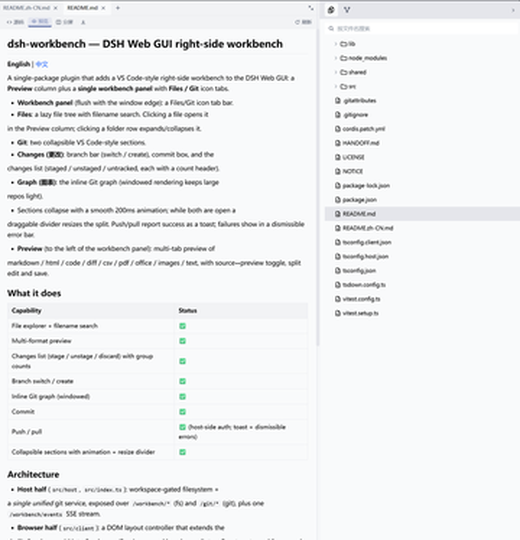
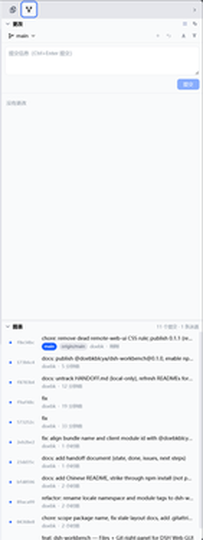
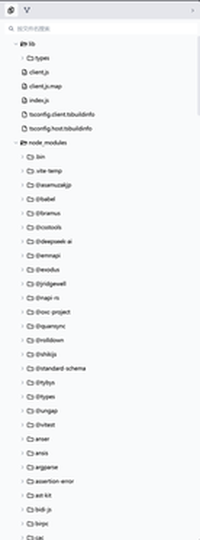
| Git 面板 — 可折叠的「更改 / 图表」分节 | 文件树与搜索 |
|---|---|
|  |
 |
特性
- 文件 —— 懒加载文件树 + 按文件名搜索;点文件在 Preview 栏打开(拖拽可插入路径到输入框)。
- Git —— 两个可折叠分节(VS Code 风格):
- 更改:分支栏(切换 / 新建分支)、提交框、变更列表(已暂存 / 未暂存 / 未跟踪,各带数量标题)。
- 图表:带泳道和 ref 标签的内嵌 Git 图谱 —— 窗口化渲染,大仓库也轻量。
- 分节有 200ms 平滑折叠动画;两节都展开时之间有可拖拽分隔线调比例(18%–80%)。
- 推送/拉取成功以 toast 提示;失败显示可关闭的错误条(认证 / 无上游 / 分叉 / 身份未配置等均可读文案)。
- 预览 —— markdown / html / code / diff / csv / pdf / office / 图片 / 文本的多 tab 预览, 支持源码↔预览切换、分屏编辑和保存(带写冲突保护)。
功能
| 能力 | 状态 | |---|---| | 文件树 + 文件名搜索 | ✅ | | 多格式预览 | ✅ | | 变更列表(暂存 / 取消暂存 / 放弃),分组带数量 | ✅ | | 分支切换 / 新建 | ✅ | | 内嵌 Git 图谱(窗口化) | ✅ | | 提交 | ✅ | | 推送 / 拉取 | ✅(宿主侧认证;成功 toast、失败可关闭) | | 可折叠分节 + 动画 + 拖拽调比例 | ✅ |
架构
插件一个包、两个半身:浏览器 UI 与宿主服务之间走 HTTP + 一条 SSE 变更流 (fs watch 与 git 轮询合流)。
flowchart LR
  subgraph Host[DSH web 服务器 · Node.js]
    H["宿主侧(src/host)<br/>门控 fs + 统一 git 服务<br/>路由 · 工作区门控 · 轮询守卫"]
  end
  subgraph Page[浏览器 · DSH Web GUI]
    C["浏览器侧(src/client)<br/>React 面板 · 无框架 store<br/>DOM 布局控制器"]
  end
H <-->|"HTTP /workbench/* · /git/*<br/>+ SSE /workbench/events"| C- 宿主侧(
src/host):工作区门控的文件系统 + 统一 的 git 服务(上游两个 git 服务 合并成一个门控、一个仓库缓存、一次操作标记探测 —— 1 次 git spawn 而非 7 次)。 - 浏览器侧(
src/client):一个 DOM 布局控制器把 shell 网格扩展出 Preview + 工作台两栏, React 组件 + 无框架 store(layout / explorer / scm / preview / git),按项目持久化。
使用
安装已发布包:
dsh plugin --profile web add @doebkblcya/dsh-workbench任意项目会话里右侧即出现工作台:
- 文件 tab —— 浏览文件树;点文件在 Preview 打开。
- Git tab —— 在变更列表暂存/放弃,填提交信息后提交(Ctrl+Enter),分支栏推送/拉取; 图谱展示带 ref 与泳道的提交历史。
开发
npm install
npm run build        # tsc -b && tsdown → lib/index.js + lib/client.js
npm run typecheck
# 本地 checkout 链接安装到 profile:
dsh plugin --profile web add link:<path-to-this-repo>
许可与署名
BSD-3-Clause。本包是 dsh-web-ui monorepo(https://github.com/zhu1090093659/dsh-web-ui)
的衍生作品——具体是 dsh-aionui-panel 和 dsh-git-graph(均 0.1.15)。右侧面板设计
本身重新实现了 AionUi(iOfficeAI/AionUi,Apache-2.0)。完整署名见
LICENSE 和 NOTICE。
说明:上游
package.json元数据写的是Apache-2.0,而包里实际发布的LICENSE文件是BSD-3-Clause(仓库根 LICENSE 才是 Apache-2.0)。本 fork 遵循实际发布的包 许可证(BSD-3-Clause);两者皆为宽松许可证,衍生开发无论哪种都合规。