
@drguptavivek/who-2022-va
v0.1.0
Published
Independent JavaScript implementation of the 2022 WHO verbal autopsy instrument.

Maintainers
 drguptavivek
Readme
2022 WHO Verbal Autopsy Instrument for JavaScript
An independent, React Native-first implementation of the 2022 WHO Verbal Autopsy instrument V1.1. One checked-in, platform-neutral JSON contract drives Expo, React Native, React Native Web, non-React websites, field validation, and submission validation.
This project is not affiliated with, sponsored by, or endorsed by the World Health Organization (WHO). “WHO” identifies the source instrument only. See Licensing and attribution.
The runtime and package build do not use SurveyJS, Excel, or XLSForm generation. The WHO workbook and its exceljs compiler are retained only as development fixtures for source-conformance tests; they never write the canonical JSON contract.
Documentation
- Developer guide — setup, repository map, common workflows, testing, and contribution rules
- API reference — entry points and the main headless, form, draft, localization, and attachment APIs
- Architecture — executable contract, runtime boundaries, shared behavior, and platform services
- Attachment processing — validation policy, browser/native lifecycles, and the server boundary
Installation
npm install @drguptavivek/who-2022-vaThe headless entry point has no UI peer requirement. Install the peers for the UI entry point you use:
# React web or the web component
npm install react react-dom react-native-web

# Expo / React Native (normally already supplied by the host application)
npm install react react-native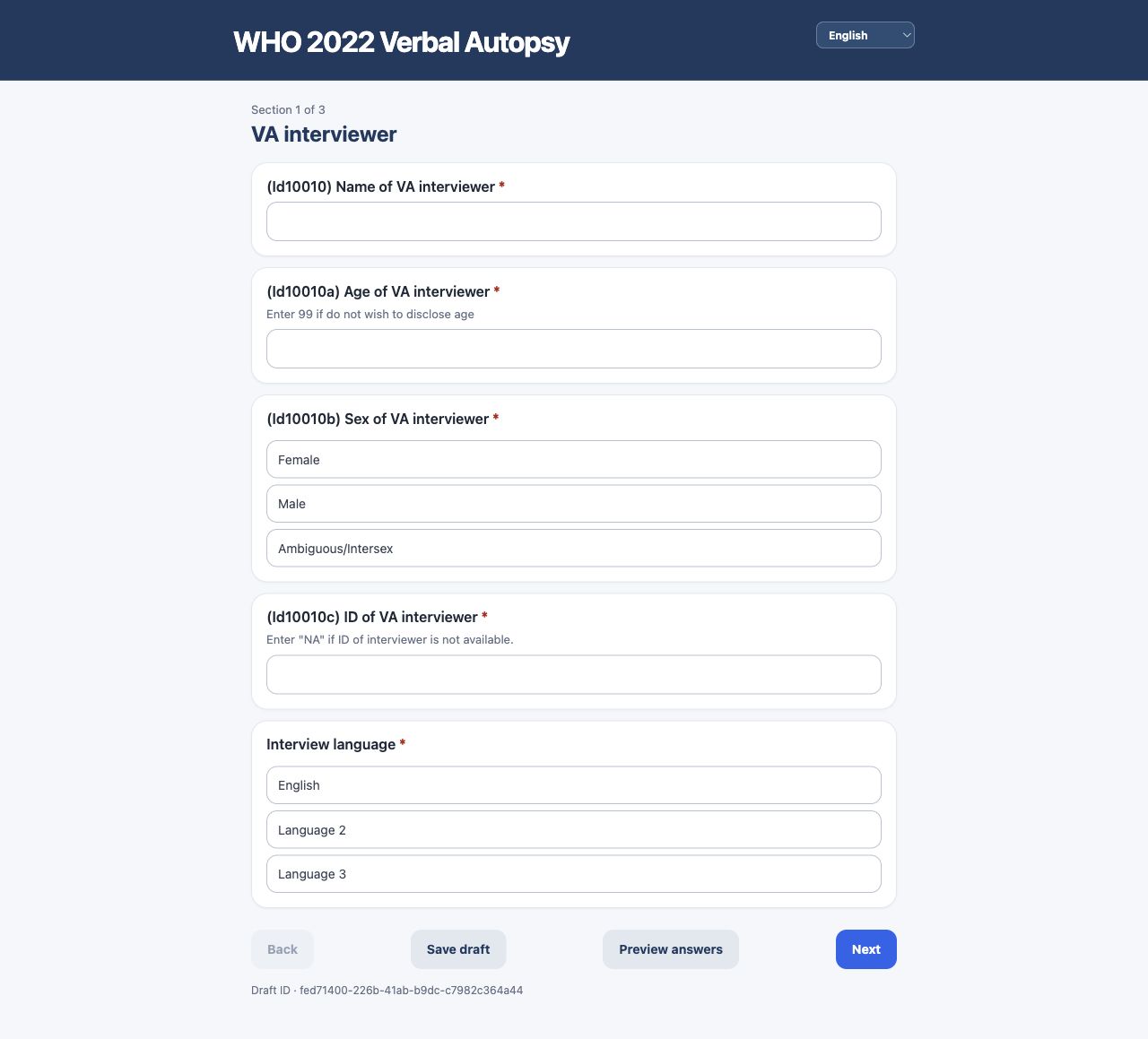
Package entry points
| Import | Purpose |
| --- | --- |
| @drguptavivek/who-2022-va | Headless instrument, expression, session, and submission APIs |
| @drguptavivek/who-2022-va/native | Expo and React Native WhoVaForm |
| @drguptavivek/who-2022-va/web | React web WhoVaForm, rendered through React Native Web |
| @drguptavivek/who-2022-va/web-component | <who-va-2022-form> wrapper for non-React web apps |
Runtime performance
The canonical JSON remains one offline artifact, but the /native and /web form entry points no longer parse it when the application bundle starts. They dynamically load and cache it when a form first needs the default instrument. The root @drguptavivek/who-2022-va entry keeps the synchronous whoVa2022Instrument export for headless and server compatibility; applications concerned about startup cost can import loadWhoVa2022Instrument instead.
Opening the first default form still parses the complete instrument once. The runtime does not fetch a section at a time: relevance, calculations, navigation, and final validation can refer to questions in other sections, and the instrument must continue working completely offline. This trades a single predictable parse for simpler, reliable interviews; only the current section's controls are rendered. Further section chunking should be considered only if profiling the target low-spec devices shows this deferred parse is still material.
Once an instrument is used, the runtime builds shared indexes for questions by name, questions by section, sections by name, and calculated questions.
Indexes are cached by instrument identity in a WeakMap. Sessions and translated instruments can be released normally, while repeated lookups avoid scanning all 450 questions.
Calculations run once after an answer changes and once for full submission validation. Relevance checks reuse that calculated state instead of recalculating the 38 derived fields for every question.
Session snapshots compute the visible section list once and render only its current questions. Answer-preview filtering is memoized and runs only while the preview is open.
Field validation remains real time. Type, choice, and constraint errors appear as the interviewer enters an answer and clear immediately after correction; Next and Complete still perform section or full-form validation.
Host-provided language modules are loaded on demand. Translation application structurally shares every unchanged section, question, and choice with the English instrument. JavaScript runtimes normally retain imported language modules in their module cache; applications can bound the loader's translated-instrument cache independently.
Expo / React Native
import { SafeAreaView } from "react-native";
import { WhoVaForm, type WhoVaDraftStore } from "@drguptavivek/who-2022-va/native";

const draftStore: WhoVaDraftStore = {
  async save(draft) {
    // Use Expo SQLite, AsyncStorage, MMKV, or the app database here.
    await appStorage.set(`who-va-2022:draft:${draft.id}`, JSON.stringify(draft));
  }
};

export default function App() {
  return (
    <SafeAreaView style={{ flex: 1 }}>
      <WhoVaForm
        initialData={{ Id10010c: "INT-001" }}
        draftStore={draftStore}
        platform={{
          pickDate: async (_question, _data, currentValue) => {
            // Open the host app's native date picker and return YYYY-MM-DD.
            return openNativeDatePicker(currentValue);
          },
          captureAudio: async () => {
            // Connect Expo Audio or the host application's recorder here.
            return { uri: "file:///recordings/va.m4a", mimeType: "audio/mp4" };
          },
          captureImage: async () => openCamera(),
          selectImage: async () => openImageLibrary(),
          selectFile: async (_question, _data, acceptedMimeTypes) => {
            // Connect Expo DocumentPicker and restrict it to acceptedMimeTypes.
            return openDocumentPicker(acceptedMimeTypes);
          }
        }}
        onDraftSaved={(draft) => console.log(`Saved ${draft.id}`)}
        onComplete={(result) => {
          if (result.valid) queueForSubmission(result.data);
        }}
      />
    </SafeAreaView>
  );
}
Date picking, audio capture, and draft storage are injected by the host so the module does not force a particular Expo SDK, database, upload service, or file lifecycle. The Save draft button and every Next/Complete press write a UUID-addressed envelope through draftStore. If pickDate is omitted on native, full-date questions remain usable as validated text inputs with alphabetic, localized months; order follows the locale (DD-MMM-YYYY, MMM-DD-YYYY, or YYYY-MMM-DD). Stored answers always use canonical YYYY-MM-DD. Web renderers use the browser's locale-aware native calendar control automatically. Date fields with the WHO year appearance, such as Id10024, use a four-digit year input rather than the full-date control.
Reusable question controls
Both /web and /native export WhoVaQuestionControls. Its named components are Text, Integer, Date, SingleChoice, MultipleChoice, Confirm, Audio, Image, File, Note, Calculated, and System; Control dispatches from a question's canonical control value. These components accept the same question/value/data/issues/onAnswer contract and can be used outside the full form.
WHO text questions with appearance: "multiline", including the detailed open narrative, use a tall multiline input. Image controls support camera/library selection, preview, hide/view, 90-degree rotation, zoom, replace, and remove. File controls request PDF MIME type only and support replace/remove. Web supplies browser selectors; Expo/React Native hosts connect camera, image-library, and document-picker functions through platform.
Attachment answers are durable references, not embedded base64 data. Browser images are decoded directly from the selected Blob, resized and JPEG-encoded, and stored in IndexedDB; the answer JSON stores only an ID and metadata. Native adapters can provide inspect(uri) so the original camera file is decoded by the platform without first copying all of its bytes into the JavaScript heap. The processed native file remains a URI that the host can stream to its upload service.
The default limits protect low-memory devices: images are capped at 10 MB and 16 megapixels before processing, then reduced to at most 2048 pixels on the longest edge and 2 MB. PDFs are capped at 5 MB and 10 pages; the original PDF is replaced by JPEG page images no larger than 1600 pixels on the longest edge. Host applications may choose stricter image limits.
React web
import { WhoVaForm } from "@drguptavivek/who-2022-va/web";

export function VerbalAutopsyPage() {
  return <WhoVaForm onDraftSaved={(draft) => console.log(draft.id)} onComplete={(result) => submit(result.data)} />;
}
Web uses localStorage by default under who-va-2022:draft:<uuid>. Pass draftId to continue overwriting a known draft, or pass a custom draftStore to use another persistence layer. Audio questions use the browser microphone: press Record audio, then Stop and save recording. The browser will request microphone permission, and recording requires a secure context (https:// or localhost).
Upload a stored browser attachment as a Blob; do not convert it to base64:
import { loadWhoVaWebAttachmentBlob } from "@drguptavivek/who-2022-va/web";

const blob = await loadWhoVaWebAttachmentBlob(attachmentReference);
if (blob) {
  const body = new FormData();
  body.append("file", blob, attachmentReference.name);
  await fetch("/api/attachments", { method: "POST", body });
}
After loading all drafts that must remain on the device, orphaned IndexedDB binaries can be removed explicitly:
import { cleanupWhoVaWebAttachments } from "@drguptavivek/who-2022-va/web";

await cleanupWhoVaWebAttachments(allRetainedDrafts.map((draft) => draft.data));
Only call cleanup with the complete set of retained drafts/answers; omitted references are treated as deleted. Object URLs used for previews are revoked when controls release them.
localStorage is unencrypted browser storage. For production VA data, provide a secured storage adapter with the application's encryption, access-control, retention, and device-loss protections.
Any web application
import { defineWhoVaElement } from "@drguptavivek/who-2022-va/web-component";

defineWhoVaElement();
<who-va-2022-form locale="en"></who-va-2022-form>
<script type="module">
const form = document.querySelector("who-va-2022-form");
form.setData(savedDraft);
form.addEventListener("who-va-draft-saved", event => console.log(event.detail.id));
form.addEventListener("who-va-complete", event => submit(event.detail.data));
const assessment = form.validate();
</script>The element exposes getData(), setData(data), getDraftId(), validate(), and complete(). Set a draft-id attribute before attaching the element to continue a known UUID; otherwise it generates one.
Adding languages
The package ships only the unmodified English source instrument as a built-in language. WHO_VA_2022_LANGUAGES therefore contains only en. Host applications can use the localization APIs with translations for which they have the necessary rights or permissions.
The preferred runtime layout is one independent file per language. Each file is JSON-serializable and owns that locale's section labels, question text, hints, guidance, choice labels, constraint messages, and optional form UI strings:
// languages/fr.ts (languages/fr.json has the same data shape)
import type { WhoVaLanguageFile } from "@drguptavivek/who-2022-va";

export default {
  locale: "fr",
  instrument: {
    sections: { va_interviewer: "Enquêteur AV" },
    questions: {
      Id10021: {
        label: "Quand la personne décédée est-elle née ?",
        hint: "Utilisez la meilleure date disponible",
        constraintMessage: "Saisissez une date de naissance valide",
        choices: { "1": "Oui", "0": "Non" }
      }
    }
  },
  ui: {
    next: "Suivant",
    required: "{label} est obligatoire"
  }
} satisfies WhoVaLanguageFile;
Register dynamic imports once. No language file is downloaded until it is selected; loaded files are cached. A regional request such as fr-CA falls back to the fr file, then to the base English instrument.
import { createWhoVaLanguageLoader, whoVa2022Instrument } from "@drguptavivek/who-2022-va";
import { WhoVaForm } from "@drguptavivek/who-2022-va/web";

const loadLanguage = createWhoVaLanguageLoader(whoVa2022Instrument, {
  fr: () => import("./languages/fr.js"),
  sw: () => import("./languages/sw.js")
});

const language = await loadLanguage(selectedLocale);

<WhoVaForm
  instrument={language.instrument}
  locale={language.locale}
  uiTranslations={language.uiTranslations}
/>;
Stable question names and choice values are never translated, so saved submissions and branching logic remain compatible across languages. Constraint expressions are also shared; each language file supplies only the interviewer-facing constraintMessage.
Changing the loaded instrument and locale props switches the active language without discarding the current session answers.
Adding translations manually
XLSForm is not required. A translation may be partial, so another question, hint, choice, or constraint message can be added whenever it becomes available:
import { whoVa2022Instrument, withInstrumentTranslation } from "@drguptavivek/who-2022-va";

const instrument = withInstrumentTranslation(whoVa2022Instrument, "fr", {
  questions: {
    Id10021: {
      label: "Quand la personne décédée est-elle née ?",
      hint: "Utilisez la meilleure date disponible"
    },
    Id10022: {
      choices: {
        "1": "Oui",
        "0": "Non"
      },
      constraintMessage: "Sélectionnez une réponse valide"
    }
  }
});
Only the supplied fields are added. Existing translations are preserved, untranslated fields fall back to English, and question IDs, choice values, calculations, relevance rules, and stored answers are unchanged. The same instrument object can be passed directly to WhoVaForm, or the translation object can be placed under instrument in a lazy WhoVaLanguageFile as shown above.
Translations of the source questionnaire may be adaptations under its CC BY-ND 3.0 IGO licence. Confirm that you have the necessary permission before distributing a translated instrument.
Web theming
The React web renderer and web component expose namespaced CSS custom properties. Set them on :root, an application wrapper, or one form instance; no component fork or !important override is needed.
.my-va-page {
  --who-2022-web-color-brand: #275dad;
  --who-2022-web-color-brand-deep: #173b70;
  --who-2022-web-color-brand-soft: #eaf1fb;
  --who-2022-web-color-canvas: #f5f7fb;
  --who-2022-web-color-surface: #ffffff;
  --who-2022-web-color-ink: #172033;
  --who-2022-web-color-muted: #5c667a;
  --who-2022-web-color-border: #dce2eb;
  --who-2022-web-color-control-border: #9aa8bc;
  --who-2022-web-radius-control: 10px;
  --who-2022-web-radius-card: 16px;
  --who-2022-web-form-max-width: 48rem;
  --who-2022-web-form-padding: clamp(1rem, 2.5vw, 1.5rem);
}
<section class="my-va-page">
<who-va-2022-form locale="en"></who-va-2022-form>
</section>All web theme properties use the --who-2022-web- namespace. Less commonly needed tokens cover guidance, danger, and image-preview colors: color-ink-subtle, color-guidance, color-danger, color-danger-border, color-danger-strong, color-danger-soft, and color-image-background.
The form is mobile-first: it fills the available width with responsive padding, then stops growing at --who-2022-web-form-max-width (default 48rem). The same cap applies in portrait and landscape, preventing long question text and controls from stretching across widescreen displays. Set the token on a wrapper or individual form when a host application needs a narrower measure. --who-2022-web-form-padding controls both gutters with one CSS length; --who-2022-web-form-padding-inline and --who-2022-web-form-padding-block can override the horizontal and vertical gutters independently.
Headless validation
import { validateSubmission, whoVa2022Instrument } from "@drguptavivek/who-2022-va";

const assessment = validateSubmission(whoVa2022Instrument, incomingPayload);
if (!assessment.valid) {
  return { status: 422, issues: assessment.issues };
}

await save(assessment.data);
This is the same validator used by native and web sessions. Interactive sessions also run field validation after each accepted answer, so users see constraint errors before pressing Next.
When Next or Complete finds validation issues, the shared renderer aligns the first invalid question at the top of the screen and highlights its error card. Web also focuses the first interactive control; Expo and React Native use the question's measured content position with ScrollView.scrollTo.
Development and tests
pnpm dev          # launch the browser preview at http://127.0.0.1:5173
pnpm typecheck
pnpm test         # includes source-conformance and runtime tests
pnpm test:e2e     # run Chromium form automation with trace, video, and HTML report
pnpm test:e2e:headed # watch each action at 800 ms and each form sequentially
pnpm test:e2e:report # open the most recent Playwright report
pnpm build
pnpm check
Install the pinned Playwright browser once with pnpm exec playwright install chromium. The browser suite enters answers through the rendered controls, captures validation errors and corrected states, verifies the visible age summary and calculated values derived from Id10021, and confirms valid paths can advance without alerts.
Canonical artifacts:
src/generated/who-va-2022.instrument.json— authoritative runtime instrumentsrc/generated/who-va-2022.question-audit.json— human-reviewable question matrix retained alongside the contract
The package build reads only the checked-in JSON. Tests may compile the retained XLSForm in memory to detect source drift and verify type, coded values, requiredness, relevance AST, constraints, calculations, field validation, and isolated submission validation. The test compiler never regenerates or modifies the JSON.
See the developer guide for the full contributor workflow and Architecture for the trust boundaries and extension points.
Licensing and attribution
The original software implementation is released under the MIT License.
The questionnaire content remains copyright World Health Organization and is identified by WHO as licensed under CC BY-ND 3.0 IGO. See NOTICE for attribution, licence boundaries, and the non-endorsement statement.