
npm package discovery and stats viewer.

Discover Tips

  • General search

    [free text search, go nuts!]

  • Package details

    pkg:[package-name]

  • User packages

    @[username]

Sponsor

Optimize Toolset

I’ve always been into building performant and accessible sites, but lately I’ve been taking it extremely seriously. So much so that I’ve been building a tool to help me optimize and monitor the sites that I build to make sure that I’m making an attempt to offer the best experience to those who visit them. If you’re into performant, accessible and SEO friendly sites, you might like it too! You can check it out at Optimize Toolset.

About

Hi, 👋, I’m Ryan Hefner  and I built this site for me, and you! The goal of this site was to provide an easy way for me to check the stats on my npm packages, both for prioritizing issues and updates, and to give me a little kick in the pants to keep up on stuff.

As I was building it, I realized that I was actually using the tool to build the tool, and figured I might as well put this out there and hopefully others will find it to be a fast and useful way to search and browse npm packages as I have.

If you’re interested in other things I’m working on, follow me on Twitter or check out the open source projects I’ve been publishing on GitHub.

I am also working on a Twitter bot for this site to tweet the most popular, newest, random packages from npm. Please follow that account now and it will start sending out packages soon–ish.

Open Software & Tools

This site wouldn’t be possible without the immense generosity and tireless efforts from the people who make contributions to the world and share their work via open source initiatives. Thank you 🙏

© 2026 – Pkg Stats / Ryan Hefner

@dsh-sparrow/dsh-chat-fim

v0.1.5-rc.2.1

Published

DSH web plugin: chat input suggestions via DeepSeek FIM completion (Beta) — a card suggests what you may type next, Tab adopts, Esc dismisses; trigger sensitivity adjustable (high/medium/low)

Readme

dsh-chat-fim

简体中文 | English | GitHub

聊天输入框续写联想 —— DeepSeek Harness(DSH)Web 插件(dsh-sparrow 合集成员)。

打字停顿片刻,输入框上方会以官方 @ 候选菜单同款悬浮卡给出「接下来可能写的文字」建议:Tab 采用进草稿,Esc 丢弃。补全由 DeepSeek 官方 FIM 补全(Beta)驱动,续写直接站在你的角度接话。

安装

dsh plugin --profile web add @dsh-sparrow/dsh-chat-fim

适配 dsh 0.1.5-rc.2(本版构建与验证所对齐的确切官方版本线;更新的版本线、尤其是预发布版本不在承诺范围内),并需要可用的 pnpmdsh plugin 会把安装操作转发给 pnpm)。

不要直接执行 npm install @dsh-sparrow/dsh-chat-fim:那只会把包下载到某个 node_modules,不会注册进 DSH 的 web profile。请使用上面的 dsh plugin 命令安装,并在安装后重启 DSH。

使用

  • 开关:输入框工具行「✦ FIM」胶囊,点击开 / 关;默认关闭,开启状态本地记忆

  • 触发:开启后打字停顿自动联想;句末标点(。!?.!?;;)结尾仅「高」档触发(中/低不触发),拼音等输入法组合输入中不触发;其余规则(停顿时长、最短草稿、夹入英文半词、词后空格、句末标点)随下方灵敏度三档伸缩

  • 建议:Tab 采用、Esc 丢弃(也可直接点选);官方 @/斜杠候选菜单打开时本建议自动让位;每次建议只有一句(续写到句末标点即止),想连续续写就连续按 Tab——触发更勤可切「高」档

  • 触发灵敏度:胶囊右侧「方点 + ▾」触发区可选高 / 中 / 低三档(点击整区只开选档菜单、不会误触开关;方点恒显 3 个、自下而上点亮 3/2/1 个指示当前档,悬停有提示),续写模型跟随你选择的主模型(deepseek-flash / v4-pro / v4-flash;vision 等回退 deepseek-flash)。三档规则:

    | 档位 | 停顿 | 最短草稿 | 夹入英文半词 | 词后空格 | 句末标点 | |---|---|---|---|---|---| | 高 | 250ms | 中文 4 字 / 英文 2 字符 | 联想 | 联想 | 联想 | | 中(默认) | 400ms | 中文 8 字 / 英文 6 字符 | 不联想 | 联想 | 不联想 | | 低 | 800ms | 中文 12 字 / 英文 8 字符 | 不联想 | 不联想 | 不联想 |

  • 当前会话主模型不是 DeepSeek 系列时,开关整体隐藏

  • 凭据:续写请求复用你在 dsh 中配置的 DeepSeek API key(FIM 补全 Beta),不新增凭据、key 不进浏览器;产生的 token 计入你的 DeepSeek 账户

截图
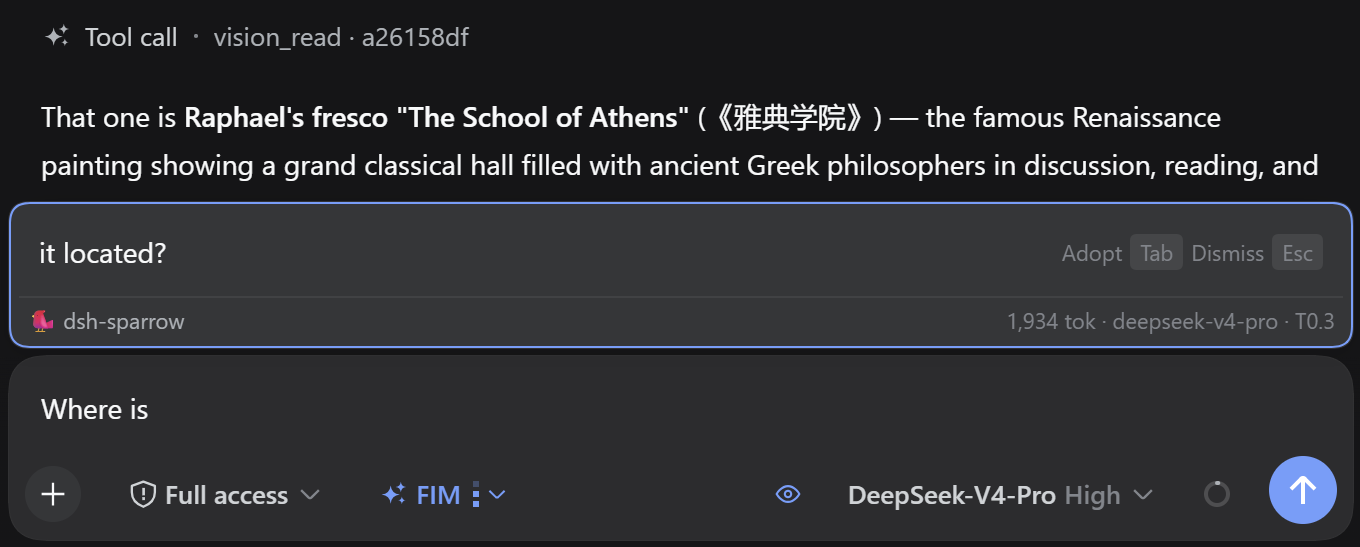
续写联想建议卡

卸载与残留

  • 插件不写任何文件、不改 .dsh 内部结构,只做网络转发;
  • 唯一的持久状态是浏览器 localStorage 键 dsh-chat-fim:enabled(开关)与 dsh-chat-fim:sensitivity(触发灵敏度)。卸载后这两个键留在浏览器里、无害,介意可在 DevTools 中删除。

更新日志CHANGELOG.zh-CN.md