
@dsh-sparrow/dsh-codebuddy-credits
v0.1.5-rc.2.2
Published
Company CodeBuddy credits as a DeepSeek Harness LLM provider — official API key, models only, no agent harness

Maintainers
 peiyucn
Readme
dsh-codebuddy-credits
把公司发的 CodeBuddy 额度接成 DeepSeek Harness(DSH)的 LLM provider—— 企业发放的 WorkBuddy/CodeBuddy 积分,在 DSH 里直接用。官方 API Key 直连: CodeBuddy 只提供积分对应的模型推理,agent 循环(工具、权限、上下文)完全 由 DSH 承担。
插件在 DSH 模型选择器里注册一个 CodeBuddy Credits provider(内部路由
codebuddy-credits)。DSH 自己跑 agent 循环(工具、权限、上下文),CodeBuddy
只负责推理,额度记在 CodeBuddy 账号上。
为什么做这个
公司发的 CodeBuddy 积分只能在 CodeBuddy 生态里花。如果你习惯用 DSH 当 agent 宿主,这个插件把积分花在你想要的地方——走官方 API Key 机制,不借用浏览器 登录态、不装 CodeBuddy CLI。
环境要求
- DSH 0.1.5-rc.2(本版构建与验证所对齐的确切官方版本线;更新的版本线、尤其是预发布版本不在承诺范围内)
- Node.js >= 22.19.0
安装
dsh plugin --profile web add @dsh-sparrow/dsh-codebuddy-credits@latest装完重启 DSH。headless 场景用 --profile headless 再装一次。
获取 API Key
- 登录 CodeBuddy 平台:https://copilot.tencent.com/profile/(企业控制台: API 管理 → 访问密钥;国际版 https://www.codebuddy.ai/profile/keys)。
- 创建密钥。企业密钥按账号签发,模型可用范围跟随账号权限。
配置(界面内完成)
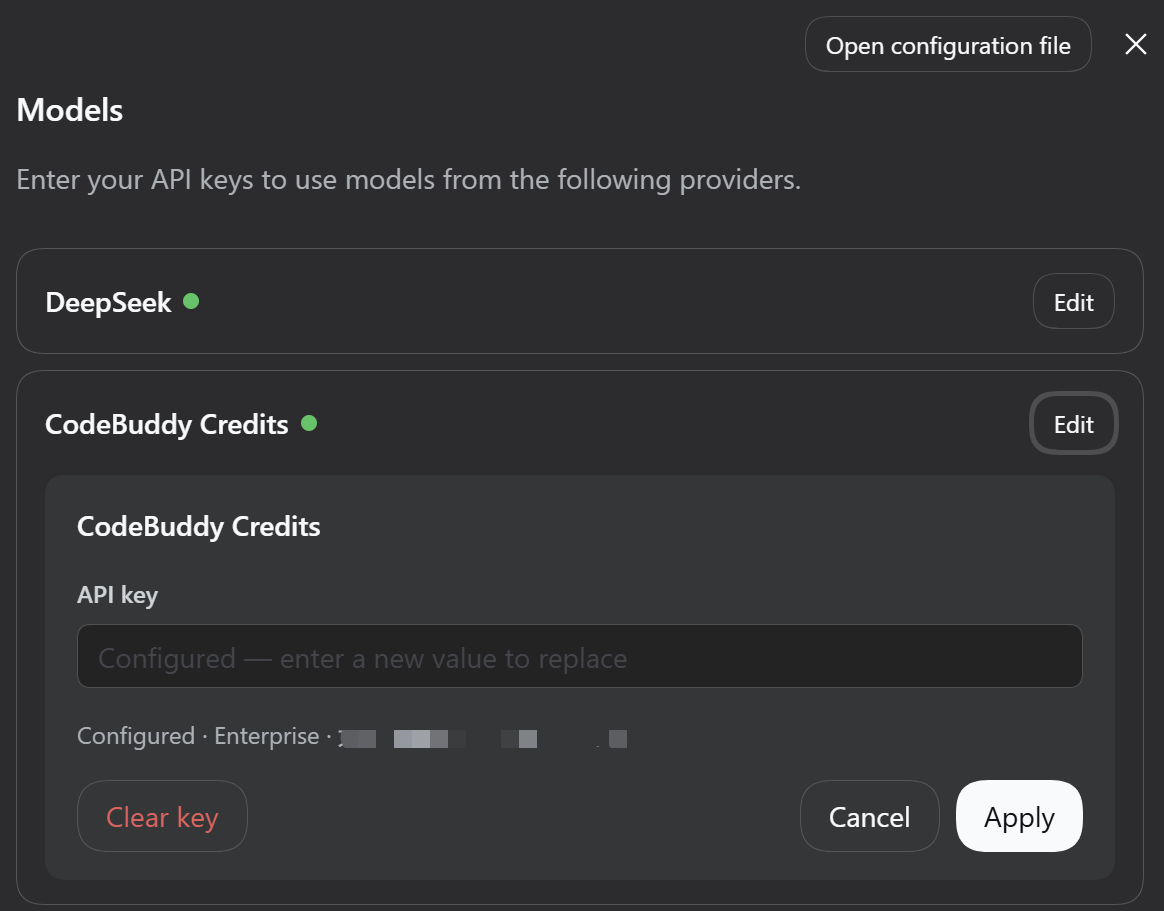
打开 设置 → 模型,在 CodeBuddy Credits 行上直接粘贴 Key 并保存:
- 保存 Key 时,插件用这把 Key 查询 CodeBuddy 模型目录(按该 Key 的账号权限 返回,企业管理员配置的可用模型)并启用 provider。目录只存进程内、按需 刷新,不写入设置文件;
- 配置成功后,卡片同时列出这把 Key 可用的模型(只读:模型名 +
x0.00 · 1M只读事实),并提供「获取可用模型」按钮——管理员调整清单后可手动重扫; 刷新只作用于本 provider; - 之后模型选择器里即可选择这些模型。选择器是官方的 CodeBuddy 版变体:
模型行左侧是模型名、右侧是只读事实(
x0.00 · 1M,即积分系数 · 上下文 长度),推理等级按服务端逐模型声明; - 未配置 Key 时,插件不发起任何网络请求,模型选择器也不出现本 provider;
- 移除 Key 后 provider 随即停用。
Key 只存入 DSH 凭据库,不进 settings.yaml。环境变量
CODEBUDDY_CREDITS_API_KEY 在启动时同样生效;旧拼写 CODEBUDDY_API_KEY
仍可识别并自动迁移。界面保存是推荐方式。
积分可见性
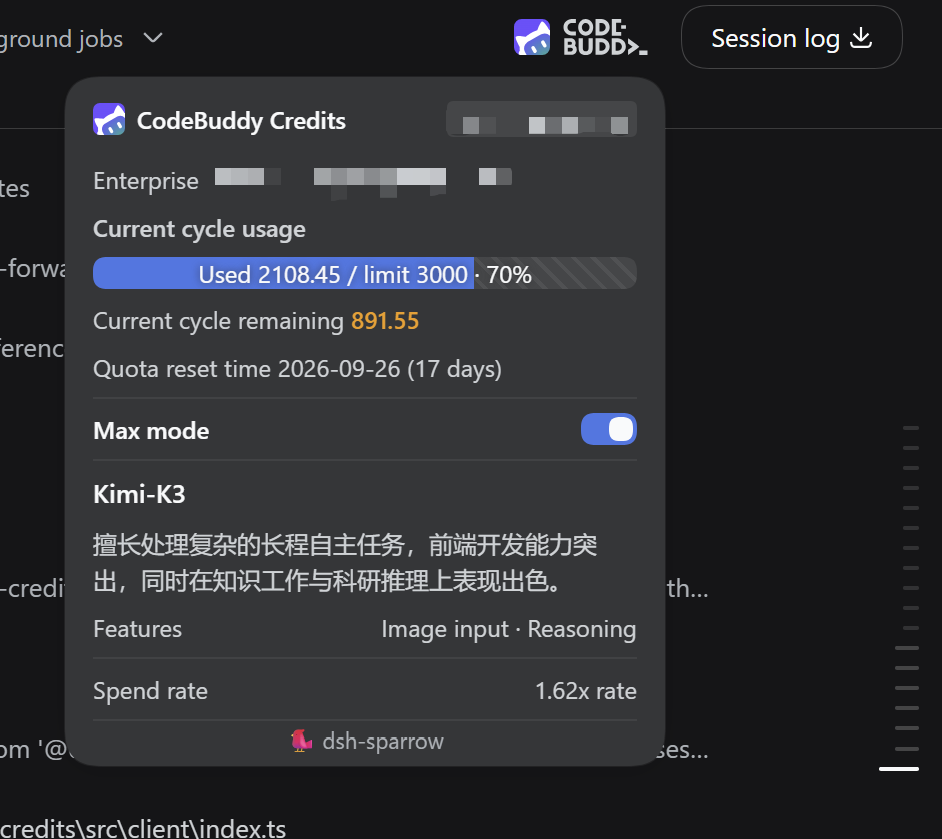
配置 Key 后,插件在对话界面里展示 CodeBuddy 用量:
- 会话头部入口(会话列右上角、Session log 按钮左侧,对话页与新会话 首页均显示):展开面板显示账号/企业、当期额度(已用 / 额度 / 剩余、进度条、 重置日期),以及当前选中 CodeBuddy 模型的只读事实(积分系数 · 上下文长度)、 描述与可用功能;
- 会话积分胶囊:输入框下方官方统计行里再多一颗同款胶囊(本会话累计积分与调用 次数),点开显示调用次数与按模型聚合的每次调用明细;
- 每轮积分胶囊:单轮消耗的积分(在该轮操作行末尾),点开显示调用次数 与按模型聚合的每次调用明细。
会话与单轮统计由会话自身的事件日志重放得出,重启 DSH 后不清零,重新打开 旧会话也仍准确;额度面板始终读服务端权威数字。
截图
如实说明
- 推理端点就是官方 CodeBuddy CLI 用的那套。Key 是官方签发、认证方式是官方 IAM 文档明示的,但对话接口本身没有公开的稳定性承诺——本插件是第三方 适配器,不是官方产品。
- 接口只支持流式,非流式请求会被拒绝。
- 模型计费跟随账号:企业计划下 hy 系列目前免费、minimax-m3-pay 收费,政策 随时可能变。
- 通过 Key 发起的请求会进入账号用量记录(企业用量控制台连提示词文本都可见)。