
@dulysse1/ts-helper
v1.4.5
Published
A personal TypeScript playground to explore the limits of the type system and keep growing my knowledge ✨

Maintainers
 dulysse1
Readme

🛠 ts-helper 🛠
A personal TypeScript playground for exploring the limits of TypeScript's type system and sharpening my skills. ✨
Getting started 🆙
Prerequisites
Install TypeScript in your project
npm install typescript --save-devOr
yarn add typescript --devOr
pnpm i -D typescriptFor best results, add this to your tsconfig.json
{
	"compilerOptions": {
		"strictNullChecks": true, // highly recommended (required by few utilities)
		"strict": true, // this is optional, but enable whenever possible
		"lib": ["es2015"] // this is the lowest supported standard library
	}
}
Usage 🤔
ES module import ✅
import type { Num, Arr, Str } from "@dulysse1/ts-helper";
// now you can create your types!
Documentation 🧗
| Num | Op | Obj | Arr | Union | Str | Any | Lab | Class | Brd | Test | | ------------------- | --------------------- | ----------------- | --------------- | --------------- | ----------------- | ----------- | ----------- | --------------- | --------------- | ------------- | | Numbers | Operator | Object | Array | Union | String | Any | Lab | Class | Brand | Test |
Exports — overview
This shows the exports currently provided from the src/ directory.
- Num: Increment, Decrement, Greater, Lower, GreaterEq, LowerEq, IsPositive, IsNegative, Add, Subtract, Opposite, Range, Between, IsZero, Multiply, Divide, Eval, Factorial, Modulo, Power, IsFloat, Compare, Comparators, ParseInt, ParseFloat, IsEven, IsOdd, IsInteger, Abs
- Op: Equal, Satisfy, And, Or, Not, Xor, AndAll, OrAll, If, Fallback, IsEqual, IsAssignable
- Obj: Merge, KeyOf, Intersection, Omit, Partial, Required, Prettify, Rename, HasKey, Filter, Update, Reversed, Exclude, Tree, Entries
- Arr: IsTuple, Reverse, Readable, Length, At, ToUnion, IsReadonly, Includes, Join, First, Last, Count, Concat, Flat, Fill, FillRange, Filter, Zip, Unique, Map, Infer, Some, IndexOf
- Union: Last, Exclude, ToArray, Count, First, IsUnion, Through, Has, OneOf
- Str: IsExactString, ContainExactString, Split, Width, Replace, ReplaceAll, PlacedAt, Reversed, Repeat, TrimStart, TrimEnd, Trim, Count, Includes, Infer, Alphanumeric, Special, ReplaceMap, UnAccent, ToCamelCase, ToPascalCase, ToKebabCase, ToSnakeCase, AsciiMap, AsciiCode, AsciiRange, IsUpperCase, IsLowerCase, IsDigit, Filter
- Any: Implicit, IsAny, IsLiteral, PrimitiveOf, IsPrimitive
- Lab: TicTacToe, Connect4
- Class: Constructor
- Brd: Symbol, IsBranded, Branded
- Test: Describe, It, Out
Examples
🧪 Test your own types
- Since version
1.3.0you can test your own types like unit test with compiler check. Here is an example of usage with a type from my module:
import { Test, type Num } from "@dulysse1/ts-helper";

Test.Describe(
	"Evaluation of mathematical expressions represented as string",
	Test.It<Num.Eval<"2+2*2">, 6, typeof Test.Out.PASS>(),
	Test.It<Num.Eval<"20.2-4/2">, 18.2, typeof Test.Out.PASS>(),
	Test.It<Num.Eval<"HELLO">, number, typeof Test.Out.FAIL>(),
	Test.It<Num.Eval<"23.3/32323">, number, typeof Test.Out.PASS>(),
	//         [Tested type]  [Expected]  [Comparison result]
);

Test.Describe(
	"Check if a number is between two other numbers",
	Test.It<Num.Between<1, 1, 5>, true, typeof Test.Out.PASS>(),
	Test.It<Num.Between<0, 10, 20>, true, typeof Test.Out.FAIL>(),
	Test.It<Num.Between<number, 10, 7>, boolean, typeof Test.Out.PASS>(),
);- Add the following script in your package.json:
{
	"test:type": "npx tsc --extendedDiagnostics --noEmit"
}- You can now run the command to check your tested types!
👉 Numbers
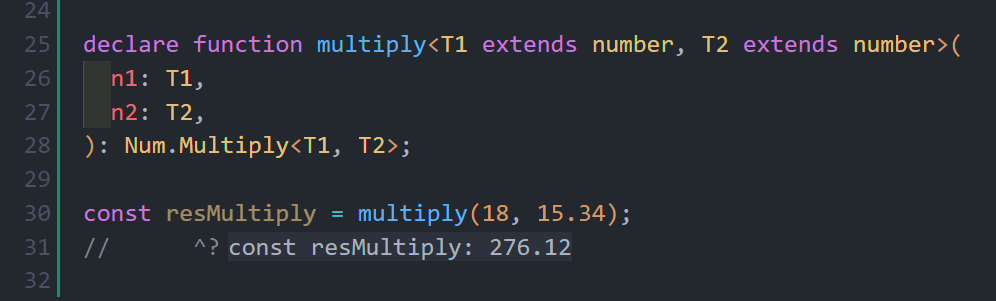
⚠️ Returns an absolute result with a precision of two decimals for numbers that don't reach compiler limits, otherwise it returns an
explicit result. ⚠️New feature since version
1.2.6! The multiply function allow onefloattype 🤯🤯🤯
- New feature since version
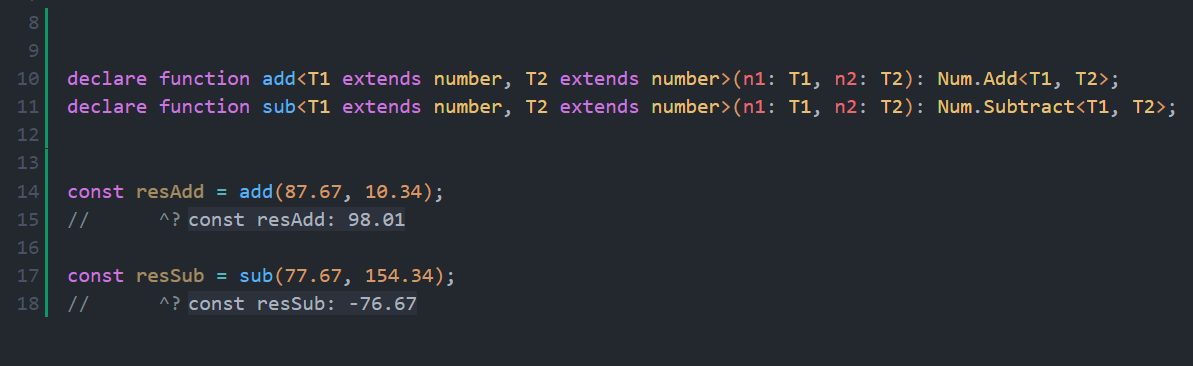
1.2.2! Add and Substract functions allowfloattype 🤯🤯
- New feature since version
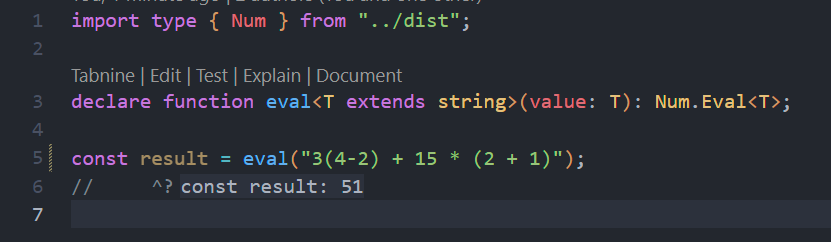
1.1.1! Eval function return type for calculation 🤯
- Increment a number by one
import type { Num } from "@dulysse1/ts-helper";

type A = Num.Increment<5>; // 6
type B = Num.Increment<0>; // 1- Decrement a number by one
import type { Num } from "@dulysse1/ts-helper";

type A = Num.Decrement<5>; // 4
type B = Num.Decrement<0>; // -1- Check whether
Ais greater thanB
import type { Num } from "@dulysse1/ts-helper";

type A = Num.Greater<5, 3>; // true
type B = Num.Greater<3, 5>; // false- Check whether
Ais lower thanB
import type { Num } from "@dulysse1/ts-helper";

type A = Num.Lower<3, 5>; // true
type B = Num.Lower<5, 3>; // false- Check whether
Ais greater than or equal toB
import type { Num } from "@dulysse1/ts-helper";

type A = Num.GreaterEq<5, 5>; // true
type B = Num.GreaterEq<4, 5>; // false- Check whether
Ais lower than or equal toB
import type { Num } from "@dulysse1/ts-helper";

type A = Num.LowerEq<3, 3>; // true
type B = Num.LowerEq<4, 3>; // false- Get the opposite of a number
import type { Num } from "@dulysse1/ts-helper";

type A = Num.Opposite<5>; // -5
type B = Num.Opposite<-3>; // 3- Generate a range of numbers between
StartandEnd
import type { Num } from "@dulysse1/ts-helper";

type A = Num.Range<1, 5>; // [1, 2, 3, 4, 5]
type B = Num.Range<5, 1>; // [5, 4, 3, 2, 1]- Check if a number is between two other numbers
import type { Num } from "@dulysse1/ts-helper";

type A = Num.Between<3, 1, 5>; // true
type B = Num.Between<6, 1, 5>; // false- Check if a number is zero
import type { Num } from "@dulysse1/ts-helper";

type A = Num.IsZero<0>; // true
type B = Num.IsZero<4>; // false- Compute the modulo of two numbers
import type { Num } from "@dulysse1/ts-helper";

type A = Num.Modulo<10, 3>; // 1
type B = Num.Modulo<8, 4>; // 0- Raise a number to a given power
import type { Num } from "@dulysse1/ts-helper";

type A = Num.Power<2, 3>; // 8
type B = Num.Power<5, 2>; // 25- Compare two numbers and return a comparison result
import type { Num } from "@dulysse1/ts-helper";

type A = Num.Compare<2, 5>; // -1
type B = Num.Compare<5, 2>; // 1
type C = Num.Compare<5, 5>; // 0- Expose the available comparison operators
import type { Num } from "@dulysse1/ts-helper";

type Cmp = Num.Comparators; // { "<": ...; ">": ...; "==": ... }- Check if a number is an integer
import type { Num } from "@dulysse1/ts-helper";

type A = Num.IsInteger<5>; // true
type B = Num.IsInteger<5.5>; // false- Get the absolute value of a number
import type { Num } from "@dulysse1/ts-helper";

type A = Num.Abs<-5>; // 5
type B = Num.Abs<7>; // 7- Check if a number is
positive
import type { Num } from "@dulysse1/ts-helper";

type A = Num.IsPositive<-2343>; // false
type B = Num.IsPositive<134>; // true
type C = Num.IsPositive<0>; // true- Add two numbers
import type { Num } from "@dulysse1/ts-helper";

type A = Num.Add<10, 10>; // 20
type B = Num.Add<-10, 10>; // 0
type C = Num.Add<-23, -34>; // -57
type C = Num.Add<87.67, 10.34>; // 98.01 NEW!- Substract two numbers
import type { Num } from "@dulysse1/ts-helper";

type A = Num.Subtract<10, 10>; // 0
type B = Num.Subtract<10, -40>; // 50
type C = Num.Subtract<12.4, 3.2>; // 9.2 NEW!- Multiply two numbers
import type { Num } from "@dulysse1/ts-helper";

type A = Num.Multiply<10, 10>; // 100
type B = Num.Multiply<-6, 7>; // -42
type C = Num.Multiply<234, 783>; // number- Divide two numbers
import type { Num } from "@dulysse1/ts-helper";

type A = Num.Divide<20, 10>; // 2
type B = Num.Divide<0, 7>; // 0
type C = Num.Divide<7, 0>; // number- Get the
factorialof one number
import type { Num } from "@dulysse1/ts-helper";

type A = Num.Factorial<0>; // 1
type B = Num.Factorial<-3>; // -6
type C = Num.Factorial<5>; // 120- Check if a number is
even
import type { Num } from "@dulysse1/ts-helper";

type A = Num.IsEven<0>; // true
type B = Num.IsEven<-3>; // false
type C = Num.IsEven<5.5>; // false- Check if a number is
odd
import type { Num } from "@dulysse1/ts-helper";

type A = Num.IsOdd<0>; // false
type B = Num.IsOdd<-3>; // true
type C = Num.IsOdd<5.5>; // true- Check if a number is
float
import type { Num } from "@dulysse1/ts-helper";

type A = Num.IsFloat<0>; // false
type B = Num.IsFloat<-3>; // false
type C = Num.IsFloat<5.5>; // true- Parse a string to
floatnumber
import type { Num } from "@dulysse1/ts-helper";

type A = Num.ParseFloat<"0">; // 0
type B = Num.ParseFloat<"-3">; // -3
type C = Num.ParseFloat<"5.5">; // 5.5- Parse a string to
integernumber
import type { Num } from "@dulysse1/ts-helper";

type A = Num.ParseInt<"0">; // 0
type B = Num.ParseInt<"-3">; // -3
type C = Num.ParseInt<"5.5">; // 5
👉 Object
- Get keys of object by an optional filter
import type { Obj } from "@dulysse1/ts-helper";

type A = Obj.KeyOf<{ a: string; b: number }, string>; // "a"- Merge two type objects
import type { Obj } from "@dulysse1/ts-helper";

type A = Obj.Merge<{ a: string }, { b: number }>; // { a: string; b: number; }- Merge two object types into one
import type { Obj } from "@dulysse1/ts-helper";

type A = Obj.Merge<{ a: string }, { b: number }>; // { a: string; b: number }- Get keys of an object by optional value filtering
import type { Obj } from "@dulysse1/ts-helper";

type A = Obj.KeyOf<{ a: string; b: number; c: boolean }, string>; // "a"
type B = Obj.KeyOf<{ a: string; b: number }, number>; // "b"- Intersect two object types
import type { Obj } from "@dulysse1/ts-helper";

type A = Obj.Intersection<{ a: string }, { a: string; b: number }>; // { a: string }- Omit specific keys from an object type
import type { Obj } from "@dulysse1/ts-helper";

type A = Obj.Omit<{ a: string; b: number; c: boolean }, "b" | "c">; // { a: string }- Make every object property optional
import type { Obj } from "@dulysse1/ts-helper";

type A = Obj.Partial<{ a: string; b: number }>; // { a?: string; b?: number }- Make every object property required
import type { Obj } from "@dulysse1/ts-helper";

type A = Obj.Required<{ a?: string; b?: number }>; // { a: string; b: number }- Flatten complex type intersections into a readable object
import type { Obj } from "@dulysse1/ts-helper";

type A = Obj.Prettify<{ a: string } & { b: number }>; // { a: string; b: number }- Rename object keys without changing the value type
import type { Obj } from "@dulysse1/ts-helper";

type A = Obj.Rename<{ a: string }, "a", "b">; // { b: string }- Check whether a key exists in an object type
import type { Obj } from "@dulysse1/ts-helper";

type A = Obj.HasKey<{ a: string }, "a">; // true
type B = Obj.HasKey<{ a: string }, "b">; // false- Filter object keys by value type
import type { Obj } from "@dulysse1/ts-helper";

type A = Obj.Filter<{ a: string; b: number; c: boolean }, string | number>; // { a: string; b: number }- Update the value type of an existing key
import type { Obj } from "@dulysse1/ts-helper";

type A = Obj.Update<{ count: number }, "count", string>; // { count: string }- Reverse the key order of an object type
import type { Obj } from "@dulysse1/ts-helper";

type A = Obj.Reversed<{ a: "x"; b: "y"; c: "z" }>; // { x: 'a'; y: 'b'; z: 'c'; }- Exclude one or more keys from an object type
import type { Obj } from "@dulysse1/ts-helper";

type A = Obj.Exclude<{ a: string; b: number; c: boolean }, "a" | "c">; // { b: number }- Work with nested object trees and recursive structures
import type { Obj } from "@dulysse1/ts-helper";

type A = Obj.Tree<{ user: { name: string } }>; // { user: { name: string } }- Extract object entries as a union of
[key, value]tuples
import type { Obj } from "@dulysse1/ts-helper";

type A = Obj.Entries<{ a: string; b: number }>; // ["a", string] | ["b", number]
👉 String
- Infer filter logic to a string (
since v1.3.0)
import type { Str } from "@dulysse1/ts-helper";

function checkEmail<T extends string>(
	email: Str.Infer<
		T,
		{
			minChar: 5;
			maxChar: 40;
			pattern: `${string}@${string}.${"com" | "fr" | "us"}`;
		}
	>,
) {
	//...
}

checkEmail(""); // ERROR ❌
checkEmail("demo@d"); // ERROR ❌
checkEmail("[email protected]"); // ✅- Transform a string to
camelCaseorsnake_caseorkebab-caseorPascalCase(since v1.4.1)
import type { Str } from "@dulysse1/ts-helper";

type A = Str.ToCamelCase<"hello world">; // "helloWorld"
type B = Str.ToPascalCase<"hello world">; // "HelloWorld"

// Typescript implementation example:

// very usefull with vuejs to convert JS props to HTML attributes!
const toKebabCase = <T extends string>(str: T): Str.ToKebabCase<T> =>
	str
		.match(/[A-Z]{2,}(?=[A-Z][a-z]+[0-9]*|\b)|[A-Z]?[a-z]+[0-9]*|[A-Z]|[0-9]+/g)
		.map(x => x.toLowerCase())
		.join("-") as Str.ToKebabCase<T>;

// very usefull to convert JS props to Python/Django props!
const toSnakeCase = <T extends string>(str: T): Str.ToSnakeCase<T> =>
	str
		.match(/[A-Z]{2,}(?=[A-Z][a-z]+[0-9]*|\b)|[A-Z]?[a-z]+[0-9]*|[A-Z]|[0-9]+/g)
		.map(x => x.toLowerCase())
.join("_") as Str.ToSnakeCase<T>;- Split a string to array
import type { Str } from "@dulysse1/ts-helper";

type A = Str.Split<"coucou">; // ["c", "o", "u", "c", "o", "u"]
type B = Str.Split<"coucou", "c">; // ["ou", "ou"]- Replace all iteration of one character
import type { Str } from "@dulysse1/ts-helper";

type A = Str.ReplaceAll<"coucou", "c", "x">; // "xouxou"- Check whether a string is exactly a specific literal value
import type { Str } from "@dulysse1/ts-helper";

type A = Str.IsExactString<"hello", "hello">; // true
type B = Str.IsExactString<"hello", "world">; // false- Split a string into an array of characters
import type { Str } from "@dulysse1/ts-helper";

type A = Str.Split<"coucou">; // ["c", "o", "u", "c", "o", "u"]- Check whether a string contains an exact substring
import type { Str } from "@dulysse1/ts-helper";

type A = Str.ContainExactString<"hello world", "world">; // true- Measure the printable width of a string
import type { Str } from "@dulysse1/ts-helper";

type A = Str.Width<"Hi">; // 2
type B = Str.Width<"é">; // 1- Replace the first matching occurrence in a string
import type { Str } from "@dulysse1/ts-helper";

type A = Str.Replace<"hello world", "world", "there">; // "hello there"- Replace all occurrences of one character or substring
import type { Str } from "@dulysse1/ts-helper";

type A = Str.ReplaceAll<"coucou", "c", "x">; // "xouxou"- Insert a string at a specific index
import type { Str } from "@dulysse1/ts-helper";

type A = Str.PlacedAt<"abcd", "X", 2>; // "abXd"- Reverse a string
import type { Str } from "@dulysse1/ts-helper";

type A = Str.Reversed<"abc">; // "cba"- Repeat a string a given number of times
import type { Str } from "@dulysse1/ts-helper";

type A = Str.Repeat<"ha", 3>; // "hahaha"- Remove leading whitespace from a string
import type { Str } from "@dulysse1/ts-helper";

type A = Str.TrimStart<" hello">; // "hello"- Remove trailing whitespace from a string
import type { Str } from "@dulysse1/ts-helper";

type A = Str.TrimEnd<"hello ">; // "hello"- Trim spaces from both ends of a string
import type { Str } from "@dulysse1/ts-helper";

type A = Str.Trim<" hello ">; // "hello"- Count the number of characters in a string
import type { Str } from "@dulysse1/ts-helper";

type A = Str.Count<"hello">; // 5- Check whether a string contains a given substring
import type { Str } from "@dulysse1/ts-helper";

type A = Str.Includes<"hello world", "world">; // true- Infer a string shape from a pattern or constraint
import type { Str } from "@dulysse1/ts-helper";

type A = Str.Infer<"hello", { minChar: 3; maxChar: 10 }>; // "hello"- Access the built-in alphanumeric character sets
import type { Str } from "@dulysse1/ts-helper";

type A = Str.Alphanumeric["a_z"]; // ["a", "b", "c", ..., "z"]
type B = Str.Alphanumeric["0_9"]; // ["0", "1", "2", ..., "9"]- Use the special-character union from the library
import type { Str } from "@dulysse1/ts-helper";

type A = Str.Special; // "!" | "@" | "#" | ...
type B = Extract<Str.Special, "-">; // "-"- Replace characters using a map of replacements
import type { Str } from "@dulysse1/ts-helper";

type A = Str.ReplaceMap<"a-b-c", { a: "x"; b: "y" }>; // "x-y-c"- Remove accents from a string
import type { Str } from "@dulysse1/ts-helper";

type A = Str.UnAccent<"café">; // "cafe"- Convert a string to camelCase
import type { Str } from "@dulysse1/ts-helper";

type A = Str.ToCamelCase<"hello world">; // "helloWorld"- Convert a string to PascalCase
import type { Str } from "@dulysse1/ts-helper";

type A = Str.ToPascalCase<"hello world">; // "HelloWorld"- Convert a string to kebab-case
import type { Str } from "@dulysse1/ts-helper";

type A = Str.ToKebabCase<"helloWorld">; // "hello-world"- Convert a string to snake_case
import type { Str } from "@dulysse1/ts-helper";

type A = Str.ToSnakeCase<"helloWorld">; // "hello_world"- Read the ASCII mapping object for a character
import type { Str } from "@dulysse1/ts-helper";

type A = Str.AsciiMap["A"]; // 65
type B = Str.AsciiMap["B"]; // 66- Get the ASCII code of a character
import type { Str } from "@dulysse1/ts-helper";

type A = Str.AsciiCode<"A">; // 65- Build an ASCII range between two numeric codes
import type { Str } from "@dulysse1/ts-helper";

type A = Str.AsciiRange<65, 67>; // ["A", "B", "C"]- Check whether a string is uppercase
import type { Str } from "@dulysse1/ts-helper";

type A = Str.IsUpperCase<"HELLO">; // true- Check whether a string is lowercase
import type { Str } from "@dulysse1/ts-helper";

type A = Str.IsLowerCase<"hello">; // true- Check whether a string is made of digits
import type { Str } from "@dulysse1/ts-helper";

type A = Str.IsDigit<"123">; // true- Filter a string using allowed or excluded character sets
import type { Str } from "@dulysse1/ts-helper";

type A = Str.Filter<"a1b2", { allowedChars: ["a", "b"] }>; // "ab"
type B = Str.Filter<"a1b2", { excludedChars: ["0", "1", "2"] }>; // "ab"
👉 Array
All Array-related utilities grouped with practical examples. Import Arr (and Num when useful) once and reuse in the examples below.
import type { Arr, Num } from "@dulysse1/ts-helper";

// Map examples
type M1 = Arr.Map<[1, 2, 3], `2 * ${number}`, "eval">; // [2, 4, 6]
type M2 = Arr.Map<[1, 2, 3], string>; // ["1", "2", "3"]
type M3 = Arr.Map<[1, 2, 3], "a">; // ["a", "a", "a"]

// Filter examples
type F1 = Arr.Filter<[1, 2, 3, "4"], string>; // ["4"]
type F2 = Arr.Filter<[2, 3, 4, "5"], Num.Range<1, 3>[number]>; // [2, 3]

// Fill / FillRange / Length
type Filled = Arr.Fill<3, number>; // [number, number, number]
type FilledConst = Arr.Fill<3, 0>; // [0, 0, 0]
type Range13 = Arr.FillRange<1, 3>; // [1, 2, 3]
type L = Arr.Length<[1, 2, 3]>; // 3

// At / First / Last / IndexOf
type At1 = Arr.At<[10, 20, 30], 1>; // 20
type First1 = Arr.First<[10, 20, 30]>; // 10
type Last1 = Arr.Last<[10, 20, 30]>; // 30
type Idx = Arr.IndexOf<[1, 2, 3], 2>; // 1

// Concat / Flat / Zip / Unique
type Concat = Arr.Concat<[1], [2]>; // [1, 2]
type Flat = Arr.Flat<[[1], [2]]>; // [1, 2]
type Z = Arr.Zip<[1, 2], ["a", "b"]>; // [[1, 'a'], [2, 'b']]
type U = Arr.Unique<[1, 1, 2]>; // [1, 2]

// Some / Includes / ToUnion / Map to strings
type SomeTrue = Arr.Some<[true, false]>; // true
type Inc = Arr.Includes<[1, 2], 2>; // true
type ToU = Arr.ToUnion<[1, 2, 3]>; // 1 | 2 | 3
type MapStr = Arr.Map<[1, 2, 3], string>; // ['1','2','3']

// Tuple / Readable / IsReadonly / Reverse
type IsT = Arr.IsTuple<[1, 2]>; // true
type Read = Arr.Readable<[1, 2]>; // readonly [1, 2]
type IsRO = Arr.IsReadonly<readonly [1, 2]>; // true
type Rev = Arr.Reverse<[1, 2, 3]>; // [3, 2, 1]
Notes:
- Use Num utilities (Range, etc.) when you need numeric helpers inside array transforms (shown above).
- These examples are type-level and intended to be used with
import typein your TypeScript code.
- Check whether a type is a tuple
import type { Arr } from "@dulysse1/ts-helper";

type A = Arr.IsTuple<[1, 2, 3]>; // true
type B = Arr.IsTuple<number[]>; // false- Reverse the order of a tuple
import type { Arr } from "@dulysse1/ts-helper";

type A = Arr.Reverse<[1, 2, 3]>; // [3, 2, 1]- Mark an array as readonly
import type { Arr } from "@dulysse1/ts-helper";

type A = Arr.Readable<[1, 2, 3]>; // readonly [1, 2, 3]- Read the length of a tuple
import type { Arr } from "@dulysse1/ts-helper";

type A = Arr.Length<["a", "b", "c"]>; // 3- Access an item by index
import type { Arr } from "@dulysse1/ts-helper";

type A = Arr.At<[10, 20, 30], 1>; // 20- Convert a tuple into a union
import type { Arr } from "@dulysse1/ts-helper";

type A = Arr.ToUnion<[1, 2, 3]>; // 1 | 2 | 3- Check if an array is readonly
import type { Arr } from "@dulysse1/ts-helper";

type A = Arr.IsReadonly<readonly [1, 2]>; // true- Check if a tuple includes a value
import type { Arr } from "@dulysse1/ts-helper";

type A = Arr.Includes<[1, 2, 3], 2>; // true- Join tuple items into a string
import type { Arr } from "@dulysse1/ts-helper";

type A = Arr.Join<["a", "b", "c"], ", ">; // "a, b, c"- Get the first item of a tuple
import type { Arr } from "@dulysse1/ts-helper";

type A = Arr.First<[10, 20, 30]>; // 10- Get the last item of a tuple
import type { Arr } from "@dulysse1/ts-helper";

type A = Arr.Last<[10, 20, 30]>; // 30- Count the number of items in a tuple
import type { Arr } from "@dulysse1/ts-helper";

type A = Arr.Count<[1, 2, 3]>; // 3- Concatenate two tuples
import type { Arr } from "@dulysse1/ts-helper";

type A = Arr.Concat<[1, 2], [3, 4]>; // [1, 2, 3, 4]- Flatten a nested tuple array
import type { Arr } from "@dulysse1/ts-helper";

type A = Arr.Flat<[[1], [2, 3]]>; // [1, 2, 3]- Fill a tuple with a value
import type { Arr } from "@dulysse1/ts-helper";

type A = Arr.Fill<3, number>; // [number, number, number]- Fill a range of values
import type { Arr } from "@dulysse1/ts-helper";

type A = Arr.FillRange<1, 3>; // [1, 2, 3]- Filter values of a tuple by a predicate
import type { Arr, Num } from "@dulysse1/ts-helper";

type A = Arr.Filter<[1, 2, 3, "4"], string>; // ["4"]
type B = Arr.Filter<[2, 3, 4, "5"], Num.Range<1, 3>[number]>; // [2, 3]- Zip two tuples into pairs
import type { Arr } from "@dulysse1/ts-helper";

type A = Arr.Zip<[1, 2], ["a", "b"]>; // [[1, "a"], [2, "b"]]- Remove duplicate values from a tuple
import type { Arr } from "@dulysse1/ts-helper";

type A = Arr.Unique<[1, 1, 2, 2, 3]>; // [1, 2, 3]- Map each value of a tuple to another type
import type { Arr } from "@dulysse1/ts-helper";

type A = Arr.Map<[1, 2, 3], string>; // ["1", "2", "3"]- Infer a tuple based on a complex pattern
import type { Arr } from "@dulysse1/ts-helper";

type A = Arr.Infer<[1, 2, 3], number>; // [number, number, number]- Check whether at least one item matches a condition
import type { Arr } from "@dulysse1/ts-helper";

type A = Arr.Some<[false, true, false]>; // true- Find the index of a value inside a tuple
import type { Arr } from "@dulysse1/ts-helper";

type A = Arr.IndexOf<[1, 2, 3], 2>; // 1
👉 Any
- Use a strict any type : The only valid way to use
anyas type. it's provide you to override the default eslint@typescript-eslint/no-explicit-anyrule. But be careful ! Don't use this type in your code for bad reasons.
declare type IAnyFunction = (...args: Any.Implicit[]) => Any.Implicit; // "right way !"

const name: Any.Implicit = {}; // "wrong way !"- Check whether a type is exactly
any
import type { Any } from "@dulysse1/ts-helper";

type A = Any.IsAny<any>; // true
type B = Any.IsAny<string>; // false- Check whether a type is a literal value rather than a broader primitive
import type { Any } from "@dulysse1/ts-helper";

type A = Any.IsLiteral<"hello">; // true
type B = Any.IsLiteral<string>; // false- Extract the primitive equivalent of a type
import type { Any } from "@dulysse1/ts-helper";

type A = Any.PrimitiveOf<string>; // string- Check whether a type is a primitive value
import type { Any } from "@dulysse1/ts-helper";

type A = Any.IsPrimitive<string>; // true
type B = Any.IsPrimitive<{ a: string }>; // false
👉 Union
- Make a union of object types discriminable and safe with
Union.OneOf
import type { Union } from "@dulysse1/ts-helper";

type UserMessage =
	| { type: "text"; text: string }
	| { type: "image"; src: string };

type SafeMessage = Union.OneOf<
	[{ type: "text"; text: string }, { type: "image"; src: string }]
>;

const ok: SafeMessage = { type: "text", text: "hello" };
// const bad: SafeMessage = { type: "text", text: "hello", src: "x" }; // Error- Check if a value type is included in a union
import type { Union } from "@dulysse1/ts-helper";

type A = Union.Has<"a" | "b" | "c", "b">; // true

type B = Union.Has<"a" | "b" | "c", "d">; // false- Access a union member by index and get the last member
import type { Union } from "@dulysse1/ts-helper";

type A = Union.Through<1 | 2 | 3, 1>; // 2

type B = Union.Last<1 | 2 | 3>; // 3- Get the last member of a union
import type { Union } from "@dulysse1/ts-helper";

type A = Union.Last<"a" | "b" | "c">; // "c"- Exclude members from a union
import type { Union } from "@dulysse1/ts-helper";

type A = Union.Exclude<"a" | "b" | "c", "b">; // "a" | "c"- Convert a union to a tuple-like array
import type { Union } from "@dulysse1/ts-helper";

type A = Union.ToArray<"a" | "b">; // ["a", "b"]- Count the members of a union
import type { Union } from "@dulysse1/ts-helper";

type A = Union.Count<"a" | "b" | "c">; // 3- Get the first member of a union
import type { Union } from "@dulysse1/ts-helper";

type A = Union.First<"a" | "b" | "c">; // "a"- Check whether a type is a union
import type { Union } from "@dulysse1/ts-helper";

type A = Union.IsUnion<"a" | "b">; // true
type B = Union.IsUnion<string>; // false- Read a union member at a given offset
import type { Union } from "@dulysse1/ts-helper";

type A = Union.Through<1 | 2 | 3, 1>; // 2- Check whether a union contains a value
import type { Union } from "@dulysse1/ts-helper";

type A = Union.Has<"a" | "b" | "c", "b">; // true- Enforce a discriminated union of object literals
import type { Union } from "@dulysse1/ts-helper";

type A = Union.OneOf<
	[{ type: "text"; text: string }, { type: "image"; src: string }]
>;
👉 Operator
- Compose boolean logic in type-space with
Op.If,Op.And,Op.Or, andOp.IsEqual
import type { Op } from "@dulysse1/ts-helper";

type A = Op.If<true, "yes", "no">; // "yes"
type B = Op.And<true, false>; // false
type C = Op.Or<true, false>; // true
type D = Op.IsEqual<"a", "a">; // true- Use chained conditions to build type-safe guards
import type { Op } from "@dulysse1/ts-helper";

type Result<T extends boolean> = Op.If<T, "allowed", "blocked">;

type Ok = Result<Op.AndAll<[true, true, true]>>; // "allowed"- Check whether two values are structurally equal
import type { Op } from "@dulysse1/ts-helper";

type A = Op.Equal<1, 1>; // true- Combine two boolean types with logical AND
import type { Op } from "@dulysse1/ts-helper";

type A = Op.And<true, false>; // false- Combine two boolean types with logical OR
import type { Op } from "@dulysse1/ts-helper";

type A = Op.Or<true, false>; // true- Satisfy a type constraint with a conditional type
import type { Op } from "@dulysse1/ts-helper";

type A = Op.Satisfy<1, number>; // 1- Negate a boolean type
import type { Op } from "@dulysse1/ts-helper";

type A = Op.Not<true>; // false- Exclusive-or between boolean types
import type { Op } from "@dulysse1/ts-helper";

type A = Op.Xor<true, false>; // true- Check whether all values in a tuple are true
import type { Op } from "@dulysse1/ts-helper";

type A = Op.AndAll<[true, true, true]>; // true- Check whether at least one value in a tuple is true
import type { Op } from "@dulysse1/ts-helper";

type A = Op.OrAll<[false, false, true]>; // true- Conditionnally select a type based on a boolean
import type { Op } from "@dulysse1/ts-helper";

type A = Op.If<true, "yes", "no">; // "yes"- Return a fallback when a type is unknown or invalid
import type { Op } from "@dulysse1/ts-helper";

type A = Op.Fallback<undefined, string>; // string- Check exact equality between two types
import type { Op } from "@dulysse1/ts-helper";

type A = Op.IsEqual<"a", "a">; // true- Check whether one type is assignable to another
import type { Op } from "@dulysse1/ts-helper";

type A = Op.IsAssignable<string, any>; // true
👉 Brand
- Create nominal types with
Brd.Brandedto avoid accidental mixing of primitive values
import type { Brd } from "@dulysse1/ts-helper";

type UserId = Brd.Branded<string, "userId">;
type Email = Brd.Branded<string, "email">;

type IsUserId = Brd.IsBranded<UserId, "userId">; // true
type NotEmail = Brd.IsBranded<string, "userId">; // false- Use the hidden brand symbol as the nominal marker
import type { Brd } from "@dulysse1/ts-helper";

type A = Brd.Symbol; // unique symbol- Check whether a type is branded with a given tag
import type { Brd } from "@dulysse1/ts-helper";

type A = Brd.IsBranded<Brd.Branded<string, "userId">, "userId">; // true- Apply a brand tag to a primitive type
import type { Brd } from "@dulysse1/ts-helper";

type UserId = Brd.Branded<string, "userId">;
👉 Class
- Model constructor signatures with
Class.Constructor
import type { Class } from "@dulysse1/ts-helper";

type UserCtor = Class.Constructor<
	[string, number],
	{ name: string; age: number }
>;
type UserInstance = InstanceType<UserCtor>; // { name: string; age: number }
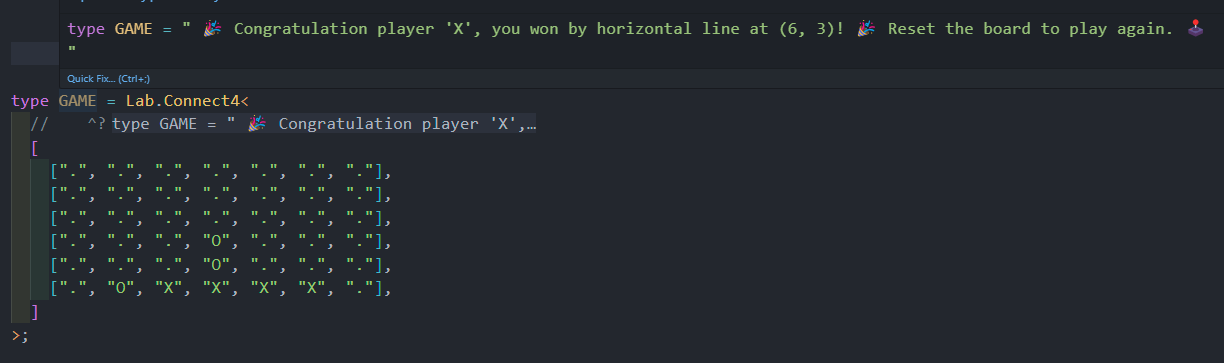
Lab
- Explore experimental type-level games and logic examples
import type { Lab } from "@dulysse1/ts-helper";

type Game = Lab.TicTacToe<[[0, 0, 0], [0, 0, 0], [0, 0, 0]]>;

type AnotherGame = Lab.Connect4<
	[
		[0, 0, 0, 0, 0, 0, 0],
		[0, 0, 0, 0, 0, 0, 0],
		[0, 0, 0, 0, 0, 0, 0],
		[0, 0, 0, 0, 0, 0, 0],
		[0, 0, 0, 0, 0, 0, 0],
	]
>;
And many more besides! 😲
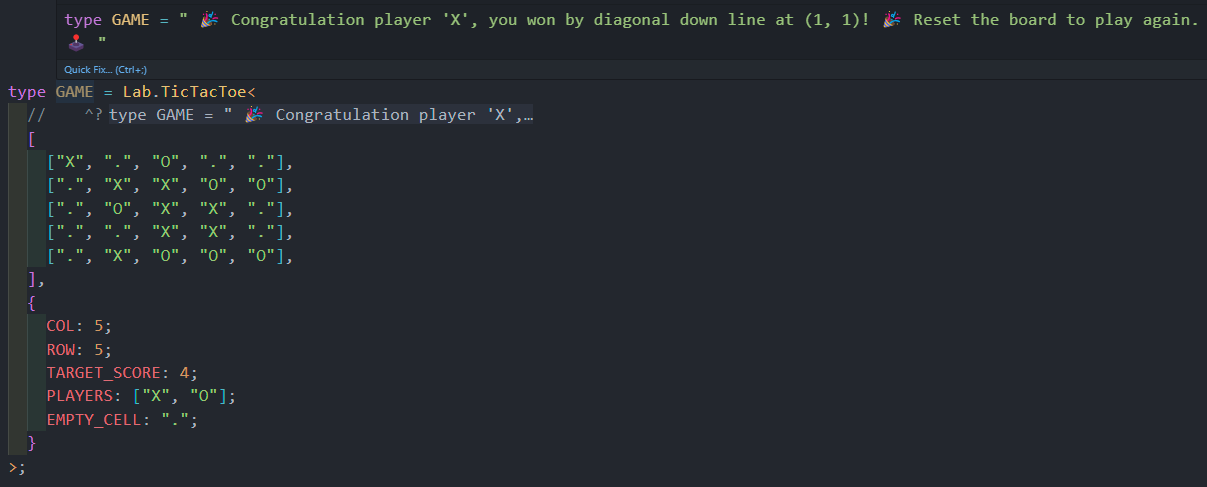
- New feature since version
1.2.3! There is now alabwith experimental types to show the power of@dulysse1/ts-helper!
Do you have any ideas or recommendations for improvement? 🤔
Contact me! 😃
Author: Ulysse Dupont
Contact: [email protected]