
@dustinbyrne/kb
v0.4.1
Published
An automated Kanban board for [pi](https://github.com/badlogic/pi-mono). You (or an agent) add high level ideas to your task list, and a team of agents execute them using worktrees.


Readme
@dustinbyrne/kb
An automated Kanban board for pi. You (or an agent) add high level ideas to your task list, and a team of agents execute them using worktrees.
Installation
pi install npm:@dustinbyrne/kbThis gives pi the ability to manage and create tasks in your kanban dashboard.
The dashboard
Run /kb in pi to launch the dashboard and AI engine.
/kb              # start on default port 4040
/kb stop         # stop it
/kb 8080         # run on a custom port
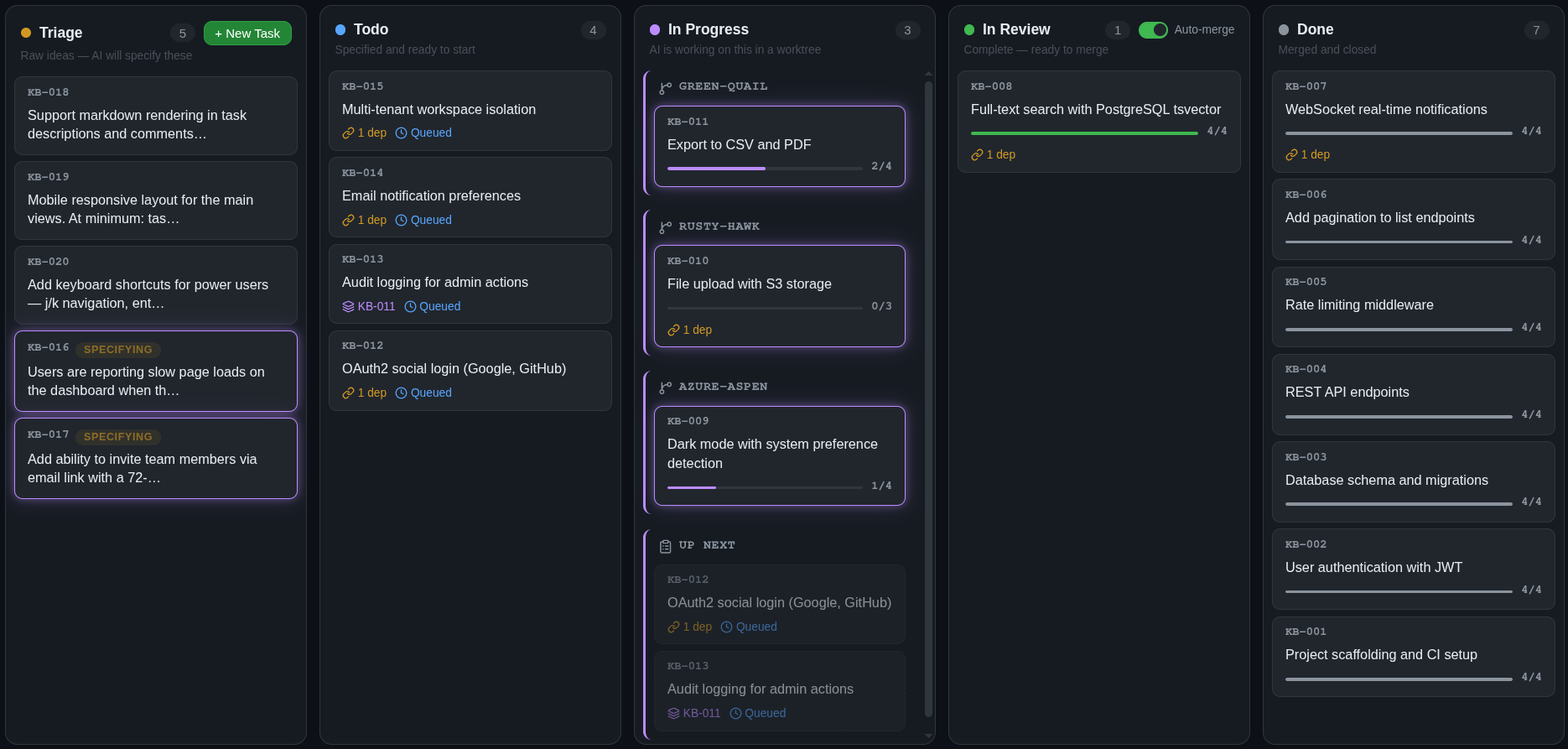
The dashboard gives you:
- A live kanban board — tasks move through columns automatically as AI works on them
- Task detail view — see the generated spec, step-by-step progress, reviewer verdicts, and full execution log
- Dependency-aware scheduling — declare dependencies between tasks or let the engine infer them; work starts in the right order automatically
- Auto-merge — on by default; reviewed work squash-merges into your branch without you lifting a finger
- Parallel execution — independent tasks run simultaneously in isolated git worktrees
- Self-sustaining board — agents may spawn follow-up tasks as they work, which get triaged, scheduled, and executed like any other task; the board feeds itself
How it works
You create a task with a rough description. From there, a pipeline of specialized agents takes over.
Specification
A triage agent reads your codebase — file structure, existing patterns, related code — and turns your rough idea into a detailed specification. It breaks the work into discrete steps, identifies which files are in scope, writes acceptance criteria, and assigns a complexity rating that determines how aggressively the work gets reviewed later.
Scheduling
Tasks declare dependencies on each other. The scheduler builds a dependency graph and starts work only when upstream tasks are done. Independent tasks run in parallel — each in its own isolated git worktree, so there are no conflicts during execution.
Execution & review
An executor agent works through the spec step by step in the worktree. At each step boundary, a separate reviewer agent, with read-only access, independently evaluates the work. The reviewer can approve (continue), request revisions (fix specific issues), or force a rethink (change the approach entirely). Review depth scales with the task's complexity rating: trivial tasks get light checks, complex tasks get thorough multi-pass review. This execution model is heavily based on Taskplane.
Merge
When execution finishes and the reviewer signs off, the task moves to "in review." By default, the completed work is automatically squash-merged into your current branch with a clean commit. Worktrees can be cleaned up after merge or reused by the next task to keep build caches warm. You can disable auto-merge if you prefer to review and merge manually.
Tasks flow through: Triage → Todo → In Progress → In Review → Done.
Working from chat
You can manage tasks without leaving the conversation:
"Every ten minutes, analyze the server code for logic the client hasn't implemented yet and create tasks. Tasks may spawn additional tasks, so just add enough to keep the board saturated."
"Create a kb task to fix the login redirect bug"
"Add a task for dark mode support, it depends on KB-003"
"What's the status of KB-042"
"Attach screenshot.png to KB-007"
"Pause KB-012 — I want to add more context first"
The extension gives pi tools to create tasks, check progress, attach files, and pause or resume automation.
Standalone CLI
kb also works as a standalone CLI outside of pi. See STANDALONE.md for installation and usage without the pi extension.
Full documentation
For architecture details, development setup, and contributor info, see the project README.
License
ISC