
@dynostack/react-grid
v0.6.0
Published
Dynostack React Grid: an open-source React data table built on TanStack Table, Radix UI and Tailwind CSS, with advanced filters, inline editing, column controls, CSV/Excel export, themes and i18n.

Maintainers
 dynostack
Readme
Dynostack React Grid — @dynostack/react-grid
Dynostack React Grid: an open-source React data table with advanced filtering, inline editing, column controls, themes, and exports.
Built on TanStack Table v8 · Radix UI · Tailwind CSS · ships shadcn/ui look-and-feel out of the box.




Live showcase · Interactive playground · Setup and configuration docs
Try every feature on real sample data, customize themes and density, share a configuration link, and copy the matching React props. The demo includes spring-based interactions and works on mobile.
A single <DataTable /> component that gives you ag-grid–level functionality with a fraction of the API surface and a shadcn/ui aesthetic. Every behavior is opt-in via props — drop it in and it works; configure it and it scales.
Showcase
A graphite studio for your data. Switch between light and dark, configure every feature, and copy the React configuration in the live playground.
| Graphite dark | Precision light |
| --- | --- |
| 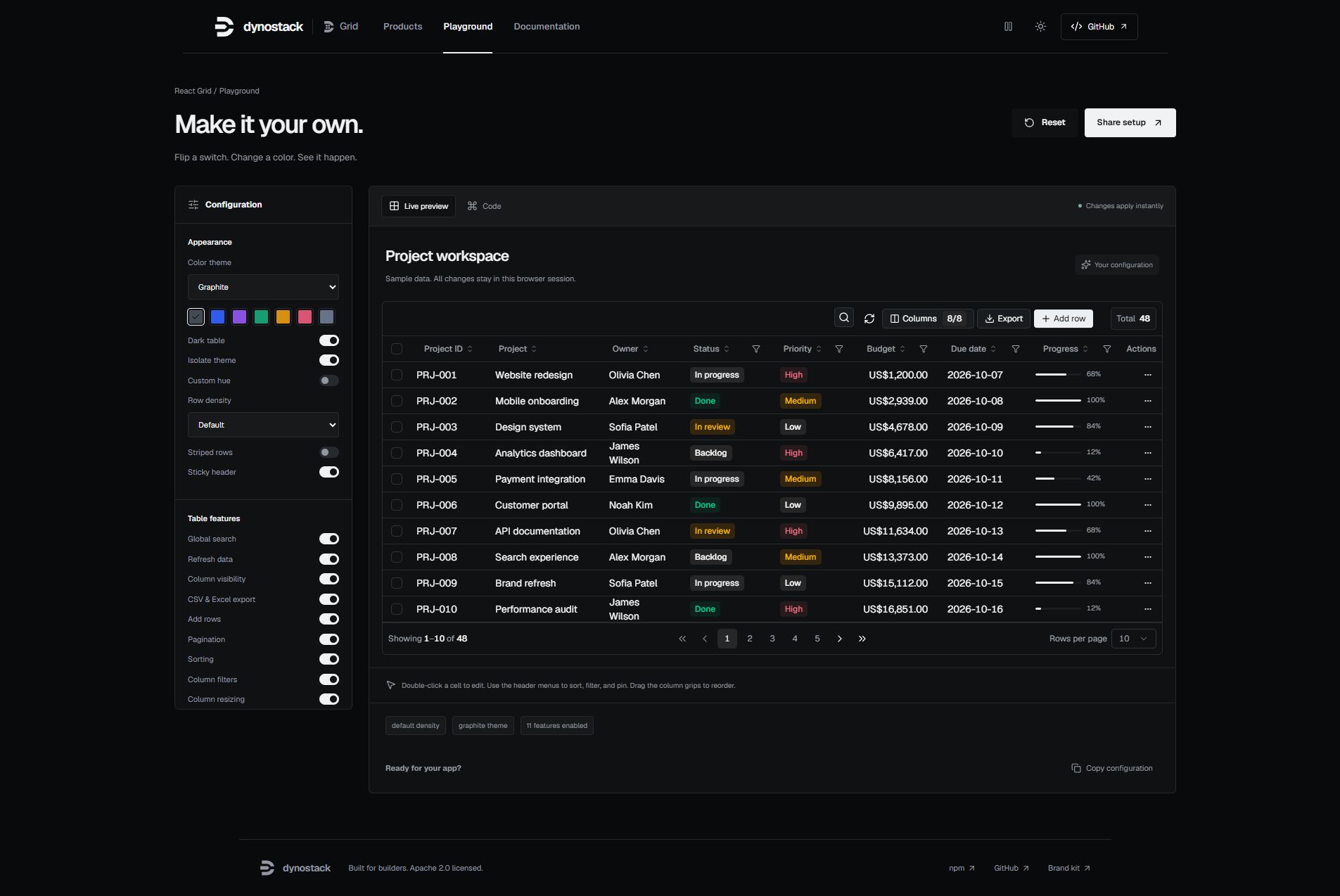 |
| 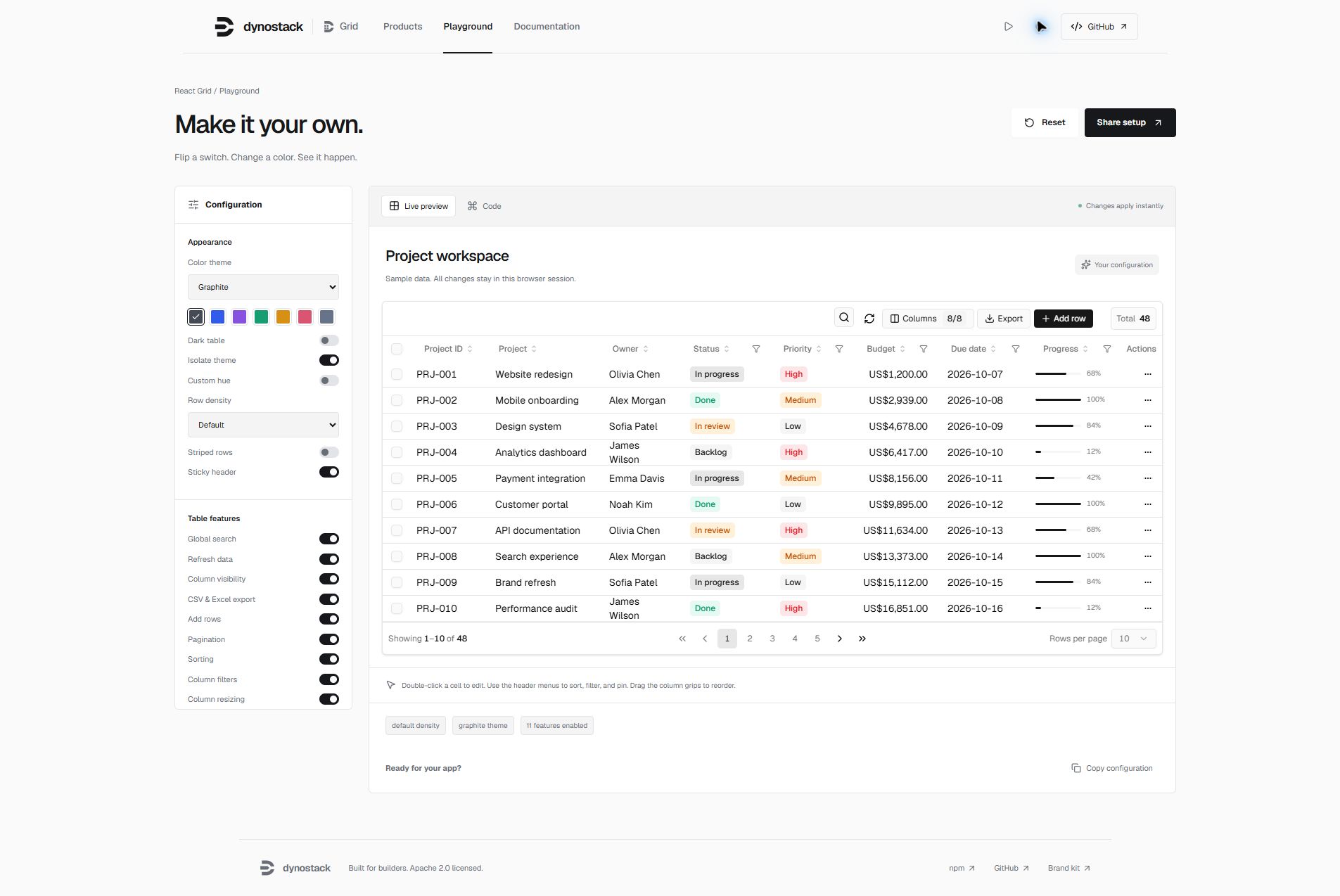 |
|
| Filter builder | Selection and export |
| --- | --- |
| 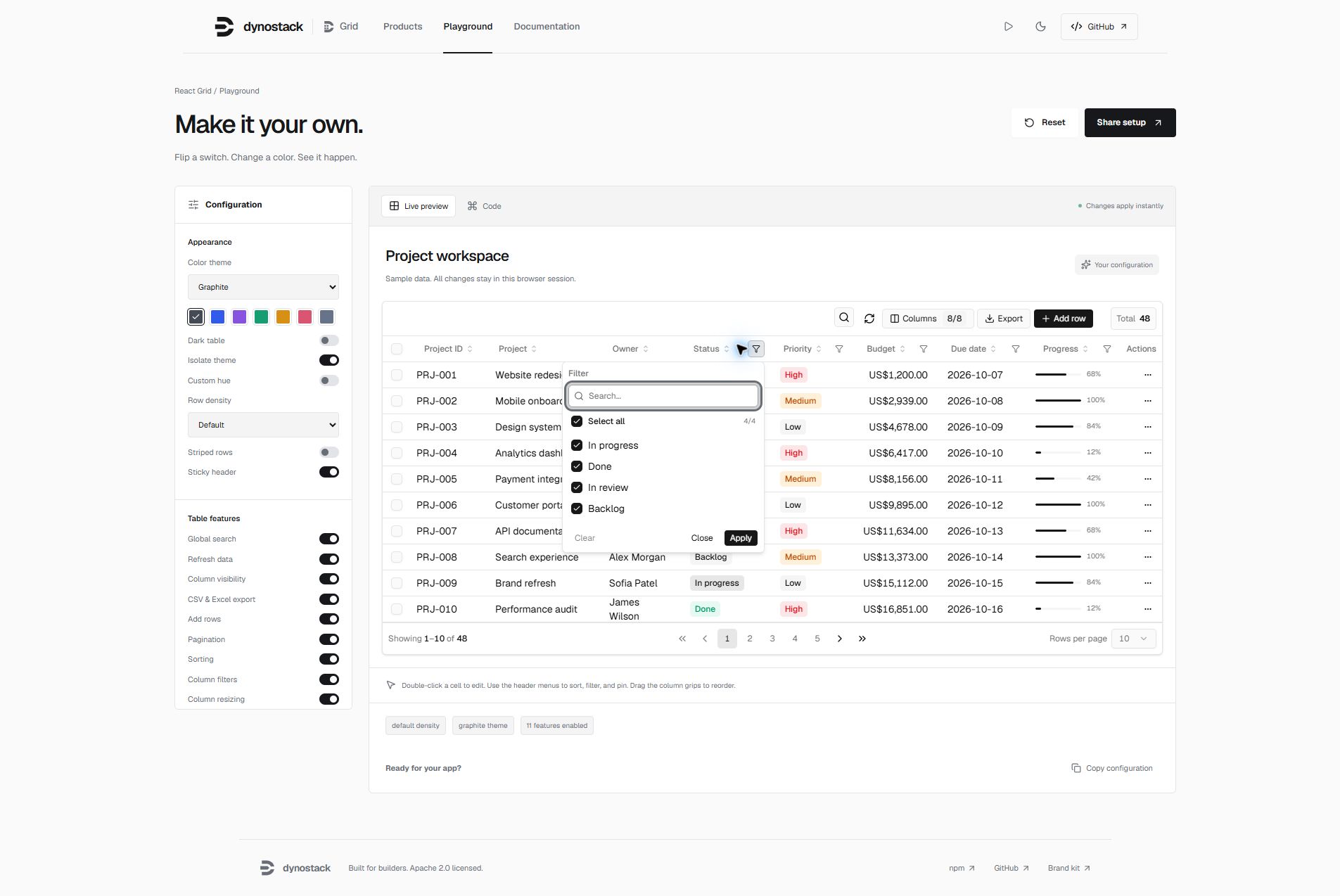 |
| 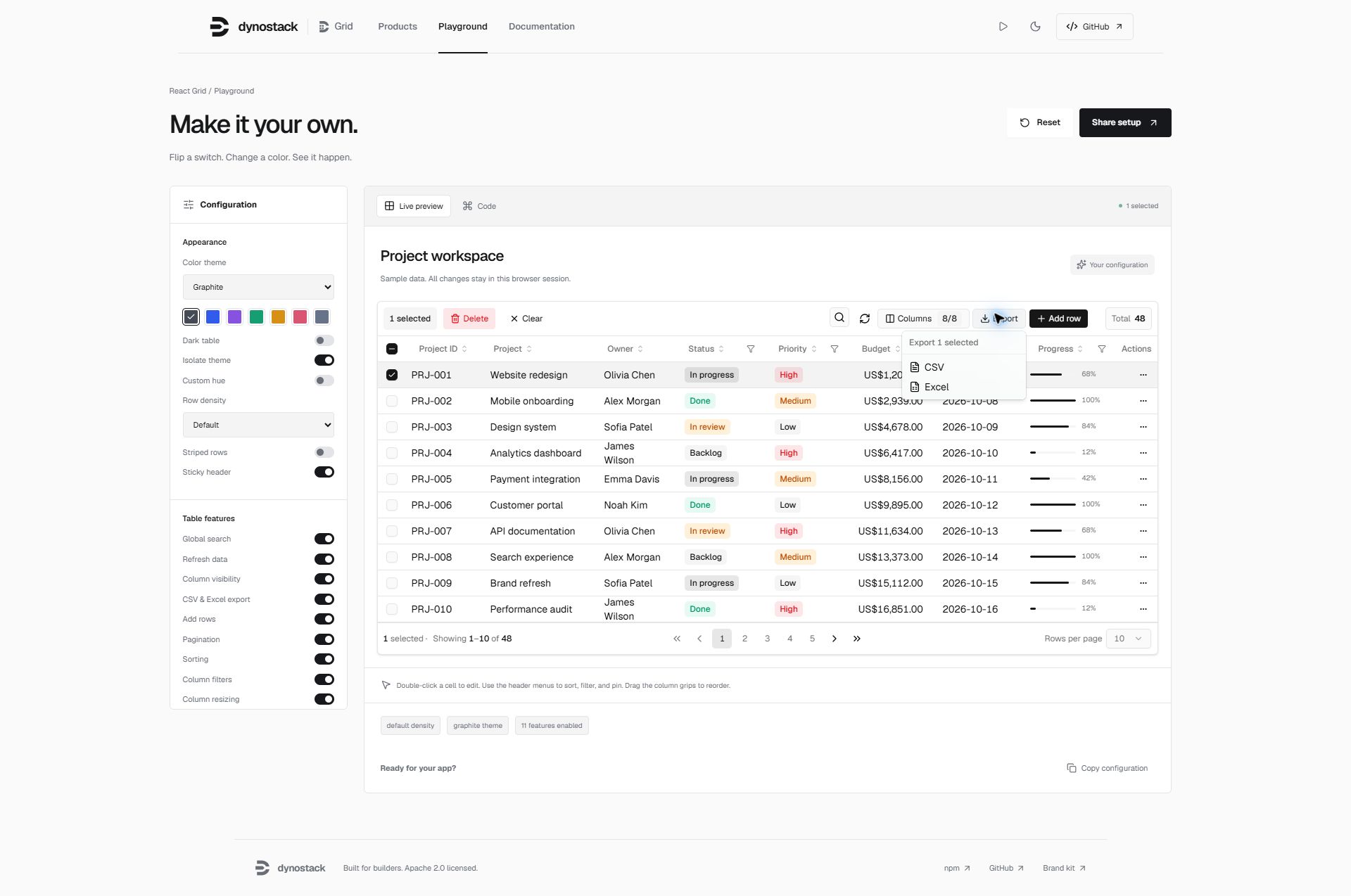 |
|
import { DataTable, themePresets } from '@dynostack/react-grid'

// Add .dark to an ancestor for dark mode, or .light for light mode.
<DataTable data={rows} columns={columns} theme={themePresets.graphite} />
Highlights
Layout and state controls —
initialSorting,onSelectionChange,ariaLabel,striped,stickyHeader, andmaxHeight. Disabling pagination renders all matching loaded rows.Safer exports and editing — spreadsheet formulas in untrusted text are neutralized; row editing respects
meta.isEditable; theme values cannot escape scoped CSS declarations.Filters that actually filter — text, number, date with operators (
contains,not contains,equals,before,after,in range,blank,not blank, …), AND/OR combine of two conditions, and a set filter with search + select-allInline editing — double-click cell to edit, or enter row-edit mode with
Save/CancelAdd row — local optimistic insert, edit, then commit on save
Per-column sort, hide, pin, resize, drag-reorder — pinned columns are fully opaque while you scroll horizontally
Selection + bulk actions — pinned
__selectcolumn with select-all, clear, bulk deleteExpandable rows — provide a
renderSubRowpanel or use TanStack's nestedgetSubRowsCSV / Excel export — selection-aware (export selected vs. all)
Built-in row Details panel —
Viewopens a scoped sheet with compact, relaxed, and comfy field layoutsScoped delete confirmation — row and bulk delete confirmations stay inside the table instead of covering the entire app
Theming that just works — shadcn-compatible CSS variables, automatic OS dark-mode follow, cascade-layered defaults that never overwrite your app theme, full-repaint moded presets (
graphite,violet,emerald,amber,rose,sky,slate, …),buildPreset(hue)for custom hues, andisolateto opt out of inheriting the app themeDensity —
compact·default·comfortablei18n / labels — every visible string is overridable
Feature flags — turn off any toolbar control or table capability with a single boolean
Tiny API, full TypeScript — one component, fully typed generics, no provider context to wire up
Table of contents
- Install
- Showcase
- Tailwind setup
- Theme tokens
- Quick start
- Data fetching
- Theming
- Density
- Feature flags
- Labels (i18n)
- Column meta
- Editing
- Filters
- Selection & bulk actions
- Expandable rows
- Export
- View sheet
- Delete confirmation
- Custom row actions
- Server-side data
- API reference
- Compatibility
- Roadmap
- Contributing
- License
Install
Run the showcase locally
git clone https://github.com/wanted-coder-vijay/wcv-data-grid.git
cd wcv-data-grid
npm install
npm run build
npm install --prefix showcase
npm run showcase:dev
New layout controls
<DataTable
  data={rows}
  columns={columns}
  initialSorting={[{ id: "name", desc: false }]}
  onSelectionChange={(selectedRows) => setSelectedRows(selectedRows)}
  ariaLabel="Project workspace"
  striped
  stickyHeader
  maxHeight="480px"
/>
onSelectionChange returns selected loaded row objects; server-side exports and selection do not fetch unseen pages. Editing flags are UI controls: your server must also validate fields, values, and permissions. CSV/Excel exports neutralize formula prefixes in strings while preserving actual numeric values. Excel output remains an HTML-based .xls, not native XLSX. Theme tokens reject declaration delimiters, CSS comments, backslash escapes, and URL expressions.
npm i @dynostack/react-grid
# or
pnpm add @dynostack/react-grid
# or
yarn add @dynostack/react-grid
Peer deps: react >= 18.2, react-dom >= 18.2. All other runtime dependencies (@tanstack/react-table, radix-ui, lucide-react, class-variance-authority, clsx, tailwind-merge) are installed automatically and remain external to the package bundle.
Tailwind setup
The component ships Tailwind class names verbatim, so your Tailwind build needs to know two things:
- Where to scan for the class strings inside the bundle.
- Which semantic color tokens (
bg-popover,bg-card,text-foreground, …) exist.
The package's styles.css registers the tokens for you via Tailwind v4's @theme inline. You only need to wire scanning.
Tailwind v4 — zero config
/* your global stylesheet (e.g. src/index.css) */
@import "tailwindcss";
@source "../node_modules/@dynostack/react-grid/dist";
@import "@dynostack/react-grid/styles.css";
@import "@dynostack/react-grid/page.css";   /* optional: extend tokens to <body> */
That's the whole setup. No tailwind.config.js, no @theme block to copy-paste, no shadcn install required. Overlay surfaces (popovers, dropdowns, sheets, the row-actions menu) all render correctly out of the box.
Tailwind v3
v3 doesn't read CSS @theme directives, so the semantic-color mapping has to live in your tailwind.config.js. The shadcn install guide for v3 covers the exact theme.extend.colors block you need — copy that, plus add the package's dist to your content array:
// tailwind.config.{js,ts}
export default {
  content: [
    "./src/**/*.{ts,tsx}",
    "./node_modules/@dynostack/react-grid/dist/**/*.{js,mjs,cjs}",
  ],
  theme: {
    extend: {
      colors: {
        // copy the shadcn v3 color mapping here
        // (background, foreground, card, popover, primary, secondary,
        //  muted, accent, destructive, border, input, ring)
        background: "hsl(var(--background))",
        foreground: "hsl(var(--foreground))",
        // … etc
      },
    },
  },
}
Then import styles.css as usual:
import "@dynostack/react-grid/styles.css"Starting a new project? Use Tailwind v4. The v4 path above is meaningfully simpler — the package handles token registration for you.
Theme tokens
The grid is built on shadcn/ui CSS variables. It auto-adjusts to whatever theme your app already has:
| Your app has… | What you do | What you get |
|---|---|---|
| Nothing (bare React) | import "@dynostack/react-grid/styles.css" | Clean light theme, auto-switches to dark on OS preference. |
| shadcn/ui (default theme) | Nothing | Grid inherits your :root tokens automatically. |
| shadcn/ui with a custom theme (Stone / Zinc / your own hue) | Nothing | Grid picks up your custom tokens automatically. |
| Custom theme using shadcn token names | Nothing | Same as above. |
| Custom theme with non-shadcn names | Pass theme prop | Per-instance override mapped to shadcn vars. |
| Want one grid to ignore the app theme | Pass isolate | Grid uses bundled defaults regardless of :root. |
Why this just works. The bundled styles.css:
- Registers Tailwind v4 utility tokens via a top-level
@theme inlineblock — sobg-popover,text-foreground,border-border, etc. resolve to your tokens without any consumer-side@themeblock. - Declares variable values inside the
dynostack-grid-defaultscascade layer — any unlayered consumer rule (which is where shadcn and most app CSS lives) automatically wins, regardless of import order. You can't accidentally overwrite your app's theme by importing the grid's stylesheet.
Minimal install (Tailwind v4)
/* your global stylesheet */
@import "tailwindcss";
@source "../node_modules/@dynostack/react-grid/dist";
@import "@dynostack/react-grid/styles.css";
See the Tailwind setup section for v3.
Optional: extend the theme to the page
By default the grid only styles itself, not the surrounding page. If you want <body> to use the same background/foreground as the grid:
import "@dynostack/react-grid/styles.css"
import "@dynostack/react-grid/page.css"   // optional
Dark mode
| Mode | How to enable | Behavior |
|---|---|---|
| Follow OS | Default — no action required | Light by day, dark by night via prefers-color-scheme. |
| Force light | Add class="light" to <html> | Stays light regardless of OS. |
| Force dark | Add class="dark" to <html> | Stays dark regardless of OS. |
| Per-instance | <DataTable theme={themePresets.violet}> | Grid auto-flips light/dark inside the moded preset. |
Either way you can still override any token per-instance via the theme prop.
Quick start
import { DataTable } from "@dynostack/react-grid"
import "@dynostack/react-grid/styles.css" // optional — only if you don't have shadcn tokens

type User = {
  id: number
  name: string
  email: string
  role: "admin" | "viewer"
  joinedAt: string
}

const columns = [
  { accessorKey: "id", header: "ID", size: 70 },
  {
    accessorKey: "name",
    header: "Name",
    meta: { label: "Name", editor: "text", filterType: "text" },
  },
  {
    accessorKey: "email",
    header: "Email",
    meta: { label: "Email", editor: "text", filterType: "text" },
  },
  {
    accessorKey: "role",
    header: "Role",
    meta: {
      label: "Role",
      editor: "select",
      filterType: "multi-select",
      selectOptions: [
        { value: "admin", label: "Admin" },
        { value: "viewer", label: "Viewer" },
      ],
    },
  },
  {
    accessorKey: "joinedAt",
    header: "Joined",
    meta: { label: "Joined", editor: "date", filterType: "date" },
  },
]

export function Users({ data }: { data: User[] }) {
  return (
    <DataTable<User>
      data={data}
      columns={columns}
      onCellEdit={(row, columnId, value) => save({ ...row, [columnId]: value })}
      onRowSave={(row, draft) => save({ ...row, ...draft })}
      onAddRow={() => ({ name: "", email: "", role: "viewer", joinedAt: today() })}
      onBulkDelete={(rows) => removeMany(rows.map((r) => r.id))}
      initialColumnPinning={{ left: ["__select", "id", "name"], right: ["__actions"] }}
    />
  )
}
That's it. You now have sort + filter + edit + add + delete + export + pin + resize + reorder + select.
Data fetching
DataTable supports two data ownership models.
1. Controlled data from your page
Use this when your app already owns fetching with TanStack Query, SWR, Redux, loader functions, or custom hooks. The table receives rows and loading flags as props, and your app owns error/toast behavior.
const usersQuery = useQuery({
  queryKey: ["users"],
  queryFn: fetchUsers,
})

<DataTable<User>
  data={usersQuery.data ?? []}
  columns={columns}
  isLoading={usersQuery.isLoading}
  isFetching={usersQuery.isFetching}
  onRefresh={() => usersQuery.refetch()}
  totalRecords={usersQuery.data?.length ?? 0}
/>
For blocking load errors, render your own page-level error state or pass an empty array. For background errors, show a toast from your query/mutation callbacks.
2. Internal fetching with dataSource
Use this when you want the table to own fetch/loading/error/refresh state.
fetchRows receives the current table state and can return either an array or
{ rows, totalRecords }.
<DataTable<User>
  columns={columns}
  dataSource={{
    fetchRows: async ({ pageIndex, pageSize, sorting, columnFilters, globalFilter }) => {
      const res = await fetch("/api/users", {
        method: "POST",
        headers: { "content-type": "application/json" },
        body: JSON.stringify({
          pageIndex,
          pageSize,
          sorting,
          columnFilters,
          q: globalFilter,
        }),
      })

      if (!res.ok) throw new Error("Failed to load users")
      return res.json() as Promise<{ rows: User[]; totalRecords: number }>
    },
    mode: "server",
    onError: (error, context) => {
      toast.error(context.message)
      console.error(error)
    },
  }}
/>
Internal mode behavior:
- Initial load shows the table skeleton.
- Initial load failure shows an inline
Could not load rowsstate withRetry. - Refresh failure keeps the last successful rows visible and calls
onError. mode: "client"expects the full row array and lets the table sort/filter/page in memory.mode: "server"expects the current page and usestotalRecordsfor pagination.
Keep using onCellEdit, onRowSave, onAddRow, and onBulkDelete for mutations.
The table does not assume your write API; this lets you choose optimistic updates,
rollback, toast notifications, and validation.
Theming
The theme prop accepts two shapes. Pick whichever fits your use case.
Shape 1 — Flat tokens
<DataTable
  theme={{
    primary: "oklch(0.6 0.2 200)",
    primaryForeground: "oklch(1 0 0)",
    accent: "oklch(0.94 0.05 200)",
    radius: "0.25rem",
    fontFamily: "Inter, system-ui, sans-serif",
  }}
/>
All shadcn tokens are supported plus radius and fontFamily. Anything you omit falls through to whatever your app's :root provides.
Shape 2 — Moded { light, dark }
A moded theme repaints the whole table and auto-flips on dark mode (OS preference or a .dark ancestor):
<DataTable
  theme={{
    light: { background: "oklch(0.99 0.005 285)", primary: "oklch(0.55 0.22 285)", /* … */ },
    dark:  { background: "oklch(0.16 0.012 285)", primary: "oklch(0.7  0.18 285)", /* … */ },
  }}
/>
The grid emits a scoped <style> block for each instance, so grids can use different moded themes. Set className="dark" or className="light" on a table to force its mode independently of the page. Moded light tokens live in the scoped stylesheet so they cannot override the dark declarations.
Use a preset
Presets ship in moded shape — passing one repaints the entire table and follows dark mode automatically:
import { DataTable, themePresets } from "@dynostack/react-grid"

<DataTable theme={themePresets.violet} />
Available presets:
| Preset | Hue |
|---|---|
| neutral | Grayscale (default appearance) |
| light | Force light, no dark variant |
| dark | Force dark, no light variant |
| violet | 285° |
| emerald | 162° |
| amber | 65° |
| rose | 15° |
| sky | 235° |
| slate | 240° (low chroma) |
Build a custom preset from a single hue
import { DataTable, buildPreset } from "@dynostack/react-grid"

const teal = buildPreset(180)        // hue only
const subtleTeal = buildPreset(180, 0.015)  // hue + custom chroma

<DataTable theme={teal} />
buildPreset(hue, chroma?) returns a full { light, dark } token set tinted around the given OKLCH hue.
Compose with a preset
<DataTable
  theme={{
    ...themePresets.violet,
    light: { ...themePresets.violet.light, primary: "oklch(0.7 0.18 250)" },
  }}
/>
Isolate a grid from the app theme
When embedding inside a heavily-themed shell where you want the table to keep its own look:
<DataTable isolate /* uses bundled neutral tokens, ignores app :root */ />
<DataTable isolate theme={themePresets.violet} /* isolated AND violet */ />
Multiple grids, different themes
CSS variables are emitted on each table root, so this works:
<DataTable theme={themePresets.violet} />
<DataTable theme={themePresets.emerald} />
<DataTable theme={{ primary: "oklch(0.6 0.2 200)" }} />
Precedence summary
┌──────────────────────────────────────────────────────────┐
│ Scoped grid tokens / flat inline theme overrides       │  ← highest
├──────────────────────────────────────────────────────────┤
│ Consumer's :root rules         (shadcn, custom app CSS)  │
├──────────────────────────────────────────────────────────┤
│ @layer dynostack-grid-defaults (bundled styles.css)      │  ← lowest
└──────────────────────────────────────────────────────────┘
Density
<DataTable density="compact"     /* tighter rows */ />
<DataTable density="default"     /* shadcn defaults */ />
<DataTable density="comfortable" /* extra padding */ />
Feature flags
Every toolbar control and table capability is a switch. Defaults are sensible — only set what you want to disable.
<DataTable
  features={{
    search: true,            // global search input
    refresh: true,           // refresh button (when onRefresh is provided)
    columnVisibility: true,  // columns popover
    export: true,            // CSV / Excel menu
    addRow: true,            // "Add row" button (when onAddRow is provided)
    pagination: true,        // bottom pagination bar
    sorting: true,           // sort headers
    filtering: true,         // per-column filter popovers
    resizing: true,          // resize handles
    reordering: true,        // drag-to-reorder columns
    pinning: true,           // pin / unpin column controls
  }}
/>
Labels (i18n)
Every user-facing string is overridable.
<DataTable
  labels={{
    search: "Rechercher...",
    addRow: "Ajouter",
    delete: "Supprimer",
    clear: "Effacer",
    selected: "sélectionné(s)",
    refresh: "Actualiser",
    columns: "Colonnes",
    export: "Exporter",
    csv: "CSV",
    excel: "Excel",
    total: "Total",
    noData: "Aucune donnée.",
    noResults: "Aucun résultat.",
    refreshing: "Actualisation",
    rowsPerPage: "Lignes par page",
    page: "Page",
    of: "sur",
  }}
/>
Column meta
Each column can declare:
type ColumnMeta = {
  label?: string                       // header label & filter title
  editor?:
    | "text" | "number" | "currency" | "date"
    | "select" | "switch" | "checkbox"
  filterType?:
    | "text" | "number" | "date"
    | "select" | "multi-select" | "boolean"
  selectOptions?: { value: string; label: string }[]
  align?: "left" | "right" | "center"
  cellClassName?: string
  headerClassName?: string
  exportable?: boolean
  validate?: (value: unknown, row) => string | undefined | Promise<string | undefined>
  isEditable?: boolean | ((row) => boolean)
  badgeMap?: Partial<
    Record<string,
      "default" | "secondary" | "destructive" |
      "success" | "warning" | "outline"
    >
  >
}
The default filterFn for a column is wired automatically from meta.filterType. You can still set a custom filterFn on the column to override it.
Editing
Two modes, both prop-driven. One editing session is active at a time:
Single cell — double-click
<DataTable
  onCellEdit={(row, columnId, value) =>
    saveMutation.mutateAsync({ ...row, [columnId]: value })
  }
/>
Whole row — Edit action → Save / Cancel
<DataTable
  onRowSave={(row, draft) =>
    saveMutation.mutateAsync({ ...row, ...draft })
  }
/>
Save handlers accept void | Promise<unknown>. Return the save promise so the grid can wait for persistence. While saving or validating, editors and Save/Cancel are disabled. Rejected promises and thrown errors keep editing open and retain the draft for retry. Successful saves close editing; the application remains responsible for updating data.
Add field validation to editable column metadata:
{
  accessorKey: "name",
  meta: {
    editor: "text",
    validate: (value) =>
      typeof value === "string" && value.trim() ? undefined : "Name is required.",
  },
}
Validators return an error string or undefined, synchronously or asynchronously. Row saves validate every editable editor column, including hidden columns, against the merged row draft. Cell saves validate the changed value with the original row. Invalid values never reach save callbacks. Field errors are announced and linked to editors; hidden-field errors also appear in the row summary. Customize labels.saving, labels.saveError, and labels.validationError for your language. Validate permissions and values again on the server.
isEditable on meta can disable editing for individual rows or columns:
{
  accessorKey: "email",
  meta: {
    editor: "text",
    isEditable: (row) => row.role !== "billing",
  },
}
Filters
The package exports the filter primitives so you can build custom panels too:
import {
  textFilterFn,
  numberFilterFn,
  dateFilterFn,
  setFilterFn,
  booleanFilterFn,
  type AdvFilter,
  type SetFilter,
  type TextOp,
  type NumberOp,
  type DateOp,
} from "@dynostack/react-grid"
| filterType | Operators | Value shape |
| -------------- | -------------------------------------------------------------------------------------------------------------------------- | ---------------------------------------------------- |
| text | contains, notContains, equals, notEqual, startsWith, endsWith, blank, notBlank | AdvFilter<TextOp, string> |
| number | equals, notEqual, lessThan, lessThanOrEqual, greaterThan, greaterThanOrEqual, inRange, blank, notBlank | AdvFilter<NumberOp, number> |
| date | equals, notEqual, before, after, inRange, blank, notBlank | AdvFilter<DateOp, string> |
| select | set filter | SetFilter ({ selected: string[] }) |
| multi-select | set filter | SetFilter ({ selected: string[] }) |
| boolean | All / True / False | boolean \| undefined |
Text/number/date panels also expose AND/OR combine of a second condition, ag-grid style.
The set filter automatically derives unique values from the visible rows when selectOptions is not declared — search box, "Select all (filtered)" with indeterminate state, individual checkboxes.
Selection & bulk actions
Selection is on by default (enableSelection: true). When any row is selected the toolbar swaps in:
- A
<count> selectedbadge Deletebutton → opens the confirmation dialog first, then callsonBulkDelete?(rows)after confirmClearbutton → resets selection
<DataTable
  onBulkDelete={(rows) => removeMany(rows.map((r) => r.id))}
/>
Expandable rows
Sub-row panel (custom JSX)
<DataTable
  renderSubRow={(row) => <UserAuditPanel user={row} />}
/>
Nested rows (TanStack getSubRows)
<DataTable
  getSubRows={(row) => row.children}
/>
When either is set, an __expand chevron column is added and pinned right next to __select.
Export
<DataTable exportFileName="users" />Toolbar Export menu offers CSV and Excel. If any rows are selected, the menu becomes "Export N selected"; otherwise it exports all visible (filtered) rows.
Mark a column non-exportable via meta.exportable: false.
View sheet
Click the row action "View" → a right-side Sheet slides in showing every visible column as a {Label}: {value} card. The user can switch layout density inline:
| Option | Layout | Intended use |
| --- | --- | --- |
| Compact | 3 columns, tighter cards | Scan more fields at once. |
| Relaxed | 2 columns, medium spacing | Balanced default for mixed values. |
| Comfy | 1 column, roomier cards | Read long values without cramped wrapping. |
The sheet is responsive and wider on desktop so the multi-column modes have enough room for real row data.
Works out of the box with no props. Customize via viewSheet:
<DataTable
  viewSheet={{
    side: "right",                              // or "left"
    defaultDensity: "relaxed",                  // initial layout density
    hideDensityTabs: true,                      // hide the layout picker
    fields: ["name", "email", "role"],          // limit / reorder shown columns
    renderField: ({ column, value, row }) =>    // override how a value renders
      column.id === "phone" ? <a href={`tel:${value}`}>{String(value)}</a> : null,
    renderHeader: (row) => <YourCustomHeader row={row} />,
    labels: {
      title: (row) => `${row.name} (${row.role})`,
      description: (row) => `Joined ${row.joinedAt}`,
      emptyValue: "—",
      density: { compact: "3 cols", relaxed: "2 cols", comfy: "1 col" },
    },
  }}
  onView={(row) => track("user.view", row)}   // optional side-effect
/>
Disable the built-in sheet entirely:
<DataTable viewSheet={false} onView={(row) => router.push(`/users/${row.id}`)} />onView fires before the sheet opens, so you can navigate / log / fetch alongside it.
Delete confirmation
Both the row-action "Delete" and the toolbar "Bulk delete" open a confirmation AlertDialog by default. The user must confirm before onDelete or onBulkDelete fires.
The dialog is mounted inside the DataTable portal container, so its blur / dim overlay covers only that table instance. It does not block or blur the rest of the page.
<DataTable
  onDelete={(row) => api.deleteUser(row.id)}
  onBulkDelete={(rows) => api.bulkDelete(rows.map(r => r.id))}
  confirmDelete={{
    title: ({ rows, source }) =>
      source === "bulk"
        ? `Delete ${rows.length} users?`
        : `Delete ${rows[0].name}?`,
    description: ({ rows }) =>
      `${rows.length === 1 ? "This user" : "These users"} will be permanently removed. This cannot be undone.`,
    confirmLabel: "Yes, delete",
    cancelLabel: "Keep",
  }}
/>
Use onDelete for the built-in row delete action. Do not put the actual delete mutation in onRowAction("delete"), because the built-in delete action is handled by the confirmation flow.
Skip the dialog (fire immediately):
<DataTable confirmDelete={false} onDelete={(row) => softDelete(row)} />Custom row actions
<DataTable
  rowActions={["view", "edit", "duplicate", "delete"]}
  customRowActions={[
    {
      id: "suspend",
      label: "Suspend",
      icon: <BanIcon />,
      danger: true,
      show: (r) => r.status !== "suspended",
    },
    { id: "archive", label: "Archive", icon: <ArchiveIcon /> },
  ]}
  onRowAction={(action, row) => {
    if (action === "suspend") saveMutation.mutate({ ...row, status: "suspended" })
    // ...
  }}
  onDelete={(row) => deleteMutation.mutate([row.id])}
/>
Server-side data
You can do server-side data in either mode.
Controlled server-side data
Own the API call in your page and pass the result into the table:
const [q, setQ] = useState("")
const usersQuery = useQuery({
  queryKey: ["users", q],
  queryFn: () => fetchUsers({ q }),
})

<DataTable
  data={usersQuery.data ?? []}
  isLoading={usersQuery.isLoading}
  isFetching={usersQuery.isFetching}
  onRefresh={() => usersQuery.refetch()}
  globalFilter={q}
  onGlobalFilterChange={setQ}
  totalRecords={usersQuery.data?.length ?? 0}
/>
Pair this with TanStack Query's pagination/cursor utilities when you want query caching and mutation orchestration outside the grid.
Built-in server-side data
Let the grid call your API by setting dataSource.mode to "server":
<DataTable<User>
  columns={columns}
  dataSource={{
    mode: "server",
    fetchRows: async (state) => {
      const res = await fetch("/api/users/grid", {
        method: "POST",
        headers: { "content-type": "application/json" },
        body: JSON.stringify(state),
      })

      if (!res.ok) throw new Error("Users request failed")
      return res.json() as Promise<{ rows: User[]; totalRecords: number }>
    },
    onError: (_error, context) => {
      toast.error(context.message)
    },
  }}
/>
state contains pageIndex, pageSize, sorting, columnFilters, and
globalFilter. In server mode the table assumes the API already applied those
operations and only renders the returned page.
API reference
| Prop | Type | Default | Description |
| ------------------------- | ---------------------------------------------------------- | ---------------------- | ------------------------------------------------------ |
| data | TData[] | [] | Controlled row data. Use this when fetching outside the table. |
| columns | ColumnDef<TData>[] | — | TanStack column definitions. |
| dataSource | DataTableDataSource<TData> | — | Optional internal fetcher for client/server data loading. |
| isLoading | boolean | false | Initial skeleton state. |
| isFetching | boolean | false | Background-refresh indicator. |
| onRefresh | () => void | — | Refresh button handler. |
| totalRecords | number | data.length | Total count badge in toolbar. |
| exportFileName | string | "export" | Base filename for CSV / Excel export. |
| enableSelection | boolean | true | Show the __select column. |
| renderSubRow | (row: TData) => ReactNode | — | Custom expandable panel. |
| getSubRows | (row: TData) => TData[] \| undefined | — | Nested rows accessor. |
| rowActions | ("view" \| "edit" \| "duplicate" \| "delete")[] | all four | Built-in row actions. |
| customRowActions | CustomRowAction<TData>[] | [] | Extra row actions. |
| onRowAction | (action, row) => void | — | Row action handler. |
| onCellEdit | (row, columnId, value) => void \| Promise<unknown> | — | Single-cell save handler. |
| onRowSave | (row, draft) => void \| Promise<unknown> | — | Row-edit save handler. |
| onAddRow | () => Partial<TData> | — | Returns the empty draft for "Add row". |
| onBulkDelete | (rows: TData[]) => void | — | Bulk delete handler. |
| initialPageSize | number | 10 | Initial pagination size. |
| pageSizeOptions | number[] | shadcn defaults | Page-size dropdown options. |
| initialColumnPinning | ColumnPinningState | { left: [], right: [] } | Initial pinned columns. |
| initialColumnVisibility | VisibilityState | {} | Initial hidden columns. |
| initialSorting | SortingState | [] | Initial column sort order. |
| onSelectionChange | (rows: TData[]) => void | — | Observe selected loaded rows. |
| ariaLabel | string | "Data table" | Accessible name for the table. |
| striped | boolean | false | Alternate row backgrounds. |
| stickyHeader | boolean | false | Keep headers visible in the scroll viewport. |
| maxHeight | CSSProperties["maxHeight"] | — | Limit the vertical scroll viewport. |
| globalFilter | string | uncontrolled | Controlled global filter value. |
| onGlobalFilterChange | (value: string) => void | — | Controlled global filter setter. |
| className | string | — | Extra classes on the table root. |
| toolbarSlot | ReactNode | — | Custom JSX prepended into the toolbar. |
| features | DataTableFeatures | all on | Feature flags. |
| labels | DataTableLabels | English defaults | i18n labels. |
| density | "compact" \| "default" \| "comfortable" | "default" | Row density. |
| theme | DataTableTheme | inherits :root | Per-instance CSS-variable overrides. Accepts flat tokens or { light, dark }. |
| isolate | boolean | false | Ignore the app's :root and render with bundled defaults. |
| onView | (row: TData) => void | — | Side-effect when "View" is clicked. Fires before the sheet opens. |
| onDelete | (row: TData) => void | — | Single-row delete handler. Fires after the confirm modal (or immediately if confirmDelete={false}). |
| viewSheet | ViewSheetConfig<TData> \| false | enabled | Configure or disable the built-in View sheet. |
| confirmDelete | ConfirmDeleteConfig<TData> \| boolean | true | Configure or disable the delete confirmation modal (applies to single + bulk). |
TData must extend { id: string \| number }.
type DataTableDataSource<TData> = {
  fetchRows: (params: {
    pageIndex: number
    pageSize: number
    sorting: SortingState
    columnFilters: ColumnFiltersState
    globalFilter: string
  }) => Promise<TData[] | { rows: TData[]; totalRecords?: number }>
  mode?: "client" | "server"
  enabled?: boolean
  initialData?: TData[]
  deps?: readonly unknown[]
  onError?: (
    error: unknown,
    context: { type: "load" | "refresh"; message: string }
  ) => void
}
// Theme types
type DataTableTokens = {
background?: string
foreground?: string
card?: string
cardForeground?: string
popover?: string
popoverForeground?: string
primary?: string
primaryForeground?: string
secondary?: string
secondaryForeground?: string
muted?: string
mutedForeground?: string
accent?: string
accentForeground?: string
destructive?: string
destructiveForeground?: string
border?: string
input?: string
ring?: string
radius?: string
fontFamily?: string
}
type DataTableModedTheme = {
light?: DataTableTokens
dark?: DataTableTokens
}
type DataTableTheme = DataTableTokens | DataTableModedTheme// Theme exports
import {
themePresets, // ready-made moded presets
buildPreset, // (hue, chroma?) => DataTableModedTheme
splitTheme, // (theme) => { light, dark }
tokensToStyle, // (tokens) => React.CSSProperties
tokensToCssBlock, // (tokens) => "var:val;var:val" string
ISOLATE_LIGHT_TOKENS,
ISOLATE_DARK_TOKENS,
} from "@dynostack/react-grid"// View sheet types
type ViewSheetDensity = "compact" | "relaxed" | "comfy"
type ViewSheetConfig<TData> = {
side?: "right" | "left" | "top" | "bottom"
defaultDensity?: ViewSheetDensity
hideDensityTabs?: boolean
fields?: string[]
renderField?: (args: {
column: Column<TData, unknown>
value: unknown
row: TData
}) => React.ReactNode
renderHeader?: (row: TData) => React.ReactNode
labels?: {
title?: (row: TData) => React.ReactNode
description?: (row: TData) => React.ReactNode
emptyValue?: string
density?: { compact?: string; relaxed?: string; comfy?: string }
}
}
// Confirm-delete types
type ConfirmDeleteContext<TData> = {
rows: TData[]
source: "single" | "bulk"
}
type ConfirmDeleteConfig<TData> = {
title?: (ctx: ConfirmDeleteContext<TData>) => React.ReactNode
description?: (ctx: ConfirmDeleteContext<TData>) => React.ReactNode
confirmLabel?: string
cancelLabel?: string
}Compatibility
| Stack | Tested on | | ----------------- | -------------------------- | | React | 18.x · 19.x | | TanStack Table | 8.21+ | | Tailwind CSS | 3.x · 4.x | | Bundler | Vite · Next.js · Webpack 5 |
ESM and CJS bundles ship side-by-side. Tree-shakeable. Marked "use client" for Next.js App Router compatibility.
Roadmap
- [ ] Server-side pagination/sorting helpers (controlled-state recipes)
- [ ] Column groups (header rowSpan/colSpan)
- [ ] Pivot mode
- [ ] Aggregation row (sum, avg, min, max, count)
- [ ] Saved view profiles (filter + visibility + pinning snapshots)
- [ ] Virtualized rows (TanStack Virtual integration)
- [ ] Storybook + visual regression tests
- [ ] CodeSandbox / StackBlitz starter
Have a use case that isn't covered? Open an issue — happy to consider it.
Contributing
git clone https://github.com/wanted-coder-vijay/wcv-data-grid.git
cd wcv-data-grid
npm install
npm run dev       # tsup --watch
npm run typecheck # tsc --noEmit
npm run build     # produce dist/
PRs welcome. Please keep the prop API additive — feature toggles over breaking changes.
License
Apache-2.0 · Copyright © 2026 vijay kumar anchupogu (wanted-coder-vijay)
See NOTICE for attribution requirements.
Package history. This package was briefly published as
@dynostack/[email protected]under the MIT license before being renamed to@dynostack/react-gridand relicensed under Apache-2.0. The old name is deprecated; new code should depend on@dynostack/react-gridonly.
Editing browser regression check
Run npm run dev --prefix showcase -- --port 5181 and then npm run test:editing with Playwright available. The fixture lives at /tests/editing.html. Set PLAYWRIGHT_MODULE to an installed Playwright package path if it is outside this checkout; BROWSER_CHANNEL defaults to msedge, and EDITING_BASE_URL defaults to http://127.0.0.1:5181. The check covers validation, pending controls, failed persistence, retry, and cancellation. The fixture uses simulated persistence and is excluded from the production showcase entry point.
Controlled state and saved views (source build)
These APIs are implemented in this repository and playground; npm 0.5.2 predates them.
import { useState } from 'react'
import { DataTable, createDataTableState } from '@dynostack/react-grid'
// Inside your component:
const [state, setState] = useState(() => createDataTableState({
  pagination: { pageIndex: 0, pageSize: 20 },
}))
<DataTable data={rows} columns={columns}
  state={state} onStateChange={setState}
  savedViews={{ storageKey: 'project-views-v1' }} />
state supports sorting, columnFilters, globalFilter, pagination, rowSelection,
columnOrder, columnSizing, columnVisibility, columnPinning and expanded.
onStateChange receives the complete next snapshot, including internal slices.
Pass a partial state to control only those slices; omitted slices remain internal.
Supplied slices without a handler are read-only. initialState is applied once,
overrides legacy initial props, and must contain complete values for supplied
slices. state.globalFilter takes precedence over legacy globalFilter.
Keep row/column IDs stable. Reset by setting a fresh createDataTableState().
savedViews adds Save view, Restore, Rename, Delete view, Reset view and Clear
saved views. Snapshots contain search, filters, sorting, order, visibility, widths
and pinning. They exclude rows, drafts, selection, expansion and pagination.
Restore resets pageIndex to zero but retains pageSize and selection. Reset view
restores the initial configuration. Controls lock while editing or saving.
Persistence is optional: omit storageKey for session-only views. Use a unique,
versioned key per dataset/schema. Clear saved views removes that localStorage
key. Invalid, unavailable or full storage reports an error without blocking the
table. Filter values must be JSON-compatible and may contain sensitive search
terms. Maximum: 50 views, 80 characters per name. Persistence stores configuration,
never records. For application-managed presets, pass views and
onViewsChange and omit storageKey; initialViews seeds uncontrolled presets.
Override control strings through savedViews.labels.
Playground walkthrough
- Enable Required name & nonnegative budget. Clear a project name and press Enter: validation prevents persistence. Fix it and retry.
- Enable Simulate 1.2-second saves and Fail saves. Edit a cell or use Edit in its row menu. Observe pending controls and retained draft after failure. Disable Fail saves, then Enter or Save row to retry. Escape/Cancel discards.
- Enable Application controlled state. Change search, sort, selection, column visibility/order/widths and page size; open Inspect table state. Reset controlled state restores the table without replacing data.
- Enable Named saved views, optionally Persist views in this browser. Configure the table, enter a name and Save view. Change the table and Restore. Rename/Delete manage presets; Reset view resets layout; Clear saved views removes presets and persisted storage. Playground Reset preserves saved views.
The Code tab and shared playground URL include these options. Saves in the
playground are simulated; production callbacks must return backend promises and
update data only after successful persistence. See FEATURE_STATUS.md
for all 18 roadmap items and current limitations.
Keyboard navigation, virtual rows and native workbooks (source build)
<DataTable data={rows} columns={columns}
  enableKeyboardNavigation virtualizeRows maxHeight="520px"
  features={{ pagination: false }} />
Keyboard navigation is opt-in. Arrows move through visible cells; Home/End move to row edges; Tab/Shift+Tab move across rows and leave at the table boundary. Enter/F2 edits editable cells, Escape cancels and returns focus. Tab from a cell editor saves before moving; validation/failure retains the draft and focus. Themed select menus retain their own keyboard navigation. The date calendar supports arrows, Home/End and PageUp/PageDown; Escape closes the editor and restores cell focus. Whole-row editing uses normal Tab order and explicit Save/Cancel. Row and column positions are announced. Focus uses subtle borders/backgrounds rather than heavy outlines.
Virtual rows use TanStack Virtual with measured heights, overscan and a bounded viewport (480px default). Disable pagination to virtualize all loaded records; server mode still requires the application to load records. Editing rows remain mounted outside the visible window. Expanded details span separate table rows, so detail panels are independently measured virtual items. Utility columns stay at the front: checkbox, expansion, then data. Save/cancel icons remain horizontal; save shows a spinner and locks controls, with success/failure toasts.
For native workbooks, install the optional exceljs peer dependency:
// npm install exceljs
<DataTable data={rows} columns={columns}
  onExportXlsx={async (table, fileName) => {
    const { exportToXlsx } = await import('@dynostack/react-grid/xlsx')
    await exportToXlsx(table, fileName, {
      sheetName: 'Projects', formats: { budget: '$#,##0.00' },
      additionalSheets: [{ name: 'Info', headers: ['Scope'], rows: [['Loaded records']] }],
    })
  }} />
/xlsx is a separate entry point; the core grid never imports ExcelJS.
createXlsxWorkbook(sheets) returns Uint8Array bytes for custom download/storage.
Each sheet accepts name, headers, rows and optional zero-based formats.
Numbers, booleans and Date objects retain native types. ISO dates stay text.
Strings, including formula-looking text, stay literal. Headers are bold/frozen.
Export respects visible exportable columns and selected loaded rows; otherwise it
exports filtered loaded rows, including virtual rows outside the viewport.
The toolbar announces workbook preparation and reports failures for retry.
Legacy exportToExcel retains its HTML .xls behavior for compatibility.
ExcelJS is a substantial dependency and is lazy-loaded in the playground. This
repository overrides ExcelJS's uuid dependency to ^11.1.1 after verifying its
only call is v4. Consumers should audit their optional dependency tree and use
an appropriate override where needed, e.g. "overrides": { "exceljs": { "uuid": "^11.1.1" } }.
Playground: enable Keyboard cell navigation; enable Virtualize loaded rows and choose 10,000 or 50,000 sample rows (pagination switches off); enable Native XLSX export, then toggle numeric formatting and the extra information sheet. Export → XLSX workbook exercises the real adapter. Code/shared configuration includes all options. The French toolbar demo toggle has been removed; library label overrides remain available. These APIs are newer than npm 0.5.2.
Blank new rows and record details
onAddRow returns a draft with a unique id (omit editable values to keep fields blank). Save validates and awaits onRowSave; insert the saved record into your application data in that callback. Cancel discards the draft; a failed save retains it for retry. Adding clears search, filters and sorting and opens the first page to make the draft visible.
<DataTable data={rows} columns={columns}
  onAddRow={() => ({ id: crypto.randomUUID() })}
  onRowSave={saveAndUpdateRows} onDelete={deleteRow}
  viewSheet={{ actions: { edit: true, delete: false },
    width: "min(36rem, 100vw)", defaultDensity: "compact",
    labels: { title: row => row.name, edit: "Edit project" } }} />
Details actions require the corresponding onRowSave / onDelete callback. Edit returns to inline row editing; Delete uses the table confirmation flow. Set actions.edit or actions.delete to false to hide them. Customize side, fields, renderField, hideDensityTabs and labels as needed. Table and details scrollbars use the same slim style in both directions.
A named saved view saves a table setup, such as “Overdue projects”: its search, filters, sorting and column layout. Restore reapplies that setup to the current records; it does not store a copy of the records.
Large datasets and themed editors
virtualizeRows now keeps detail panels virtualized and isolates scrolling to the row window. Use features={{ pagination: false }} and a bounded maxHeight to scroll all loaded rows. virtualOverscan?: number defaults to 8 (clamped to 1–100); virtualRowHeight?: number sets a minimum height and initial estimate while taller content is measured. Active edit rows remain mounted. Flat datasets of at least 2,000 records build their TanStack row model in tasks capped at 256 new row objects and about 6 ms, reusing unchanged record identities; progress is announced and obsolete work is canceled when data changes. Very large nested getSubRows models still use synchronous TanStack preparation. Sorting, filtering, select-all and exports operate on all loaded records; use server mode for expensive queries.
Select editors use the themed Radix popup in row and cell editing. Date editors use a themed calendar with month/year selection, Today/Clear, arrows, Home/End and PageUp/PageDown. Date values remain date-only YYYY-MM-DD strings. Choose an option/date to update a row draft; persist the draft through onRowSave.
The complete source API and callback types are in API_REFERENCE.md and the searchable website reference. npm run docs:generate regenerates declarations directly from source; showcase builds do this automatically.
Dynostack Studio (local first release)
The separate React Studio package contains working form, scheduler, dashboard, workflow, Gantt, document and chart modules. It does not change the grid's public API or dependencies. Run the existing showcase and open /studio for interactive playgrounds, JSON export, integration examples and save-failure simulation.
Run npm run studio:build, npm run studio:test, and npm run studio:test:browser (default browser URL: http://127.0.0.1:5192). Use STUDIO_BASE_URL for another local port. First-release scope distinguishes supported behavior from advanced capabilities still to implement. Studio is not published or deployed by these commands.
Advanced grid operations and Studio
Grouping and aggregation, custom React editors, atomic batch editing and undo/redo, query selection, nested filters, formatting rules, summaries and live update helpers are documented in ADVANCED_GRID.md. The showcase includes an editable API adapter lab at /api-playground. Non-grid builders ship separately as @dynostack/react-studio.