
@e9g/spectral-display
v0.1.7
Published
WebGPU audio spectrogram and waveform visualization

Maintainers
 xkore
xkoreReadme
Spectral Display
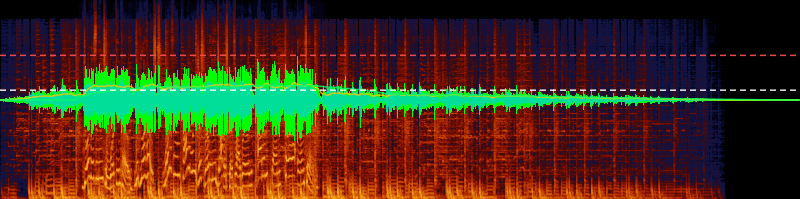
WebGPU-accelerated audio visualization for React. Renders spectrograms, waveforms, and BS.1770-4 loudness metrics from raw audio samples.
Features
- GPU-accelerated spectrogram via WebGPU compute shaders (Cooley-Tukey FFT)
- Waveform rendering with min/max peak envelope
- BS.1770-4 loudness measurement — momentary, short-term, and integrated LUFS
- Configurable frequency scales: linear, log, mel, ERB
- Built-in colormaps (lava, viridis) with custom colormap support
- BS.1770-4 true peak measurement via 4x oversampling
- Configurable computation toggles — disable spectrogram, loudness, or true peak independently
- Streaming architecture — processes audio in chunks without loading entire files into memory
Install
npm install @e9g/spectral-displayPeer dependencies: react >= 18, react-dom >= 18
Quick Start
import { useSpectralCompute, SpectrogramCanvas, WaveformCanvas, LoudnessCanvas } from "@e9g/spectral-display";

function AudioDisplay({ device, metadata, readSamples }) {
	const computeResult = useSpectralCompute({
		metadata,
		query: { startMs: 0, endMs: 30000, width: 800, height: 200 },
		readSamples,
		config: { device, frequencyScale: "mel", colormap: "lava" },
	});

	return (
		<div style={{ position: "relative", width: 800, height: 200 }}>
			<SpectrogramCanvas computeResult={computeResult} />
			<div style={{ position: "absolute", inset: 0 }}>
				<WaveformCanvas computeResult={computeResult} />
			</div>
			<div style={{ position: "absolute", inset: 0 }}>
				<LoudnessCanvas computeResult={computeResult} />
			</div>
		</div>
	);
}
Pass your own GPUDevice via config.device to share it across components. If omitted, the hook acquires one automatically.
The readSamples callback provides audio data on demand:
const readSamples = (channel: number, sampleOffset: number, sampleCount: number) => {
	// Return a Float32Array of samples for the given channel and range
	return Promise.resolve(channelData[channel].subarray(sampleOffset, sampleOffset + sampleCount));
};
Visualizations
Spectrogram
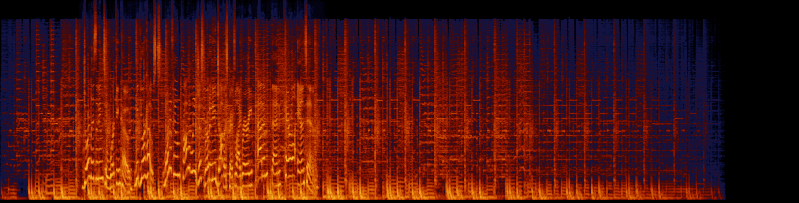
Frequency content over time. Supports linear, log, mel, and ERB frequency scales with configurable FFT size, dB range, and colormap.
Waveform
Peak amplitude envelope showing min/max sample values per time column.

Loudness
BS.1770-4 loudness metrics: RMS envelope (filled), momentary LUFS (400ms window), short-term LUFS (3s window), and integrated LUFS (horizontal dashed line). LUFS values are mapped to amplitude (10^(lufs/20)) so they visually correspond to the waveform scale. True peak is shown as a red dashed horizontal line at the interpolated peak amplitude.

API
useSpectralCompute(options: SpectralOptions): ComputeResult
The main hook. Manages the GPU engine lifecycle, runs the processing pipeline, and returns results reactively.
SpectralOptions
| Field | Type | Description |
| ------------- | --------------------------------------------------- | --------------------------------- |
| metadata | SpectralMetadata | Audio file properties |
| query | SpectralQuery | Time range and output dimensions |
| readSamples | (channel, offset, count) => Promise<Float32Array> | Callback to provide audio samples |
| config | Partial<SpectralConfig> | Optional processing configuration |
SpectralMetadata
| Field | Type | Description |
| ---------------- | ----------------------- | ----------------------------------------------------- |
| sampleRate | number | Sample rate in Hz |
| sampleCount | number | Total samples per channel |
| channelCount | number | Number of audio channels |
| channelWeights | ReadonlyArray<number> | Optional BS.1770-4 channel weights (default: all 1.0) |
SpectralQuery
| Field | Type | Description |
| --------- | -------- | -------------------------- |
| startMs | number | Start time in milliseconds |
| endMs | number | End time in milliseconds |
| width | number | Output width in pixels |
| height | number | Output height in pixels |
SpectralConfig
All fields are optional — defaults are applied automatically.
| Field | Type | Default | Description |
| ---------------- | ------------------------------ | ----------- | ------------------------------------------------- |
| fftSize | number | 4096 | FFT window size (power of 2) |
| frequencyScale | FrequencyScale | "log" | "linear", "log", "mel", or "erb" |
| dbRange | [number, number] | [-120, 0] | Spectrogram dB range [min, max] |
| colormap | string \| ColormapDefinition | "lava" | "lava", "viridis", or custom colormap |
| waveformColor | [number, number, number] | Auto | RGB color for waveform rendering |
| device | GPUDevice | Auto | WebGPU device (acquired automatically if omitted) |
| signal | AbortSignal | Internal | External abort signal for cancellation |
| spectrogram | boolean | true | Enable spectrogram GPU computation |
| loudness | boolean | true | Enable K-weighting and LUFS computation |
| truePeak | boolean | true | Enable BS.1770-4 true peak measurement |
ComputeResult
Discriminated union with status field:
{ status: "idle" }— no computation started{ status: "error", error: Error }— pipeline failed{ status: "ready", spectrogramTexture, waveformBuffer, waveformPointCount, loudnessData, options }— results available
Components
<SpectrogramCanvas computeResult={computeResult} />
Renders the spectrogram texture to a canvas via GPU blit.
<WaveformCanvas computeResult={computeResult} color={[r, g, b]} />
Renders the waveform envelope via GPU compute. color is optional RGB (0-255).
<LoudnessCanvas computeResult={computeResult} />
Renders loudness metrics on a 2D canvas. Optional boolean props to toggle each visualization:
| Prop | Default | Description |
| ------------- | -------- | --------------------------------- |
| rmsEnvelope | true | RMS amplitude envelope fill |
| momentary | false | 400ms momentary LUFS line |
| shortTerm | false | 3s short-term LUFS line |
| integrated | true | Integrated LUFS horizontal line |
| truePeak | false | True peak amplitude line |
| colors | Built-in | Override colors per visualization |
All components accept a ref prop for canvas element access.
Browser Requirements
- WebGPU — required for spectrogram and waveform rendering. Check
navigator.gpufor support. scheduler.yield()— optional. Used for cooperative yielding during processing. Falls back tosetTimeoutif unavailable.
License
ISC