
@eclectic-ai/wiremd
v0.6.1
Published
Text-first UI design tool - Create wireframes and mockups using Markdown syntax
Downloads
379

Maintainers
 eclectic-ai
Readme
wiremd
Mermaid for wireframes — describe a screen, get a wireframe. Every mockup is a plain
.mdfile.



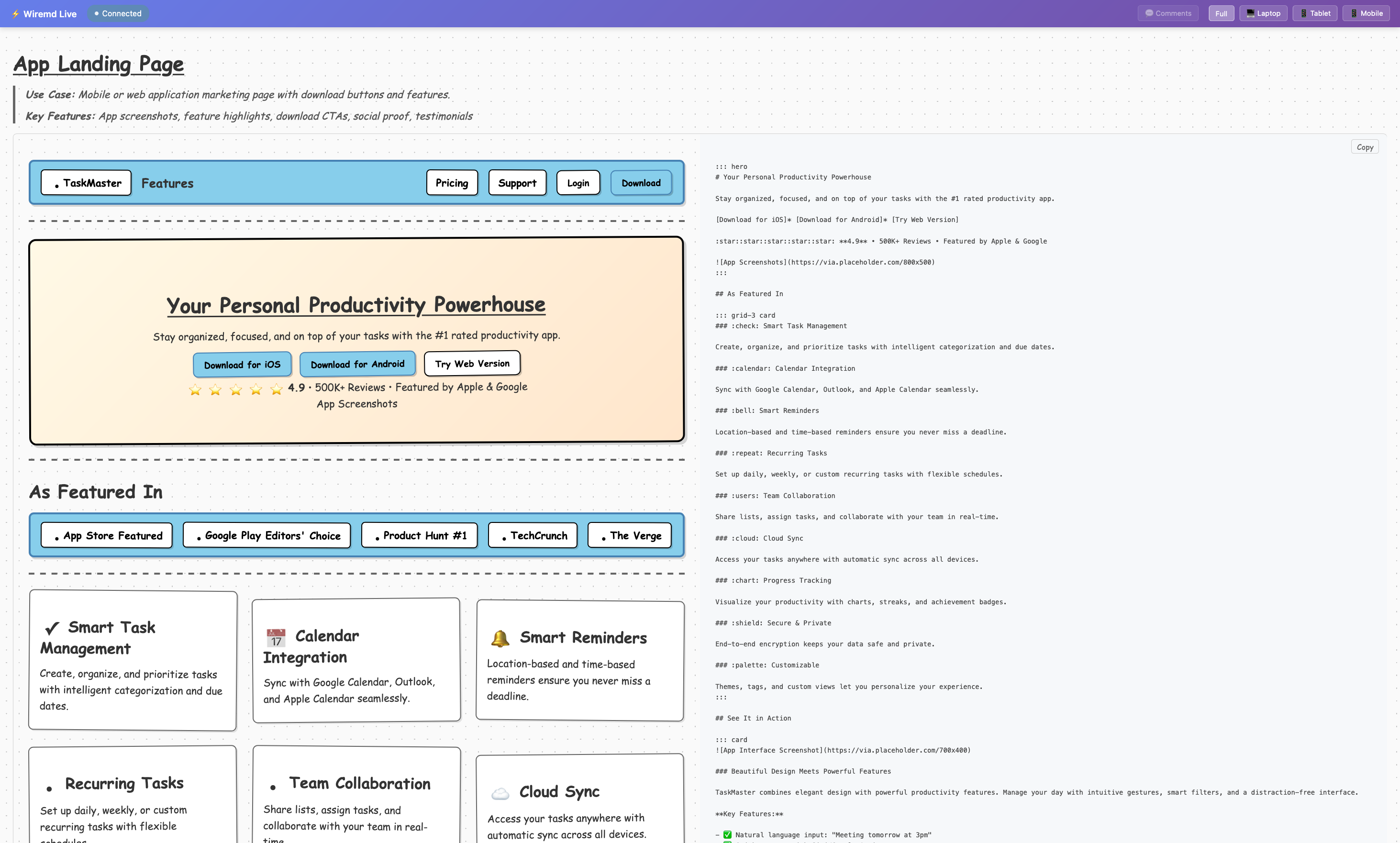
wiremd converts Markdown with extended wireframing syntax into visual HTML mockups. Write a screen description, Claude renders it. Or write the Markdown directly. Every wireframe is version-controlled, diff-able, and readable by any LLM — no image generation required.
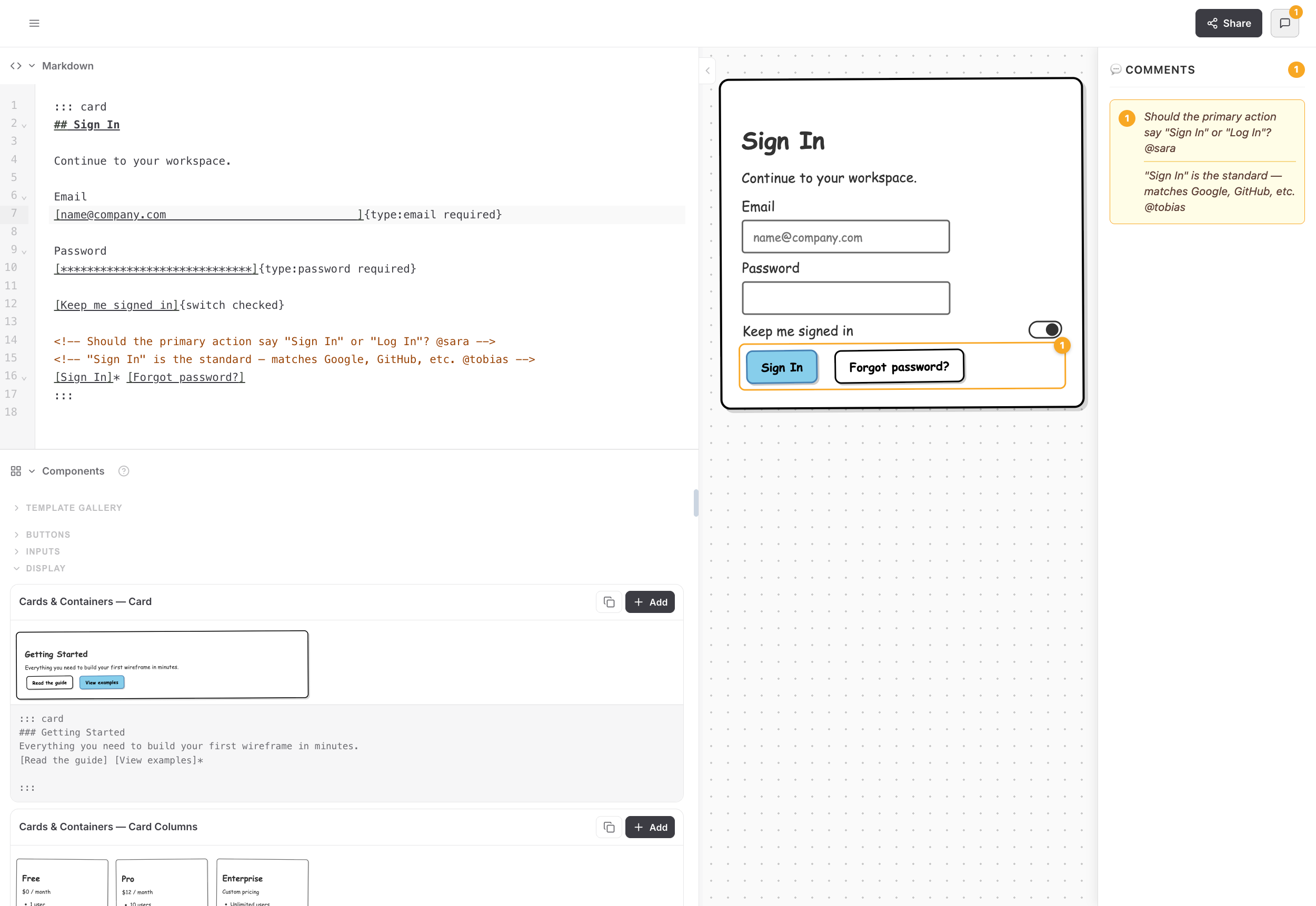
Getting started
npm install -g @eclectic-ai/wiremd # installs the 'wiremd' CLIwiremd login.md --style sketch --serve 3000Open http://localhost:3000 — the preview live-reloads as you edit.
[!TIP] Not sure where to start? The interactive editor runs in the browser — no install needed.
Syntax
wiremd extends standard Markdown with concise UI primitives. Everything is still valid Markdown.
## Login

Email
[[email protected]___]{type:email}

Password
[____________]{type:password}

[Sign in]* [Forgot password?]{ghost}

---

Don't have an account? [Create one]
| Syntax | Renders as |
|--------|-----------|
| [Label]* | Primary button |
| [Label]{danger} | Danger button |
| [___] / [Hint___] | Text input with optional placeholder |
| [Options___v] | Select dropdown |
| [ ] / [x] | Checkbox |
| [Label]{switch} | Toggle switch |
| ((Badge)){success} | Status badge |
| :icon-name: | Tabler icon |
| ::: columns-3 | Multi-column layout |
| ::: accordion | Collapsible sections |
| ::: tabs | Tabbed panels |
| <!-- note --> | Annotation callout |
Full reference: teezeit.github.io/wiremd/reference/syntax
Visual styles
Seven built-in themes — switch with --style:
| Style | Description |
|-------|-------------|
| sketch | Comic Sans, hand-drawn look (default) |
| clean | Modern minimal |
| wireframe | Traditional grayscale |
| material | Google Material Design |
| tailwind | Utility-first with purple accents |
| brutal | Neo-brutalism |
| none | Unstyled semantic HTML |
CLI
# Render a single file
wiremd login.md

# Choose a style and output path
wiremd login.md --style clean -o login.html

# Serve a file with live-reload
wiremd login.md --serve 3000 --watch

# Render every .md file in a directory
wiremd screens/

# Serve an entire directory
wiremd screens/ --serve 3000 --watch

# Output JSON AST
wiremd login.md --format json
Use with Claude
Claude Code:
npx skills add teezeit/wiremd/extensions/skillsClaude Desktop (Cowork): download wireframe-skill.zip → Settings → Plugins → + Add → Upload (.zip) (recommended), or Settings → Skills → + Add → Upload (.zip).
[!NOTE] Rendering requires CLI execution — wiremd works fully in Claude Code and Claude Desktop Cowork. Claude Desktop chat and claude.ai can write wiremd Markdown but cannot render it.
Then ask: "Wireframe a login screen with email, password, and a forgot password link."
Three modes depending on your setup:
| Mode | What you see | |------|-------------| | display | HTML artifact in Claude's panel — works everywhere | | editor | Live browser tab with hot-reload — best for iterating | | serve | Local dev server — any browser, Claude on your machine |
Full guide: teezeit.github.io/wiremd/guide/claude
VS Code extension
Install Wiremd from the VS Code Marketplace. Live preview updates as you type, no Claude required.
code --install-extension eclectic-ai.wiremd-previewProgrammatic API
import { parse, renderToHTML, renderToReact, renderToTailwind, renderToJSON } from '@eclectic-ai/wiremd';

const ast = parse(`
## Contact Form

Name [___]
Email [[email protected]___]{type:email}

[Send]*
`);

const html = renderToHTML(ast, { style: 'clean' });
const jsx  = renderToReact(ast, { typescript: true, componentName: 'ContactForm' });
const tw   = renderToTailwind(ast);
const json = renderToJSON(ast, { pretty: true });
Migrating from v0.3 or earlier
If your wiremd files use the old ## {.grid} / ## {.row} syntax or |pill| notation, run the migration script:
python3 scripts/migrate-v0.4.py          # all .md files under cwd
python3 scripts/migrate-v0.4.py src/     # specific directory
python3 scripts/migrate-v0.4.py page.md  # single file
See CHANGELOG.md for the full list of breaking changes in v0.4.
Exporting to Figma
Generate JSON from your wiremd file, then use the wiremd Figma Plugin to import it as native, editable Figma frames:
wiremd your-mockup.md --format json -o mockup.jsonSee extensions/figma/README.md.
Project structure
wiremd is a pnpm + Turborepo monorepo. The published @eclectic-ai/wiremd npm package lives in packages/core/; everything else consumes it via workspace dependencies.
wiremd/
├── packages/core/          # published npm package — parser, renderers, CLI
├── apps/
│   ├── docs/               # VitePress documentation site       :5173
│   ├── editor/             # web editor (React + CodeMirror)    :5174
│   └── landing/            # marketing site (Vue)               :5175
├── extensions/
│   ├── vscode/             # VS Code live-preview extension
│   ├── figma/              # imports wiremd JSON into Figma
│   └── skills/wireframe/   # Claude skill
└── scripts/                # build-bundle, sync-versions, package-skill
pnpm install # install all workspaces
pnpm turbo run dev # start all dev servers concurrently
pnpm turbo run build # build everything (core first, then apps)
pnpm turbo run test # run the full test suite
pnpm turbo run typecheckContributing
Contributions are welcome. See CONTRIBUTING.md for the feature checklist, fixture corpus conventions, and release process.
git clone https://github.com/teezeit/wiremd.git
cd wiremd
pnpm install
pnpm --filter @eclectic-ai/wiremd run test:watch
Credits
Created by teezeit.
Inspired by Mermaid, Balsamiq, and PlantUML Salt.