
@ecommerce-chat/shopping-assistant
v1.7.6
Published
Embeddable AI shopping assistant widget for e-commerce websites

Maintainers
 kagin007
Readme
Shopping Assistant Widget
Embeddable AI-powered shopping assistant for e-commerce websites. Help your customers find products through natural conversation.
Get your API key at echatr.com - Sign up to connect your product catalog and start helping customers find products through AI-powered conversations. First 50 products are free!
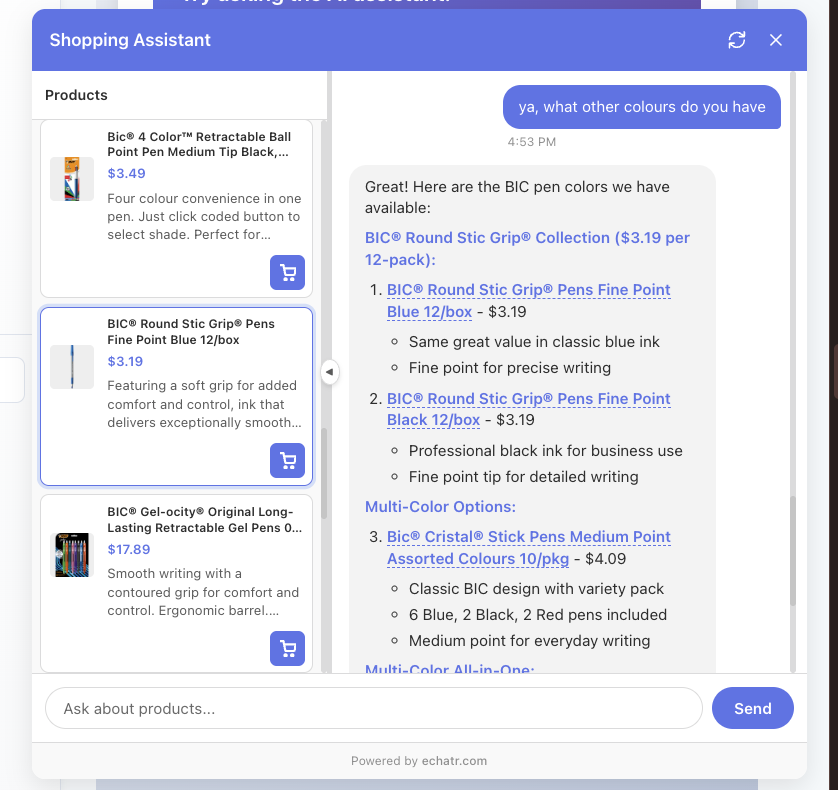
Features
- 🤖 AI-powered product recommendations
- 🔍 Semantic product search
- 💬 Natural conversation interface
- 🎨 Customizable appearance
- 📱 Mobile-responsive design
- ⚡ Lightweight and fast
Installation
Via CDN (Recommended)
Add these two lines to your HTML:
<!-- Include the widget CSS and JS -->
<link rel="stylesheet" href="https://cdn.jsdelivr.net/npm/@ecommerce-chat/shopping-assistant@1/dist/widget.css">
<script src="https://cdn.jsdelivr.net/npm/@ecommerce-chat/shopping-assistant@1/dist/widget.iife.js"></script>

<!-- Initialize the widget -->
<script>
  // Try it without an API key for demo mode!
  ShoppingAssistant.init({
    position: 'bottom-right',
    primaryColor: '#667eea'
  });

  // Or connect your store:
  // ShoppingAssistant.init({
  //   apiKey: 'YOUR_API_KEY',  // Get this from echatr.com
  //   position: 'bottom-right',
  //   primaryColor: '#667eea'
  // });
</script>
Via NPM
npm install @ecommerce-chat/shopping-assistantConfiguration
ShoppingAssistant.init({
  // Required
  apiKey: 'store_...',              // Your store API key from eChat dashboard

  // Optional
  position: 'bottom-right',         // 'bottom-right' | 'bottom-left'
  primaryColor: '#667eea',          // Widget theme color

  // Optional: Cart integration
  getCart: function() {
    return {
      items: [],
      total: 0
    };
  },

  // Optional: Cart actions
  onAddToCart: async function(productId, quantity) {
    // Add product to your cart system
    await myCart.add(productId, quantity);
    return { success: true };
  },

  onRemoveFromCart: async function(productId) {
    // Remove product from your cart system
    await myCart.remove(productId);
    return { success: true };
  },

  // Optional: Product navigation
  onNavigateToProduct: function(productId) {
    // Navigate to product detail page
    window.location.href = `/products/${productId}`;
  },

  onViewProductDetails: function(productId) {
    // Show product details in modal or panel
    showProductModal(productId);
  },

  // Optional: Coupon application
  onApplyCoupon: async function(couponCode) {
    // Apply coupon code to cart
    await fetch('/cart/coupon', {
      method: 'POST',
      body: JSON.stringify({ code: couponCode })
    });
    return { success: true };
  }
});
Options
Configuration Options
All options are optional! You can initialize the widget with no configuration for demo mode.
| Option | Type | Default | Description |
|--------|------|---------|-------------|
| apiKey | string | undefined | Your store API key from echatr.com. Omit for demo mode with sample products. |
| position | string | 'bottom-right' | Widget position: 'bottom-right' or 'bottom-left' |
| primaryColor | string | '#667eea' | Primary theme color for the widget |
Optional Callbacks
| Option | Type | Description |
|--------|------|-------------|
| getCart | function | Function to retrieve current cart state |
| onAddToCart | function | Callback when user adds product to cart |
| onRemoveFromCart | function | Callback when user removes product from cart |
| onNavigateToProduct | function | Callback to navigate to product detail page |
| onViewProductDetails | function | Callback to show product details in modal/panel |
| onApplyCoupon | function | Callback when user applies a coupon code |
Advanced Options
| Option | Type | Default | Description |
|--------|------|---------|-------------|
| apiUrl | string | 'https://api.echatr.com/api/v1' | Backend API URL (only override for self-hosting) |
Example Queries
Your customers can ask natural questions like:
- "Show me laptops under $1500"
- "I need wireless headphones with noise cancellation"
- "What cameras do you have for beginners?"
- "Find me accessories for my laptop"
Browser Support
- Chrome (latest)
- Firefox (latest)
- Safari (latest)
- Edge (latest)
License
MIT
Getting Your API Key
- Visit echatr.com and create an account
- Add your store and upload your product catalog (First 50 products free!)
- Copy your API key from the dashboard
- Add it to your widget configuration
Support
- Website: echatr.com
- Issues: GitHub Issues