
@edgeflare/ng-oidc
v0.0.1
Published
oidc-client-ts wrapper for Angular and Capacitor
Downloads
16


Readme
oidc-client-ts wrapper for Angular and Capacitor
1. Install
npm install oidc-client-ts @edgeflare/ng-oidc2. Configure Angular
Update <approot>/src/app/app.config.ts. The example directory includes a minimal app.
import { ApplicationConfig } from '@angular/core';
import { provideRouter, Route } from '@angular/router';
import { UserManagerSettings } from 'oidc-client-ts';
import { initOidc, OIDC_ROUTES } from '@edgeflare/ng-oidc';

// Define OIDC configuration
const oidcConfig: UserManagerSettings = {
  authority: "https://iam-PROJECT_ID.PROJECT_REGION.edgeflare.dev",
  client_id: "CLIENT_ID",
  redirect_uri: "http://localhost:4200/signin/callback",
  response_type: "code",
  scope: "openid profile email",
  post_logout_redirect_uri: "http://localhost:4200/signout/callback",
  automaticSilentRenew: true,
  silentRequestTimeoutInSeconds: 30,
  silent_redirect_uri: "http://localhost:4200/silent-refresh-callback.html",
};

// Provide OIDC configuration and routes in the application configuration
export const appConfig: ApplicationConfig = {
  providers: [
    // other providers
    ...initOidc(oidcConfig),
    provideRouter(OIDC_ROUTES),
    // more providers
  ],
};
Providing OIDC_ROUTES registers below routes:
/signin/{callback,error,''}/signout/callback/oidc-profile, protected by anauthGuardsupplied withng-oidc
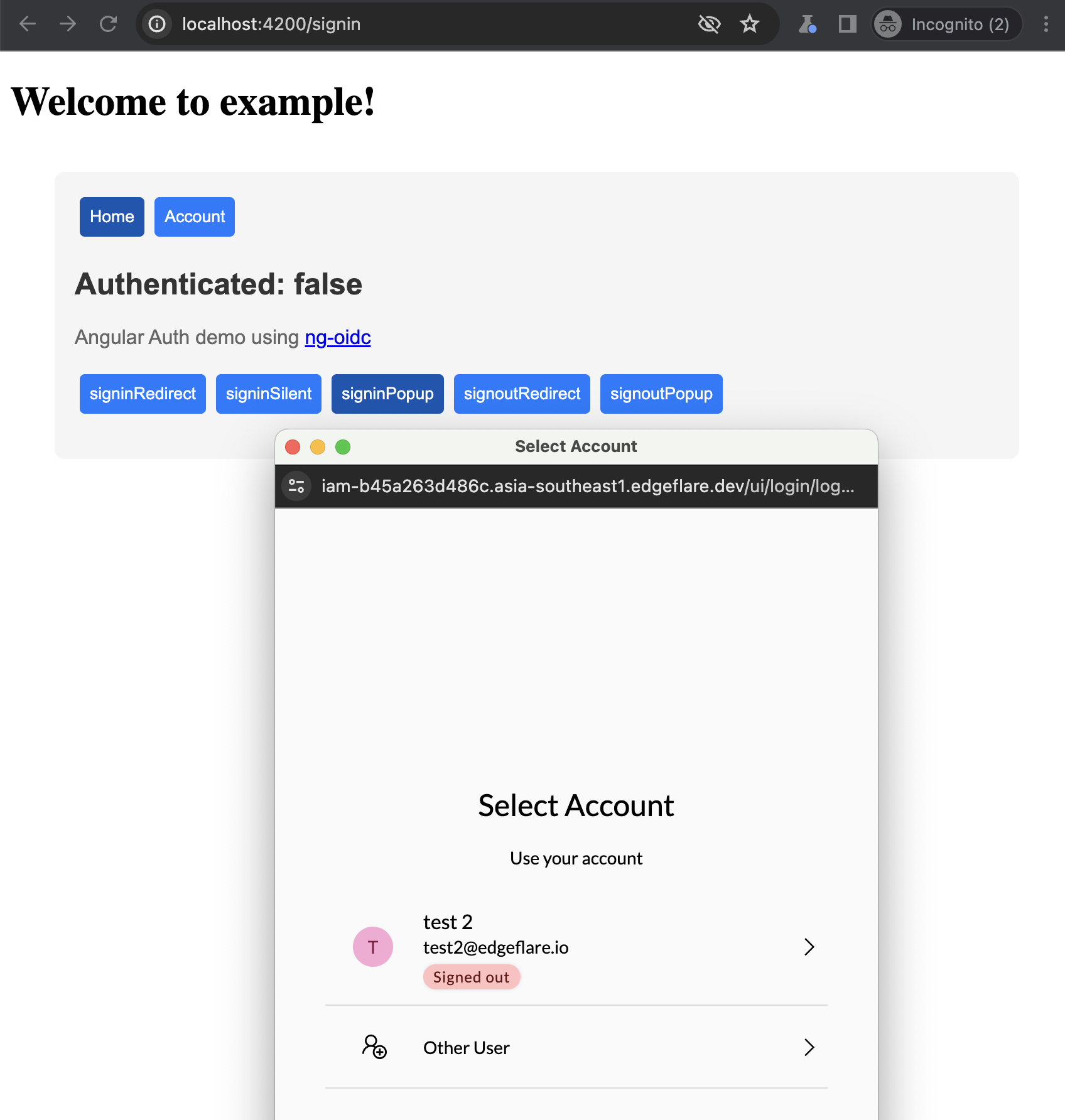
See signinRedirect, signinPopup etc examples at http://localhost:4200/signin. It additionally provides user and isAuthenticated signals; which can be called like user() to get the current user, and isAuthenticated() to check if the user is authenticated.
The routes can be registered on parent routes other root /, with ng-oidc supplied components or your own.
const myOidcRoutes: Route[] = [
  // signin is now at /account/signin
  { path: 'account', loadChildren: () => import("@edgeflare/ng-oidc").then((m) => m.OIDC_ROUTES)},
  // Or just the only required route. must match the `redirect_uri` in oidcConfig
  { path: 'signin-callback', loadComponent: () => import("@edgeflare/ng-oidc").then((m) => m.SigninCallbackComponent)},
];

// ...
export const appConfig: ApplicationConfig = {
  providers: [
    ...initOidc(oidcConfig),
    provideRouter(myOidcRoutes),
  ],
};
To enable silent refresh, include the <approot>/public/silent-refresh-callback.html with below content:
<script src="./oidc-client-ts.js"></script>
<script>
  var mgr = new oidc.UserManager({ response_mode: 'query' });
  mgr.signinSilentCallback().catch(error => {
    console.error(error);
  });
</script>
Features (roadmap)
- [x] signinRedirect, signinPopup, signoutRedirect, signoutPopup
- [x] authGuard using canActivateFn
- [ ] signinSilent (gotta get it to work reliably)
- [ ] Capactior support for native mobile apps
Contributing / Development
With ~200 lines of code ng-oidc doesn't really do much except calling oidc-client-ts functions. It sets up and exposes oidc-client-ts' UserManager functions through an Angular service, AuthService. The function signatures used in this service are the same as those provided by oidc-client-ts.
signinRedirect(args?): Promise<void>signinPopup(args?): Promise<void>signinPopup(args?): Promise<User>
For advanced usage, call AuthService.userManagerInstance() to get the UserManager instance. If you wanna make it better, please do! Fork the repo, make your changes, and submit a PR.
License
Apache License 2.0