
@eeacms/volto-arcgis-block
v0.1.485
Published
volto-arcgis-block: Volto add-on
Downloads
2,642


Readme
Volto Arcgis Block for Copernicus site

ArcGIS Map integration for Volto blocks
This Volto block allows adding a map block into your site but it has several dependencies.
This block has been implemented to fit the needs of the Copernicus Land Monitoring Service, and as such, it requires an specific endpoint on the Plone site to retrieve the information to be shown in the map.
This endpoint is called @mapviewer and an example implementation is in the clms.types product.
This means that the product is not generic enough to show any ArcGIS map.
Styling
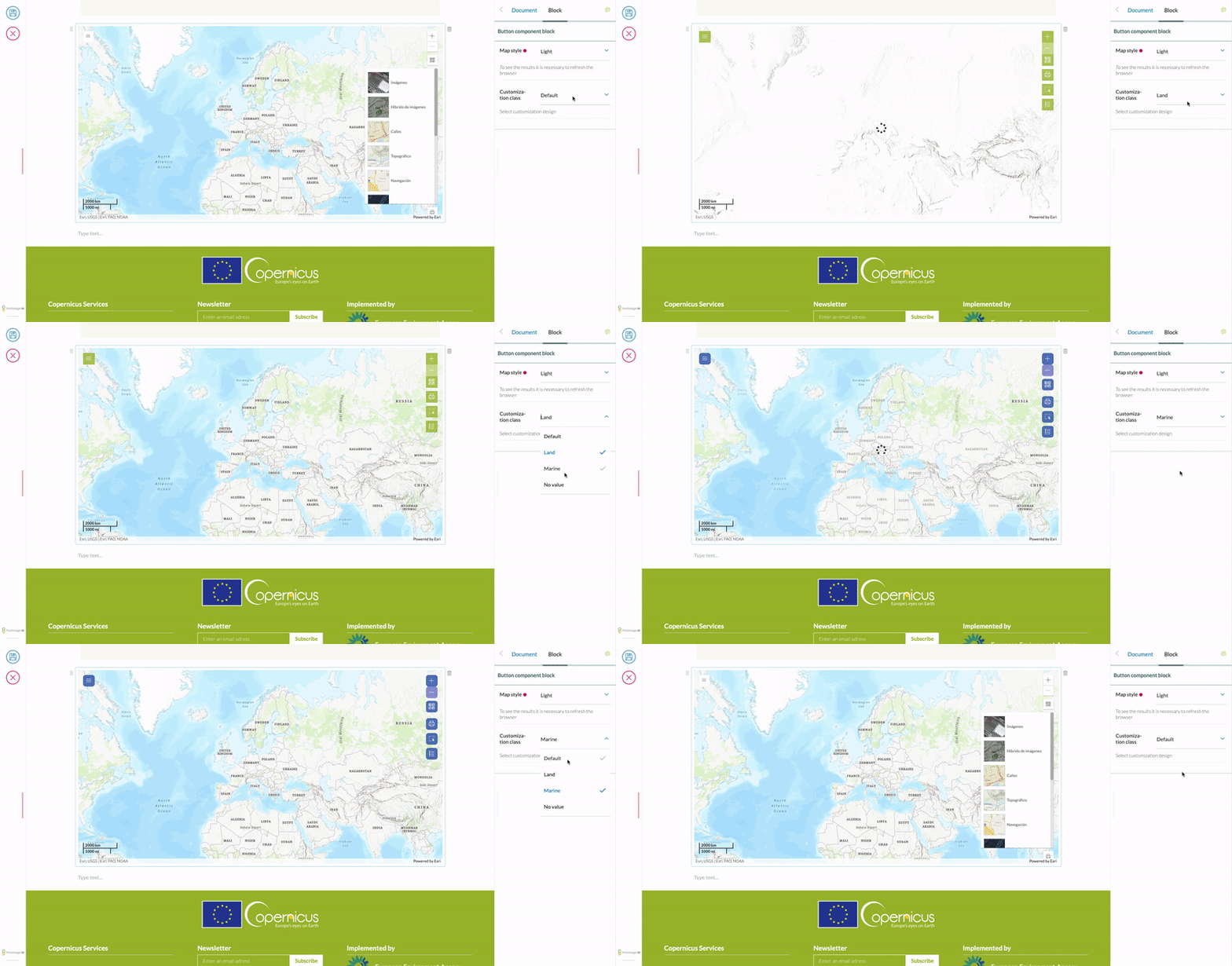
To create custom styles, we need to add it in the block configuration and import the Less file into our project.
- Add the new styles in the custom Blocks configuration:
import { ARCGIS_BLOCK } from '@eeacms/volto-arcgis-block/constants';

const customBlocks = (config) => ({
  ...config.blocks.blocksConfig,
  [ARCGIS_BLOCK]: {
    ...config.blocks.blocksConfig[ARCGIS_BLOCK],
    styles: {
      ...config.blocks.blocksConfig[ARCGIS_BLOCK]?.styles,
      land: {
        title: 'Land style',
        customClass: 'land',
      },
    },
},- Import the CSS in your project:
@import url('maps.less');- CSS structure:
.land { // <-- Wrap your design inside a class with the name you used in customClass
    .map {
        width: 100%;
        height: 600px;
        padding: 0;
        margin: 0;
    }

    .esri-view .esri-view-surface--inset-outline:focus::after {
        outline: none !important;
    }

    .esri-component.esri-zoom.esri-widget {
        margin-bottom: 0;
        box-shadow: none;
    }
}
Note: If the style selector does not show your new style, try to change the order of the declaration of the addons in package.json, giving preference to volto-arcgis-block
"addons": [
    "@eeacms/volto-arcgis-block",
    "@eeacms/volto-clms-theme"
  ],
Release
Automatic release using Jenkins
- The automatic release is started by creating a Pull Request from
developtomaster. The pull request status checks correlated to the branch and PR Jenkins jobs need to be processed successfully. 1 review from a github user with rights is mandatory. - It runs on every commit on
masterbranch, which is protected from direct commits, only allowing pull request merge commits. - The automatic release is done by Jenkins. The status of the release job can be seen both in the Readme.md badges and the green check/red cross/yellow circle near the last commit information. If you click on the icon, you will have the list of checks that were run. The
continuous-integration/jenkins/branchlink goes to the Jenkins job execution webpage. - Automated release scripts are located in the
eeacms/gitflowdocker image, specifically js-release.sh script. It uses therelease-ittool. - As long as a PR request is open from develop to master, the PR Jenkins job will automatically re-create the CHANGELOG.md and package.json files to be production-ready.
- The version format must be MAJOR.MINOR.PATCH. By default, next release is set to next minor version (with patch 0).
- You can manually change the version in
package.json. The new version must not be already present in the tags/releases of the repository, otherwise it will be automatically increased by the script. Any changes to the version will trigger aCHANGELOG.mdre-generation. - Automated commits and commits with [JENKINS] or [YARN] in the commit log are excluded from
CHANGELOG.mdfile.
Manual release from the develop branch ( beta release )
Installation and configuration of release-it
You need to first install the release-it client.
npm install -g release-itRelease-it uses the configuration written in the .release-it.json file located in the root of the repository.
Release-it is a tool that automates 4 important steps in the release process:
- Version increase in
package.json( increased from the current version inpackage.json) CHANGELOG.mdautomatic generation from commit messages ( grouped by releases )- GitHub release on the commit with the changelog and package.json modification on the develop branch
- NPM release ( by default it's disabled, but can be enabled in the configuration file )
To configure the authentification, you need to export GITHUB_TOKEN for GitHub
export GITHUB_TOKEN="${GITHUB_TOKEN}"To configure npm, you can use the npm login command or use a configuration file with a TOKEN :
echo "//registry.npmjs.org/:_authToken=YYYYYYYYYYYYYYYYYYYYYYYYYYYYYY" > .npmrcUsing release-it tool
There are 3 yarn scripts that can be run to do the release
yarn release-beta
Automatically calculates and presents 3 beta versions - patch, minor and major for you to choose ( or Other for manual input).
? Select increment (next version):
❯ prepatch (0.1.1-beta.0)
  preminor (0.2.0-beta.0)
  premajor (1.0.0-beta.0)
  Other, please specify...
yarn release-major-beta
Same as yarn release-beta, but with premajor version pre-selected.
yarn release
Generic command, does not automatically add the beta to version, but you can still manually write it if you choose Other.
Important notes
Do not use release-it tool on master branch, the commit on CHANGELOG.md file and the version increase in the package.json file can't be done without a PULL REQUEST.
Do not keep Pull Requests from develop to master branches open when you are doing beta releases from the develop branch. As long as a PR to master is open, an automatic script will run on every commit and will update both the version and the changelog to a production-ready state - ( MAJOR.MINOR.PATCH mandatory format for version).
How to contribute
See DEVELOP.md.
Secret Scanning
This repository uses the Betterleaks GitHub Action to scan the current
repository content on every push and pull request. The scan uses the rules in
.gitleaks.toml and uploads a betterleaks-report artifact when a finding is
detected.
If the optional SMTP secrets are configured, failed scans also send an email to the last commit committer. The workflow expects these repository or organization secrets:
SMTP_URLSMTP_PORT(optional, defaults to25)SMTP_EMAILSMTP_PASSWORD(optional if the SMTP server does not require authentication)
Port 465 is sent with direct TLS; other ports use the default SMTP handshake.
The email includes a short finding summary from the redacted Betterleaks report,
including the redacted matched line from each finding.
There are three common outcomes:
Everything is OK. The
Betterleaks / Scan for secretscheck is green and no action is needed. Regular references to runtime values are OK, for example:const tokenFromCookie = req.universalCookies.get('auth_token');A real secret was found. The check is red and the workflow log asks you to download the
betterleaks-reportartifact. Open the artifact from the GitHub Actions run and check the reported file, line and rule. Remove the committed value, move it to the proper secret store, and rotate it if it was exposed. A report entry looks like this:{ "RuleID": "secret-literal-assignment", "File": "src/config.js", "StartLine": 12, "Secret": "[REDACTED]" }The finding is a false positive. Keep the value only if it is clearly not sensitive, such as a test fixture, placeholder, or public example. Add
betterleaks:allowon the same line and include a short explanation in the pull request.const testPassword = 'admin'; //betterleaks:allowpassword: "admin" #betterleaks:allow
Do not add betterleaks:allow to real credentials.