
@eeacms/volto-eea-chatbot
v4.1.5
Published
@eeacms/volto-eea-chatbot: Volto add-on


Readme
Volto Chatbot

Volto add-on that integrates an AI-powered chatbot with a customizable interface and advanced settings to tailor its behavior and enhance user interactions.
Upgrade
1.0.0 (Breaking) - This release introduces breaking changes to the chatbot configuration and API endpoints, making it compatible with Onyx v2.
Features
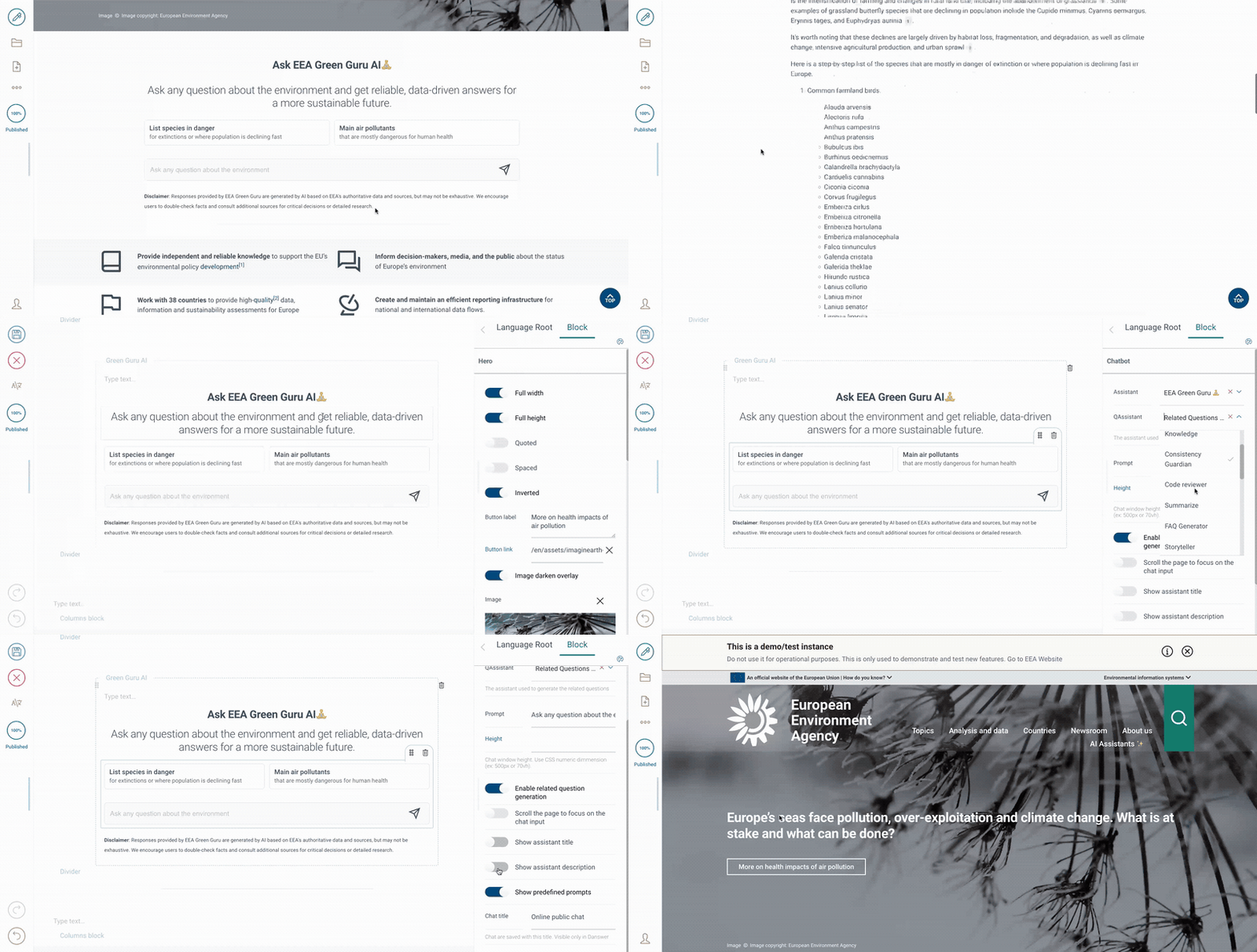
The Volto Chatbot block allows the integration of an AI-powered chatbot into your Volto project. It offers a customizable interface and advanced settings to tailor the chatbot's behavior to your needs. Below is an overview of its features and configuration options.
Functionalities
| Property | Description | Type | Default |
| ---------------------------- | ------------------------------------------------------------------------------- | -------- | -------------------------------- |
| assistant | Choose from the list of available assistants configured in the application. | Dropdown | - |
| qgenAsistantId | Select an assistant for generating related questions. | Dropdown | - |
| enableQgen | Toggle the generation of related questions. | Boolean | false |
| enableFeedback | Enable or disable thumbs up/down feedback for assistant responses. | Boolean | true |
| enableMatomoTracking | Enable tracking of user interactions via Matomo Analytics. | Boolean | true |
| enableShowTotalFailMessage | Show total failure message. | Boolean | false |
| showAssistantTitle | Display or hide the assistant's title in the chat interface. | Boolean | true |
| showAssistantDescription | Display or hide the assistant's description in the chat interface. | Boolean | true |
| qualityCheck | Show automated fact-checking of AI answers against source documents. | Dropdown | Disabled |
| onDemandInputToggle | Sets the default state of the fact-check AI toggle. | Boolean | true |
| showTools | Show or hide tools in the chat interface. | Array | ["internal_search_tool_start"] |
| scrollToInput | Automatically scroll the page to focus on the chat input when interacting. | Boolean | false |
| showAssistantPrompts | Show or hide predefined prompts provided by the assistant. | Boolean | true |
| enableStarterPrompts | Define custom prompts to initiate a chat with the assistant. | Boolean | false |
| starterPromptsHeading | Heading shown above the prompts. | String | - |
| starterPromptsPosition | Prompts position. | Dropdown | Top |
| placeholderPrompt | Set placeholder text for the chat input field. | String | Ask a question |
| chatTitle | Title assigned to saved chats, visible only in Onyx or analytics. | String | Online public chat |
| height | Set the height of the chat window using CSS dimensions (e.g., 500px, 70vh). | String | - |
Getting started
Try volto-eea-chatbot with Docker
git clone https://github.com/eea/volto-eea-chatbot.git
cd volto-eea-chatbot
make
make start
Go to http://localhost:3000
make start now defaults to Volto 18. To run the same setup against Volto 17, use:
  VOLTO_VERSION=17 make
  VOLTO_VERSION=17 make start
Add volto-eea-chatbot to your Volto project
Make sure you have a Plone backend up-and-running at http://localhost:8080/Plone
docker compose up backendStart Volto frontend
If you already have a volto project, just update
package.json:"addons": [ "@eeacms/volto-eea-chatbot" ], "dependencies": { "@eeacms/volto-eea-chatbot": "*" }If not, create one with Cookieplone, as recommended by the official Plone documentation for Volto 18+:
uvx cookieplone project
cd project-title
Install or update dependencies, then start the project:
make installFor a Cookieplone project, start the backend and frontend in separate terminals:
make backend-start
make frontend-start
For a legacy Volto 17 project, install the package with
yarnand restart the frontend as usual.
Block presentation variations
Since 4.1.0 the chatbot block's presentation is pluggable. The block ships with the default classic presentation (the standard chat window), and other add-ons can register additional presentations ("variations") — e.g. to re-style the chat, replace the sources UI, or render custom elements inline in the assistant's answer. When two or more variations are registered, Volto core automatically adds a Presentation choice field to the block's edit sidebar, so editors can pick the variation per block. Old block content without a variation value keeps resolving to the default.
Registering a variation
Push your variation onto blocksConfig.eeaChatbot.variations from your add-on's applyConfig (same cross-add-on pattern as volto-tabs-block):
export default function applyConfig(config) {
  const block = config.blocks.blocksConfig.eeaChatbot;
  if (block) {
    block.variations = block.variations || [];
    if (!block.variations.find((v) => v.id === 'catalogue')) {
      block.variations.push({
        id: 'catalogue',
        title: 'Catalogue',
        isDefault: false,
        view: CatalogueChatView,
      });
    }
  }
  return config;
}
A variation is { id, title, isDefault, view } (optionally edit / schemaEnhancer); view is the React component rendered for the block.
Variation view contract
The variation view receives the block's fields as top-level props (there is no data prop), plus presentation props:
<View
  persona={assistantData}   // the selected assistant
  block_id                  // the block's internal id
  isEditMode
  isPlaywrightTest          // ?playwright=yes query flag
  initialQuery              // ?query=… pre-filled question
  initialDeepResearch       // ?deepResearch=… flag
  {...blockFields}          // assistant, onyxVersion, height, …
/>
If the registry is empty the block falls back to the classic ChatWindow, so registering a variation can never break the block.
Reusing the classic chat window
A variation does not have to build a presentation from scratch — it can wrap the classic ChatWindow and only change what it needs to:
import { ChatWindow } from '@eeacms/volto-eea-chatbot/ChatBlock/chat';

export default function CatalogueChatView(props) {
  return (
    <ChatWindow
      {...props}
      hideSourcesTab
      extraRemarkPlugins={[myRemarkPlugin]}
      extraMarkdownComponents={{ myElement: MyElementComponent }}
    />
  );
}hideSourcesTab— suppresses the classic Sources tab, sidebar and inline citation list only (the answer text and the quality-check logic are unaffected).extraRemarkPlugins/extraRehypePlugins/extraMarkdownComponents— additional remark/rehype plugins and react-markdown component overrides, merged with the built-ins (the same mechanism the quality markers use). This lets a variation render custom inline elements inside the streamed answer.
Custom markdown components can read the message that owns them through ChatMessageContext (also exported from @eeacms/volto-eea-chatbot/ChatBlock/chat): ChatMessage wraps every message in the context provider, so a component rendered from the answer text can e.g. match a marker against message.documents.
Note: the variations registry,
hideSourcesTab, the extra-markdown pass-through props andChatMessageContextare new in 4.1.0. If your project resolves an older published version, these seams don't exist — import the module namespace (e.g.import * as chat from '…/ChatBlock/chat') and guard againstundefinedinstead of using named imports.
Quality Checks (Fact-Checking)
When qualityCheck is enabled, the chatbot sends AI answers and their source
documents to a fact-checking backend that extracts claims, verifies each
against the sources, and returns per-claim verdicts with evidence.
Backend dependency
The fact-checking feature requires the
eea/rag-facts-check service running
and reachable at the URL configured in RAG_FACT_CHECKER_URL.
Without this backend, quality checks will fail with a connection error.
The backend exposes a halloumi-compatible endpoint (POST /halloumi/generate)
so the frontend can call it without code changes. It also provides a native
POST /check endpoint with a richer response schema.
Deploying the backend
# Clone and build
 git clone https://github.com/eea/rag-facts-check.git
cd rag-facts-check
docker build -t rag-fact-check .

# Run (requires an LLM endpoint)
# Set LLM_API_KEY to your actual API key before running
docker run -p 8000:8000 \
  -e LLM_API_BASE=http://your-llm:4002/v1 \
  -e LLM_API_KEY \
  -e LLM_MODEL=gemma \
  rag-fact-check
See the backend README for full configuration options.
Environment Configuration
To properly configure the middleware and authenticate with the Onyx service, ensure that the following environment variables are set:
This document lists the environment variables used in the Volto Chatbot project.
ONYX_URLThe base URL for the Onyx service. Used for API calls to Onyx.ONYX_API_KEYThe API key for authenticating with the Onyx service. This is the recommended authentication method.JEST_USE_SETUPUsed in Jest configuration. When set to 'ON', it enables a specific Jest setup.RAG_FACT_CHECKER_URLThe base URL for the rag-facts-check fact-checking backend. Required whenqualityCheckis enabled. Default:http://localhost:8000.
Development-specific environment variables
MOCK_LLM_FILE_PATHWhen set, this specifies the absolute path to the JSONL file containing the mocked Onyx stream response. Setting this variable enables mocking of Onyx LLM calls.DUMP_LLM_FILE_PATHWhen set, the LLM response will be dumped to the specified absolute file path for debugging or to create new mock files.MOCK_STREAM_DELAYSpecifies a delay for mock streaming, used in testing or development.
Release
See RELEASE.md.
How to contribute
See DEVELOP.md.
Secret Scanning
This repository uses the Betterleaks GitHub Action to scan the current
repository content on every push and pull request. The scan uses the rules in
.gitleaks.toml and uploads a betterleaks-report artifact when a finding is
detected.
If the optional SMTP secrets are configured, failed scans also send an email to the last commit committer. The workflow expects these repository or organization secrets:
SMTP_URLSMTP_PORT(optional, defaults to25)SMTP_EMAILSMTP_PASSWORD(optional if the SMTP server does not require authentication)
Port 465 is sent with direct TLS; other ports use the default SMTP handshake.
The email includes a short finding summary from the redacted Betterleaks report,
including the redacted matched line from each finding.
There are three common outcomes:
Everything is OK. The
Betterleaks / Scan for secretscheck is green and no action is needed. Regular references to runtime values are OK, for example:const tokenFromCookie = req.universalCookies.get('auth_token');A real secret was found. The check is red and the workflow log asks you to download the
betterleaks-reportartifact. Open the artifact from the GitHub Actions run and check the reported file, line and rule. Remove the committed value, move it to the proper secret store, and rotate it if it was exposed. A report entry looks like this:{ "RuleID": "secret-literal-assignment", "File": "src/config.js", "StartLine": 12, "Secret": "[REDACTED]" }The finding is a false positive. Keep the value only if it is clearly not sensitive, such as a test fixture, placeholder, or public example. Add
betterleaks:allowon the same line and include a short explanation in the pull request.const testPassword = 'admin'; //betterleaks:allowpassword: "admin" #betterleaks:allow
Do not add betterleaks:allow to real credentials.
Copyright and license
The Initial Owner of the Original Code is European Environment Agency (EEA). All Rights Reserved.
See LICENSE.md for details.