
@eeacms/volto-toolbar-actions
v3.0.0
Published
@eeacms/volto-toolbar-actions: Volto add-on
Downloads
589


Readme
volto-toolbar-actions

Volto Toolbar extra actions for Site Administrators
Features
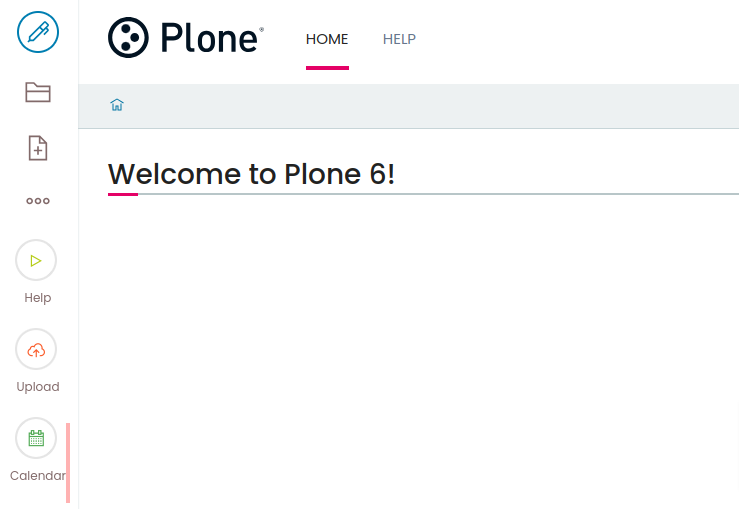
Demo - How to add a toolbar action via ZMI
- Go to ZMI > portal_actions
- Add a new CMF Action Category called toolbar_top_actions or toolbar_bottom_actions
- Within this category add a new CMF Action called help
- Edit help
- Title:
Help - URL (Expression):
string:${portal_url}/help - Icon (Expression)
string:play circular orange largeSee Semantic UI Icon for more icons variations. Aditionally you can provide:no-title- to hide the action titleno-icon- to hide the action icon
- Condition
python:'/help' not in plone_context_state.object_url()See ContextState available methods - Permissions
Modify portal content
- Title:
Getting started
Try volto-toolbar-actions with Docker
  git clone https://github.com/eea/volto-toolbar-actions.git
  cd volto-toolbar-actions
  make
  make start
Go to http://localhost:3000
make start now defaults to Volto 18. To run the same setup against Volto 17, use:
  VOLTO_VERSION=17 make
  VOLTO_VERSION=17 make start
Add volto-toolbar-actions to your Volto project
Make sure you have a Plone backend up-and-running at http://localhost:8080/Plone
docker compose up backendStart Volto frontend
If you already have a volto project, just update
package.json:"dependencies": { "@eeacms/volto-toolbar-actions": "*" }and
volto.config.js:const addons = ['@eeacms/volto-toolbar-actions'];If not, create one with Cookieplone, as recommended by the official Plone documentation for Volto 18+:
uvx cookieplone project
cd project-title
Install or update dependencies, then start the project:
make installFor a Cookieplone project, start the backend and frontend in separate terminals:
make backend-start
make frontend-start
For a legacy Volto 17 project, install the package with
yarnand restart the frontend as usual.Go to http://localhost:3000
Happy editing!
Release
See RELEASE.md.
How to contribute
See DEVELOP.md.
Copyright and license
The Initial Owner of the Original Code is European Environment Agency (EEA). All Rights Reserved.
See LICENSE.md for details.