
@eeemarv/io-spi
v0.2.8
Published
Promise Based Native Node.js Addon for SPI devices on Linux

Maintainers
 eeemarv
Readme
Node Native SPI Addon




A high-performance Node.js native addon for SPI communication on Linux, leveraging direct spidev.h APIs.
Features
Async/await friendly Promise-based transfers with configurable per-transfer settings.
Batched transfers: Submit multiple SPI transactions in one call for maximum performance.
Zero abstraction: Direct mapping to the Linux SPI interface (
spi_ioc_transfer).Full support for Linux SPI parameters (e.g., delay_usecs, cs_change).
Dynamic reconfiguration of mode, speed_hz, and bits_per_word.
Getters for current device settings.
Built-in TypeScript type declarations.
Concurrency & Multiple Chip Select (CS)
Non-Blocking API
All transfers are asynchronous by design:
import SPIDevice from '@eeemarv/io-spi';
spi = new SPIDevice('/dev/spidev0.0');

// Fire-and-forget transfer
spi.transfer([txBuffer])
   .then([rxBuffer] => console.log('Done!'))
   .catch(err => console.error('Error:', err));
Key notes
- Transfers are queued at the OS level but don't block Node.js's event loop.
- Each transfer() call returns a native Promise (no manual threading required).
Multiple Chip Select (CS) Pins
To control multiple SPI slaves, create separate instances per CS
// Each CS line gets its own instance
// each instance contains its own configuration:
// mode, max_speed_hz and bits_per_word

const spiCS0 = new SPIDevice('/dev/spidev0.0');  // Uses CS0
const spiCS1 = new SPIDevice('/dev/spidev0.1',{
  max_speed_hz: 500_000
});  // Uses CS1

const txBufferForDevice0 = Buffer.from([0x55, 0xAA]);
const txBufferForDevice1 = Buffer.from([0x66, 0xBB]);

// Concurrent operations
Promise.all([
  spiCS0.transfer([txBufferForDevice0]),
  spiCS1.transfer([txBufferForDevice1])
]).then(([[rxBufferfromDevice0], [rxBufferFromDevice1]]) => {
  console.log(rxBufferfromDevice0);
  console.log(rxBufferfromDevice1);
}).catch((error) => {
  console.error(error);
});
Hardware Setup
- Ensure each slave has a dedicated CS line (e.g., CS0, CS1).
- Kernel must expose multiple /dev/spidevX.Y devices (check
ls /dev/spidev* -l).
Example Wiring (Raspberry Pi):
Pi (Master) | Peripheral 0 | Peripheral 1 ---|---|--- MOSI (GPIO10) | MOSI | MOSI MISO (GPIO9) | MISO | MISO SCLK (GPIO11) | SCLK | SCLK CE0 (GPIO8) | CS | - CE1 (GPIO7) | - | CS
Installation
npm install @eeemarv/io-spi

# OR

yarn add @eeemarv/io-spi
Prerequisites
Linux (e.g., Raspberry Pi, Orange Pi) with SPI kernel support.
Node.js v20+
Build tools:
sudo apt-get install build-essential python3Usage
Import
const SPIDevice = require('@eeemarv/io-spi');

// OR

import SPIDevice from '@eeemarv/io-spi';
Initialize
const spi = new SPIDevice('/dev/spidev0.0', {
  mode: 3,          // SPI mode (default 0)
  max_speed_hz: 500_000,  // Clock speed (default 1_000_000 or 1MHz)
  bits_per_word: 16    // Bits per word (default 8)
});
Or configure dynamically:
spi.setMode(2);           // Switch to mode 2
spi.setMaxSpeedHz(250_000); // Reduce speed to 250kHz
spi.setBitsPerWord(8);

console.log(spi.getMode()); // e.g., 2
Transfer Data
Simple Transfer (Uses Device Defaults)
spi.transfer([
  Buffer.from([0x01, 0x02])
]).then(([result]) => {
  console.log(result); // Buffer with received data
}).catch((error) => {
  console.log(error);
});
Advanced Transfer (Per-Transfer Settings)
spi.transfer([
  Buffer.from([0x01, 0x02]), // Uses device defaults
  {                           // Overrides settings for this transfer
    tx_buf: Buffer.from([0x03, 0x04]), // required
    speed_hz: 500000,         // Temporary speed change
    delay_usecs: 100,            // Delay after transfer (microseconds)
    cs_change: 1           // Toggle CS after this transfer
  },
  Buffer.from([0x05, 0x06])  // Reverts to device defaults
]).then((results) => {
    console.log(results); // `results` is an array of Buffers (one per transfer)
}).catch((error) => {
    console.log(error);
});
API Reference
new SPIDevice(path[, options])
path (string): SPI device path (e.g., /dev/spidev0.0).
options (object):
- mode: SPI mode 0-3 (CPOL/CPHA), more rare modes are also supported. Defaults to 0.
- max_speed_hz (number): Clock speed in Hz. Defaults to 1_000_000 (1Mhz)
- bits_per_word (number): Bits per word. Defaults to 8
Methods
Method | Description ---|--- transfer(transfers) | Returns a Promise<Buffer[]> for all transfers. Each transfer can override settings (see below). setMode(mode) | Sets SPI mode. Throws if invalid. getMode() | Returns current mode. setMaxSpeedHz(hz) | Sets maximum clock speed (Hz). getMaxSpeedHz() | Returns current maximum speed. setBitsPerWord(bits) | Sets bits per word (usually 8). getBitsPerWord() | Returns current bits per word.
Transfer Object Parameters
Each transfer can specify:
Parameter | Type | Description
---|---|---
tx_buf | Buffer | Data to send. Required.
speed_hz | number | Temporary clock speed (overrides max_speed_hz).
delay_usecs | number | Delay after transfer (microseconds).
cs_change | number (0,1) | Toggle chip select after this transfer. default is 0.
See Linux spidev.h for full documentation of all parameters.
Parameters tx_nbits, rx_nbits and word_delay_usecs can also be used, but these are not widely implemented.
TypeScript Support
This package includes built-in TypeScript type declarations via index.d.ts.
If you're using TypeScript, you'll get autocompletion and type checking automatically:
import SPIDevice from '@eeemarv/io-spi';

const spi = new SPIDevice('/dev/spidev0.0', {
  max_speed_hz: 1_000_000,
  mode: 0
});
Type definitions include
- Constructor options
- transfer() method with buffer/object overloads
- Getter/setter methods for mode, speed, and bits-per-word
No need to install @types/... — types are bundled with the package.
Examples
The loopback test is the only example included in the npm package. More examples can be found in a separate repository on Github.
Loopback Test
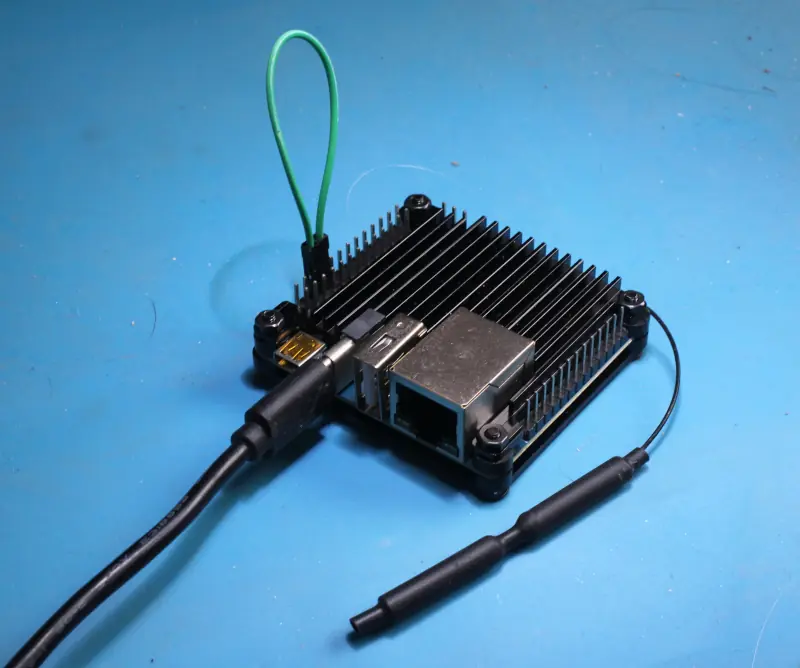
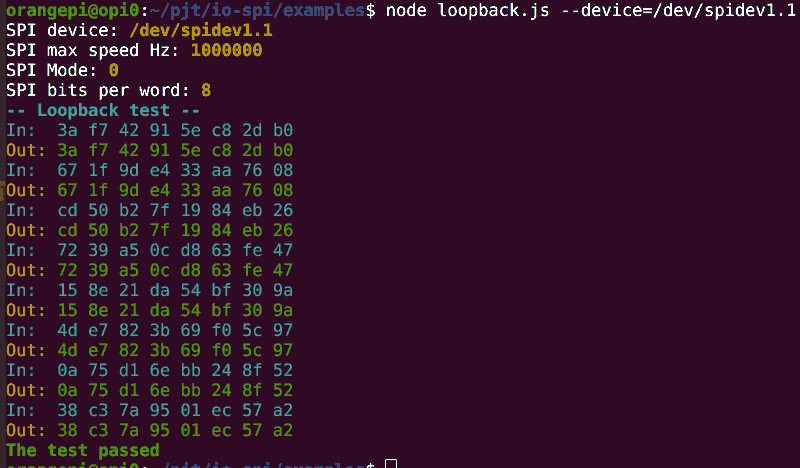
With this test you can see if the SPI device works without the involvement of a slave device. Connect the MOSI pin directly to the MISO pin, run the test and see if the data matches.
node loopback.js
# Use the `--help` flag to see all possible configurations.
The default device is /dev/spidev0.0 but can be changed
with the --device flag.
Troubleshooting
Enable SPI
Check out if SPI is enabled. To list all available SPI devices:
ls -l /dev/spi*Check out the manual of your SBC on how to enable the SPI devices.
If you have raspi-config (common on the Raspberry Pi), run
sudo raspi-configNavigate to Interface options > Enable SPI.
On the Orange Pi, run orangepi-config
sudo orangepi-configNavigate to System > Hardware > Toggle hardware configuration.
Permission Denied
To allow non-root users to access the SPI device (e.g. /dev/spidev0.0, /dev/spidev1.1) without sudo, you need to modify the device permissions and group ownership permanently.
1. Create a Dedicated Group for SPI Access
sudo groupadd spi2. Set a udev Rule to Change SPI Device Permissions
Ubuntu, Debian and Raspbian use udev to manage device permissions. Create a new rule:
sudo nano /etc/udev/rules.d/90-spi.rulesAdd this line to grant read/write access to the spi group:
SUBSYSTEM=="spidev", GROUP="spi", MODE="0660"3. Reload udev Rules & Trigger Changes
sudo udevadm control --reload-rules
sudo udevadm trigger
4. Verify the Changes
Check the SPI device permissions:
ls -l /dev/spidev*Expected output:
crw-rw---- 1 root spi 153, 0 Jun 17 10:14 /dev/spidev1.1Now, users in the spi group can access it without sudo.
5. Add Your User to the Group
sudo usermod -aG spi $(whoami) # Replace $(whoami) with the target username(Log out and back in for the group change to take effect.)
Invalid Arguments
Verify parameters match spidev.h constraints (e.g., valid mode).
Build Issues
Rebuild with node-gyp rebuild --verbose
Hardware connection problems
For good connection, especially at speeds above 1Mhz, be sure
- to keep wires or paths short
- to keep wires or paths bundled together
- to take ground (and power) from pins the closed to the MISO, MOSI, CS and CLCK pins in order to provide a ground return path
- to thoroughly clean up flux after soldering
- that you are invoking the right spi device. E.g. on the Orange Pi Zero 3 only /dev/spidev1.1 is available on the pinout.
License
MIT