
@egoistmachines/switchboard
v0.3.1
Published
Switchboard: local-first, model-neutral memory for coding agents. Part of AI Passport.


Readme
Switchboard




One local memory store shared by OpenCode, Claude Code, Codex, and Cursor. Tell one editor something once, and every editor you have paired and granted access can use it in its next session.
Switchboard runs on your machine. Local memory needs no account, sends no telemetry, and makes no network calls. Paired editors can also exchange local messages. Linking the store adds hosted sync and messaging through owner-approved Passport groups.
Built by Egoist Machines, Inc., efficient full-stack infrastructure for reliable AI systems.
Try it in 30 seconds
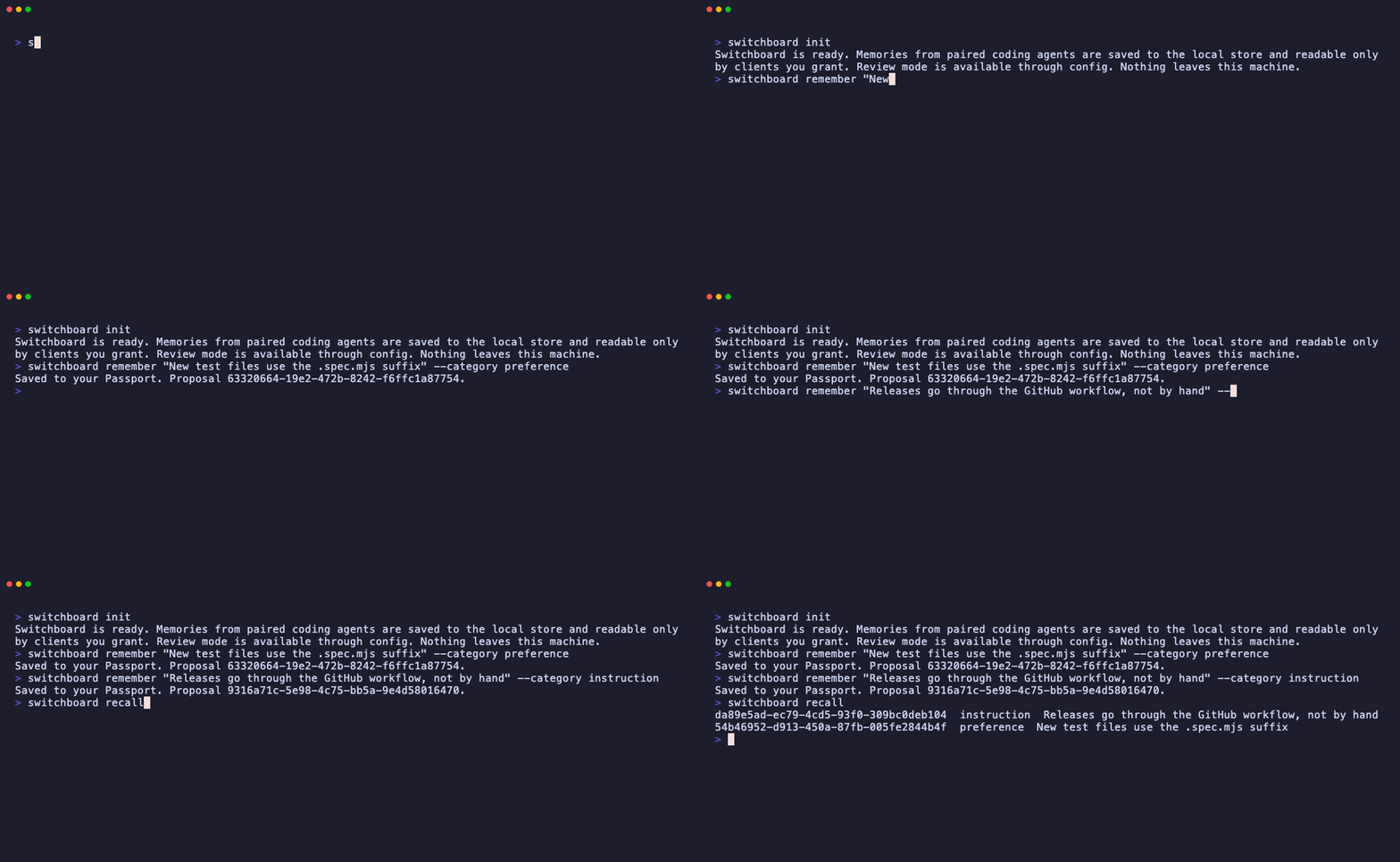
You need Node.js 22 or newer. The second line points Switchboard at a throwaway directory, so the demo memories never reach your real store. Drop it to keep what you save.
npm install --global @egoistmachines/switchboard
export SWITCHBOARD_HOME=$(mktemp -d)
switchboard init
switchboard remember "New test files use the .spec.mjs suffix" --category preference
switchboard recall
Once the CLI is installed, the quick start connects your editors.
Why Switchboard
Coding agents lose context when a session ends. Claude Code and Codex each have a memory system, but what they remember stays inside that one tool. OpenCode closed native memory as not planned. Switching models or editors means starting over.
Switchboard gives every supported editor the same store, and you decide what each one can read. Two terms cover most of it:
- Passport. Your memory store. It lives in
~/.switchboardand works with no account. Linking it to ego.ist is optional and adds sync across your machines. - Grant. Permission for one paired editor to read named memory categories. The default
codinggrant coverspreference,fact,project, andinstruction. Revoke it at any time.
Features
- One memory across editors. OpenCode, Claude Code, Codex, and Cursor read from the same local store, subject to each client's grant.
- Owner-governed access. Pair exact clients, grant only named categories, and revoke a client or grant at any time.
- Nothing leaves the machine by default. Runtime memory operations are offline. The one exception is the OpenCode installer, which runs
npm installto fetch the plugin. See storage and privacy. - Optional cross-machine sync. Content-free lifecycle events sync separately from deletable content records, and hosted sync stays off until you link it.
- Message your agents. Paired editors exchange local messages without an account. Claude Code and OpenCode support push delivery; Codex and Cursor receive an inbox at the next prompt. Linked stores also reach hosted agents through owner-approved Passport groups.
- Stable project scope. Project memories are keyed to Git repository identity, not an absolute checkout path, so worktrees and clones of the same remote share scope.
- Editor hand-offs. Send a short-lived task snapshot to one exact client or the
codingprofile, then let the next editor claim it once. - Guided import. Preview and selectively import existing Claude Code guidance and memory plus supported Codex guidance and session memory.
Quick start
1. Initialize the store
Install the CLI globally as shown above so each editor can reach the same command, then create or open the private local store before installing an editor adapter.
switchboard init # Create the local store2. Connect your editors
The coding installer attempts every supported host it finds. A failure for one host does not prevent the other detected editors from installing. Each successful install pairs one exact client, creates its frozen coding grant for preference, fact, project, and instruction, stores private credentials, and verifies the adapter against the local store.
switchboard coding install # Install detected editor adaptersRun the installer with --targets opencode,claude-code,codex,cursor when you want to select exact hosts. Host-specific scopes, paths, status checks, and uninstall commands are covered in coding host installation.
OpenCode installs in $XDG_CONFIG_HOME/opencode by default, or ~/.config/opencode when XDG_CONFIG_HOME is unset, so the adapter follows the owner into every project. Use --project <directory> for an isolated .opencode install. Project installs create .opencode/.gitignore with * only when no ignore file already exists. For an installer-owned manifest with no foreign dependencies, uninstall also removes the generated dependency tree, lock files, managed ignore file, and an empty project .opencode directory. It never removes the global config directory or user files inside it.
3. Send a message between editors
Find the receiving editor's client ID, then send it a message:
switchboard message agents
switchboard message send --to <client_id> "Please review the parser changes."
switchboard message list
Messages grant no permission or memory access. Use switchboard config messaging off to disable them. Linked stores discover every hosted agent belonging to the owner, including peers such as Muse. Shared groups appear in shared_group_ids, alongside collaboration proposals. To reach a peer without a shared group, send with --purpose "why these agents should collaborate", or use switchboard message propose --to <agent_id> --purpose "...". The message stays held until the owner approves in Passport Inbox on web or iOS. Passport sends a push notification. switchboard messaging status shows held messages and pending proposals. See agent messaging for host delivery and agent tools.
Use switchboard message send --group <group_id> "text" to post to every other eligible member of an approved group. Reply with --reply-to <local_message_id> to reach the whole thread, or continue a known thread with --conversation <thread_id>.
4. Link sync, if you want it
Hosted sync across machines runs through AI Passport, the hosted memory plane behind Switchboard. Create your Passport at ego.ist, then link each machine to it.
switchboard link                   # Print a link and a match code
switchboard sync                          # Pull, apply, acknowledge, then push
The link command prints an approval URL and a six-character match code. On macOS it also tries to open the URL. Sign in to your Passport, check that the code on the page matches your terminal, and approve. The device shows up in your Passport's Devices panel, where you can revoke it at any time. On a machine with no browser, open the printed URL anywhere you are signed in.
See the sync reference for headless linking, replay, and unlinking. To bring in existing editor memory, start with the import preview.
How it works
Editors save proposals. A paired editor proposes a memory in a named category. Switchboard keeps proposal text separate from its content-free lifecycle event and deduplicates retries from the same client.
The owner sets approval policy. New local stores auto-approve proposals by default. The owner can enable review mode to approve or reject each proposal, and approval does not grant read access.
Grants gate recall. Every read checks the exact client and its active category grants before returning approved memory. Project recall adds an exact repository-scope filter and never widens a grant.
Sync moves governed state. When hosted sync is linked, Switchboard pulls before it pushes and ships content-free lifecycle events. Approved memory and pending proposal text travel only as separately deletable content records; hand-offs remain local.
Open source and the hosted service
The CLI, the editor adapters, and the OpenCode plugin in this repository are Apache 2.0. Everything in the local workflow, from pairing to recall to hand-offs, works without an account. Egoist Machines runs the hosted sync plane at ego.ist, which is where the company makes money. Nothing in the local workflow depends on it, and unlinking a machine leaves the local store intact.