
@elafo/pi-better-snippets
v0.3.0
Published
Previews syntax-highlighted fenced snippets and copies them individually from Pi assistant responses.

Maintainers
 elafo
elafoReadme
pi-better-snippets

Pi extension that renders fenced code blocks in assistant responses as syntax-highlighted panels and lets you copy each snippet independently.
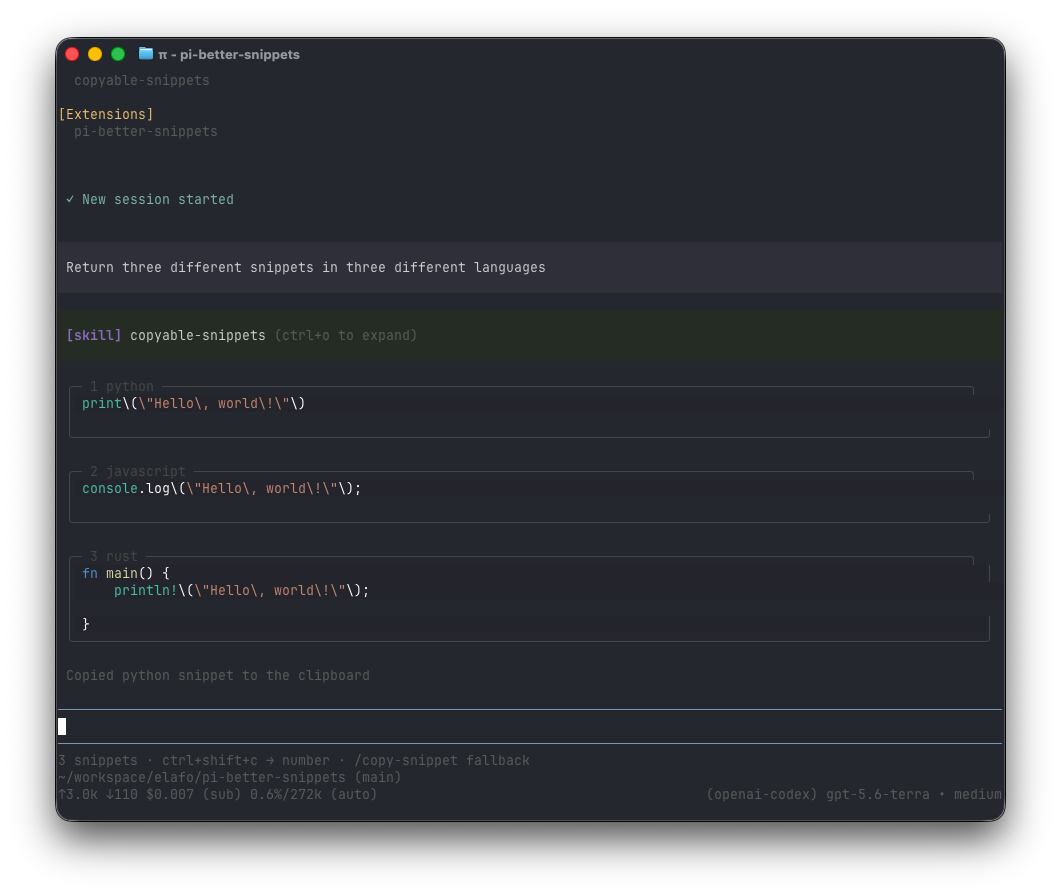
Watch the real Pi TUI demo (MP4).
Requirements
- Node.js
>=22.19.0. - Pi coding agent and Pi TUI host peers. Official Pi package documentation requires the core host peer ranges to be
*; this is a host-resolution contract, not a claim that every host version is compatible. Pi coding agent/TUI0.85.1is the enforced supported floor, and CI separately tests current registry latest. Other host versions require recorded CI evidence and are not guaranteed by this README. - An interactive Pi TUI session for the picker and clipboard actions. Copying is not available in print, JSON, or RPC-only use.
The public Git repository and npm publication are external release gates. This repository does not claim that the public Git URL or npm package is currently available; verify availability before relying on either installation source.
Install
Review the source before installing. Pi packages execute with the permissions of the Pi process, and assistant responses can contain untrusted content.
Install the npm package globally:
pi install npm:@elafo/pi-better-snippetsInstall the npm package for the current project only:
pi install -l npm:@elafo/pi-better-snippetsInstall from the public Git source globally:
pi install git:github.com/eLafo/pi-better-snippetsInstall the Git source for the current project only:
pi install -l git:github.com/eLafo/pi-better-snippetsUse one source, rather than installing both copies. Public Git and npm availability must be verified as part of a release; a local checkout or package archive is not evidence that either public source is published.
Update
Update one installed package, preserving its global or project scope:
pi update npm:@elafo/pi-better-snippets
# or
pi update git:github.com/eLafo/pi-better-snippets
To update all installed packages, use pi update --extensions. A Git installation pinned to a tag or commit does not move to a newer ref automatically; install the new ref explicitly, for example pi install git:github.com/eLafo/pi-better-snippets@<tag>.
Use
Ctrl+Shift+Cor/copy-snippet: opens the same picker showing the snippets and a preview. The picker supports navigation, paging, selection, and cancellation. Press/to enter opt-in search, type a query, then pressEscto leave search and restore the normal list. Search filters only snippet number, language, and the bounded one-line preview./copy-snippet <n>: copies snippet n, including snippets after the ninth.
/copy-snippet is the shortcut fallback when the key binding is unavailable or conflicts with another Pi binding.
The extension preserves the original Markdown in the session. It only changes its terminal rendering and copies the content inside complete backtick or tilde fences.
The picker labels, one-line previews, and rendered panels are sanitized and bounded display text. They can omit or truncate content, including a suffix that is not visible in the preview. An explicit copy action instead sends the complete raw body of the selected fence to the OS clipboard, including any control characters or other unseen content in that body. Never treat the preview as a complete safety review: paste into a safe text editor and inspect the full content before execution or sharing.
Safety and clipboard privacy
Snippets originate in potentially untrusted assistant responses. Review the selected code and its language metadata before executing, sharing, or storing it. The extension does not vouch for the safety of assistant-generated content.
Copying happens only after an explicit user action through the shortcut or /copy-snippet. Only the selected fence body is sent to the clipboard: fence markers, language labels, picker text, and explanations are excluded. The selected body may contain anything present in the assistant response, including secrets or terminal-control text, so review it before copying.
The operating system clipboard and clipboard managers may expose, retain, synchronize, or store copied text in clipboard history. The extension does not control that persistence or clear history; use the privacy controls provided by your OS or clipboard manager.
Localization
Interface text selects Spanish when the system locale language is es (including variants such as es-MX) and English for other locales or invalid locale values. The current bundled catalog supports only English and Spanish; it does not automatically add arbitrary new locales. Some technical key labels remain as provided by the current UI catalog.
The bundled copyable-snippets skill helps Pi format user-requested content as separate, clean fenced blocks. It activates for explicit copyable/clipboard-ready requests, not merely because an ordinary answer contains code.
Uninstall
Remove a global installation:
pi remove npm:@elafo/pi-better-snippets
# or, for a Git installation:
pi remove git:github.com/eLafo/pi-better-snippets
Remove a project-local installation with -l:
pi remove -l npm:@elafo/pi-better-snippets
# or
pi remove -l git:github.com/eLafo/pi-better-snippets
Restart Pi after changing package settings. If both sources were installed, remove each source separately.
Troubleshooting
- Wrong runtime or tested host baseline: run
node --versionandpi --version. Upgrade Node to22.19.0or newer; Pi coding agent/TUI0.85.1is the currently tested baseline. Later host versions need CI evidence and are not guaranteed. - The extension is not loaded: run
pi list, confirm the package is installed in the intended global or project scope, then runpi update <source>and restart an interactivepisession. Project-local installs may require--approvewhen Pi asks for trust. - The picker does not appear: use an interactive
piTUI, notpi -p, JSON, or RPC-only mode. Try/copy-snippet, which is the documented shortcut fallback, and confirm that the latest assistant response contains complete fenced blocks. - Copying fails: check that the OS clipboard provider is available and that Pi can access it. Retry the explicit copy action and inspect the reported error; the extension does not silently retry or clear clipboard history.
- Unexpected language: set the desired locale before starting Pi (for example,
LANG=es_MX.UTF-8 pi) and restart Pi. Onlyes*locales select Spanish; all other locales select English. - Install or update errors: verify the requested npm/Git source is publicly available and that the network can reach it. Public availability is a release gate and is not implied by this checkout.
Develop
Source-repository maintenance instructions, including validation, dependency lifecycle review, releases, and the quality checklist, are in DEVELOPMENT.md.