
@elumixor/react-telegram
v0.3.0
Published
Stream React JSX into editable Telegram messages. Built on @elumixor/react-message-renderer + grammy.

Maintainers
 elumixor
Readme
@elumixor/react-telegram
Stream React JSX into editable Telegram messages. Built on @elumixor/react-message-renderer and grammy.
A <Message> is a Telegram message. Render once, the bot sends. Re-render with new state, the bot edits the same message in place via Telegram's editMessageText API. The reconciler tracks message ids and chunks for you.
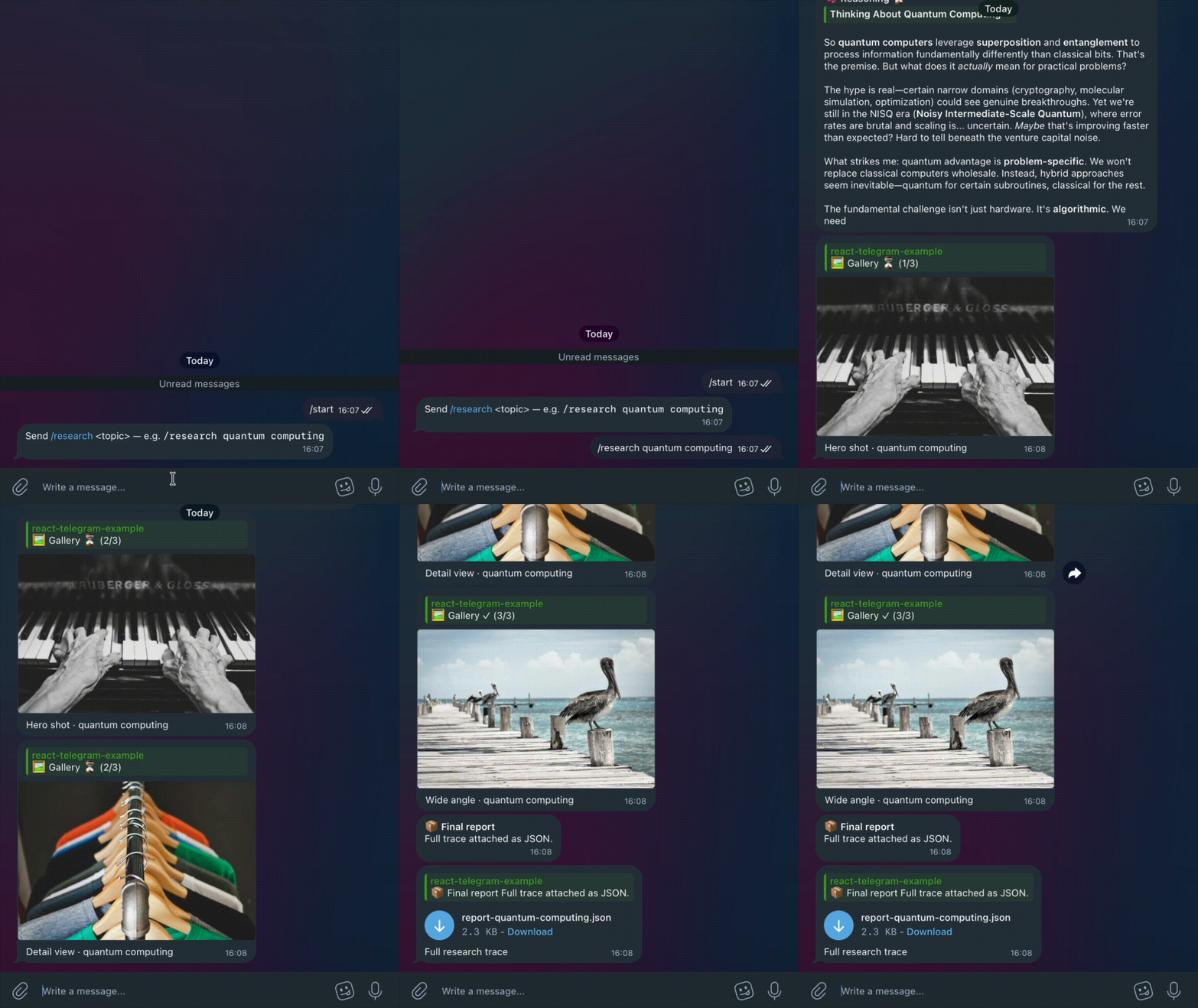
Demo: the
parallel-researchexample — four messages updating concurrently, real Claude streaming into the reasoning panel, photo gallery, and a final JSON report. (higher-quality .mp4)
Install
bun add @elumixor/react-telegram @elumixor/react-message-renderer grammy reactPeer dependencies: grammy >= 1, react >= 19.
The 30-second tour
import { Message, useFinishRender } from "@elumixor/react-message-renderer";
import { TelegramRenderer } from "@elumixor/react-telegram";
import { Bot, type Context } from "grammy";
import { useEffect, useState } from "react";

function Agent() {
  const [steps, setSteps] = useState<string[]>([]);
  const finish = useFinishRender();

  useEffect(() => {
    void (async () => {
      for (const step of ["Loading…", "Analyzing…", "Done"]) {
        await new Promise((r) => setTimeout(r, 700));
        setSteps((p) => [...p, step]);
      }
      void finish();
    })();
  }, [finish]);

  return (
    <Message>
      <b>Working</b>
      <br />
      {steps.join("\n")}
    </Message>
  );
}

const bot = new Bot(process.env.BOT_TOKEN!);
bot.command("start", async (ctx: Context) => {
  const renderer = new TelegramRenderer(ctx, { throttleMs: 600 });
  await renderer.render(<Agent />);
});
await bot.start();
In the chat, the user sees one message that grows in place from "Loading…" to a full three-line summary. No tracking message ids manually.
What you get
TelegramRenderer— extend-free, pass a grammyContextand you're done.<Message repliesTo={id}>— setsreply_parameters.message_idon first send.<Message linkPreview={…}>— fine-grainedlink_preview_options: ignore certain URLs, force a specific URL, or disable.- Markdown-flavoured text inside
<Message>is converted to Telegram-HTML automatically (**bold**,_italic_,[link](url), fenced code blocks, lists, headers, strikethrough). - Messages longer than 4000 chars are split across multiple consecutive Telegram messages, threaded with
reply_parametersso they stay grouped. - When the React tree shrinks (
<Message>removed, or text gets shorter than chunk count), orphan messages are deleted. When it grows, only new chunks get sent.
Public API
TelegramRenderer(ctx, { throttleMs?, logger?, draftStreaming? })TelegramMessageManager(ctx, { replyToMessageId?, logger? })— single-message-instance manager, if you want to skip the React layer<Photo src caption?>and<Document src filename? caption?>— declarative attachments. Place them inside<Message>; they're sent as replies to the parent text message and tracked positionally so re-renders don't resend.<Message threadId={n}>— explicit forum/topic thread routing. Overridesctx.message?.message_thread_id.serializeTelegram(node, mode?)— markdown-aware HTML serializermarkdownToTelegramHtml(text)— standalone Markdown → Telegram-HTMLsplitMessage(text, maxLength?)— chunk safely on paragraph/sentence/word boundaries, preserving fenced code blocks
Tuning the throttle
throttleMs (default 800) controls how often the renderer is allowed to commit to Telegram while React is producing updates. Pick it to match what you're optimizing for:
| value | behaviour | when to use |
| --- | --- | --- |
| 300–500ms | Smoother streaming, more editMessageText calls. | Short streams (a few seconds) where you want a near-real-time feel. |
| 800ms (default) | Balanced. Stays well under Telegram's per-chat edit budget on a single bot, even under sustained streaming. | Most agent / streaming-LLM use cases. |
| 1500ms+ | Fewer edits, more "summary frames". | Long-running jobs where you'd rather show milestone updates than every token. |
The hard ceiling is Telegram's rate limit: roughly 1 message edit per second per chat (loosely; Telegram throttles silently when over). On a single bot serving multiple chats simultaneously you have separate budgets per chat, but if you're streaming into the same chat from concurrent jobs, lower throttles bunch them up against the shared limit.
The renderer always flushes on finish (useFinishRender()), so the final render lands regardless of throttleMs. You're trading intermediate-frame frequency for API budget — never the final state.
Draft streaming (sendMessageDraft)
Telegram Bot API 9.3 added sendMessageDraft, a method built for streaming a message while it's being generated. Instead of editing one message over and over, you re-send the same draft_id with progressively longer text and the client animates the diff natively — no flicker, and it isn't subject to the edit-spam rate pressure. The draft is an ephemeral ~30s preview, so when generation finishes the renderer persists the result with a real sendMessage.
Opt in with draftStreaming: true:
const renderer = new TelegramRenderer(ctx, { draftStreaming: true, throttleMs: 150 });Because it animates instead of editing, you can drop throttleMs much lower for a near-real-time feel.
It's off by default and auto-gated to the cases the method supports — a single private chat, a single chunk (≤4096 chars), and text only (no <Photo>/<Document>). Anything outside that (groups, multi-chunk, attachments) silently falls back to the edit-based path, so nothing regresses. Requires grammY ≥ 1.30.
Examples
All under examples/ — cd in, cp .env.example .env, fill in your bot token, bun install && bun run dev.
streaming-counter— minimal: a fake progress bar streaming into one editable message. Start here.streaming-llm— pipes a streaming Claude response into a single message. Marquee demo.multi-message-agent— agent emitting multiple<Message>s with a<Photo>attachment, demonstrating cross-message reconciliation.forum-thread-router— routes replies into specific topic threads of a Telegram forum supergroup via<Message threadId>.
Status
0.x — API stable, expect minor breakage as the underlying renderer evolves.
License
ISC