
@emtt/vue3-cron-element-plus
v0.1.4
Published
Configurable Vue 3 cron editor with Element Plus


Readme
@emtt/vue3-cron-element-plus
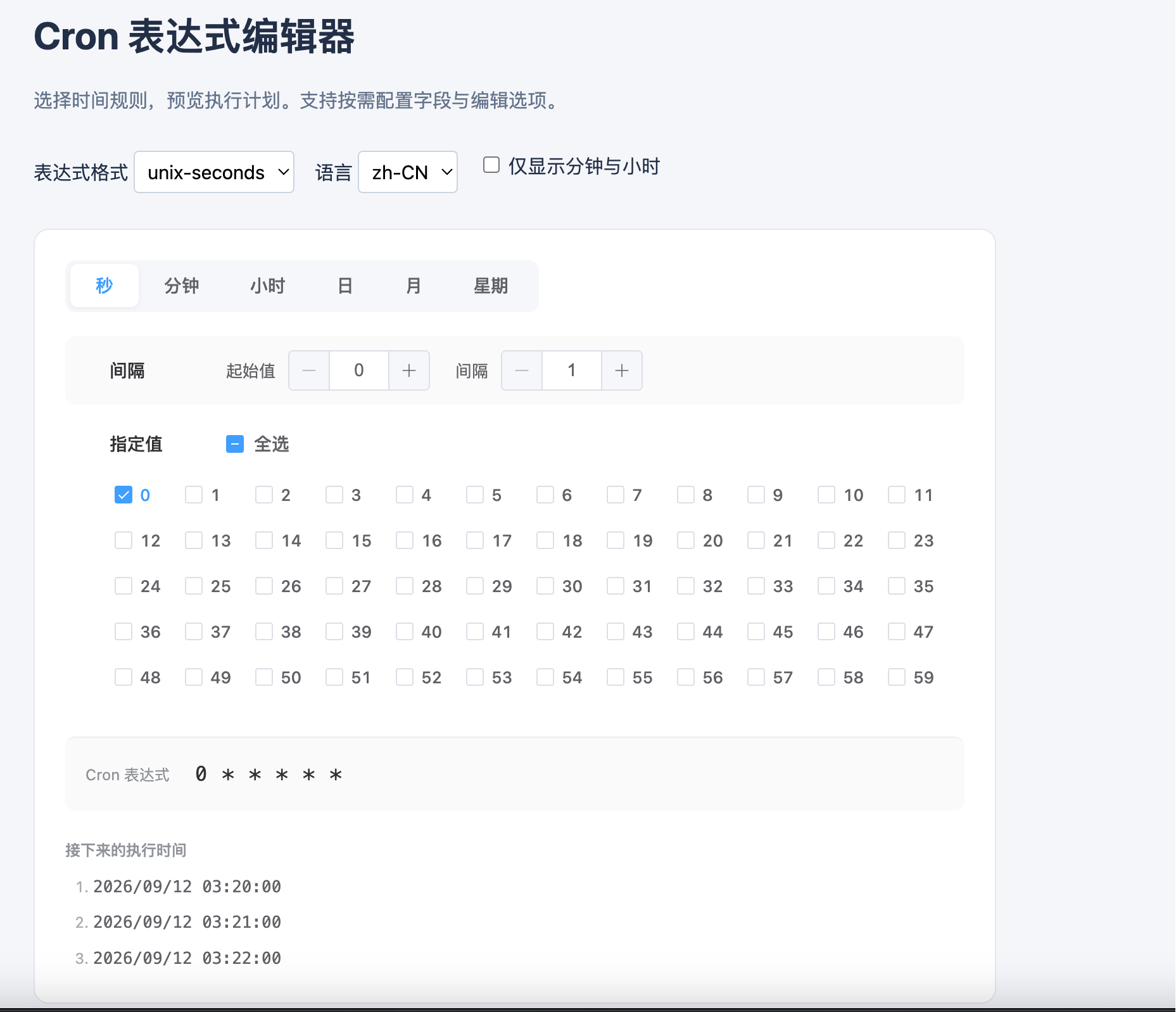
一个适用于 Vue 3 的 Cron 表达式编辑器,基于 Element Plus 构建。它支持秒级调度,也允许你按项目需要决定显示哪些时间字段、开放哪些编辑方式。
为什么选择它
很多 Vue 3 项目需要让用户自己配置定时规则,但现成组件往往只能固定显示一套字段。本组件把“显示哪些字段”和“每个字段允许怎样填写”分开配置,适合后台任务、工作流和通知计划等场景。
- 支持 Unix 五段、带秒六段和 Quartz 六段格式。
- 秒、分、时、日、月、星期都可以按需显示。
- 每个时间字段可以单独开放间隔、范围、指定值和“不指定”等编辑方式;默认配置与字段特性匹配。
- 指定值区域提供“全选”操作,选中全部数值时自动生成
*。 - 支持表达式回显、执行时间预览、中文和英文文案,以及自定义文案。
- Vue 和 Element Plus 使用 peer dependency,组件不会把它们打进发布包。
安装
pnpm add @emtt/vue3-cron-element-plus vue element-plus组件按需使用 Element Plus 控件,无需全局注册 Element Plus。在应用入口统一引入一次 @emtt/vue3-cron-element-plus/style.css,其中包含所需的 Element Plus 样式和编辑器布局样式。JavaScript 入口不会自动导入 CSS:
<script setup lang="ts">
import { ref } from 'vue'
import { VCron } from '@emtt/vue3-cron-element-plus'
import '@emtt/vue3-cron-element-plus/style.css'

const expression = ref('0 * * * * *')
</script>

<template>
  <VCron v-model="expression" />
</template>
组件默认使用带秒的六段格式,默认语言为简体中文。需要传统五段格式时,设置 format="unix"。
配置示例
下面的配置只显示分钟和小时,并限制每个字段可以使用的编辑方式:
<VCron
  v-model="expression"
  format="quartz"
  :fields="['minute', 'hour']"
  :options="{
    minute: ['step', 'specific'],
    hour: ['all', 'range', 'specific'],
  }"
  locale="zh-CN"
  time-zone="Asia/Shanghai"
/>
fields 至少包含一个字段;options 中的每个数组也至少包含一个有效选项。未传入时,使用当前格式对应的默认配置。隐藏字段仍保留在表达式中,不会因为隐藏而被改写。
API
| 属性 | 类型 | 默认值 | 说明 |
| -------------- | -------------------------------------- | -------------------- | -------------------------------------------------------- |
| modelValue | string | 当前格式的默认表达式 | 使用 v-model 读写表达式 |
| format | 'unix' \| 'unix-seconds' \| 'quartz' | 'unix-seconds' | 表达式格式 |
| fields | CronField[] | 当前格式的全部字段 | 控制显示哪些时间字段 |
| options | CronOptions | 各字段的默认编辑方式 | 控制每个字段开放哪些编辑方式 |
| disabled | boolean | false | 是否禁用编辑 |
| locale | 'en' \| 'zh-CN' | 'zh-CN' | 内置文案语言 |
| messages | Partial<CronMessages> | — | 覆盖字段名称、选项名称和错误提示 |
| timeZone | string | 浏览器时区 | 只影响执行时间预览,使用 IANA 时区名称 |
| previewCount | number | 3 | 显示几条下一次执行时间;设为 0 可关闭预览,最大为 20 |
事件:
update:modelValue:表达式通过校验并更新后触发。change:表达式发生有效变化后触发。error:输入或配置存在问题时触发,参数为{ code, field? }。对应的 TypeScript 类型为CronEmits。
组件入口只导出使用方需要的 CronFormat、CronField、CronMode、CronOptions、CronIssue、CronMessages、CronProps 和 CronEmits 类型,以及 VCron 和 Cron 解析工具函数。
三种格式
| 格式 | 字段顺序 | 默认表达式 | 星期编号 |
| -------------- | ------------------- | ------------- | --------------------- |
| unix | 分 时 日 月 星期 | * * * * * | 0 或 7 表示星期日 |
| unix-seconds | 秒 分 时 日 月 星期 | 0 * * * * * | 0 或 7 表示星期日 |
| quartz | 秒 分 时 日 月 星期 | 0 * * * * ? | 1 表示星期日 |
Unix 格式在“日”和“星期”同时限制时采用 OR 规则。Quartz 要求日和星期必须且只能有一个使用 ?;编辑其中一个字段时,组件会同步调整另一个字段。
支持范围
支持 *、数字、数字列表、升序范围,以及从数字或 * 开始的间隔表达式。当前版本暂不支持年份、L、W、#、名称形式的月份或星期,以及带步长的范围。遇到不支持的外部表达式时,组件会保留原值并显示错误,不会静默改写。
组件只负责编辑和预览 Cron 表达式,不负责执行任务。未传入 timeZone 时,预览使用浏览器时区;传入后使用指定的 IANA 时区。预览不会在后台自动刷新,只会在表达式或相关配置变化时重新计算。
本地开发
pnpm install
pnpm dev
运行测试和构建:
pnpm test:dev
pnpm pack