
@engr-lukman/vue-secure-pin
v1.0.0
Published
A secure PIN input component for Vue.js applications with virtual keyboard and PIN masking, designed for financial applications

Maintainers
 engr.lukman
Readme
Vue Secure PIN
A secure PIN input component for Vue.js applications with a virtual keyboard and PIN masking, specifically designed for financial applications.
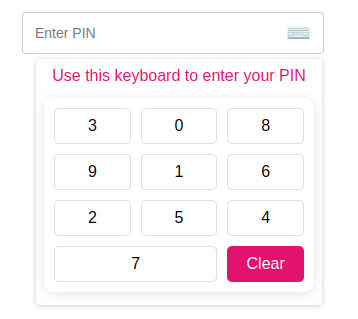
Demo
Check out the interactive Storybook demo to see the component in action.
Features
- Secure PIN Entry: Automatically masks PIN input for privacy
- Virtual Keyboard: Prevents keylogging and enhances security
- Shuffle Option: Randomizes keypad numbers for added security
- TypeScript Support: Full type definitions and type safety
- Customizable: Easy to style and adapt to your application's design
- Simple API: Straightforward props and events
Requirements
- Vue.js 3.0 or higher
- Node.js 20.0 (LTS) or higher
- TypeScript 4.5+ (for TypeScript users)
Installation
# Using npm
npm install @engr-lukman/vue-secure-pin

# Using yarn
yarn add @engr-lukman/vue-secure-pin

# Using pnpm
pnpm add @engr-lukman/vue-secure-pin
Usage
Register as a Plugin (Global)
// main.ts
import { createApp } from "vue";
import App from "./App.vue";
import SecurePinPlugin from "@engr-lukman/vue-secure-pin";

const app = createApp(App);
app.use(SecurePinPlugin);
app.mount("#app");
Import Component Directly
// In your Vue component with script setup
import { SecurePin } from "@engr-lukman/vue-secure-pin";

// For Vue 3 script setup syntax
// No further registration needed
TypeScript Usage Example
<template>
  <div>
    <SecurePin
      :max-length="5"
      :is-error="hasError"
      :error-message="errorMessage"
      :is-enable-shuffle="true"
      @callback-event="handlePinChange"
    />
  </div>
</template>

<script setup lang="ts">
import { ref } from 'vue';
import { SecurePin } from "@engr-lukman/vue-secure-pin";
import type { PinEventPayload } from "@engr-lukman/vue-secure-pin";

const hasError = ref<boolean>(false);
const errorMessage = ref<string>("");

const handlePinChange = (payload: PinEventPayload): void => {
  // Get the actual and masked PIN values
  const { pin, pinMasked } = payload;

  // Example validation
  if (pin === "12345") {
    hasError.value = false;
  } else if (pin.length === 5) {
    hasError.value = true;
    errorMessage.value = "Invalid PIN. Please try again.";
  }
};
</script>

// For Vue 3 Options API or Vue 2
export default {
  components: {
    SecurePin
  }
}
Basic Example with Form Validation
<template>
  <div class="form-group">
    <label>{{ $t("pin.label") }}</label>
    <secure-pin
      :max-length="5"
      :is-error="v$.pinMasked.$error"
      :error-message="v$.pinMasked.$errors[0]?.$message"
      :placeholder="$t('pin.placeholder')"
      :is-enable-shuffle="true"
      :show-keyboard="true"
      :title="$t('keyboard.title')"
      :clear-label="$t('keyboard.clear')"
      @callback-event="onPinHandler"
    />
  </div>
</template>

<script setup lang="ts">
import useVuelidate from "@vuelidate/core";
import { helpers, required } from "@vuelidate/validators";
import { reactive } from "vue";
import { useI18n } from "vue-i18n";

// Import the SecurePin component and its types
import { SecurePin } from "@engr-lukman/vue-secure-pin";
import type { PinEventPayload } from "@engr-lukman/vue-secure-pin";

const { t } = useI18n();

// Define validation rules
const rules = {
  pin: { required: helpers.withMessage(t("pin.required"), required) },
  pinMasked: {
    required: helpers.withMessage(t("pin.required"), required),
    policy: helpers.withMessage(
      t("pin.validation"),
      helpers.regex(/^[\d*]{4,5}$/)
    ),
  },
};

// Type-safe reactive form payload
interface PinPayload {
  pin: string;
  pinMasked: string;
}

const payload = reactive<PinPayload>({
  pin: "",
  pinMasked: "",
});

const v$ = useVuelidate(rules, payload, { $autoDirty: true });

// Type-safe callback handler
const onPinHandler = (event: PinEventPayload): void => {
  const { pin, pinMasked } = event;

  console.log("Actual PIN:", pin); // Shows "12345" (the actual PIN)
  console.log("Masked PIN:", pinMasked); // Shows "*****"

  payload.pin = pin;
  payload.pinMasked = pinMasked;
};
</script>
Component Architecture
The Secure PIN component consists of:
- SecurePin.vue: Main component that provides the input field and keyboard functionality
- NumericKeyboard.vue: Virtual keyboard with shuffle capability for enhanced security
- useSecurePin.ts: TypeScript composable function that manages PIN state and masking
- constants.ts: TypeScript types and default configuration values
Props
| Prop | Type | Default | Description |
| --------------- | --------- | ------------------------------------- | ------------------------------------------------ |
| maxLength | number | 5 | Maximum PIN length |
| isError | boolean | false | Shows error styling when true |
| errorMessage | string | "" | Error message to display |
| placeholder | string | "Enter PIN" | Placeholder text when empty |
| isEnableShuffle | boolean | true | Randomize keypad numbers for additional security |
| showKeyboard | boolean | true | Show keyboard when component loads |
| title | string | "Use this keyboard to enter your PIN" | Title above virtual keyboard |
| clearLabel | string | "Clear" | Label for the clear button |
Events
| Event | Payload Type | Description |
| ------------- | ----------------- | ---------------------------------------- |
| callbackEvent | PinEventPayload | Emitted when PIN value changes or clears |
// PinEventPayload interface
interface PinEventPayload {
  pin: string;       // Actual PIN value (e.g. "1234")
  pinMasked: string; // Masked PIN value (e.g. "****")
}
Security Features
- PIN Masking: PIN is automatically masked with asterisks to protect sensitive information
- Virtual Keyboard: Prevents keylogging attacks by using an on-screen keyboard
- Keyboard Shuffling: Option to randomize numbers on the keypad for enhanced security
- No DOM Storage: PIN values are kept in memory and not stored in the DOM
- Click Outside Detection: Keyboard automatically closes when clicking outside the component
Customization
The component uses BEM-based CSS classes which you can target for styling. Below are the key CSS selectors you can customize:
Key CSS Classes for Customization
SecurePin Component
.pin__field- The main input field container.pin__field--error- Error state styling.pin__error- Error message text.pin__display- PIN display area
NumericKeyboard Component
.numeric-keyboard- Main keyboard container.numeric-keyboard__button- Individual number keys.numeric-keyboard__button--clear- Clear button
Using Scoped Styles in Vue Component
When using the component in Vue files with scoped styles, remember to use the :deep() selector (Vue 3) to target the component's internal elements.
<style scoped>
/* Target the pin field container */
:deep(.pin__field) {
  border-color: #3498db;
}

/* Target the keyboard buttons */
:deep(.numeric-keyboard__button) {
  background-color: #f8f9fa;
}
</style>
TypeScript Support
This package includes full TypeScript support with:
- Type definitions for all props, events, and methods
- Type-safe component usage
- Exported interfaces for payload objects
- Complete IDE autocompletion
- Optimized for Node.js 20 LTS and modern TypeScript features
// Example of importing types
import { SecurePin } from '@engr-lukman/vue-secure-pin';
import type {
  SecurePinProps,
  PinEventPayload,
  SecurePinExpose
} from '@engr-lukman/vue-secure-pin';

// Type-safe component ref
const pinComponent = ref<InstanceType<typeof SecurePin> | null>(null);

// Access exposed methods with proper types
const clearPin = () => {
  pinComponent.value?.clearHandler();
};
License
MIT © 2025 Mohammad Lukman Hussain