
@enruana/claude-orka
v0.8.3
Published
SDK for orchestrating Claude Code sessions with tmux - Branch management for conversations

Maintainers
 felipemantilla.enruana
Readme
Claude-Orka
SDK and CLI for orchestrating Claude Code sessions with tmux - Branch management for AI conversations


What is Claude-Orka?
Claude-Orka is a powerful SDK, CLI, and UI tool that enables you to:
- 🎯 Orchestrate multiple Claude Code sessions using tmux
- 🌿 Create conversation forks to explore different approaches in parallel
- 🔀 Merge forks back to main with context preservation
- 💾 Save and resume sessions with full conversation history
- 📊 Visualize session hierarchy in an interactive Electron UI
- 🔄 Automatic recovery from system restarts and crashes
Perfect for complex development workflows where you need to explore multiple solutions in parallel!
Installation
npm install -g @enruana/claude-orkaPrerequisites
- Node.js >= 18.0.0
- tmux - Terminal multiplexer
- Claude CLI - Claude Code CLI
Quick Setup (Automatic)
# Install all dependencies automatically
orka prepare

# Verify installation
orka doctor
Manual Setup
macOS:
brew install tmuxUbuntu/Debian:
sudo apt-get install tmuxClaude CLI: Download from claude.ai/download
Quick Start
# 1. Install dependencies
orka prepare

# 2. Initialize in your project
orka init

# 3. Create a new session
orka session create "Implement Feature X"
# → Opens Claude Code in tmux
# → Opens Electron UI for visual management

# 4. Create a fork to explore an alternative
orka fork create <session-id> "Try Alternative Approach"

# 5. Export and merge the fork back to main
orka merge auto <session-id> <fork-id>

# 6. Check project status
orka status
Table of Contents
Features
🎯 Session Management
- Create and manage multiple Claude Code sessions
- Save sessions for later (preserves Claude context)
- Resume sessions with full conversation history
- Automatic recovery - Resume sessions even after system restarts
- List and filter sessions by status
🌿 Fork & Merge Workflow
- Create conversation forks to explore alternatives
- Each fork maintains its own Claude session
- Generate summaries of fork explorations
- Merge learnings back to main conversation
- Validation - Merge button disabled until fork is exported
- Track parent-child relationships in fork hierarchy
💾 State Persistence
- All state stored in
.claude-orka/state.json - Automatic context preservation via Claude's native sessions
- Export summaries for fork integrations
- Smart recovery - Detects missing tmux sessions and recreates them
🎨 Beautiful CLI & UI
- Electron UI - Visual session tree with fork hierarchy
- Colored output with chalk
- Interactive tables with cli-table3
- Progress spinners with ora
- JSON output for scripting
🖥️ Electron UI
- Visual session tree showing fork hierarchy
- Interactive nodes - Click to select, view fork info
- Quick actions - Code, Terminal, Save & Close buttons
- Real-time updates - Automatically refreshes on state changes
- Fork management - Create, export, merge, and close forks visually
- Status indicators - Visual distinction for active, saved, merged, and closed forks
🎨 Custom tmux Theme
- Automatic branding - Claude-Orka sessions get a custom orange theme
- Enhanced status bar - Shows session name, project path, and current time
- Visual hierarchy - Distinct colors for active/inactive panes and windows
- Mouse support - Click to select panes and windows
- Vim-like navigation - Optional h/j/k/l keys for pane movement
- Persistent configuration - Theme automatically applied to all new sessions
The custom theme makes it easy to distinguish Claude-Orka managed sessions from regular tmux sessions. The orange branding 🎭 appears in the status bar, with the session name and project information clearly visible.
Customization:
To modify the theme, edit .tmux.orka.conf in your Claude-Orka installation:
# Find your global installation
npm root -g
# Edit the config
vim $(npm root -g)/@enruana/claude-orka/.tmux.orka.conf
Or create your own theme file and source it manually:
# After creating a session
tmux source-file ~/.my-custom-theme.conf -t <session-name>
Key Features of the Theme:
- Orange highlights (#208) for active windows and Orka branding
- Top status bar with session info
- Pane borders with titles showing current command
- Enhanced readability with high contrast colors
- Powerline-style separators for a modern look
CLI Reference
Setup Commands
orka prepare
Install and configure system dependencies automatically.
orka prepare [options]Options:
-y, --yes- Skip confirmation prompts
What it does:
- Detects your operating system
- Installs tmux via package manager (Homebrew, apt, yum)
- Checks for Claude CLI installation
- Provides installation instructions if dependencies are missing
Example:
# Interactive installation
orka prepare

# Skip confirmations
orka prepare --yes
orka doctor
Check system dependencies and configuration.
orka doctorWhat it checks:
- Node.js version
- tmux installation and version
- Claude CLI installation and authentication
- Project initialization status
Example output:
✓ Node.js v20.18.0
✓ tmux 3.5a
✓ Claude CLI installed
✓ Project initialized
orka init
Initialize Claude-Orka in the current project.
orka initWhat it does:
- Creates
.claude-orka/directory - Initializes
state.jsonwith empty state - Sets up exports directory structure
Project Commands
orka status
Show project status and session summary.
orka status [options]Options:
--json- Output in JSON format
Example:
orka status

# Output:
# 📊 Project Summary
# ──────────────────
# Project Path: /path/to/project
# Total Sessions: 3
#   Active: 1
#   Saved: 2
# Last Updated: 11/20/2025, 6:48:46 AM
#
# 📝 Sessions:
# ✓ Feature Implementation
#   ID: abc123...
#   Status: active
#   Total Forks: 2
Session Commands
orka session create
Create a new Claude Code session.
orka session create [name] [options]Arguments:
name- Optional session name (default: "Session-{timestamp}")
Options:
--no-terminal- Don't open terminal window--no-ui- Don't launch Electron UI
What it does:
- Creates new tmux session
- Launches Claude Code in the tmux session
- Opens terminal window
- Launches Electron UI for visual management
- Saves session state
Example:
# Create with custom name
orka session create "OAuth Implementation"

# Create without opening terminal
orka session create --no-terminal

# Create without UI
orka session create --no-ui
orka session list
List all sessions in the project.
orka session list [options]Options:
--status <status>- Filter by status (active, saved)--json- Output in JSON format
Example:
# List all sessions
orka session list

# List only active sessions
orka session list --status active

# Get JSON output
orka session list --json
orka session get
Get detailed information about a session.
orka session get <session-id> [options]Arguments:
session-id- Session ID to retrieve
Options:
--json- Output in JSON format
Example:
orka session get abc123orka session resume
Resume a saved or detached session.
orka session resume <session-id> [options]Arguments:
session-id- Session ID to resume
Options:
--no-terminal- Don't open terminal window--no-ui- Don't launch Electron UI
What it does:
- If tmux session exists: Reconnects to existing session
- If tmux session missing: Creates new tmux session and resumes Claude session
- Opens terminal window and launches UI
- Resumes all forks that weren't merged
Recovery mechanism:
- Detects if tmux session was lost (system restart, crash)
- Automatically creates new tmux session
- Resumes Claude session with full context
- Restores all fork panes
Example:
orka session resume abc123orka session close
Close and save a session for later.
orka session close <session-id>Arguments:
session-id- Session ID to close
What it does:
- Detaches from tmux session (session stays alive)
- Updates status to 'saved'
- Session can be resumed later with full context
Example:
orka session close abc123orka session delete
Permanently delete a session.
orka session delete <session-id>Arguments:
session-id- Session ID to delete
What it does:
- Kills tmux session
- Removes session from state
- Warning: This action cannot be undone
Example:
orka session delete abc123Fork Commands
orka fork create
Create a fork (conversation branch) from main or another fork.
orka fork create <session-id> [name] [options]Arguments:
session-id- Parent session IDname- Optional fork name (default: "Fork-{timestamp}")
Options:
--parent <parent-id>- Parent fork ID (default: "main")--vertical- Split pane vertically instead of horizontally
What it does:
- Creates split pane in tmux
- Launches new Claude session in the fork
- Tracks parent-child relationship
- Updates session state
Limitation:
- Only one active fork allowed per parent branch
- Must merge or close existing fork before creating new one
Example:
# Create fork from main
orka fork create abc123 "Try JWT Implementation"

# Create fork from another fork
orka fork create abc123 "Nested Approach" --parent def456

# Create with vertical split
orka fork create abc123 --vertical
orka fork list
List all forks in a session.
orka fork list <session-id> [options]Arguments:
session-id- Session ID
Options:
--json- Output in JSON format
Example:
orka fork list abc123orka fork resume
Resume a saved fork.
orka fork resume <session-id> <fork-id>Arguments:
session-id- Session IDfork-id- Fork ID to resume
What it does:
- Creates new split pane in tmux
- Resumes Claude session for the fork
- Restores fork context
Example:
orka fork resume abc123 def456orka fork close
Close a fork without merging (abandon experiment).
orka fork close <session-id> <fork-id>Arguments:
session-id- Session IDfork-id- Fork ID to close
What it does:
- Kills fork's tmux pane
- Sets fork status to 'closed'
- Fork can be viewed in UI but not resumed
- No export or merge required
Use case:
- Experiment didn't work out
- Want to abandon this approach
- Don't need to merge learnings back
Example:
orka fork close abc123 def456orka fork delete
Permanently delete a fork.
orka fork delete <session-id> <fork-id>Arguments:
session-id- Session IDfork-id- Fork ID to delete
What it does:
- Removes fork from session state
- Warning: Cannot be undone
Example:
orka fork delete abc123 def456Merge Commands
orka merge export
Generate export summary for a fork.
orka merge export <session-id> <fork-id>Arguments:
session-id- Session IDfork-id- Fork ID to export
What it does:
- Sends prompt to Claude to generate summary
- Claude creates executive summary of fork exploration
- Claude exports to
.claude-orka/exports/fork-{id}.md - Note: Async operation - Claude does the work in background
Example:
orka merge export abc123 def456
# Wait for Claude to complete (usually 10-15 seconds)
orka merge do
Merge a fork back to its parent.
orka merge do <session-id> <fork-id>Arguments:
session-id- Session IDfork-id- Fork ID to merge
Prerequisites:
- Fork must have been exported first
- Export file must exist
What it does:
- Sends merge prompt to parent conversation
- Includes fork export summary
- Sets fork status to 'merged'
- Closes fork pane
Example:
orka merge do abc123 def456orka merge auto
Export and merge a fork (recommended).
orka merge auto <session-id> <fork-id> [options]Arguments:
session-id- Session IDfork-id- Fork ID to export and merge
Options:
--wait <ms>- Wait time for export (default: 15000ms)
What it does:
- Generates export (Claude does this)
- Waits for export to complete
- Merges fork to parent
- Complete workflow in one command
Example:
# Use default wait time (15 seconds)
orka merge auto abc123 def456

# Custom wait time (20 seconds)
orka merge auto abc123 def456 --wait 20000
SDK API Reference
Installation
import { ClaudeOrka } from '@enruana/claude-orka'ClaudeOrka Class
Main SDK class for orchestrating Claude Code sessions.
Constructor
new ClaudeOrka(projectPath: string)Parameters:
projectPath- Absolute path to your project directory
Example:
const orka = new ClaudeOrka('/Users/username/my-project')
await orka.initialize()
Initialization
initialize()
Initialize ClaudeOrka and create state directory.
async initialize(): Promise<void>Example:
await orka.initialize()Session Methods
createSession()
Create a new Claude Code session.
async createSession(
  name?: string,
  openTerminal?: boolean
): Promise<Session>
Parameters:
name- Optional session name (default: "Session-{timestamp}")openTerminal- Open terminal window (default: true)
Returns: Session object
Example:
const session = await orka.createSession('OAuth Implementation')
console.log(session.id) // abc123...
resumeSession()
Resume a saved session.
async resumeSession(
  sessionId: string,
  openTerminal?: boolean
): Promise<Session>
Parameters:
sessionId- Session ID to resumeopenTerminal- Open terminal window (default: true)
Returns: Session object
Recovery behavior:
- Checks if tmux session exists
- If yes: Reconnects to existing session
- If no: Creates new tmux session and resumes Claude session
Example:
const session = await orka.resumeSession('abc123')closeSession()
Close a session.
async closeSession(sessionId: string): Promise<void>Parameters:
sessionId- Session ID to close
Example:
await orka.closeSession('abc123')deleteSession()
Permanently delete a session.
async deleteSession(sessionId: string): Promise<void>Parameters:
sessionId- Session ID to delete
Example:
await orka.deleteSession('abc123')listSessions()
List sessions with optional filters.
async listSessions(filters?: SessionFilters): Promise<Session[]>Parameters:
filters- Optional filters (status, name)
Returns: Array of Session objects
Example:
// List all sessions
const sessions = await orka.listSessions()

// List only active sessions
const activeSessions = await orka.listSessions({ status: 'active' })
getSession()
Get a session by ID.
async getSession(sessionId: string): Promise<Session | null>Parameters:
sessionId- Session ID
Returns: Session object or null
Example:
const session = await orka.getSession('abc123')
if (session) {
  console.log(session.name)
}
getProjectSummary()
Get complete project summary with statistics.
async getProjectSummary(): Promise<ProjectSummary>Returns: ProjectSummary object
Example:
const summary = await orka.getProjectSummary()
console.log(`Total sessions: ${summary.totalSessions}`)
console.log(`Active: ${summary.activeSessions}`)
Fork Methods
createFork()
Create a fork (conversation branch).
async createFork(
  sessionId: string,
  name?: string,
  parentId?: string,
  vertical?: boolean
): Promise<Fork>
Parameters:
sessionId- Session IDname- Optional fork name (default: "Fork-{timestamp}")parentId- Parent fork ID (default: "main")vertical- Split vertically (default: false)
Returns: Fork object
Example:
// Create fork from main
const fork = await orka.createFork('abc123', 'JWT Implementation')

// Create fork from another fork
const nestedFork = await orka.createFork(
  'abc123',
  'Nested Approach',
  'def456'
)

// Create with vertical split
const vFork = await orka.createFork('abc123', undefined, 'main', true)
resumeFork()
Resume a saved fork.
async resumeFork(sessionId: string, forkId: string): Promise<Fork>Parameters:
sessionId- Session IDforkId- Fork ID
Returns: Fork object
Example:
const fork = await orka.resumeFork('abc123', 'def456')closeFork()
Close a fork without merging.
async closeFork(sessionId: string, forkId: string): Promise<void>Parameters:
sessionId- Session IDforkId- Fork ID
Example:
await orka.closeFork('abc123', 'def456')deleteFork()
Permanently delete a fork.
async deleteFork(sessionId: string, forkId: string): Promise<void>Parameters:
sessionId- Session IDforkId- Fork ID
Example:
await orka.deleteFork('abc123', 'def456')Export & Merge Methods
generateForkExport()
Generate export summary for a fork.
async generateForkExport(
  sessionId: string,
  forkId: string
): Promise<string>
Parameters:
sessionId- Session IDforkId- Fork ID
Returns: Path to export file (relative to project)
Note: Async - Claude generates the export in background
Example:
const exportPath = await orka.generateForkExport('abc123', 'def456')
console.log(`Export will be saved to: ${exportPath}`)
// Wait 10-15 seconds for Claude to complete
merge()
Merge a fork to its parent.
async merge(sessionId: string, forkId: string): Promise<void>Parameters:
sessionId- Session IDforkId- Fork ID
Prerequisites:
- Fork must be exported first
Example:
await orka.merge('abc123', 'def456')generateExportAndMerge()
Generate export and merge (recommended).
async generateExportAndMerge(
  sessionId: string,
  forkId: string,
  waitTime?: number
): Promise<void>
Parameters:
sessionId- Session IDforkId- Fork IDwaitTime- Wait time in ms (default: 15000)
Example:
// Use default wait time
await orka.generateExportAndMerge('abc123', 'def456')

// Custom wait time
await orka.generateExportAndMerge('abc123', 'def456', 20000)
generateExportMergeAndClose()
Complete workflow: export, merge, and close.
async generateExportMergeAndClose(
  sessionId: string,
  forkId: string,
  waitTime?: number
): Promise<void>
Parameters:
sessionId- Session IDforkId- Fork IDwaitTime- Wait time in ms (default: 15000)
Example:
await orka.generateExportMergeAndClose('abc123', 'def456')Command Sending
send()
Send command to session or fork.
async send(
  sessionId: string,
  command: string,
  target?: string
): Promise<void>
Parameters:
sessionId- Session IDcommand- Command to sendtarget- Optional fork ID (default: main)
Example:
// Send to main
await orka.send('abc123', 'ls -la')

// Send to fork
await orka.send('abc123', 'npm test', 'def456')
Type Definitions
Session
interface Session {
  id: string                    // Unique session ID
  name: string                  // Session name
  tmuxSessionId: string         // tmux session ID
  status: 'active' | 'saved'    // Session status
  createdAt: string             // ISO timestamp
  lastActivity: string          // ISO timestamp
  main: MainBranch              // Main conversation
  forks: Fork[]                 // Array of forks
  projectPath?: string          // Project path
}
MainBranch
interface MainBranch {
  claudeSessionId: string       // Claude session UUID
  tmuxPaneId?: string           // tmux pane ID (if active)
  status: 'active' | 'saved'    // Branch status
  contextPath?: string          // Path to context export
}
Fork
interface Fork {
  id: string                                        // Fork ID
  name: string                                      // Fork name
  parentId: string                                  // Parent ID ('main' or fork ID)
  claudeSessionId: string                           // Claude session UUID
  tmuxPaneId?: string                               // tmux pane ID (if active)
  createdAt: string                                 // ISO timestamp
  status: 'active' | 'saved' | 'closed' | 'merged'  // Fork status
  contextPath?: string                              // Path to export
  mergedToMain?: boolean                            // Merge status
  mergedAt?: string                                 // Merge timestamp
}
SessionFilters
interface SessionFilters {
  status?: 'active' | 'saved'   // Filter by status
  name?: string                 // Filter by name (partial match)
}
ProjectSummary
interface ProjectSummary {
  projectPath: string           // Project path
  totalSessions: number         // Total sessions
  activeSessions: number        // Active sessions count
  savedSessions: number         // Saved sessions count
  sessions: SessionSummary[]    // Array of session summaries
  lastUpdated: string           // ISO timestamp
}
SessionSummary
interface SessionSummary {
  id: string                    // Session ID
  name: string                  // Session name
  claudeSessionId: string       // Claude session UUID
  status: 'active' | 'saved'    // Status
  createdAt: string             // ISO timestamp
  lastActivity: string          // ISO timestamp
  totalForks: number            // Total forks
  activeForks: number           // Active forks count
  savedForks: number            // Saved forks count
  mergedForks: number           // Merged forks count
  forks: ForkSummary[]          // Array of fork summaries
}
ForkSummary
interface ForkSummary {
  id: string                                        // Fork ID
  name: string                                      // Fork name
  claudeSessionId: string                           // Claude session UUID
  status: 'active' | 'saved' | 'closed' | 'merged'  // Status
  createdAt: string                                 // ISO timestamp
  hasContext: boolean                               // Has export
  contextPath?: string                              // Path to export
  mergedToMain: boolean                             // Merge status
  mergedAt?: string                                 // Merge timestamp
}
Electron UI Guide
Overview
The Electron UI provides a visual interface for managing Claude Code sessions and forks. It automatically launches when you create or resume a session.
Screenshots
Active Fork with Visual Hierarchy
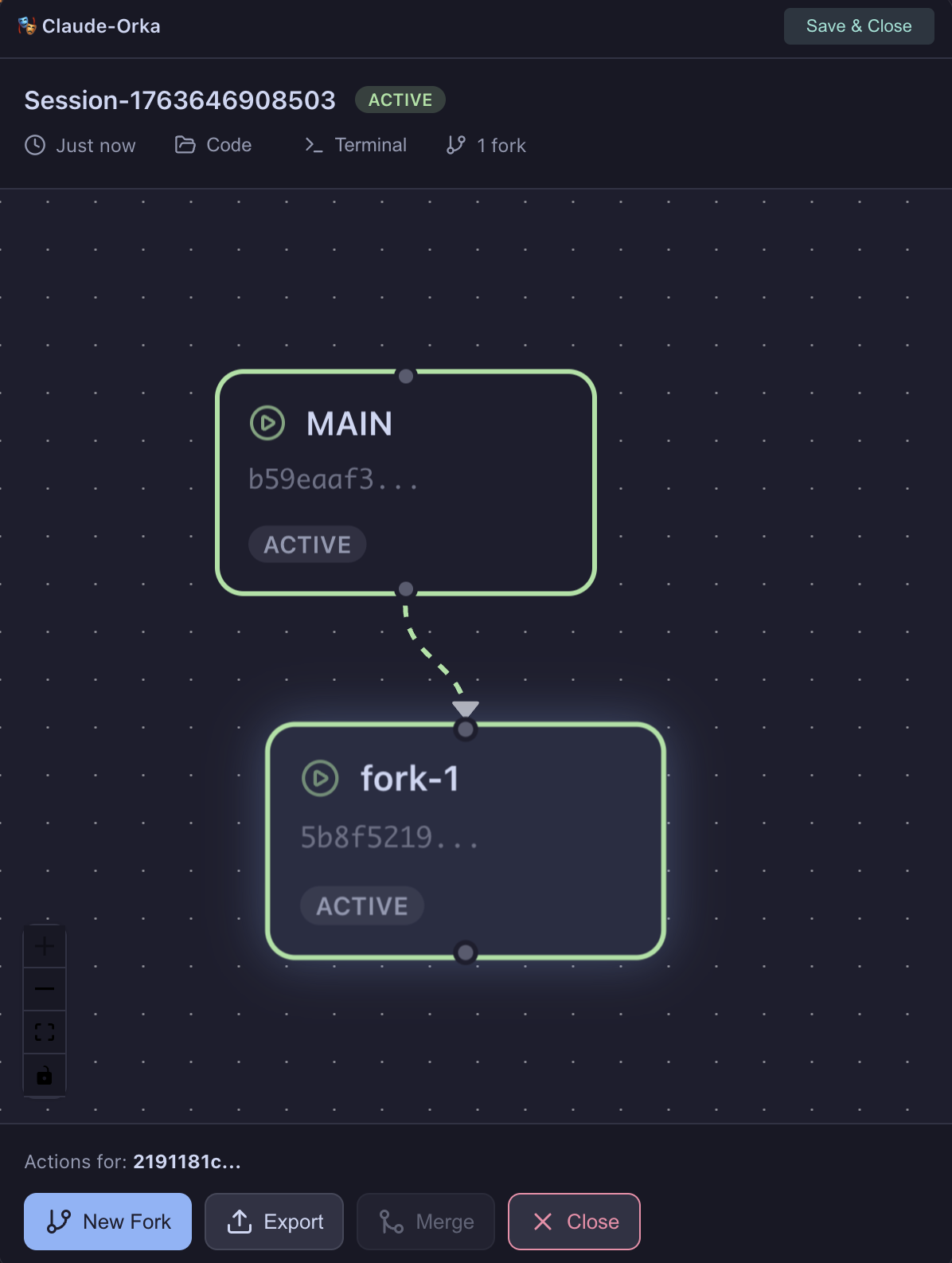
Visual session tree showing main branch and an active fork with parent-child relationship
Closed and Merged Forks
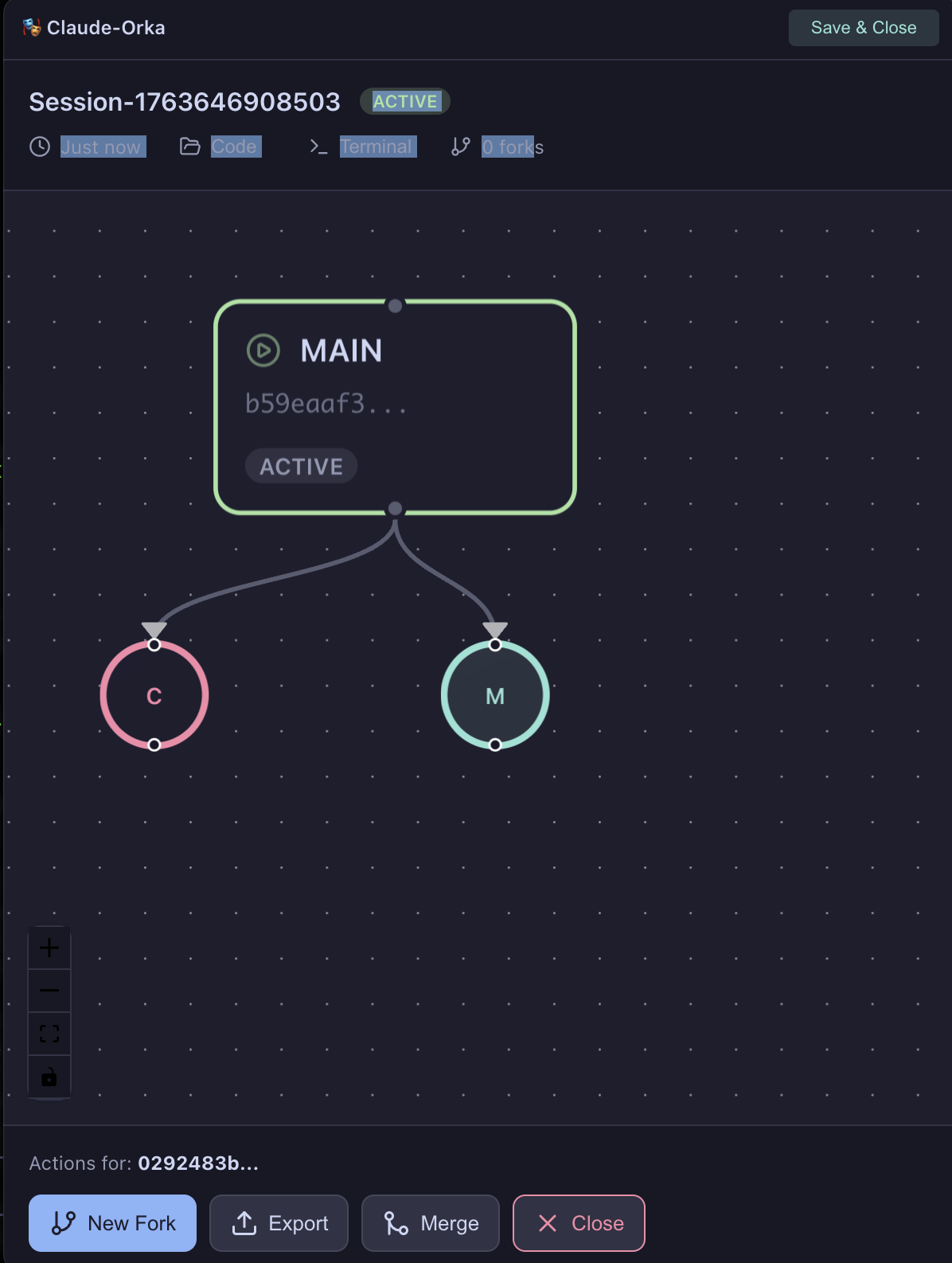
Compact visual representation: Red circles for closed forks, green circles for merged forks
Fork Info Modal
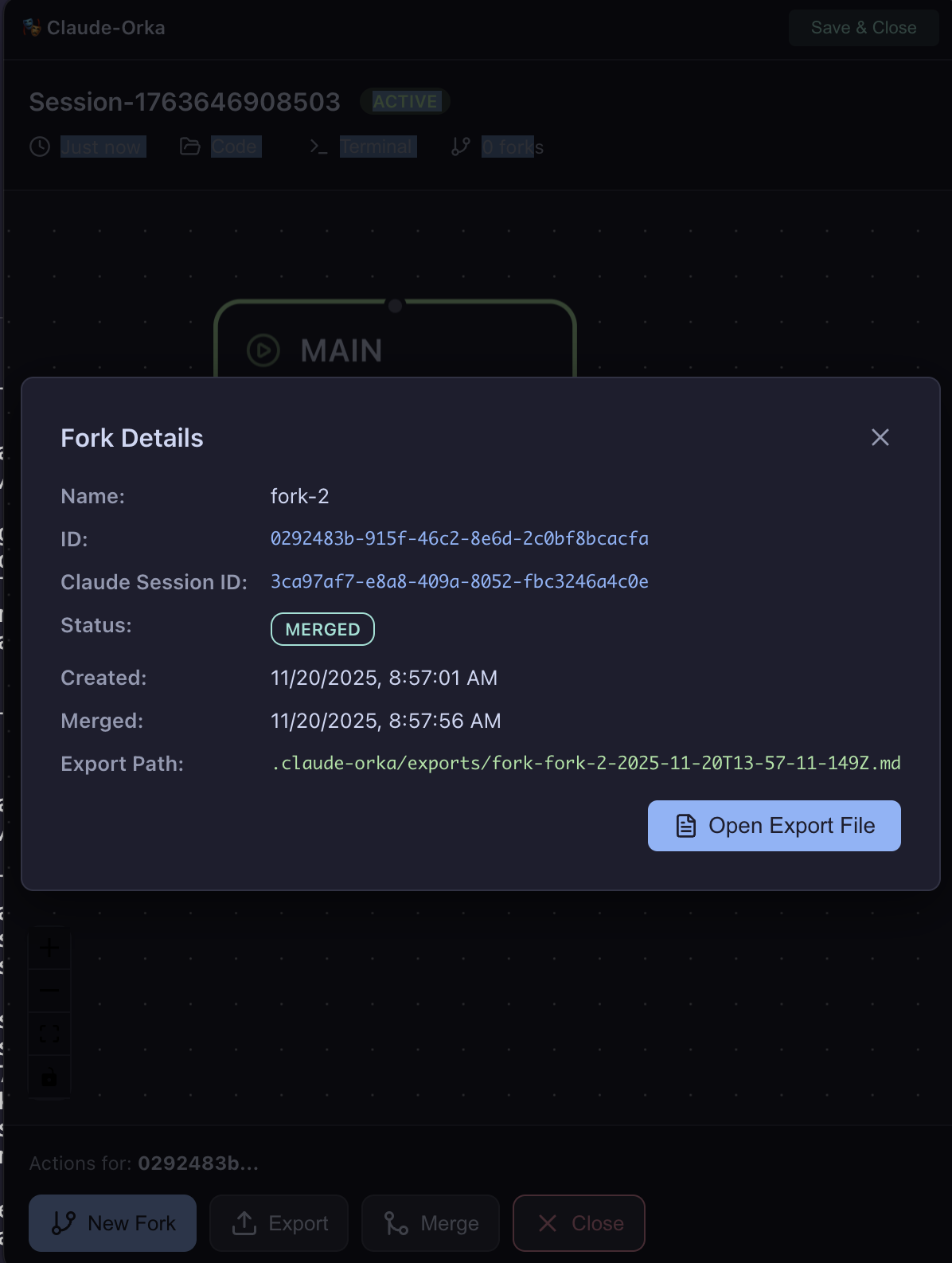
Detailed fork information modal with export file access for merged forks
Features
Visual Session Tree
- Hierarchical view of main conversation and all forks
- Parent-child relationships shown with connecting edges
- Color-coded status indicators:
- 🟢 Green: Active
- 🟡 Yellow: Saved
- 🔴 Red: Closed
- 🔵 Green circle: Merged
Interactive Nodes
Main Node:
- Large card showing "MAIN" branch
- Click to select and view in action panel
Fork Nodes (Active/Saved):
- Full cards with fork name and ID
- Click to select
- Shows fork status badge
Fork Nodes (Closed/Merged):
- Compact circles (48px)
- "C" for Closed (red border)
- "M" for Merged (green border)
- Click to open info modal with details
Header Actions
Project Name:
- Shows current project name in window title
Code Button:
- Opens project folder in Cursor (preferred)
- Falls back to VSCode
- Falls back to Finder
Terminal Button:
- Focuses the terminal window
- Brings tmux session to front
Save & Close Button:
- Detaches from tmux (session stays alive)
- Closes terminal window
- Closes Electron app
- Session can be resumed later
Action Panel
Located at the bottom, shows actions for selected node:
New Fork:
- Creates fork from selected node
- Opens dialog to enter fork name
- Disabled if active fork already exists from this node
- Tooltip explains Claude Code limitation
Export:
- Generates export summary for selected fork
- Sends prompt to Claude to create summary
- Disabled for main branch
- Shows progress "Exporting..."
Merge:
- Merges selected fork to its parent
- Disabled until fork is exported
- Tooltip: "Export the fork first before merging"
- Shows progress "Merging..."
Close:
- Closes selected fork (abandon experiment)
- No export or merge required
- Fork marked as 'closed' (red circle in tree)
- Can view info later but cannot resume
Fork Info Modal
For closed/merged forks, clicking shows modal with:
Information displayed:
- Fork name
- Fork ID
- Claude Session ID
- Status badge (color-coded)
- Created date
- Context path (if exported)
- Merged date (if merged)
Actions:
- Open Export File (merged forks only)
- Opens export markdown in default app
- Only shown if fork was merged and has export
Real-Time Updates
The UI automatically updates when:
- State file changes (
.claude-orka/state.json) - New forks are created
- Forks are merged or closed
- Session status changes
Window Controls
Frameless design:
- Custom title bar with project name
- Transparent background
- Always on top (configurable)
- Resizable (min 500x600, default 600x800)
Keyboard Shortcuts
- Cmd/Ctrl + R: Refresh (reload)
- Cmd/Ctrl + Q: Quit application
- Cmd/Ctrl + W: Close window (same as Save & Close)
Launch Options
Automatic (default):
orka session create
# UI launches automatically
Manual control:
# Skip UI launch
orka session create --no-ui

# Launch UI programmatically
const orka = new ClaudeOrka('/path/to/project')
await orka.createSession('Feature', true) // true = open terminal + UI
Examples
Example 1: Basic Workflow
import { ClaudeOrka } from '@enruana/claude-orka'

const orka = new ClaudeOrka('/Users/me/my-project')
await orka.initialize()

// Create session
const session = await orka.createSession('OAuth Implementation')
console.log(`Session created: ${session.id}`)

// Work on main... then create fork
const fork = await orka.createFork(session.id, 'Try JWT Tokens')
console.log(`Fork created: ${fork.id}`)

// Work on fork... then merge back
await orka.generateExportAndMerge(session.id, fork.id)
console.log('Fork merged!')

// Check final state
const summary = await orka.getProjectSummary()
console.log(`Total sessions: ${summary.totalSessions}`)
Example 2: Multiple Forks
const orka = new ClaudeOrka(process.cwd())
await orka.initialize()

const session = await orka.createSession('Database Design')

// Create multiple forks to explore options
const fork1 = await orka.createFork(session.id, 'PostgreSQL Approach')
const fork2 = await orka.createFork(session.id, 'MongoDB Approach')
const fork3 = await orka.createFork(session.id, 'Hybrid Approach')

// Work on each... then merge the winner
await orka.generateExportAndMerge(session.id, fork1.id)

// Close the others
await orka.closeFork(session.id, fork2.id)
await orka.closeFork(session.id, fork3.id)
Example 3: Nested Forks
const session = await orka.createSession('API Design')

// Main approach
const restFork = await orka.createFork(session.id, 'REST API')

// Try variations of REST
const restV1 = await orka.createFork(
  session.id,
  'REST with Versioning',
  restFork.id // parent is the REST fork
)

const restGraphQL = await orka.createFork(
  session.id,
  'REST + GraphQL Hybrid',
  restFork.id
)

// Merge best variation back to REST fork
await orka.generateExportAndMerge(session.id, restV1.id)

// Then merge REST fork to main
await orka.generateExportAndMerge(session.id, restFork.id)
Example 4: Session Recovery
// Create session
const session = await orka.createSession('Long Running Task')

// ... work on it ...

// Close session (detach from tmux)
await orka.closeSession(session.id)

// Later... even after system restart
const resumed = await orka.resumeSession(session.id)
console.log('Session resumed with full context!')

// If tmux was lost (restart), ClaudeOrka:
// 1. Detects missing tmux session
// 2. Creates new tmux session
// 3. Resumes Claude session with full history
// 4. Restores all forks
Example 5: CLI Script
#!/bin/bash

# Create session
SESSION_ID=$(orka session create "Feature X" --json | jq -r '.id')

# Create fork
FORK_ID=$(orka fork create $SESSION_ID "Alternative" --json | jq -r '.id')

# Export and merge
orka merge auto $SESSION_ID $FORK_ID

# Get final summary
orka status
Architecture
Directory Structure
.claude-orka/
├── state.json              # Project state (sessions, forks)
└── exports/                # Fork export summaries
    ├── fork-abc123.md      # Export for fork abc123
    └── fork-def456.md      # Export for fork def456
State File
Location: .claude-orka/state.json
Structure:
{
  "version": "1.0.0",
  "projectPath": "/path/to/project",
  "sessions": [
    {
      "id": "abc123...",
      "name": "Feature Implementation",
      "tmuxSessionId": "orka-abc123",
      "status": "active",
      "createdAt": "2025-11-20T10:00:00.000Z",
      "lastActivity": "2025-11-20T12:00:00.000Z",
      "main": {
        "claudeSessionId": "uuid-main",
        "tmuxPaneId": "%1",
        "status": "active"
      },
      "forks": [
        {
          "id": "def456",
          "name": "Alternative Approach",
          "parentId": "main",
          "claudeSessionId": "uuid-fork",
          "tmuxPaneId": "%2",
          "status": "merged",
          "createdAt": "2025-11-20T11:00:00.000Z",
          "contextPath": ".claude-orka/exports/fork-def456.md",
          "mergedToMain": true,
          "mergedAt": "2025-11-20T12:00:00.000Z"
        }
      ]
    }
  ],
  "lastUpdated": "2025-11-20T12:00:00.000Z"
}
Key Concepts
Session:
- A Claude Code conversation with main + forks
- Runs in tmux session for multiplexing
- Persists across tmux detach/attach
Main Branch:
- Primary conversation thread
- Cannot be deleted or merged
- Always exists in a session
Fork:
- Branched conversation from main or another fork
- Independent Claude session
- Can be merged back to parent
Export:
- Summary of fork's exploration
- Generated by Claude
- Markdown format
- Required before merge
Merge:
- Integrates fork learnings into parent
- Sends export summary to parent conversation
- Marks fork as 'merged'
tmux Integration
Session naming: orka-{session-id}
- Easy identification
- Consistent naming
Pane layout:
┌─────────────────────────────────┐
│ Main (MAIN)                     │
├─────────────────────────────────┤
│ Fork 1                          │
├─────────────────────────────────┤
│ Fork 2                          │
└─────────────────────────────────┘
Recovery:
- Detects if tmux session exists
- If missing: creates new session + resumes Claude
- If exists: reconnects to existing panes
Claude Integration
Session detection:
- Reads
~/.claude/history.jsonl - Finds most recent session ID
- Associates with tmux pane
Context preservation:
- Uses Claude's native session resume
- Full conversation history maintained
- Works across system restarts
Troubleshooting
Common Issues
tmux not found
Error: command not found: tmux
Solution:
# macOS
brew install tmux

# Ubuntu
sudo apt-get install tmux

# Or use orka prepare
orka prepare
Claude CLI not found
Error: command not found: claude
Solution:
- Download from claude.ai/download
- Or install via npm:
npm install -g @anthropic-ai/claude-cli - Verify:
claude --version
Project not initialized
Error: Project not initialized
Solution:
orka initSession recovery fails
Error: Session won't resume after restart
Check:
- State file exists:
.claude-orka/state.json - Claude session still valid in
~/.claude/history.jsonl - Run
orka doctorto check dependencies
Recovery:
# Force resume
orka session resume <session-id>

# If that fails, create new session
orka session create
Merge fails - no export
Error: Cannot merge - fork not exported
Solution:
# Export first
orka merge export <session-id> <fork-id>

# Wait 10-15 seconds for Claude

# Then merge
orka merge do <session-id> <fork-id>

# Or use auto (recommended)
orka merge auto <session-id> <fork-id>
UI won't launch
Error: Electron UI doesn't open
Check:
- Electron is installed:
npm list -g electron - Display is available (not SSH session)
- Permissions correct
Manual launch:
# Check if UI process is running
ps aux | grep electron

# Kill existing UI
pkill -f "electron.*claude-orka"

# Try again
orka session resume <session-id>
Multiple sessions conflict
Error: Fork creation blocked
Reason: Claude Code limitation - only one fork per branch
Solution:
# Merge or close existing fork first
orka merge auto <session-id> <existing-fork-id>

# Or close it
orka fork close <session-id> <existing-fork-id>

# Then create new fork
orka fork create <session-id> "New Fork"
Debug Mode
Enable debug logging:
# Set environment variable
export CLAUDE_ORKA_DEBUG=1

# Run command
orka session create

# Check logs
cat .claude-orka/orka.log
Getting Help
# Check system status
orka doctor

# Get help for command
orka session create --help

# View version
orka --version
Contributing
Contributions are welcome! Please feel free to submit a Pull Request.
Areas for contribution:
- Windows support
- Additional terminal emulators
- UI enhancements
- Documentation improvements
- Bug fixes
License
MIT © enruana
Links
Made with ❤️ for the Claude Code community