
@epiloguess/guifier
v2.0.0
Published
An interactive front-end toolkit simplifying JSON, YAML, TOML, and XML data. Visualize, edit, convert formats, and perform real-time data manipulations. Empower your data-driven apps with user-friendly data processing and interactive visualization.

Maintainers
 epiloguess
Keywords
Readme
Guifier
Fork of maliknajjar/guifier
An interactive front-end toolkit simplifying JSON, YAML, TOML, and XML data. Visualize, edit, and perform real-time data manipulations. Empower your data-driven apps with user-friendly data processing and interactive visualization.
What's Changed
This fork includes the following enhancements:
- JSON Schema support - Schema-driven validation with enum dropdowns, number range constraints, string validation, and field descriptions as tooltips
- YAML comment preservation - Comments in YAML files are preserved during editing
- UI improvements - Updated button, input, popover, skeleton, and tabs components
- Dependency updates - Upgraded to ajv for schema validation, yaml for better YAML handling
- XML root element preservation - XML documents now preserve their original root element name instead of hardcoded "root"
- Fullscreen mode - Added fullscreen button in main container header for better editing experience
- Improved styling - Unified button styles with muted colors that highlight on hover
- Enhanced error handling - Clear error messages for parsing failures in JSON, XML, and TOML
- Empty container indicators - Visual feedback when arrays or objects are empty
- Field information tooltips - Schema descriptions displayed as tooltips on fields
- Memory leak fix - Added
destroy()method to Guifier class for proper cleanup - Better property creation - Replaced browser prompt with custom dialog for adding object properties
- Null type support - Added null type option when creating new fields
- Date field fix - Fixed critical bug in date field binding syntax
- Undefined handling - Proper rendering of undefined values in the UI
Features
- Multi-format support: JSON, YAML, TOML, XML, and JavaScript objects
- YAML comment preservation: Comments in YAML files are preserved during editing
- JSON Schema integration: Enhance UI with schema-driven validation and controls
- Enum dropdowns for restricted values
- Number range constraints (min/max)
- String length and pattern validation
- Real-time validation feedback
- Field descriptions as tooltips
- Fullscreen mode: Toggle fullscreen mode for distraction-free editing
- XML preservation: Original XML root element names are preserved during encoding/decoding
- Visual feedback: Empty containers show clear indicators, errors are displayed prominently
- Intuitive controls: Contextual add/delete buttons with hover effects
Installation
npm install @epiloguess/guifierUsage
Import
Import the full package (includes all parsers):
import { Guifier } from '@epiloguess/guifier';Or import only what you need for smaller bundle size:
import { Guifier } from '@epiloguess/guifier/json'; // JSON only (~117 KB gzip)
import { Guifier } from '@epiloguess/guifier/yaml'; // YAML only (~138 KB gzip)
import { Guifier } from '@epiloguess/guifier/xml'; // XML only (~129 KB gzip)
import { Guifier } from '@epiloguess/guifier/toml'; // TOML only (~122 KB gzip)
Basic Example
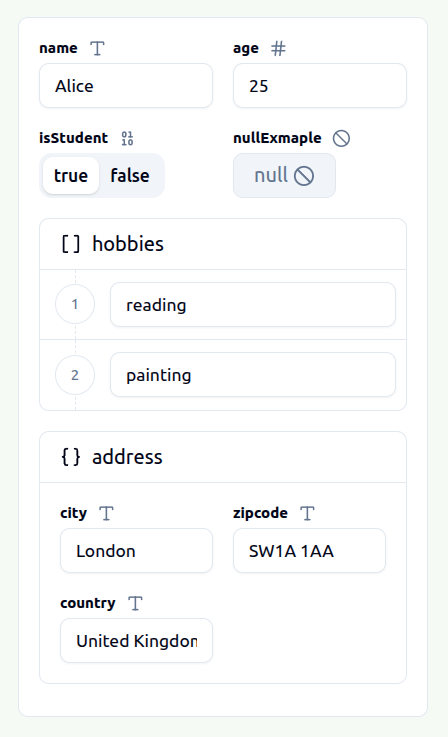
const jsonString = JSON.stringify({
	name: 'Alice',
	age: 25,
	isStudent: true,
	hobbies: ['reading', 'painting'],
	address: {
		city: 'London',
		zipcode: 'SW1A 1AA',
		country: 'United Kingdom'
	}
});

const guifier = new Guifier({
	target: document.getElementById('app'),
	dataType: 'json',
	data: jsonString
});
Format-Specific Import Example
When using format-specific imports, omit the dataType parameter:
import { Guifier } from '@epiloguess/guifier/yaml';

const yamlString = `
name: Alice
age: 25
`;

const guifier = new Guifier({
	target: document.getElementById('app'),
	data: yamlString
});

// Returns YAML string
const editedYaml = guifier.getData();

// Returns JavaScript object
const jsObject = guifier.getDataAsJs();
This will parse your data, generate an HTML GUI, and render it inside the target element.
Getting Data
// Get data in the original format
const editedData = guifier.getData();

// Get data in a different format ('json', 'yaml', 'xml', 'toml', or 'js')
const yamlData = guifier.getData('yaml');
const jsObject = guifier.getData('js');
Setting Data
guifier.setData({
	dataType: 'json',
	data: '{"name": "Bob", "age": 30}'
});

// Or with a JavaScript object
guifier.setData({
	dataType: 'js',
	data: { name: 'Bob', age: 30 }
});
JSON Schema Support
Guifier supports JSON Schema to enhance the editing experience with validation and specialized UI controls.
Basic Usage
const schema = {
	type: 'object',
	properties: {
		name: {
			type: 'string',
			enum: ['Alice', 'Bob', 'Charlie'],
			description: 'Select a user name'
		},
		age: {
			type: 'number',
			minimum: 0,
			maximum: 150,
			description: 'User age in years'
		},
		email: {
			type: 'string',
			format: 'email'
		}
	}
};

const guifier = new Guifier({
	target: document.getElementById('app'),
	dataType: 'json',
	data: jsonString,
	schema: schema
});
Supported Schema Features
| Feature | UI Enhancement |
| --------------------------------------- | ----------------------------------------------- |
| enum | Renders a dropdown select instead of text input |
| minimum / maximum | Sets min/max attributes on number inputs |
| exclusiveMinimum / exclusiveMaximum | Validates exclusive bounds |
| minLength / maxLength | Sets length constraints on string inputs |
| pattern | Validates string against regex pattern |
| description | Shows tooltip with description text |
YAML Comment Preservation
Guifier preserves comments in YAML files during editing. When you load a YAML document with comments, edit the values through the GUI, and export it back, the comments are retained.
# User configuration
name: Alice # User's name
age: 25

# Address information
address:
  city: London
  country: UK
After editing through Guifier and exporting, the comments remain in their original positions.
API Reference
Constructor
new Guifier(params);Parameters:
| Property | Type | Description |
| ---------- | ----------------------------------------------------- | ------------------------------------------------- |
| target | Element | DOM element to render the GUI |
| dataType | 'json' | 'yaml' | 'xml' | 'toml' | 'js' | Input data format (full import only) |
| data | string | GuifierData | Data to edit (string for all formats except 'js') |
| schema | JSONSchema | Optional JSON Schema for validation |
Note: When using format-specific imports (@epiloguess/guifier/json, etc.), the dataType parameter is fixed to that format and should be omitted.
Methods
getData(format?)
Returns the current data in the specified format.
format(optional):'json'|'yaml'|'xml'|'toml'|'js'. Defaults to the original input format.- For format-specific imports,
getData()returns a string in that format, andgetDataAsJs()returns the JavaScript object.
setData(params)
Updates the GUI with new data.
params.dataType: Format of the input data (full import only)params.data: The data to load
destroy()
Cleans up the Guifier instance and removes event listeners. Important: Always call this method when removing a Guifier instance to prevent memory leaks.
const guifier = new Guifier({
	target: document.getElementById('app'),
	dataType: 'json',
	data: jsonString
});

// When you're done with the guifier
guifier.destroy();
Bundle Size
| Import Path | Size (gzip) |
| -------------------------- | ----------- |
| @epiloguess/guifier | ~155 KB |
| @epiloguess/guifier/json | ~117 KB |
| @epiloguess/guifier/yaml | ~138 KB |
| @epiloguess/guifier/xml | ~129 KB |
| @epiloguess/guifier/toml | ~122 KB |
License
MIT