
@ev-ry/fx
v0.1.0-rc.4
Published
Textured particle effects for existing HTML text, images and SVG. Native when still.

Maintainers
 neucoder
Readme
Add WebGL particle motion to existing headings, display text, images and supported SVG icons. EV-RY FX borrows their content and placement from the page, animates textured particles, then returns to native browser rendering.
Start with automatic scroll reveals, or attach selected elements through a small API. Keep your existing layout and components.
See it move
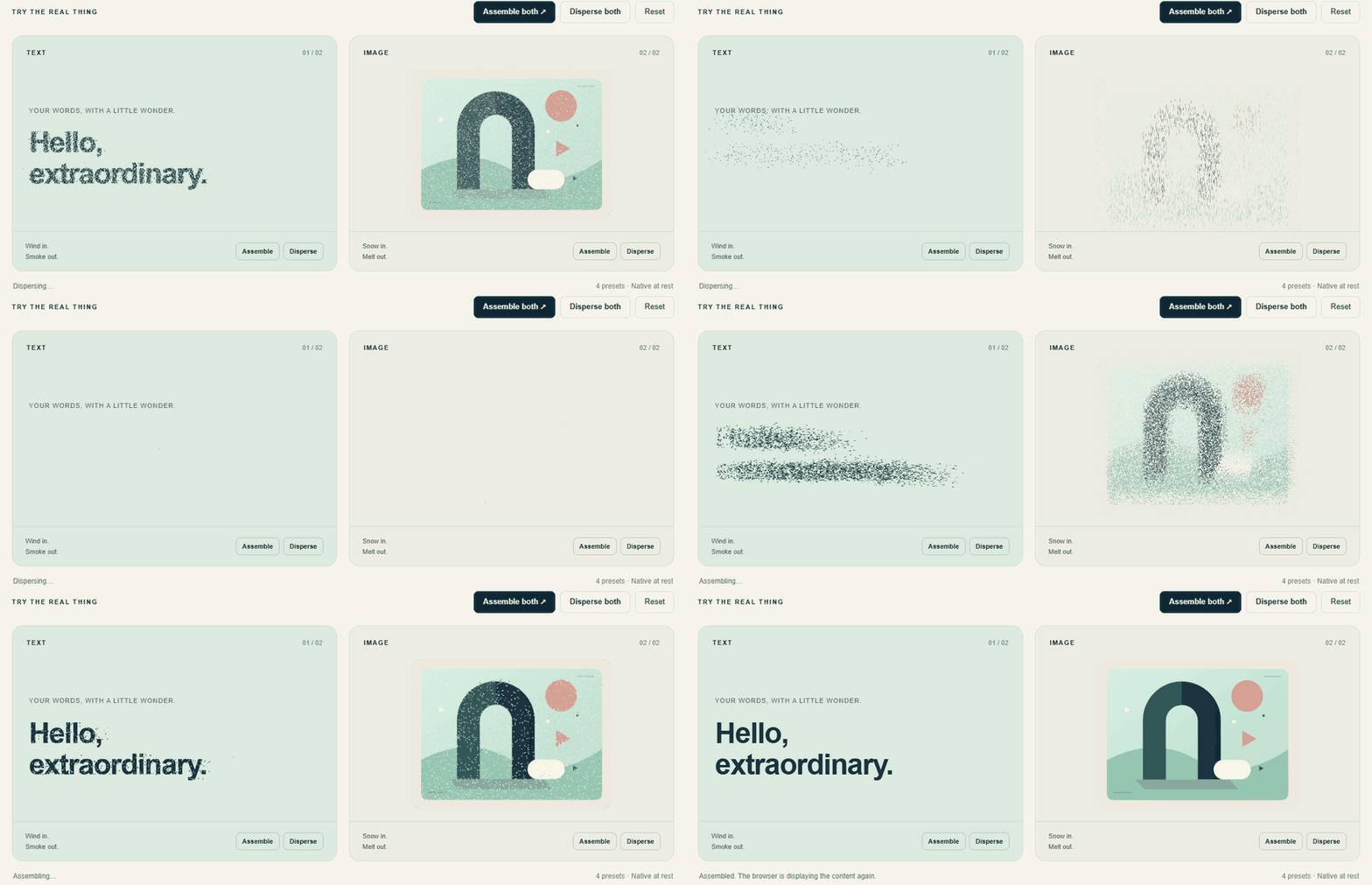
The README shows an animated preview. Open the live interactive Free demo to try the four fixed effects on real text and images. Other FX editions are separate from this MIT-licensed package.
What you get
| Content | Entry | Exit | | --- | --- | --- | | Text | Dust wind | Smoke | | Images and supported SVG | Drifting snow | Melt |
- A small automatic setup. Reveal
h1,h2,[data-thd-text]andimg[data-thd-image]on intersection. Mark exclusions withdata-thd-ignore. - Manual control when needed. Attach display text, images or supported static SVG; replay, cancel, refresh and destroy individual attachments. Simple image replacement is included.
- Your page keeps ownership. Native DOM elements retain their content and semantics. Native rendering resumes when entry motion settles.
- One visual engine. Text and media use textured triangular particles, four fixed presets and a 2000ms effect timeline. Individual particles can finish earlier within that timeline.
- A practical integration boundary. Framework-independent JavaScript, typed APIs, a classic script entry and an explicit ES-module loader. A React integration example is included.
Quick start
Public preview: 0.1.0-rc.4. Validate the supported content and layouts in your project before production use.
Install from your project folder:
npm install @ev-ry/fxAdd a script
Serve the complete installed node_modules/@ev-ry/fx directory at /thd/. Preserve its modules and asset folders; this is not a single-file bundle.
<head>
  <!-- Early mask: load before body content, without async or defer. -->
  <script src="/thd/src/dom-reveal-boot.js"></script>
  <script src="/thd/src/dom-free-script.js" data-thd-auto defer></script>
</head>
<body>
  <h1 data-thd-pending>Small details. A better feeling.</h1>
  <p data-thd-text data-thd-pending>Made for your existing page.</p>
  <img data-thd-image data-thd-pending src="photo.jpg"
       width="640" height="400" alt="Describe your photograph">
</body>
data-thd-pending prevents initial native paint before the entry effect; it does not select an element for attachment. Use it only on selected targets. The mask preserves space, is absent without JavaScript, and has a failure fallback. First-paint setup, CSP and troubleshooting →
The classic loader uses an existing window.THREE or loads the bundled Three.js r158 asset. Serve examples over HTTP, not file://. Existing THDFree, data-thd-* and src/dom-* API/file names are retained in this release.
Use a module
Provide a compatible Three.js namespace; r158 is the tested version. Call the loader in the browser after the host elements exist:
import * as THREE from 'three';
import { loadFree } from '@ev-ry/fx/script';

const api = await loadFree({ THREE, auto: false });
const free = api.create(document, { auto: false });

const title = free.attachText(document.querySelector('.title'), {
  revealOnView: { threshold: 0.5, once: false }
});

// Later, on an explicit user action:
// title.play('exit');
// title.cancel();

// On component unmount: free.destroy();
Importing the loader does not initialize the page. Its first call chooses automatic initialization; repeated calls share that initialization. Use auto:true for automatic scanning, or auto:false with api.create() for manual ownership. Do not attach the same element both ways.
For direct ownership with injected Three.js, createFree is also exported from @ev-ry/fx. See the API and lifecycle guide.
Examples and guide
| Start here | What it demonstrates | | --- | --- | | Script example | Automatic heading entry, including the early mask | | Navigation example | Back/forward navigation and page lifecycle | | React example | A string title with effect cleanup and StrictMode handling | | Detailed guide | SVG, image swaps, selectors, thresholds, canvas routing and troubleshooting | | Persian quickstart | Installation and integration notes in Persian | | Release notes | Changes, tested scope and remaining limits |
A few useful boundaries
- Repeated scroll reveals hide and rearm after a complete exit. Scroll exit does not run the smoke/melt effect; use
play('exit')for animated disappearance. - After adding or removing automatic targets, call
refresh(). Destroy owned attachments on component unmount; see the guide for back/forward-cache handling. - Ordinary page content uses a shared document-connected canvas. Special layouts can route to a local canvas. Arbitrary CSS stacking, clipping and typography are not fully reproduced.
- SVG support is a static shape/path subset. Unsupported SVG/CSS and images blocked by canvas CORS restrictions can remain native.
- This Free build does not include editable inputs, arbitrary effect customization or a dedicated React/Vue component pack.
EV-RY FX Free is MIT licensed. Bundled dependencies retain their own licenses and notices. This license covers the Free distribution; other editions are separate.
Real integration: EV-RY website
See the EV-RY product-showcase integration: alternating snow/melt image transitions, animated captions and persistent-engine navigation. This is an integration recipe; the public FX page may use features beyond the four-effect Free demo.