
@faeizfurqan/expo-story-video-and-image-editor
v1.0.5
Published
Instagram Stories-style video/image editor for Expo — color filters, text & sticker overlays, music mixing, and FFmpeg export, with native iOS color grading (no GPU readback).

Maintainers
 faeizfurqan
Readme
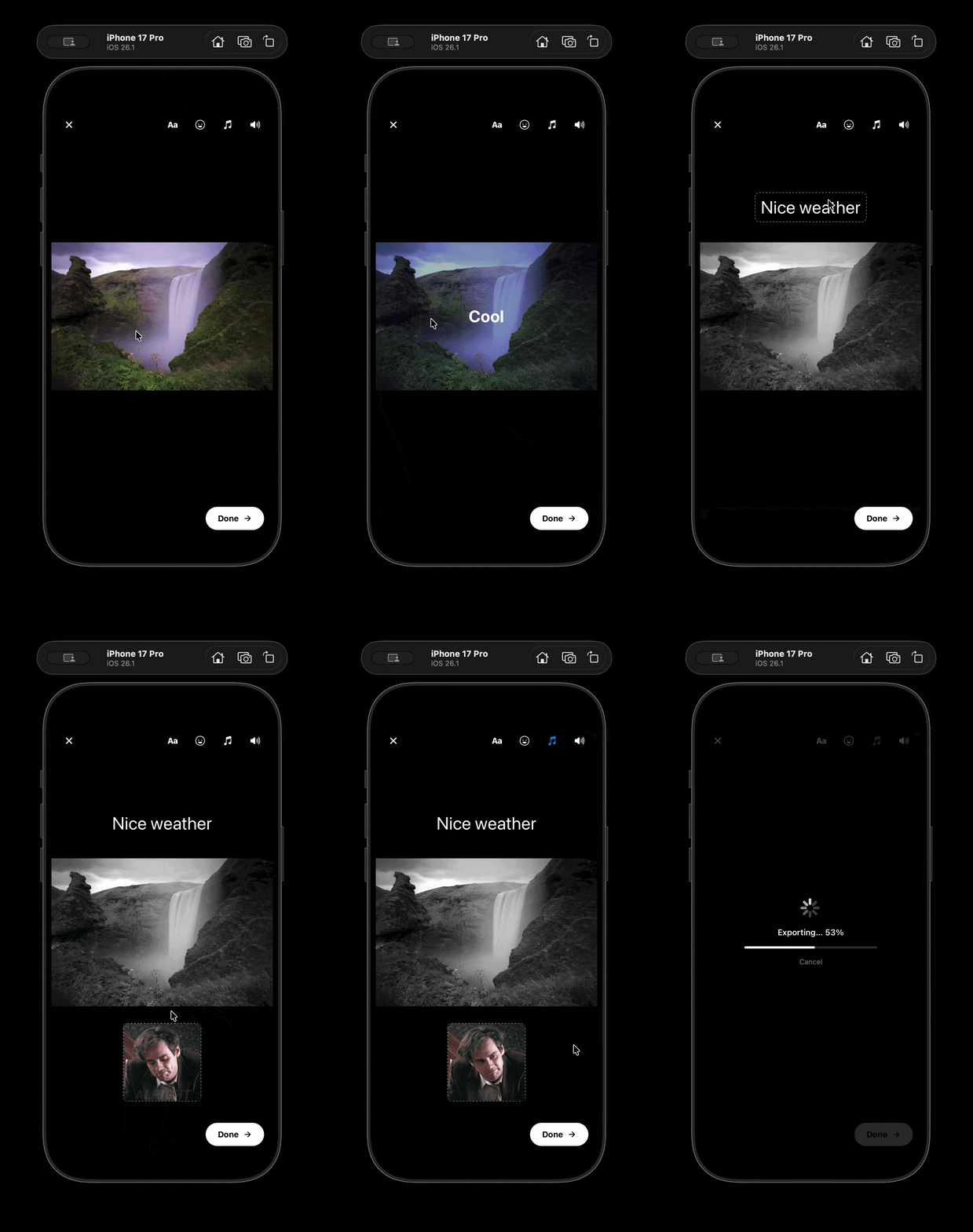
Table of Contents
- Why this over rolling your own?
- Features
- Installation
- Quick start
- Lower-level access
- Tech stack
- Project structure
- Running the example app
- License
Why this over rolling your own?
Building a Stories-style editor from scratch means fighting FFmpeg command strings, GPU-readback stalls on filtered preview, and platform-specific decoder quirks — for weeks. This package already fought those battles:
| | This package | Banuba SDK | Rolling your own | |---|:---:|:---:|:---:| | Price | Free, MIT | $$$ license | Your time | | Native iOS color grading (no GPU readback) | Yes | Yes | Weeks of AVFoundation work | | Drag/pinch text + sticker overlays | Yes | Yes | Build it yourself | | FFmpeg export pipeline | Yes, bundled | Proprietary | Build it yourself | | Open source, auditable | Yes | No | — | | Vendor lock-in | None | SDK license required | — |
Features
- Source: single video clip or still image (
sourceType: 'video' | 'image') - Filters:
normal,norway,neon,retro,warm,cool,bw,vintage,sunset,film,fade— swipeable carousel, live preview, burned into the export - Text overlays: font, color, alignment, background highlight — drag/pinch/rotate in preview
- Stickers: image or GIF overlays (via Giphy, if configured) — drag/pinch/rotate
- Music: one background track, trimmable, mixed with (or replacing) original audio
- Export: single-pass FFmpeg pipeline — quality presets, format selection, progress callback
On iOS, filtered video preview runs through a bundled native module (GradedVideoPlayer) that applies color grading via AVMutableVideoComposition + CIColorMatrix inside AVFoundation's own decode pipeline — no extra GPU readback. On Android, filtered preview renders through @shopify/react-native-skia.
Installation
yarn add @faeizfurqan/expo-story-video-and-image-editorPeer dependencies
yarn add @azzapp/[email protected] @shopify/react-native-skia @expo/vector-icons \
  @react-native-community/slider expo-audio expo-document-picker expo-file-system \
  expo-image expo-image-picker expo-modules-core expo-video \
  react-native-gesture-handler react-native-reanimated
@azzapp/react-native-skia-video must be exactly 0.9.0 — this library ships a patch-package patch pinned to that release (see Native setup below).
FFmpeg (required for export)
ffmpeg-kit-react-native was archived; install the community fork instead:
yarn add ffmpreg-kit-react-native@github:beedeez/ffmpreg-kit-react-nativeNative setup
This library includes native iOS code (the GradedVideoPlayer module, autolinked automatically), but three things need manual wiring in your own app: an iOS config plugin for FFmpeg, a patch for @azzapp/react-native-skia-video, and a dev build.
A dev build, not Expo Go.
npx expo prebuildthennpx expo run:ios/npx expo run:android, or an EAS dev build.iOS only — register the bundled FFmpeg config plugin.
ffmpreg-kit-react-native's JS package alone is not enough on iOS: the underlyingffmpeg-kit-iospod's original releases (from arthenica) are gone, so the actual native framework has to be pulled from a community mirror and injected into your Podfile beforeuse_native_modules!runs. Without this, iOS builds fail at compile time with'ffmpegkit/FFmpegKitConfig.h' file not found. Add it to your Expo config'spluginsarray, before any other plugin:// app.config.js / app.json plugins: [ 'expo-router', // or whatever else you already have first [ '@faeizfurqan/expo-story-video-and-image-editor/plugin/with-ffmpeg-kit', { package: 'full' }, // 'full' | 'https' — matches ffmpreg-kit-react-native's build flavor ], // ...your other plugins ],This plugin resolves the pod's actual installed path at prebuild time (no hardcoded relative depth — safe whether your app is a monorepo or a standalone project), so no further configuration is needed beyond registering it.
Android only — apply the bundled skia-video patch in your own app:
- Add
patch-packageas a dev dependency:yarn add -D patch-package postinstall-postinstall - Add
"postinstall": "patch-package"to your app'spackage.jsonscripts. - Copy the patch into your own
./patches/directory:mkdir -p patches cp node_modules/@faeizfurqan/expo-story-video-and-image-editor/patches/@azzapp+react-native-skia-video+0.9.0.patch patches/ - Run
yarn install(ornpx patch-package) so it applies. The patch is filename-pinned to@azzapp/[email protected]— it won't apply against any other version, perpatch-package's own versioning convention.
- Add
Re-run
npx expo prebuild(add--cleanif you're adding the FFmpeg plugin to an already-generatedios/directory — the Podfile needs to be regenerated for the plugin to inject its pod line) /pod installafter installing, so bothGradedVideoPlayerand the FFmpeg pod link correctly on iOS.
Quick start
import { VideoEditor, type ExportResult } from '@faeizfurqan/expo-story-video-and-image-editor';

function EditorScreen({ videoUri }: { videoUri: string }) {
  return (
    <VideoEditor
      source={videoUri}
      sourceType="video"
      onExportComplete={(result: ExportResult) => {
        console.log('Exported:', result.uri, result.duration, result.width, result.height);
      }}
      onExportProgress={(progress) => console.log(`${Math.round(progress * 100)}%`)}
      onCancel={() => {
        /* navigate back */
      }}
    />
  );
}
VideoEditor props
| Prop | Type | Required | Notes |
|---|---|---|---|
| source | string | yes | Local file URI of the video or image |
| sourceType | 'video' \| 'image' | no | Defaults to 'video'. An image gets a fixed preview/export duration. |
| onExportComplete | (result: ExportResult) => void | yes | |
| onExportProgress | (progress: number) => void | no | 0–1 |
| onCancel | () => void | no | |
| config | EditorConfig | no | See below |
| isActive | boolean | no | Defaults to true. Wire to your router's focus state (e.g. useIsFocused()) so the editor's decoders stop running when the screen isn't visible — the library takes no dependency on any specific navigation library. |
EditorConfig
interface EditorConfig {
  features?: { text?: boolean; filters?: boolean; stickers?: boolean; music?: boolean };
  export?: Omit<ExportConfig, 'onProgress'>; // quality, format, maxDuration, bitRate, frameRate, resolution...
  theme?: { backgroundColor?: string; accentColor?: string; textColor?: string };
  giphyApiKey?: string; // sticker picker falls back to the photo library without this
}
ExportResult
interface ExportResult {
  uri: string;
  duration: number;
  size: number;
  width: number;
  height: number;
}
Lower-level access
useVideoEditor() exposes the underlying zustand-backed editor state and actions directly, if you want to build custom UI instead of using <VideoEditor>:
import { useVideoEditor } from '@faeizfurqan/expo-story-video-and-image-editor';

const editor = useVideoEditor();

editor.initialize(sourceUri, duration, width, height, sourceType);
editor.setFilter('norway');
editor.addText({
  text: 'Hello',
  font: 'System',
  fontSize: 24,
  color: '#FFF',
  position: { x: 0.5, y: 0.5 }, // normalized 0-1, anchored at center
  rotation: 0,
  scale: 1,
  alignment: 'center',
  startTime: 0,
  endTime: duration,
});
editor.addSticker({
  uri: gifUri,
  position: { x: 0.5, y: 0.5 },
  size: { width: 120, height: 120 },
  rotation: 0,
  scale: 1,
  startTime: 0,
  endTime: duration,
});
editor.setMusic({
  uri: musicUri,
  title: 'My Track',
  startTime: 0, // when it kicks in on the OUTPUT timeline
  duration: musicDuration, // full length of the source audio file
  trimStart: 0, // where in the SOURCE file playback begins
  volume: 1,
});
editor.toggleMute();

const result = await editor.exportVideo({ quality: 'high', format: 'mp4', onProgress: (p) => console.log(p) });
Also exported: FFmpegEngine, FFmpegCommandBuilder, ExportPipeline (the export internals), createEditorStore (the raw zustand store factory), FILTER_PRESETS / getFilterByPreset / IDENTITY_MATRIX (filter color matrices), and the shared TypeScript types (TextOverlay, StickerOverlay, AudioTrack, FilterPreset, EditorState, etc.) from core/types.
Tech stack
| Library | Purpose |
|---|---|
| beedeez/ffmpreg-kit-react-native | FFmpeg export pipeline (iOS + Android) |
| @shopify/react-native-skia | Sticker/text canvas; Android filtered-video preview |
| @azzapp/react-native-skia-video | Frame-accurate video decode for Skia preview (patched, pinned to 0.9.0) |
| expo-video | Default (unfiltered) video preview playback |
| Bundled GradedVideoPlayer native module | iOS filtered-video preview — AVMutableVideoComposition + CIColorMatrix, no separate GPU readback |
| expo-audio | Music/voiceover playback in the editor |
| expo-file-system | Export output paths, temp file cleanup |
| react-native-reanimated | Gesture-driven overlays, playback sync |
| react-native-gesture-handler | Drag/pinch/rotate for text and stickers |
| zustand | Editor state |
Project structure
packages/video-editor/
  src/
    core/           # FFmpeg engine, command builder, export pipeline, shared types
    components/     # VideoEditor and its subcomponents (Preview, Text, Stickers, Audio, Filters)
    filters/        # Filter preset color matrices
    hooks/          # useVideoEditor
    store/          # zustand editor state
    utils/          # time/layout helpers
  ios/              # GradedVideoPlayer native module (Swift)
  GradedVideoPlayer.podspec
  expo-module.config.json

example/            # Expo example app exercising the library
docs/               # Architecture, API, and feature docs
Running the example app
yarn install
cd example
npx expo prebuild
npx expo start --dev-client
License
MIT