
@fastrag/okf
v0.1.0
Published
CLI for converting document corpora into Open Knowledge Format (OKF) bundles and generating graph-first Viewer Workbenches

Maintainers
 zac_ma
Readme
@fastrag/okf
CLI 与 Agent 工具集,用于创建、校验、搜索和可视化 Open Knowledge Format (OKF) 知识 bundle。将文档语料转换为结构化概念图谱,审计其完整性,并通过交互式 Viewer Workbench 进行探索。
OKF 是 Google 发布的开放规范,用于将知识结构化为互联的概念图谱(了解更多)。它与 Andrej Karpathy 的 LLM Wiki 理念一致——将知识组织为概念图谱,而非扁平的页面。
这个工具将这一理念落地为实际工作流:
- 转换 markdown 文档或 GitHub 仓库为 OKF bundle。
- 校验 bundle 规范性,审计 内部链接完整性。
- 搜索 任意 bundle 中按 metadata 检索 concept。
- 可视化 知识图谱,使用交互式 Viewer Workbench 探索。
- 管理 全链路 Wiki 知识库,通过 AI Skill 集成实现。
- 纯机械化执行。 不需要 LLM。固定版本的 source 与显式指定日期的本地 source 会生成确定、可复现的输出;无版本信息的本地默认值会明确告警。
安装
npm install -g @fastrag/okf安装后会同时提供 okf 和 wiki 两个命令;wiki 是同一套 CLI 的别名。
或直接通过 npx 运行:
npx @fastrag/okf validate ./my-bundle功能
- 将本地目录或公开 GitHub 仓库转换为 OKF bundle
- 按 OKF 规范校验 bundle
- 报告无法解析的 bundle 内 Markdown 文档目标,但不改变 conformance 结果
- 按 metadata 搜索 bundle 中的 concept(title、path、type、tags)
- 生成静态 Viewer Workbench,包含关系图、树、搜索和阅读视图
- 通过本地 HTTP 预览生成的 viewer
Viewer 预览
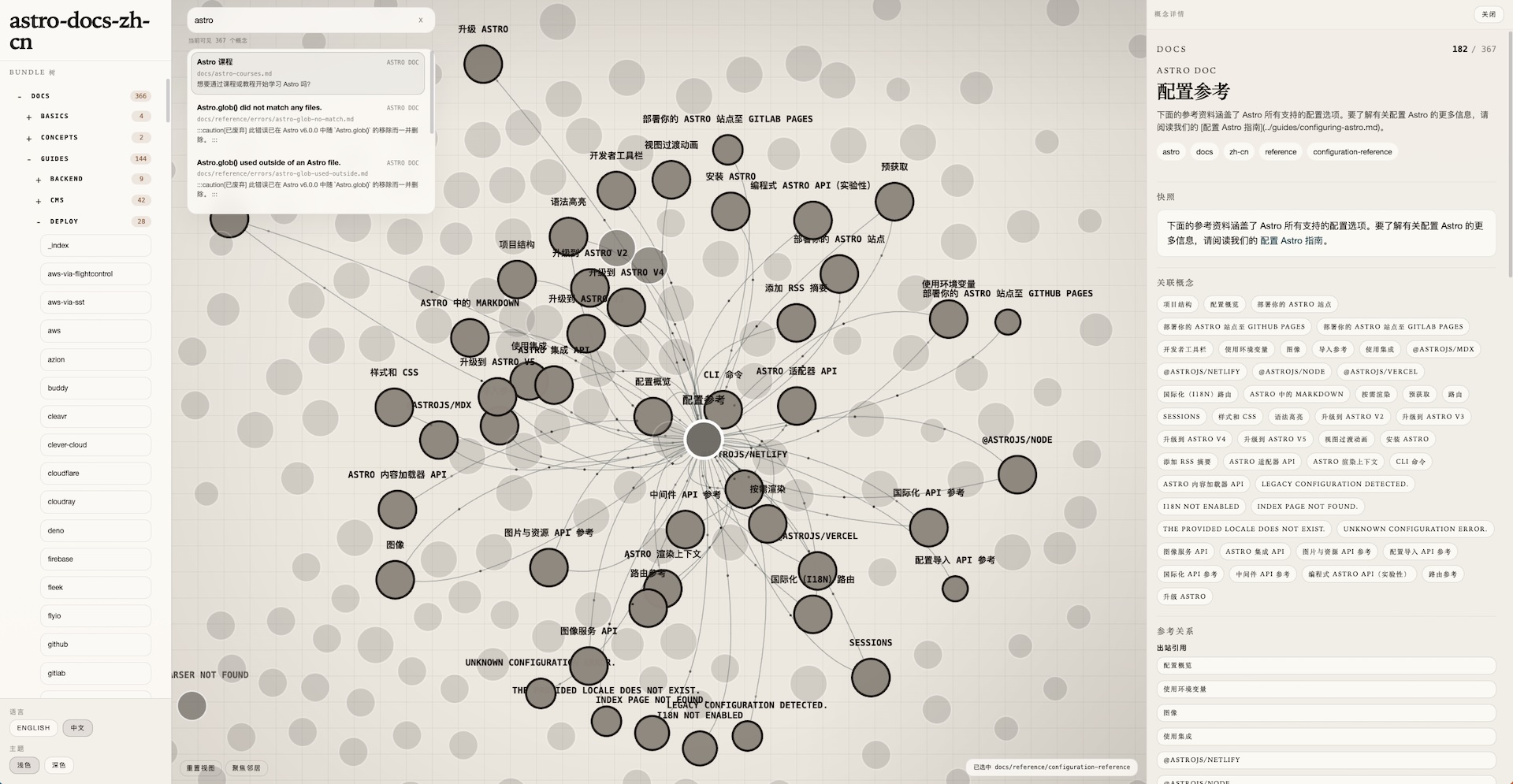
生成后的 Viewer Workbench 会把关系图探索、搜索、bundle 导航和 concept 详情放进同一个工作区。下面这张截图展示的是 Website-owned 的 astro-docs-zh-cn Public Bundle 在 workbench 中的实际界面。
快速开始
转换一个公开 GitHub 仓库:
okf convert owner/repo ./my-bundle --profile profile.yaml --ref COMMIT_SHA校验 bundle:
okf validate ./my-bundle检查 bundle 内 Markdown 目标:
okf bundle links --bundle ./my-bundle按 metadata 搜索 concept:
okf search --bundle ./my-bundle graph stage生成 viewer:
okf viewer generate --bundle ./my-bundle本地预览 viewer:
okf viewer serve --bundle ./my-bundleCLI 命令
wiki 是 okf 的直接别名,下面所有示例都可以用任意一个命令运行。
全局参数:
okf --help/okf -h— 显示根帮助okf --version/okf -v— 输出当前已安装包清单对应的 CLI 版本号
每个命令也都支持自己的帮助,例如 okf convert --help、okf bundle --help、okf search --help、okf viewer --help、okf viewer generate --help 和 okf viewer verify --help。
okf capabilities
okf capabilities --json--json 是必需的(这是唯一一个强制要求该标志的命令)。输出稳定的机器可读 package identity、已安装版本和 capability ID,供自动化流程在使用已解析的 CLI 前进行校验。
okf convert
okf convert <input> <bundle-root> --profile <profile.yaml> [--source-type local|github] [--ref <ref>] [--generated-on <YYYY-MM-DD>] [--json]<input> 可以是:
- 本地目录
- 公开 GitHub 仓库短标识,例如
owner/repo - GitHub tree URL,例如
https://github.com/owner/repo/tree/<ref>/<path>
缺失或为空的 <bundle-root> 会被创建。再次运行相同转换时,现有目标保持不变;不同的非空目标会报告冲突,不会被覆盖或合并。
GitHub 短仓库输入要求 profile 中存在 corpus_entry。使用 --generated-on <YYYY-MM-DD> 可显式指定 Bundle 日期;否则优先使用已解析 source commit 的日期,无版本信息的本地 source 则会报告可复现性告警。
使用 --json 可获取稳定的 convert.json.v1 机器 envelope。自动化流程应固定 GitHub ref 或指定 --generated-on,连续运行同一命令两次,并要求依次得到 created 和 unchanged。
okf validate
okf validate <bundle-root> [--json]校验项:
- concept 文档以可解析的 YAML frontmatter 开头
- concept 文档包含非空的
type - 保留文件
index.md和log.md符合 OKF 规则
validate 不检查 Markdown 目标可达性或关系语义。前者使用 okf bundle links;关系语义仍由 Agent 审查。
使用 --json 可获取 validate.json.v1 机器 envelope。当位置参数不便使用时,可使用等效的 --bundle-root <bundle-root>。
okf bundle
okf bundle list --bundle <bundle-root> [--kind concept|index|log|all] [--directory <dir>] [--json]
okf bundle status --bundle <bundle-root> [--json]
okf bundle links --bundle <bundle-root> [--json]
okf bundle index --bundle <bundle-root> [--directory <dir>] [--apply] [--json]
list 会递归枚举 Bundle 文档,并排除 .okf/**。status 报告确定性的机械健康状态,但不判断语义新鲜度。links 只报告无法解析的活动 bundle 内 Markdown 文档目标,不判断关系边是否应当存在。index 报告 managed-index drift,且只会在带有 --apply 时写入;省略 --directory 时,它会检查或应用 Maintenance Schema 声明的所有目录。
okf search
okf search --bundle <bundle-root> [--limit <n>] [--json] <query...>仅搜索 concept 的 title、path、type、description 和 tags。
--bundle是必需的。<query...>可以写成多个位置参数。--limit默认是20。--json输出search.json.v1机器 envelope。
okf viewer generate
okf viewer generate --bundle <bundle-root>从现有 OKF bundle 生成静态 Viewer Workbench sidecar,固定位置为 <bundle-root>/.okf/viewer/。Viewer 标题取自 bundle 目录名。生成必须显式执行且具有事务性:生成失败时保留之前完整的 sidecar;对于相同 canonical bundle 字节和相同 CLI 版本,重复生成会得到逐字节相同的输出。
sidecar 只保存 shell 和派生 artifact,Markdown 与资源文件仍保留在 bundle 的 canonical 位置。CLI 不规定派生的 .okf/viewer/ sidecar 是否应提交到版本控制;请遵循所在项目自己的 Git policy。
graph.json— 概念关系的交互式图谱tree.json— bundle 的层级树视图search-index.json— metadata 搜索索引detail-concepts.json— concept 详情元数据,以及指向 canonicalcontent/路由的阅读引用viewer-search.js— 浏览器端搜索运行时viewer-manifest.json— 确定性的 viewer 格式、generator 版本和 canonical bundle 指纹
选项:
--bundle(必需)— 现有 OKF bundle 目录路径
okf viewer serve
okf viewer serve --bundle <bundle-root> [--host 127.0.0.1] [--port 4173]为已生成的 <bundle-root>/.okf/viewer/ sidecar 启动本地 HTTP server。Viewer shell 位于 /,content/** 会解析到所选 bundle 的 canonical 文件,不会读取复制内容。sidecar 缺失或不完整时,先运行生成命令。bundle-stale 和 generator-outdated sidecar 仍会启动并输出终端告警,绝不会隐式重建。
选项:
--bundle(必需)— 拥有生成 viewer 的 bundle 路径--host— 绑定地址(默认127.0.0.1)--port— 端口号(默认4173)
okf viewer verify
okf viewer verify --bundle <bundle-root> [--json]这是对 Bundle-owned Viewer sidecar 的只读机械验证。它会检查完整的 sidecar 契约、禁止镜像内容的规则、所选 CLI 的格式和生成器身份,以及 canonical Bundle 指纹;不会重新生成或修改 Bundle。
转换 Profile
转换是 profile-driven。一个 markdown-tree profile 形如:
recipe: "markdown-tree"
output_namespace: "docs"
concept_type: "Reference Doc"
source_title: "Example Docs"
source_name: "example/docs"
corpus_entry: "docs"
base_tags:
  - "docs"
resource_base_url: "https://example.com/docs"
route_base: "/docs"
entry_document: "index.md"
strip_ordering_prefix: true
关键字段:
recipe:当前必须是"markdown-tree"。output_namespace:转换后的 concept 在 bundle 中落到哪个命名空间下。concept_type:产出的 OKF 文档type。source_title:用于生成 source artifact 的标题。source_name:记录在 provenance 里的 canonical source identity。corpus_entry:对所有 GitHub 短仓库输入(owner/repo)都是必需的;GitHub tree URL 输入省略时会使用语料根目录。base_tags:附加到产出 concept 文档上的 tags。resource_base_url:可选,用于生成 conceptresourcecanonical 上游链接。route_base:可选,用于确定性地重写 markdown 链接。entry_document:当route_base链接包含裸 route root 时必须提供。strip_ordering_prefix:可选,控制是否去掉标题、路由、链接和标签中的编号前缀。
AI Skill 集成
CLI 提供确定性机械操作;OKF Wiki Skills 在此基础上提供 AI 驱动的语义管理。两者结合可实现 Wiki 知识库的全链路管理——从初始化到日常更新再到健康审计。
Skill 概览
| Skill | 职责 | 权限 |
|-------|------|------|
| okf-wiki | 路由器——分类请求并分发到对应的叶子 Skill | 读 + 写(通过叶子) |
| okf-wiki-maintain | 写操作——初始化、采纳、更新、重构、健康审计 | 读 + 写 |
| okf-wiki-query | 只读查询——从已注册的 bundle 集合中搜索并回答 | 只读 |
典型工作流
初始化项目 Wiki(bootstrap):
用户:"为这个项目初始化一个 wiki"
→ okf-wiki 路由到 okf-wiki-maintain(bootstrap 模式)
→ Skill 检查项目源码,设计命名空间结构,提出方案
→ 用户确认 → Skill 创建符合规范的 bundle + .okf/schema.md
→ CLI 执行验证、索引生成和 run metadata 写入
日常知识更新:
用户:"auth 模块是怎么工作的?"
→ okf-wiki 先路由到 okf-wiki-query(搜索 Primary Wiki)
→ 如果 bundle 证据充分 → 带引用回答
→ 如果发现新知识 → okf-wiki-maintain(update 模式)持久化
健康审计:
用户:"检查 wiki 健康状态"
→ okf-wiki 路由到 okf-wiki-maintain(health 模式)
→ Skill 运行验证、状态检查、managed-index 检查
→ 报告机械故障 + 语义建议(过时概念、弱链接、类型漂移)
Viewer Workbench 生成:
用户:"展示 wiki 图谱"
→ okf-wiki 路由到 Viewer Workbench 分支
→ CLI:okf viewer generate → okf viewer verify --json → okf viewer serve
→ 返回 HTTP URL 用于交互式图谱探索
快速开始
- 安装 CLI(
npm install -g @fastrag/okf) - 将 OKF Wiki Skills 安装到你的 AI 编码环境中(参见 安装 OKF Skills)
- 告诉你的 AI agent "为这个项目初始化一个 wiki"——Skill 会处理其余一切
Skill 遵循严格的证据优先策略:先从源码回答再持久化,结构性变更前确认,且永不写入 Reference Bundle 或确定性 Baseline。