
@fay-i/mermaid-mcp
v1.0.0
Published
MCP server for rendering Mermaid diagrams to vector artifacts


Readme
Mermaid MCP Server
Model Context Protocol (MCP) server for rendering Mermaid diagrams to vector artifacts (SVG, PDF). Built with Puppeteer and the official Mermaid CLI for high-quality rendering with customizable themes, fonts, and styling.

Features
- High-Quality Rendering: Puppeteer + Mermaid CLI with Google Fonts and drop shadow support
- Multiple Output Formats: SVG and PDF with configurable themes (
default,dark,forest,neutral) - PDF Deck Builder: Combine multiple diagrams into multi-page PDF presentations
- Flexible Storage: Local filesystem or S3/MinIO with automatic backend detection
- Inline Mode: Return base64-encoded artifacts when no storage is configured
- Docker Ready: Volume mount support for persistent artifact storage
- MCP Compliant: Full Model Context Protocol specification compliance
Quick Start
NPM Installation
# Install globally
npm install -g @fay-i/mermaid-mcp

# Run the MCP server with a data directory
mermaid-mcp ./data/artifacts

# Show help
mermaid-mcp --help
The server requires a data directory argument where generated SVG and PDF files will be stored. The directory will be created if it doesn't exist.
Docker Compose (Recommended)
# Clone repository
git clone <repository-url>
cd mermaid-mcp

# Create local storage directory
mkdir -p ./data/artifacts

# Start with local storage (default)
docker-compose up -d

# Verify server is running
curl http://localhost:8000/health
Local Development
# Install dependencies
npm install

# Build the project
npm run build

# Run with a data directory
node dist/index.js ./data/artifacts
Configuration
Local Storage (Default)
Local storage is configured via the required command-line argument:
mermaid-mcp /path/to/data/directoryArtifacts are stored as:
/path/to/data/directory/{session-uuid}/{artifact-uuid}.svg
/path/to/data/directory/{session-uuid}/{artifact-uuid}.pdf
S3 Storage
For S3/MinIO storage, set STORAGE_TYPE=s3 and provide credentials:
# S3 storage settings
STORAGE_TYPE=s3
S3_ENDPOINT=https://s3.amazonaws.com   # S3/MinIO endpoint URL
S3_BUCKET=my-bucket                    # S3 bucket name
AWS_ACCESS_KEY_ID=...                  # AWS access key
AWS_SECRET_ACCESS_KEY=...              # AWS secret key
AWS_REGION=us-east-1                   # AWS region (default: us-east-1)
When using S3, no data directory argument is needed:
STORAGE_TYPE=s3 S3_BUCKET=my-bucket ... mermaid-mcpDocker Compose Configuration
Local Storage (Default)
services:
  mermaid-mcp:
    build: .
    volumes:
      - ./data/artifacts:/app/data/artifacts
S3 Storage
services:
  mermaid-mcp:
    build: .
    environment:
      - STORAGE_TYPE=s3
      - MERMAID_S3_ENDPOINT=https://s3.amazonaws.com
      - MERMAID_S3_BUCKET=my-bucket
      - MERMAID_S3_ACCESS_KEY=${AWS_ACCESS_KEY_ID}
      - MERMAID_S3_SECRET_KEY=${AWS_SECRET_ACCESS_KEY}
      - AWS_REGION=us-east-1
Local MinIO for Testing
# Start with MinIO included
docker-compose --profile with-s3 up -d

# Configure MCP server to use MinIO
export STORAGE_TYPE=s3
export MERMAID_S3_ENDPOINT=http://localhost:9000
export MERMAID_S3_BUCKET=mermaid
export MERMAID_S3_ACCESS_KEY=minioadmin
export MERMAID_S3_SECRET_KEY=minioadmin
MCP Tools
The server exposes four tools via the Model Context Protocol:

healthcheck
Verify server health and connectivity.
{
  "echo": "test"
}
Response:
{
  "ok": true,
  "status": "healthy",
  "version": "0.1.0",
  "timestamp": "2026-01-07T12:00:00.000Z",
  "echo": "test"
}
mermaid_to_svg
Render a Mermaid diagram to SVG format.
Parameters:
| Parameter | Type | Default | Description |
|-----------|------|---------|-------------|
| code | string | required | Mermaid source code (1-1MB) |
| theme | enum | "default" | default, dark, forest, neutral |
| background | string | "#ffffff" | CSS background color |
| config_json | string | - | Advanced Mermaid configuration |
| timeout_ms | number | 30000 | Render timeout (1000-120000ms) |
| drop_shadow | boolean | true | Apply drop shadow styling |
| google_font | string | "Source Code Pro" | Custom Google Font |
Example:
{
  "code": "flowchart LR\n    A[Start] --> B[End]",
  "theme": "default",
  "drop_shadow": true
}
Response (with storage):
{
  "ok": true,
  "request_id": "550e8400-e29b-41d4-a716-446655440000",
  "artifact_id": "7f3d2c1b-4a5e-6f7d-8c9b-0a1b2c3d4e5f",
  "download_url": "file://data/artifacts/session-uuid/artifact-uuid.svg",
  "content_type": "image/svg+xml",
  "size_bytes": 12345,
  "storage_type": "local"
}
mermaid_to_pdf
Render a Mermaid diagram to PDF format. Same parameters as mermaid_to_svg.
Timeout Budget:
- SVG rendering: 80% of
timeout_ms - PDF generation: 20% of
timeout_ms
{
  "code": "sequenceDiagram\n    Alice->>Bob: Hello",
  "theme": "neutral"
}
mermaid_to_deck
Combine multiple Mermaid diagrams into a multi-page PDF presentation.
Additional Parameters:
| Parameter | Type | Default | Description |
|-----------|------|---------|-------------|
| diagrams | array | required | 1-100 diagrams with code and optional title |
| page_size | enum | "letter" | letter, a4, legal |
| orientation | enum | "landscape" | landscape, portrait |
| show_titles | boolean | true | Display diagram titles |
| margins | object | {top: 36, ...} | Page margins in points |
Example:
{
  "diagrams": [
    {"code": "flowchart LR\n    A-->B", "title": "Architecture"},
    {"code": "sequenceDiagram\n    A->>B: Request", "title": "Sequence"}
  ],
  "page_size": "letter",
  "orientation": "landscape"
}
Rendering Pipeline
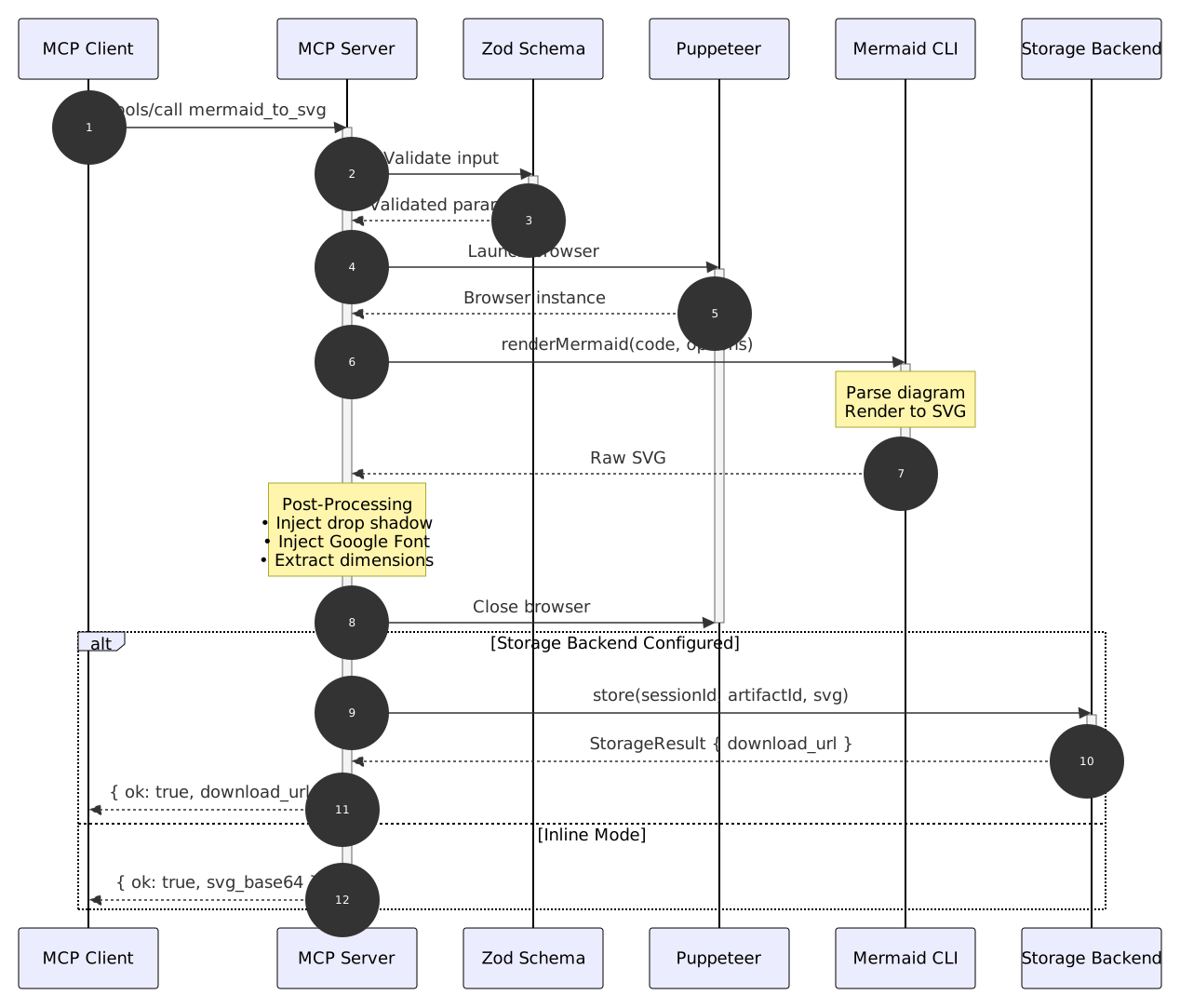
Post-Processing Features
Drop Shadow Filter: Adds subtle depth to diagram elements for better visual appearance.
Google Font Injection: Embeds custom fonts for consistent typography across different viewing environments.
GitHub Light Theme: Default theme uses GitHub-inspired colors for a clean, professional look.
Storage System
The server uses a pluggable storage backend architecture:

Storage Backend Selection

Storage Behavior
Local Storage
- Path Structure:
{LOCAL_STORAGE_PATH}/{session_id}/{artifact_id}.{ext} - URL Format:
file://{HOST_STORAGE_PATH}/{session_id}/{artifact_id}.{ext} - Persistence: Artifacts persist indefinitely (manual cleanup required)
- Atomic Writes: Temp file + rename pattern prevents partial files
- Startup Cleanup: Orphaned
.tmpfiles removed on server start
S3 Storage
- Key Format:
{artifact_id}.{ext}(flat structure, no session prefix) - URL Format: Presigned HTTPS URLs with configurable expiration
- Compatibility: Works with AWS S3, MinIO, and other S3-compatible services
- Backward Compatible: All existing S3 deployments continue to work unchanged
Troubleshooting
"Permission denied" on startup
Problem: Container cannot write to mounted volume.
Solution:
# Fix directory permissions on host
chmod 755 ./data/artifacts

# Or run container with matching UID/GID
docker run --user $(id -u):$(id -g) ...
"file:// URL not accessible"
Problem: File URLs only work on the same machine as the storage.
Solution:
# Option 1: Use HTTP URLs via CDN proxy
export LOCAL_URL_SCHEME=http
export CDN_HOST=mermaid-svc
export CDN_PORT=3001

# Option 2: Ensure HOST_STORAGE_PATH matches actual host mount point
export HOST_STORAGE_PATH=/absolute/path/on/host
"Configuration error: ambiguous storage"
Problem: Auto-detection failed because both local path and S3 credentials are configured.
Solution:
# Explicitly choose storage backend
export STORAGE_TYPE=local  # or STORAGE_TYPE=s3
Disk full errors
Problem: Local storage ran out of disk space.
Solution:
# Check disk usage
df -h /app/data/artifacts

# Remove old artifacts manually
find /app/data/artifacts -name "*.svg" -mtime +30 -delete
S3 connection errors
Problem: Cannot connect to S3/MinIO endpoint.
Solution:
# Verify S3 credentials
aws s3 ls s3://${MERMAID_S3_BUCKET} --endpoint-url=${MERMAID_S3_ENDPOINT}

# Check network connectivity
curl -v ${MERMAID_S3_ENDPOINT}

# Verify environment variables are set correctly
env | grep MERMAID_S3
Development
Running Tests
# Run all quality checks
npm run quality

# Run unit tests only
npm run test

# Run integration tests only
npm run test:integration

# Type checking
npm run typecheck

# Linting
npm run lint

# Format check
npm run format:check
Clean Slate Protocol
Before every commit/push, run the full quality gate from a clean state:
# Clean build artifacts
npm run clean

# Fresh dependency install
rm -rf node_modules && npm install

# Run all quality checks
npm run quality
Architecture
The server follows a modular architecture with clear separation of concerns:
Request Lifecycle

Deck Assembly Pipeline

Source Code Structure
src/
├── index.ts              # MCP server entry point
├── version.ts            # Version constant
├── tools/                # Tool implementations
│   ├── healthcheck.ts
│   ├── mermaid-to-svg.ts
│   ├── mermaid-to-pdf.ts
│   └── mermaid-to-deck.ts
├── renderer/             # Rendering engine
│   ├── browser.ts        # Puppeteer lifecycle
│   ├── render.ts         # Mermaid → SVG
│   └── deck-assembler.ts # PDF merging (pdf-lib)
├── storage/              # Storage backends
│   ├── factory.ts        # Backend factory
│   ├── local-backend.ts  # Local filesystem
│   └── s3-backend.ts     # S3/MinIO
└── schemas/              # Zod validation schemas
    ├── mermaid-to-svg.ts
    ├── mermaid-to-pdf.ts
    └── mermaid-to-deck.ts
Error Codes
| Code | Description |
|------|-------------|
| INVALID_INPUT | Empty or malformed input |
| INPUT_TOO_LARGE | Exceeds 1MB size limit |
| PARSE_ERROR | Mermaid syntax error |
| RENDER_TIMEOUT | Exceeded timeout budget |
| RENDER_FAILED | Browser/Puppeteer error |
| PDF_GENERATION_FAILED | PDF conversion error |
| STORAGE_ERROR | Storage backend failure |
Requirements
- Node.js 24+
- Docker 24+ (for containerized deployment)
- Chromium (bundled in Docker image)
Documentation
- Architecture Overview - Detailed system architecture
- MCP Specification - Model Context Protocol docs
- Mermaid Documentation - Mermaid diagram syntax
License
MIT - See LICENSE file for details.
Contributing
- Follow TDD practices (tests before implementation)
- Run
npm run qualitybefore every commit - One PR per user story
- No skips, ignores, or bypasses in tests or linting
- See AGENTS.md for AI agent guidelines