
@featui/flat-datepicker
v0.1.1
Published
Flat datepicker build with moment and react


Readme
扁平化日期选择组件
一个扁平化的日期选择器。组件将用户设置日期时需要选择的元素(年、月、日、时、分)扁平化地展示出来,让用户快速选择日期,而不要来回切换“年月”等时间选择视图
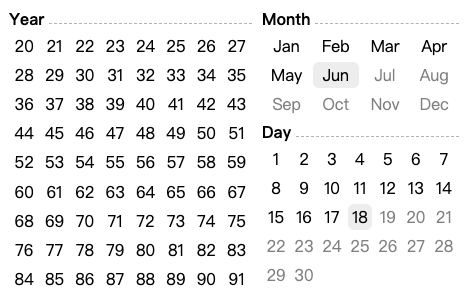
使用示例:Storybook - FlatDatepicker
安装与使用
安装
npm install @feat/flat-datepicker调用
import { FlatDatePicker } from '@feat/flat-datepicker'

function Example() {
  return (
    <FlatDatePicker
        pickerMode="normal"
        viewMode="Hm"
        format="H:m"
        onChange={console.log}
    />
  )
}
FlatDatePicker Prop Types
| Property | Type | Required? | Description |
| :------------------------- | :------- | :-------: | :---- |
| defaultValue | string,moment | | 默认值,在视图中会有灰色背景标示 |
| modifier | string | | CSS BEM 方法中的 modifier,可以在自定义组件样式时使用 |
| viewDate | string,moment,Date | | 视图日期 |
| viewDateFormat | string | | 当 viewDate 为字符串类型时,需要提供 |
| pickerMode | string | | 控制年月视图,显示历史日期 或者 将来的日期, 可选项: history, normal, future |
| viewMode | string | | 控制组件的视图范围。 可选项: YMD, YM, Y, MD, Hm, YMDHm, 默认为 YMD |
| minDate | string,moment | | 日期选择的最小值 |
| maxDate | string,moment | | 日期选择的最大值 |
| format | string | | 当 minDate 或者 maxDate 为字符串时,为必填项 |
| originYear | number | | 年份根据 pickerMode 展开的起始点 |
| yearRange | number | | 年份选择视图的范围,当 viewMode 中含有 Y 时,为必填项 |
| labels | object | | 本地化标签,{ year, month, day, hour, miniute } |
| onChange | function| √ |(moment, string) => void| isValid |function| |(m: moment, view: string, isMinView: boolean) => boolean, 控制选项是否可选 |
| feedBack | function| |(m: moment, val: string) => void` |
其他示例
出生日期选择器
历史时间,且年满18岁
const BirthdayPicker = () => (
    <FlatDatePicker
        originYear={(new Date).getFullYear() - 18}
        pickerMode="history"
        modifier="ymd"
        viewMode="YMD"
        yearRange={72}
        onChange={console.log}
    />
)
信用卡有效时期
将来的时间,且5年之内
import moment from 'moment';

export const CreditCard = () => (
    <FlatDatePicker
        viewMode="YM"
        format="YYYY-MM"
        yearRange={5}
        pickerMode="future"
        minDate={moment()
            .startOf('month')}
        maxDate={moment()
            .add(5, 'year')
            .toISOString()}
        onChange={console.log}
    />
);
本地化
const HourMinute_CN = () => (
    <FlatDatePicker
      viewMode="Hm"
      format="HH:mm"
      onChange={action('onChange')}
      labels={{
        hour: '时',
        minute: '分',
      }}
    />
);
参与开发
master 分支中包含有这个组件的最新版本的代码。
可以通过一下步骤开始本地开发
npm installnpm run stroybook