
@firstpick/pi-extension-setup-skills
v0.3.0
Published
Interactive Pi command to enable or disable local skills from a multi-selection list.

Maintainers
 firstpick
Readme
Skills for Pi
Choose which skills Pi can use for a session, by default, or with a specific model.
What you can do
- Lists installed skills, including skills disabled in Pi settings.
- Searches skill names first and sorts by status or discovery keywords.
- Saves a selection for the current session branch.
- Sets a global default or an exact provider/model profile.
- Applies model profiles when the active model changes.
- Keeps WebUI and TUI resource choices in sync.
- Uses saved choices in T3 chat sessions when paired with a compatible T3 launcher.
- Honors
--no-skillsand-ns;/skillsonly shows skills loaded explicitly for those sessions.
Install
pi install npm:@firstpick/pi-extension-setup-skillsRestart Pi if the package does not appear in your current session.
How to use it
Run /skills, then choose where the selection applies:
- Session only changes the current session branch.
- Global default applies when no session or model selection overrides it.
- Model default applies to one exact provider/model pair.
With a compatible T3 launcher, save a global or model default here and send your next T3 message to apply it there. T3's current session choice takes precedence. Skill choices stay independent of tool choices: keeping T3's own tools available does not enable a disabled skill.
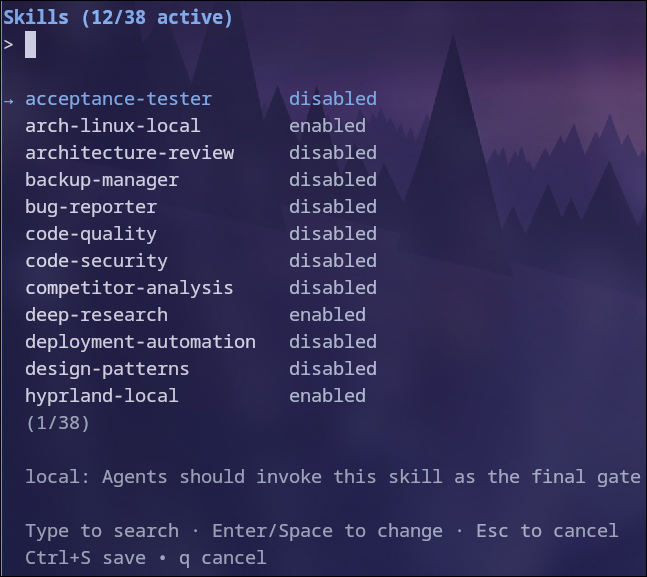
The resource list has separate Name, Discovery, and Status columns. Discovery shows how Pi found the skill, such as auto, while Status shows enabled or disabled. The selected skill's description appears below the list. Type to fuzzy-search by name, discovery value, or description. Name matches appear first, then source matches, then description matches. Use the arrow keys to move, press Enter to toggle, Ctrl+X to disable all matching skills, Ctrl+A to enable all matching skills, and Ctrl+S to save. Escape returns to the previous setup screen. From the scope screen it closes the setup flow. Ctrl+C closes the entire setup flow immediately.
To keep all skills visible but move a group to the top, enter enabled or disabled as the whole search. Enter auto or Pi built-in to put an exact Discovery value first. If no skill has that value, the list stays in its original order. In these sort-only modes, Ctrl+A and Ctrl+X affect all skills, not just the group at the top.
Before you start
This extension is the sole owner of the TUI /skills command. WebUI presents the same saved scopes in its browser interface without registering another command.
Technical details
See TECHNICAL.md for scope precedence, storage, compatibility, and troubleshooting information.